MV-9_Chapter 5. Teaching.pdf - 第94页
MV -9 Use r Manual 5- 94 outer circle teaching status inner circle t eachin g sta tus [Figure 5- 101 T eachin g example of eccentricity inspection window] ② Parameter desc ription Outer circle - Light type a nd image t…

错误!使用“开始”选项卡将 제목 2 应用于要在此处显示的文字。错误!使用“开始”选项卡将 제목 2 应用
于要在此处显示的文字。 .
5-93
8) Eccentricity inspection
- This inspection algorithm is to inspect position of pin located in the center on component
shaped like a BNC connector based on outer circle. calculate the distance after searching
center position of outer circle and inner circle.
① Teaching method
(a) Select preview in operation window, and select preview-outside among eccentricity
inspection parameter.
(b) Select light type and image type to detect outer circle.
(c) Manually select binarization method in outer circle, and set binarization value for good
separation of outer circle to be detected
(d) Adjust radius according to outer circle to be detected, and adjust search range.
(e) Select type of boundary line to be detected in each search range of outer circle.
(f) Select preview-inside, and light type and select image type to detect inner circle.
(g) Manually select binarization method in inner circle, and set binarization value for good
separation of inner circle to be detected
(h) Adjust radius according to inner circle to be detected, and adjust search range.
(i) Select type of boundary line to be detected in each search range of inner circle.
(j) Conduct trial inspection to display radius of detected outer circle and inner circle in
current. Set allowable range of radius of detected circle in the range.
(k) Enter normal criteria in pixel unit for distance between detected outer circle and outer
circle center.
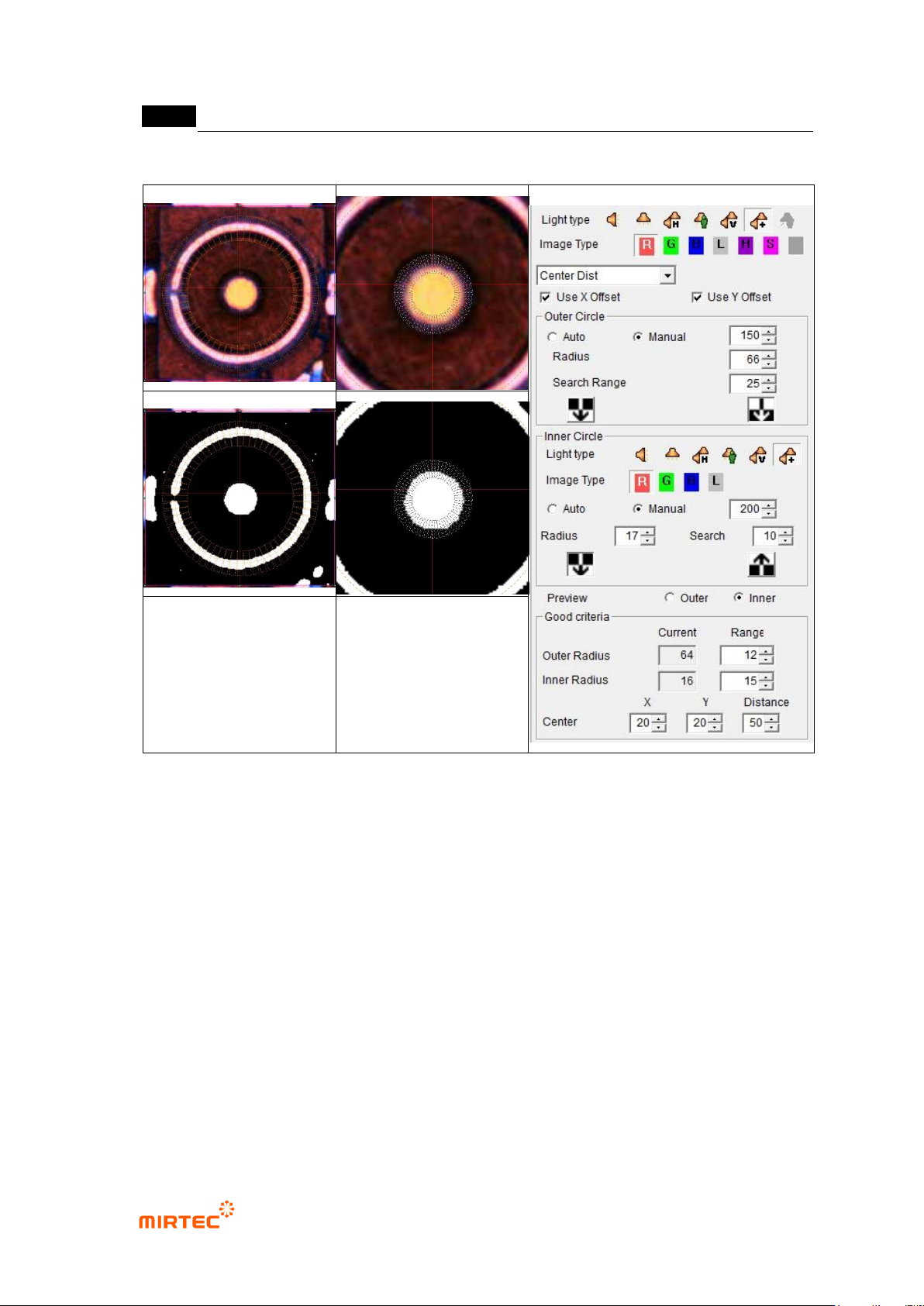
MV-9 User Manual
5-94
outer circle teaching status
inner circle teaching status
[Figure 5-101 Teaching example of eccentricity inspection window]
② Parameter description
Outer circle
- Light type and image type
Select light type and image type to detect outer circle. use light type and image
type on the top of inspection type.
Basically, select horizontal + vertical light and R or L type. In case of white light,
select vertical light and L type.
- Binarization method and binarization value
Select auto or manual binarization method, and adjust binarization value for good
separation of outer circle during manual selection.
- Radius: adjust radius to be close to outer circle to be detected.

错误!使用“开始”选项卡将 제목 2 应用于要在此处显示的文字。错误!使用“开始”选项卡将 제목 2 应用
于要在此处显示的文字。 .
5-95
- Search range
Search range means the length of segmentation region to detect circle.
Set search range to include boundary line of outer circle to be detected. Basically,
set it to 20 ~ 25.
- Detection type: select type to detect boundary line in each segmentation region
Inner circle
- Light type and image type
Basically, select horizontal + vertical light and R or L type. In case of white light,
select vertical light and L type.
- Binarization method and binarization value
Select auto or manual binarization method, and adjust binarization value for good
separation of inner circle during manual selection.
- Radius: adjust radius to be close to inner circle to be detected.
- Search range
Adjust search range to include inner circle to be detected. value of search range
differs from interval from outer circle, and set it not to include outer circle.
Preview
- Select display type when preview is selected in operation window.
Normal criteria
- Outer Radius
After trial inspection, radius of detected outer circle will be displayed in the current.
Enter normal range of radius of detected circle in the range. Basically, set it to 10 ~
15.
- Inner Radius
After trial inspection, radius detected inner circle will be displayed in the current.
Enter normal range of detected circle radius in the range. Basically, set it to 10 ~ 15.
- Center
X: Enter normal range for X direction distance between outer circle and inner circle
center
Y: Enter normal range for Y direction distance between outer circle and inner circle
center.
Distance: Enter normal range for straight distance between outer circle and inner
circle center (Euclidean distance, Euclidean Distance).
- Normal judgment criteria: If both of the following 2 conditions are satisfied, judge as good.