Maintenance Manual.pdf - 第188页
RL131 MAINTENANCE MANUAL 8.2 Trans fer Chuck DA8MEC-W 4-400-A0 8.2-7 8.2.6 A dj usting Palle t Unit No. N610074162AA 8.2.5 Adjusting Handling Accuracy of Electronic Co mponents (Transfer Chuck from Pallet) 8.2.6 Adjustin…
RL131
MAINTENANCE MANUAL
8.2 Transfer Chuck
DA8MEC-W4-400-A0
8.2-6
8.2.5 Adjusting Handling Accuracy of Electronic Components
Unit No. X02G44000AB
8.2.4 Adjusting Clearance between
Pallet and Transfer Chuck
8.2.5 Adjusting Handling Accuracy of
Electronic Components (Transfer
Chuck from Pallet)
8.2.6 Adjusting Pallet
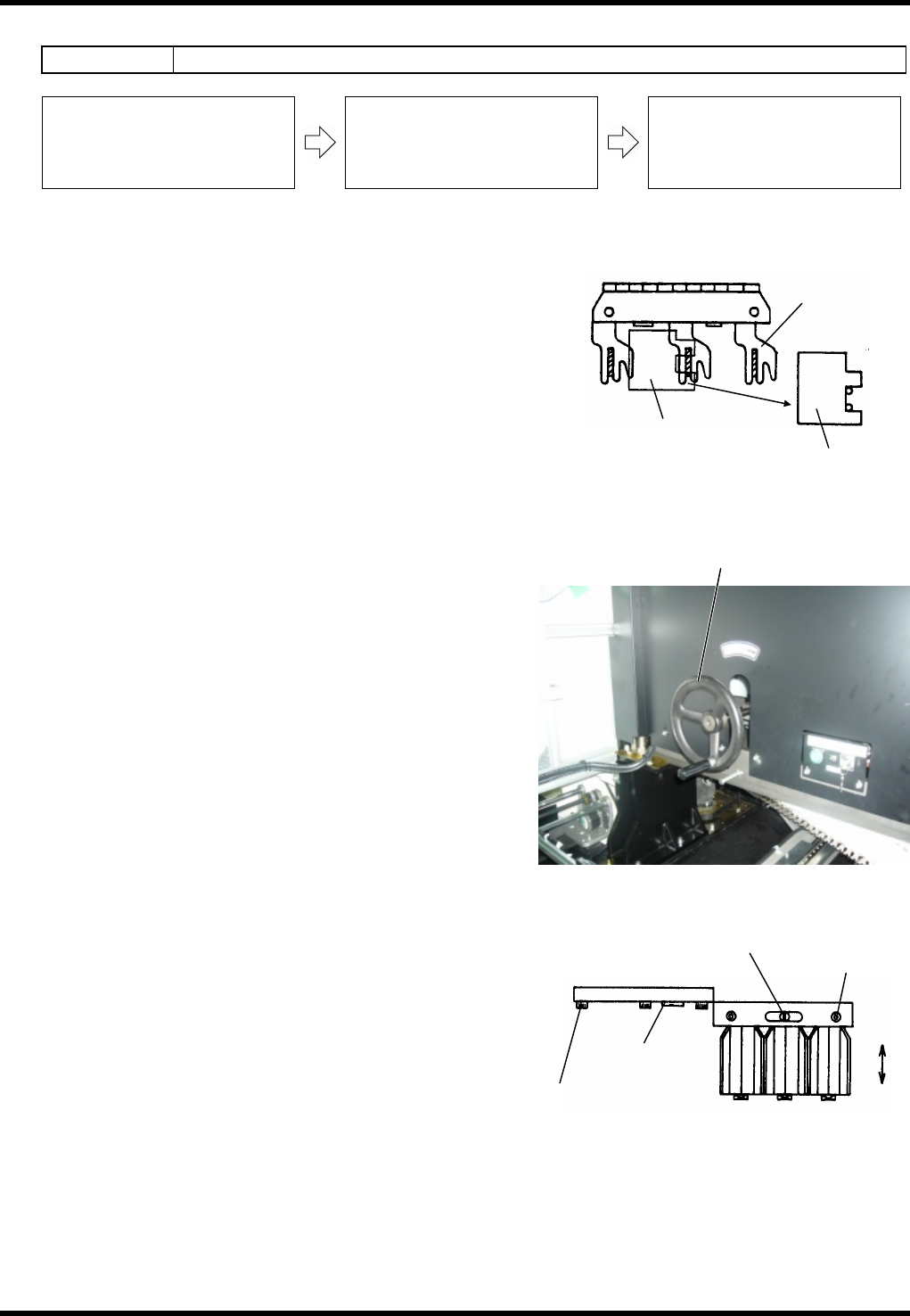
Adjusting handling accuracy (Transfer chuck from pallet)
7.
1. Fit the F type jig to the base of the pallet and insert an
electronic component jig in between the F type jig and
pallet.
2. Turn OFF <Trans head back> on the sub-control panel.
3. Rotate the handwheel to check that the transfer chuck
claws grip the leads of the electronic component jig on
the pallet straight and proper. If not, follow the steps
below.
=REMARKS=
Make sure the chuck claws grip the leads when the
cycle time is between 190° and 200°.
4. Loosen the bolt (B) (M83).
5. Rotate the fine adjustment screw (B) and move the
pallet to the position where the transfer chuck claws
can grip the component jig on the pallet straight and
proper.
6. Retighten the bolt (B) (M83) to lock in place.
7. Rotate the handwheel and recheck that chuck claws
can grip the component jig on the pallet straight and
proper. If the chuck claws grip it successfully,
adjustment is completed.
=REMARKS=
If gripping fails, repeat the steps 1 to 7 again.
Handwheel
Setting F type jig
Lead in 0.5-mm pitch
Pallet
F type jig
Adjusting pallet
Bolt (B)
(M83)
Fine adjustment
screw (B)
Fine adjustment
screw (A)
Setting machine offset
RL131
MAINTENANCE MANUAL
8.2 Transfer Chuck
DA8MEC-W4-400-A0
8.2-7
8.2.6 Adjusting Pallet
Unit No. N610074162AA
8.2.5 Adjusting Handling Accuracy of
Electronic Components (Transfer
Chuck from Pallet)
8.2.6 Adjusting Pallet
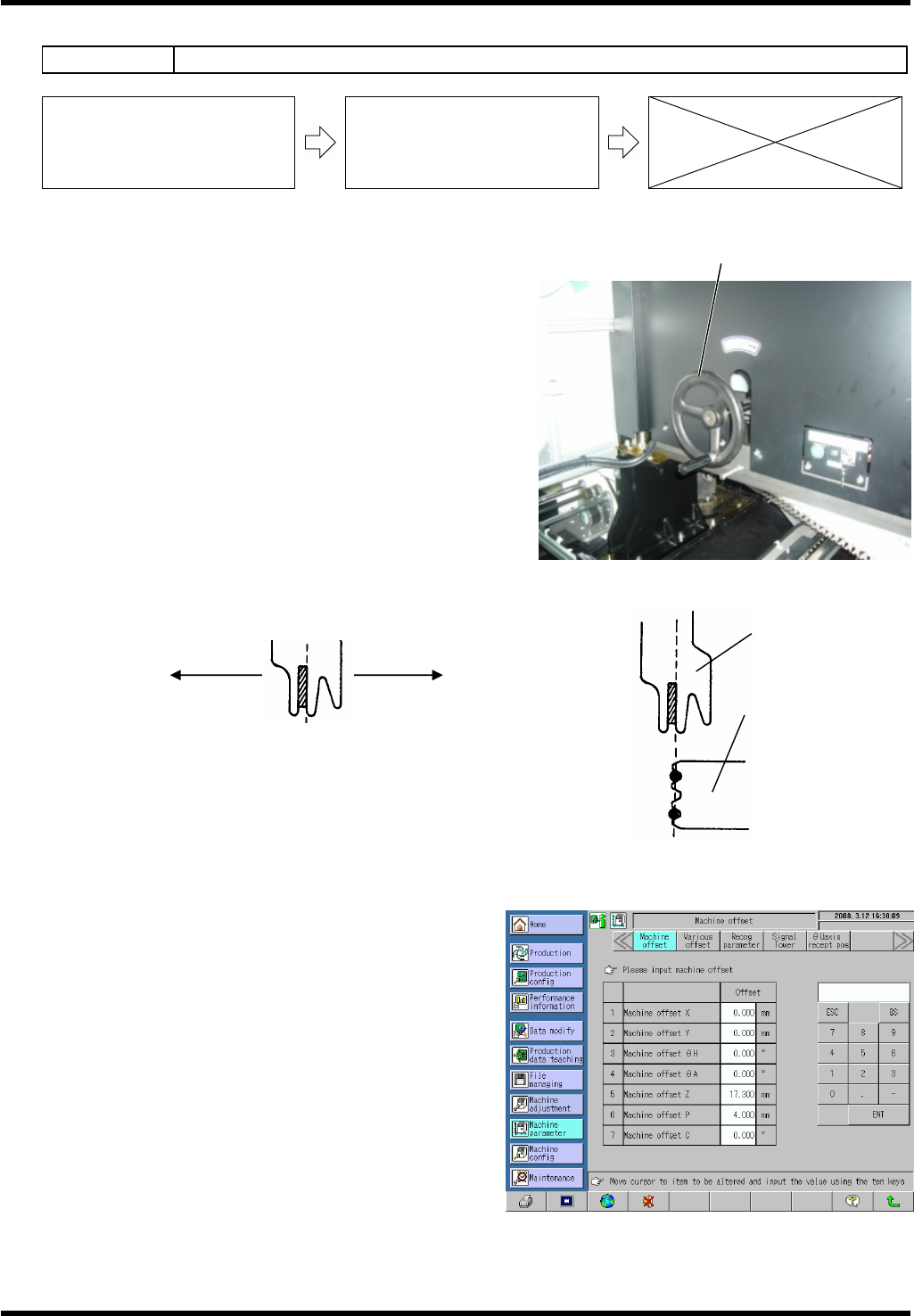
Adjusting pallet
8.
1. Rotate the handwheel to set the cycle timer to 0°.
2. Set an electronic component jig to the pallet.
3. Turn OFF [Trans head back] under IO Control on the
“Machine adjustment menu” screen.
4. Rotate the handwheel to set the cycle timer to 195°.
5. Visually check that the center of the electronic
component jig of the pallet and that of the transfer chuck
are properly aligned.
If misaligned, proceed as follows.
6. Input the visually checked misalignment to the Machine offset Z on
the left side of eh screen.
7. Supply component again via [Part soppy check] in the [Machine
adjustment] menu and check if the component on the pallet can be
smoothly gripped by the transfer chuck. If gripped successfully,
adjustment is completed.
=REMARKS=
If gripping fails, repeat the steps 1 to 7 again.
Handwheel
Pallet
Transfer chuck
- +
Setting machine offset

RL131
MAINTENANCE MANUAL
8.2 Transfer Chuck
DA8MEC-W4-400-A0
8.2-8