Maintenance Manual.pdf - 第20页
RL131 MAINTENANCE MANUAL 1.1 How to Use T his Manu al DA8MEC-06-010- A0 1.1-1 1.1. How to Use This Manual DA8MEC-06-010-A0 1.1.1 Document Summar y This section desc ribes how the R L131 Opera ting Instruc tions are org a…

RL131
MAINTENANCE MANUAL
1. INTRODUCTION
DA8MEC-06-000-A0
1-2
DA8MEC-06-000-A0
1. INTRODUCTION
This chapter describes how to use this manual.
RL131
MAINTENANCE MANUAL
1.1 How to Use This Manual
DA8MEC-06-010-A0
1.1-1
1.1. How to Use This Manual
DA8MEC-06-010-A0
1.1.1 Document Summary
This section describes how the RL131 Operating Instructions are organized.
Operation Manual
Describes the guidelines for basic operations.
1. INTRODUCTION
2. SAFETY PRECAUTIONS
3. DESCRIPTION
4. START/STOP
5. PROCEDURE FOR PRODUCTION (BASICS)
6. TROUBLESHOOTING
Programming Manual
Discusses the method of creating various programs.
1. INTRODUCTION
2. DATA CREATION
3. NC DATA CREATION
4. PART DATA CREATION
5. P.C.B. DATA CREATION
6. P.C.B. RECOGNITION DATA CREATION
7. DATA CHECK PROCEDURE
8. FILE MANAGING
Reference Manual
Offers helpful information clarifying unclear points
you may encounter in operating the equipment.
1. INTRODUCTION
2. OVERVIEW
3. VARIOUS FUNCTIONS
4. SCREEN TRANSITION
5. PRODUCTION MANAGEMENT INFORMATION
6. SYSTEM MANAGEMENT
Maintenance Manual
Provides essential information for performing
routine maintenance.
1. INTRODUCTION
2. SAFETY PRECAUTIONS
3. INSTALLATION
4. CONTROL SYSTEM
5. SENSOR LAYOUT
6. PREPARED MATERIALS
7. INSPECTION
8. MAINTENANCE GUIDE
9. SYSTEM CHECK FUNCTIONS
10. RECYCLING
11. APPENDIX
Error Code List
Contains organized error codes to be displayed
when troubles occur.
1. INTRODUCTION
2. ERROR CODES
RL131
MAINTENANCE MANUAL
1.1 How to Use This Manual
DA8MEC-06-010-A0
1.1-2
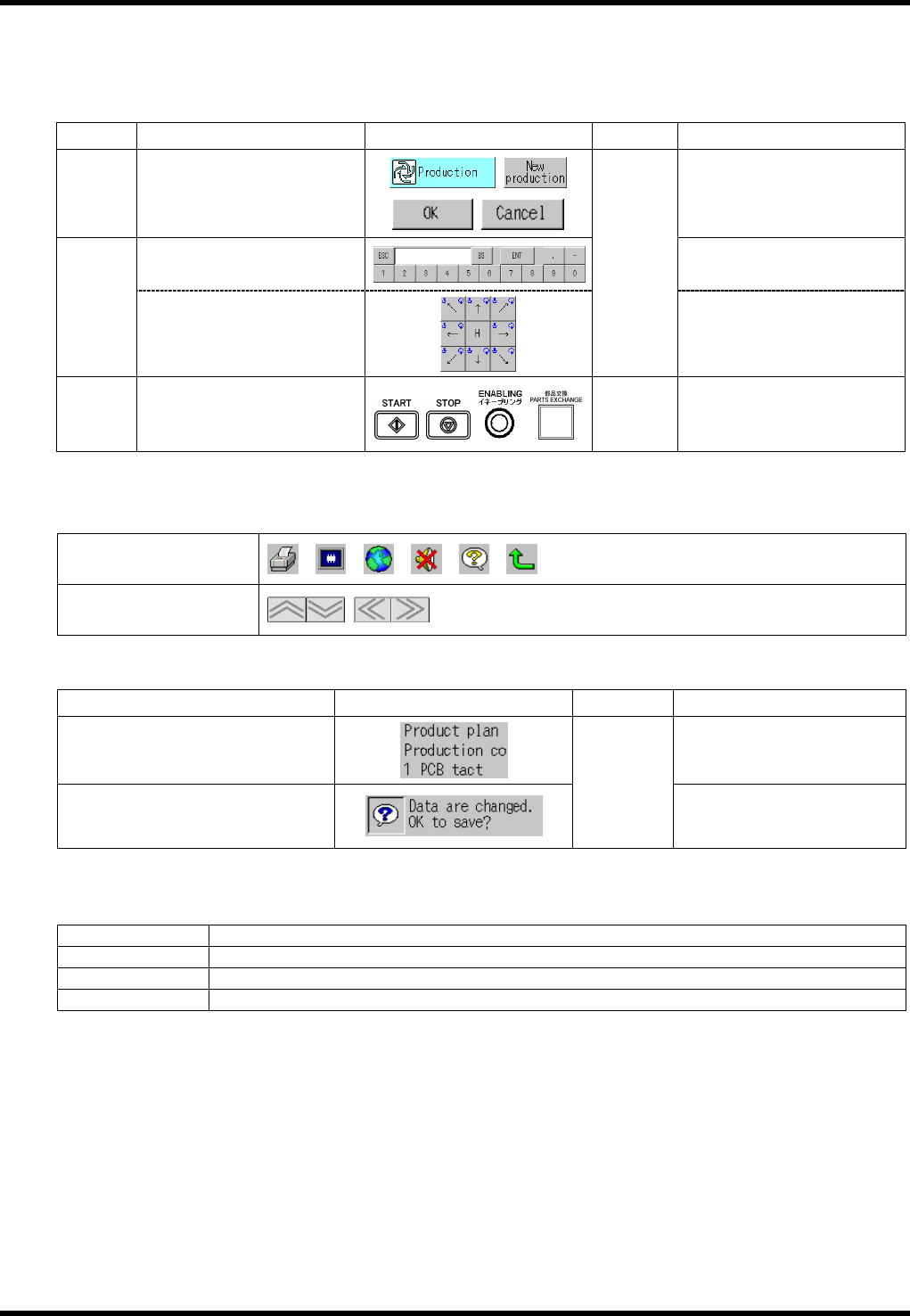
1.1.2 Conventions Used
Buttons, Keys and Switches
For buttons, keys and switches, this manual uses the following conventions for description of the procedure
except for the functions or roles of this machine.
Name
Explanation Indication example Symbol
Example of use
Button
Pressed on the screen.
[Production],
[New production], [OK],
[Cancel], etc.
Used to input characters and
numbers. (Keyboard)
[ESC], [BS], [ENT], etc.
Key
Used to move the camera
etc. (Teaching keys)
[ ]
[H], etc.
Switch
Used in operation other than
on the screen (e.g., on
control panel, sub-control
panel, power-control panel).
< >
<START>, <STOP>,
<ENABLING>,
<PARTS EXCHANGE>, etc.
(Note) < ENABLING > + <START> indicates that you should
press <START> with < ENABLING > held down.
Icons or buttons are used to show keys with no name, etc. (e.g. function keys, scroll buttons).
Function key
Scroll button
Screen Display
Item Indication example Symbol Example of use
Screen name or on-screen item
“Product plan”
Message
“ ”
“Data are changed. OK to save?”
Cautionary Statements
Cautionary statements and cross-references are entitled or marked with an icon as follows:
Notation Meaning
=REMARKS=
Matters requiring attention in operation
=HINT=
Helpful suggestions or available operations other than those described here
==
Supplementary information for learning more about operations
These titles may be numbered as ‘=HINT=1’ in figures and footnoted.
Abbreviations
The names of the referential manuals are abbreviated as follows:
Ope.: Operation Manual Ref.: Reference Manual
Prg.: Programming Manual Mtn.: Maintenance Manual
The manuals are cross-referenced with the notation ‘Manual Name / Chapter Title / Section Title’.
Ex.) == Refer to ‘Ope. / VARIOUS FUNCTIONS / Move Axis’ for details.