00193786-01.pdf - 第52页
SIPLACE GEM SW Version GEM 505.01 HOST Interface Manual Page 52 of 236 ©Siemens AG, all rights reserved SPOOLING STARTS When a transmission failure occurs, the first message sent to the spool is the event message GemSpoo…

SIPLACE GEM SW Version GEM 505.01
HOST Interface Manual
©Siemens AG, all rights reserved page 51 of 236
3.10 Spooling
When the SECS link between the Host and the SIPLACE goes down (RTY error on the
Equipment side), the SIPLACE will spool appropriate messages so that the Host can
read them once the link comes back up (after a successful Connect Request transaction).
The Host can set spooling attributes on the SIPLACE by setting certain Equipment
Constants with the S2F15/16 transaction.
The Host can define streams and functions of messages to be spooled through the
S2F43/44 transaction. Stream one (S1Fx) messages are not eligible for spooling. The
Host can also disable spooling for messages through this S2F43/44 transaction. Stream
9 messages are not spooled.
The Host may read spooled messages or purge the Equipment's spool through the
S6F23/24 transaction.
3.10.1 Word of Caution
If the Host does not intend to use the spooling features of the Equipment, the Equipment
Constant ConfigSpool (VID 66) should be set to zero. Setting this EC to zero disables
the spooling feature. If this is not set to zero, and the Host does not support spooling, the
SECS connection with the Equipment will be crippled. This happens because of the
following:
1. When spooling becomes active (transmission error), the Equipment will not send non-
stream 1 primary messages to the Host. That is, it will not send, events, alarms,
process programs, terminal display, etc.
2. When spooling becomes active, the ONLY way to deactivate it is to read or delete the
spool from the Host. In complying with the GEM standard, he Equipment does not
have the ability to reset its spooling state.
3. Therefore, if your Host does not support spooling and spooling becomes active, you
will never again receive non stream 1 messages from the Equipment. If this occurs,
you will need to use a Host simulator such as SECSIM to delete the spool.
If the Host does not intend to use the spooling features of the SIPLACE, CONFIGSPOOL
(VID 1002045) should be set to zero. This will disable the spooling feature and the
Equipment will never transition to Spool Active state. After a transition is made to Spool
Active, the only way to get out of the state is to read or purge the spool.
3.10.2 Spooling Sequence
Messages are sent to the spool only if the Host has enabled these messages for
spooling. This precondition will not be repeated throughout this section. Assume that the
messages referred to in this section have been enabled for spooling.
While spooling is active, the Host may initiate primary messages and the SIPLACE will
respond, if it is in the COMMUNICATING state.

SIPLACE GEM SW Version GEM 505.01 HOST Interface Manual
Page 52 of 236 ©Siemens AG, all rights reserved
SPOOLING STARTS
When a transmission failure occurs, the first message sent to the spool is the event
message GemSpoolingActivated (CEID 1000007). The next message sent to the spool
is the message which caused the communications failure. The following table depicts the
activity at the SIPLACE when spooling starts.
# Equipment Send
Sequence
Spool Sequence Description
1 S5F1 (Alarm
Report 1)
S6F11 (Spool
Activated Event
Report)
Equipment attempts to send an alarm
report to the Host, but experiences a
transmit failure. The
GemSpoolingActivated event (CEID
1000007) is sent to the spool.
Variable GEMSPOOLSTARTTIME
(VID 1002042) is updated.
2 S5F1 (Alarm
Report 1)
The Alarm Report message is sent to
the spool.
3 S6F11 (Event
Report 1)
S6F11 (Event
Report 1)
The Equipment generates an event
report and it is sent to the spool.
4 S5F1 (Alarm
Report 2)
S5F1 (Alarm
Report 2)
The Equipment generates an alarm
report and it is sent to the spool.
EQUIPMENT SPOOLS MESSAGES
While spooling messages, the Equipment will increment the SPOOLCOUNTACTUAL
(VID 1002038) and SPOOLCOUNTTOTAL (VID 1002039) status variables for each
message spooled. Messages which require an inquire/grant scenario are spooled along
with the inquire message as a single message. That is, if a multi-block S6F11 (Event
Report) message is being sent to the Host and spooling is active, the S6F5 (inquire) as
well as the S6F1 are sent to the spool and SPOOLCOUNTTOTAL (VID 1002039) and
SPOOLCOUNTACTUAL (VID 1002038) are incremented by one.
The SIPLACE maintains two Equipment Constants which effect the spooling of
messages. The first is CONFIGSPOOL (VID 1002045). If this is set to zero, then
spooling will never become active. If it is set to one, spooling will become active when a
transmission failure occurs.
The EC OVERWRITESPOOL (VID 1002046) determines if the Equipment should over-
write the oldest messages with new ones when the spool becomes full. If
OVERWRITESPOOL is TRUE, old messages will be over-written with new ones. If
FALSE, new messages will be discarded when the spool is full.
SAFE SPOOL MODE
The EC SAFE_SPOOL_MODE (ECID 1002943) determines whether the equipment
should stop (like a Remote-Stop see chapter 3.11.1.2 ) when the total spooltime reaches
the value determined by the EC MAX_TIME_TO_STOP (ECID 1002942).
In this case (safe spool stop) a restart ist only possible by transmitting or purging the
spooled data ( new state is 'SpooI Inactiv') and a remote start command by the host.
HOST READS SPOOLED DATA
The Host can read spooled messages by sending the S6F23 message. Upon receipt of
this message, the Equipment will reply and attempt to send spooled messages.
Messages are sent in order of oldest to newest, with no priority given to a particular kind
of message. The EC MAXSPOOLTRANSMIT (VID 1002037) determines the maximum
number of spooled messages which are sent per S6F23 message received from the
SIPLACE GEM SW Version GEM 505.01
HOST Interface Manual
©Siemens AG, all rights reserved page 53 of 236
Host. If zero, all spooled messages are sent, if any other number, that number of
messages are sent.
During the de-spooling of messages, the Equipment maintains only one outstanding
Equipment-Initiated transaction. The equipment will wait for either a reply to the primary
or a T3 timeout before starting another transaction. If the de-spooled message requires a
inquire/grant scenario, the Equipment will initiate this transaction first. If the Host accepts
the inquire, the message is sent. If not, then the Equipment removes the message from
the spool and discards it.
If a transmission failure occurs while attempting to send the spool, the event
GemSpoolTransmitFailure (CEID 1000009) is sent to the spool and spooling will remain
active. While the spool is active, any new (spoolable) messages generated by the
Equipment are also sent to the spool.
When the spool has been completely transmitted, the event GemSpoolingDeactivated
(CEID 24) is sent to the Host.
Instead of reading spooled messages, the Host can purge the spool by sending S6F23
with RSDC = 1. For details, please see section "S6F23 -- Request Spooled Data".
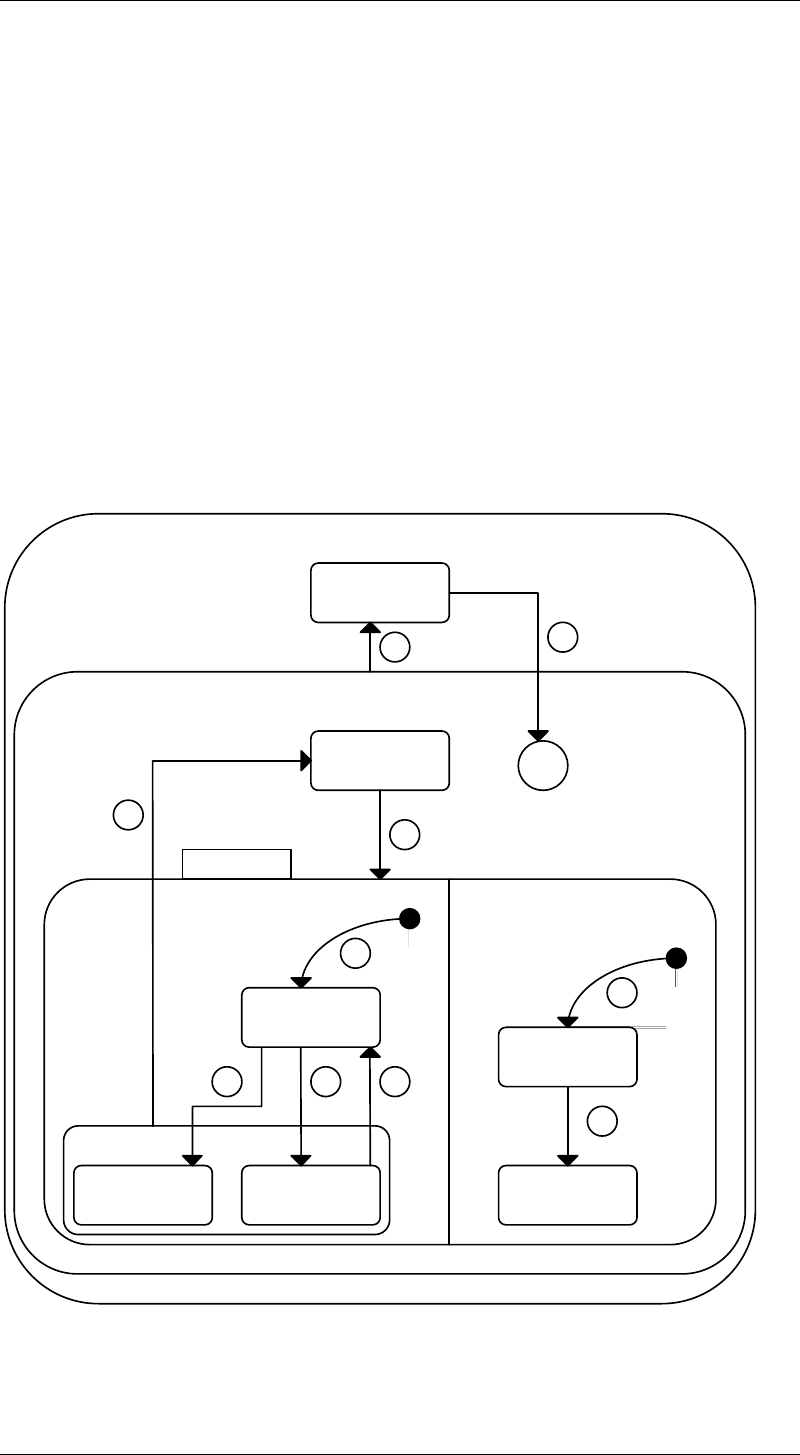
Purge Spool
Transmit
Spool
Spool Full
Spool Not Full
5
6
Spool Output
987
4
No Spool Output
Spool Active
Spool Inactive
10
3
Power Off
H*
Power On
Spooling State Diagram
1
2
Spooling State Diagram