4OM-1050-002.pdf - 第249页
0210-001 2 - 129-1 AFO01ETRP Error ID ltem Description 600101 Nozzle Recog. Recognition Error Code. Ref.: Refer to “4.3.4 Nozzle Recognition Errors” for the detailed error display . 600201 Nozzle Skip Nozzle Down Error .…
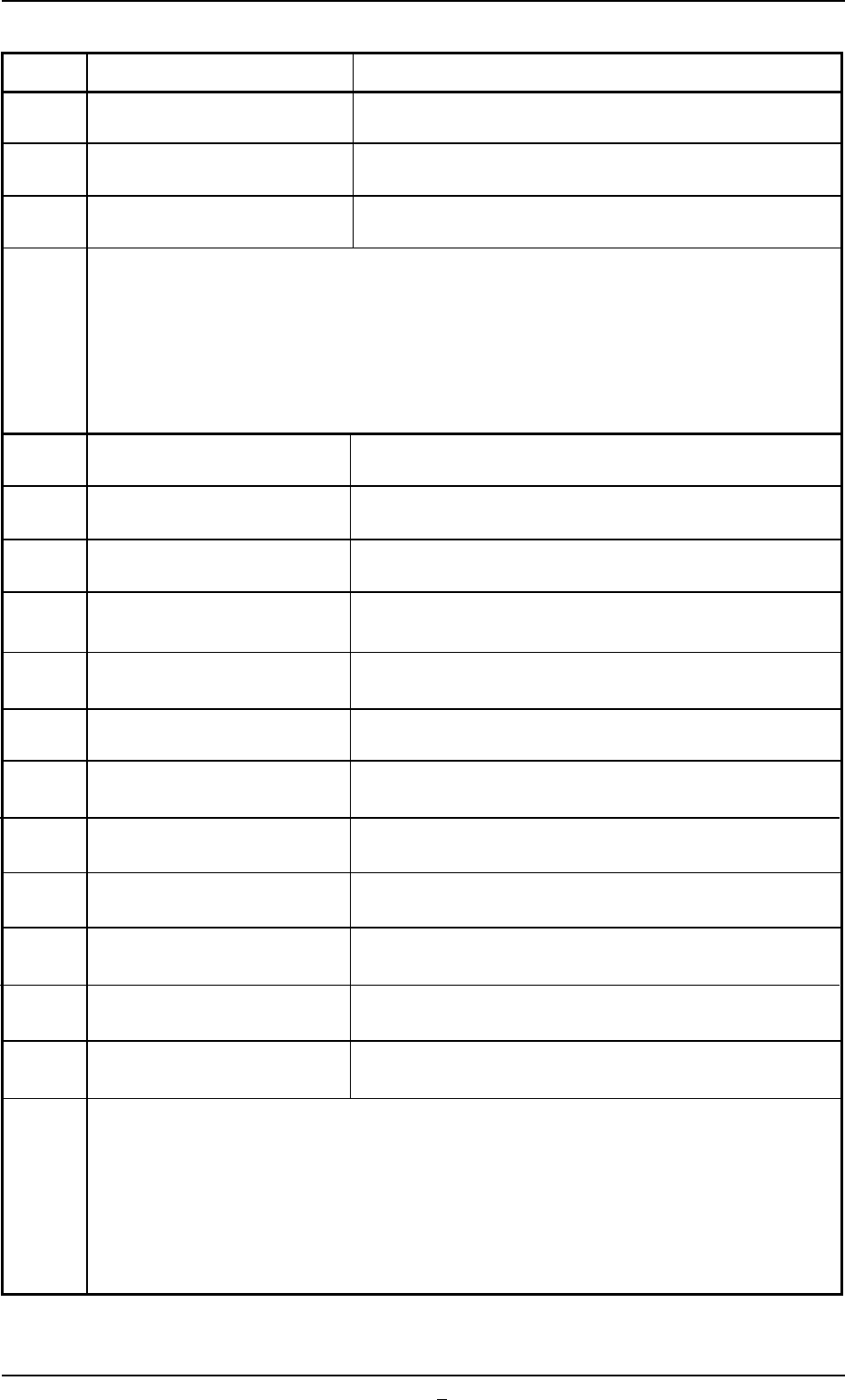
Error ID ltem Description
4f0101 PROGRAM ERROR Error in Sequence Controller! Operation Not Secured
4f0201 PROGRAM ERROR Error in Polling Task (CPU2)! Operation Not Secured
4f0202 PROGRAM ERROR Error in Polling Task (CPU3)! Operation Not Secured
(Cause 1) Self-Diagnostics Error Message
(Remedy 1) Zero all axes and re-start the operation.
When the machine cannot be set to its normal condition, consult our service
personnel for the remedy.
500101 Comp. Missing(Sensor)
500201 Comp. Vertical(Sensor)
500301 Comp. Missing(Recog.)
500401 Comp. Recog. Error
500501 Shortage of Comp. Attach the new comp. And press [READY]. Then, press
[START] button to re-start.
500601 Group Chip Remove this component. Then, press [START] button to re-
start.
500701 Comp. Thickness(Sensor)
500801 Comp. Pickup Diff.(recog.)
500901 Comp. Reverse(recog.)
500a01 Alternate Feeder Disable Enable alt. And press [READY] button. Then, press [START]
to re-start.
500b01 Cancel Recovery On
500c01 Auto Recovery Pause Attach the new comp. And press [READY]. Then, press
[START] button to re-start.
(Cause 1) Self-Diagnostics Error Message
(Remedy 1) Zero all axes and re-start the operation.
When the machine cannot be set to its normal condition, consult our service
personnel for the remedy.
0210-004 2-129 AFO01ETRP
3.3 Error IDs and Remedial Procedures
0210-001 2-129-1 AFO01ETRP
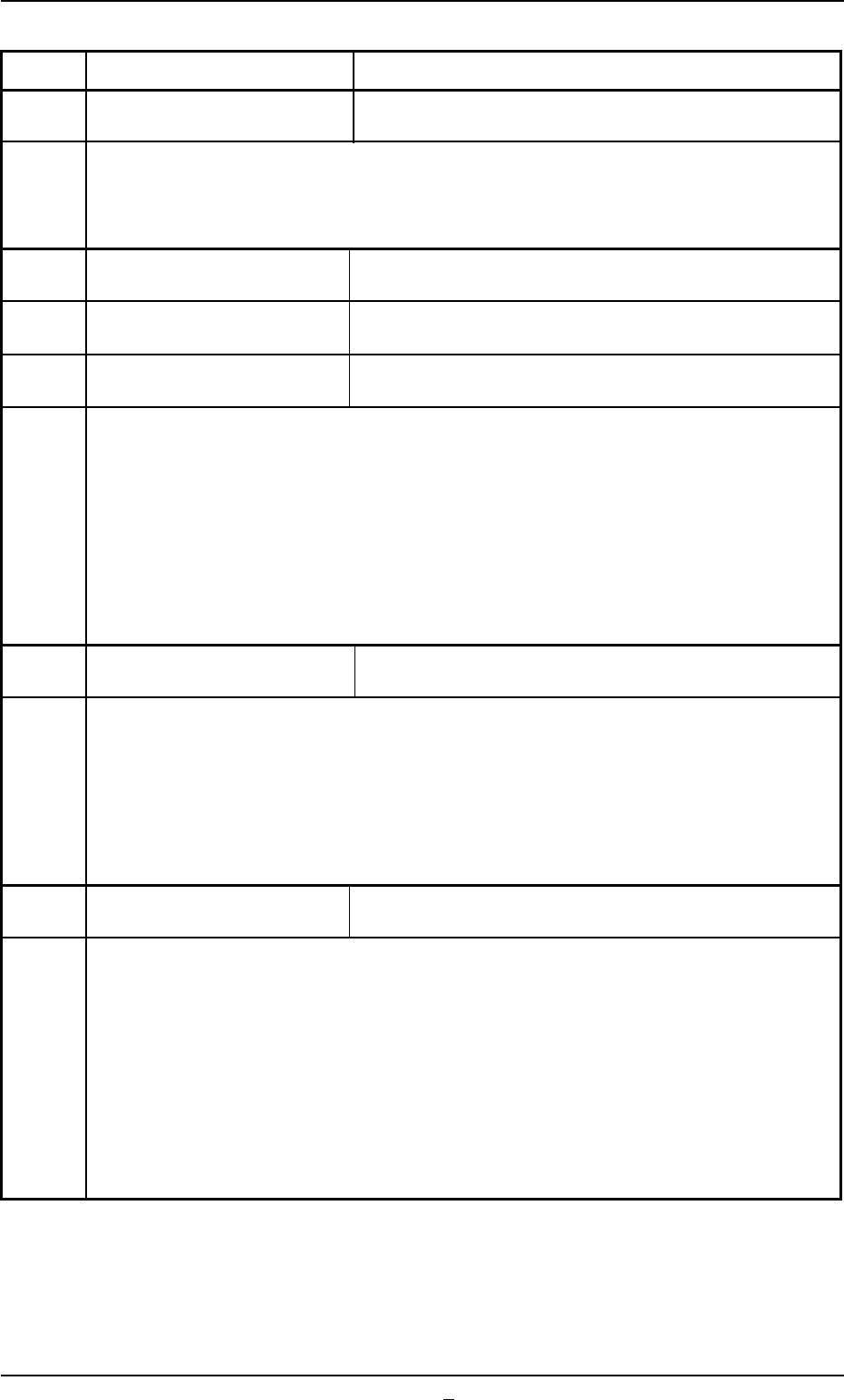
Error ID ltem Description
600101 Nozzle Recog. Recognition Error Code.
Ref.: Refer to “4.3.4 Nozzle Recognition Errors” for the detailed error display.
600201 Nozzle Skip Nozzle Down Error.(L)
600202 Nozzle Skip Nozzle Down Error.(H)
600203 Nozzle Skip Recognition Teach Error.
(Cause 1) When the selected nozzle reached the L or H level during operation, the optical
beam of the sensor was shielded (not received).
The sensor may be defective.
(Remedy 1) Remove the dirt on the nozzle end and insert the nozzle deep inside.
The sensor may be defective. If necessary, replace the sensor with a new one.
Before replacing the sensor, contact our service personnel for some advice.
600204 Nozzle Skip Teach Error Data.
(Cause 1) Dirt and dust adhere to the nozzle and an error is found in the nozzle teaching
operation.
(Remedy 1) Remove dirt and dust from the nozzle end and re-perform the nozzle teaching
operation.
600205 Nozzle Skip Lighting Check.
(Cause 1) The diffusion plate of the nozzle may be dusty and dirty or scratched.
(Remedy 1) Clean the diffusion plate or replace it with a new one.
3.3 Error IDs and Remedial Procedures
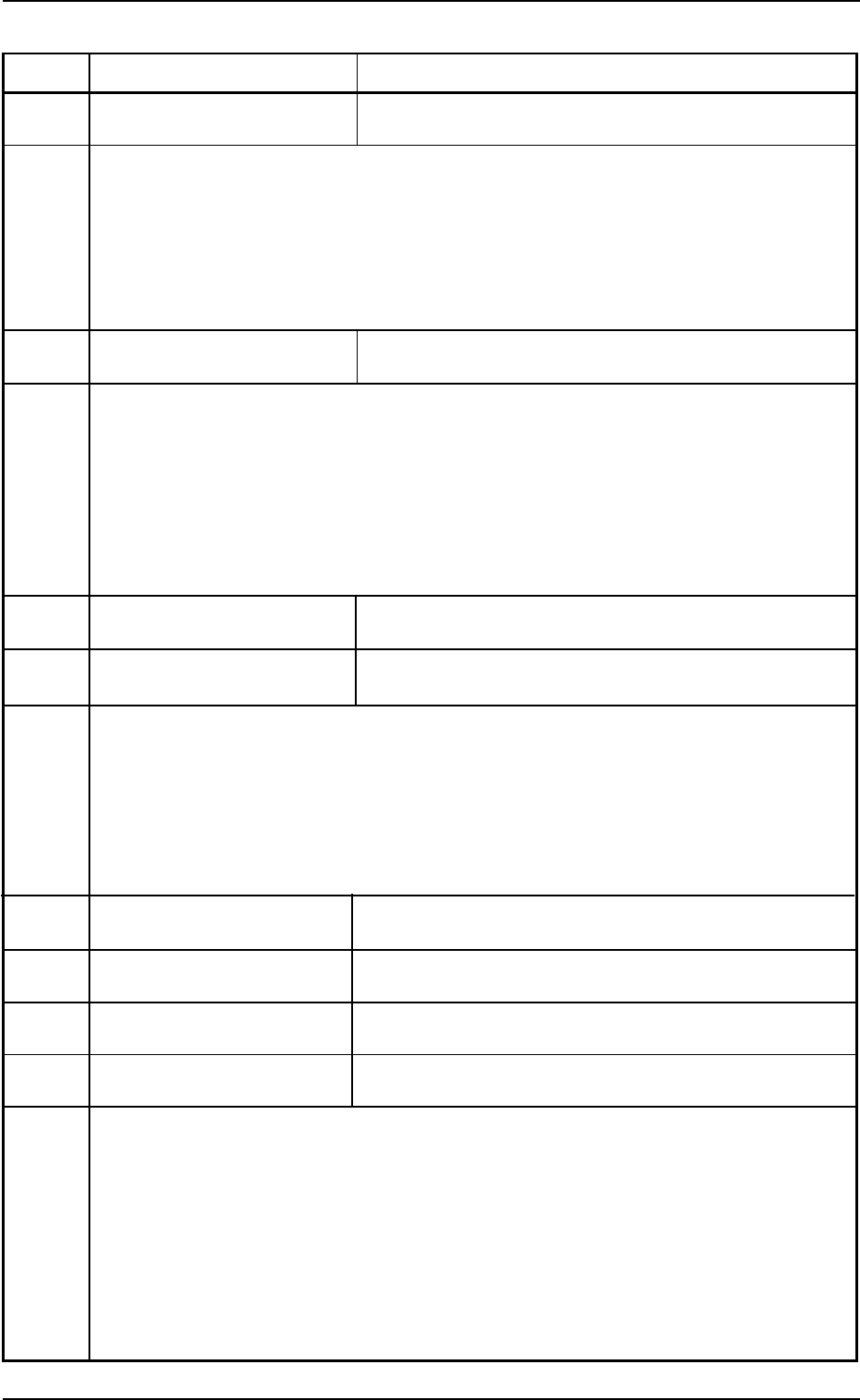
Error ID ltem Description
600206 Nozzle Skip Nozzle Level
(Cause 1) This error occurs when the L value exceeds the tolerance in comparison with the
master nozzle in the offset data.
(Remedy 1) Check if a big value is set as an L level of the master level in the offset data.
Check if the nozzle is broken or dirt adheres to the end.
600207 Nozzle Skip Nozzle Drop
(Cause 1) When a “NOZ. DOWN ERR (L)” error occurs, the nozzle is bypassed and the nozzle
bypass data indicates that “Bypass” appears as a low nozzle item.
(Remedy 1) Open the “Head/Noz. Bypass” tab sheet in the “OPN. MODE” window (submenu)
and press the [Reset Noz. Bypass] button. The “Bypass” in the “Nozzle Height”
text box disappears, indicating that “Bypass” is canceled.
600208 Nozzle Skip Dummy Nozzle
600209 Nozzle Skip Manual Bypass
(Cause 1) This appears when some nozzles are bypassed manually.
(Remedy 1) When the [Reset Noz. Bypass] button is pressed in the “Head/Noz. Bypass” tab
sheet of the “OPN. MODE” window (submenu), the manual bypass designation of
all nozzles is all canceled.
60020a Nozzle Skip Change Error.(Cam lock action)
60020b Nozzle Skip Nozzle Change Error.(Cam Free action)
60020c Nozzle Skip Cam Origin Error.
60020d Nozzle Skip Nozzle Teach Error.
(Cause 1) Self-Diagnostics Error Message
(Remedy 1) Zero all axes and re-start the operation.
When the machine cannot be set to its normal condition, consult our service
personnel for the remedy.
0210-004 2-130 AFO01ETRP
3.3 Error IDs and Remedial Procedures