Installation_Manual_SIPLACE_Explorer_2.4_EN - 第96页
4 Configuration Installation and Configuration Guide SIPLACE Explorer 4.2 Configuring the Factory Configuration Utility Edition 08/2008 EN 96 → The following details can be defined: – The file an d path for the ar chived…
Installation and Configuration Guide SIPLACE Explorer 4 Configuration
Edition 08/2008 EN 4.2 Configuring the Factory Configuration Utility
95
4
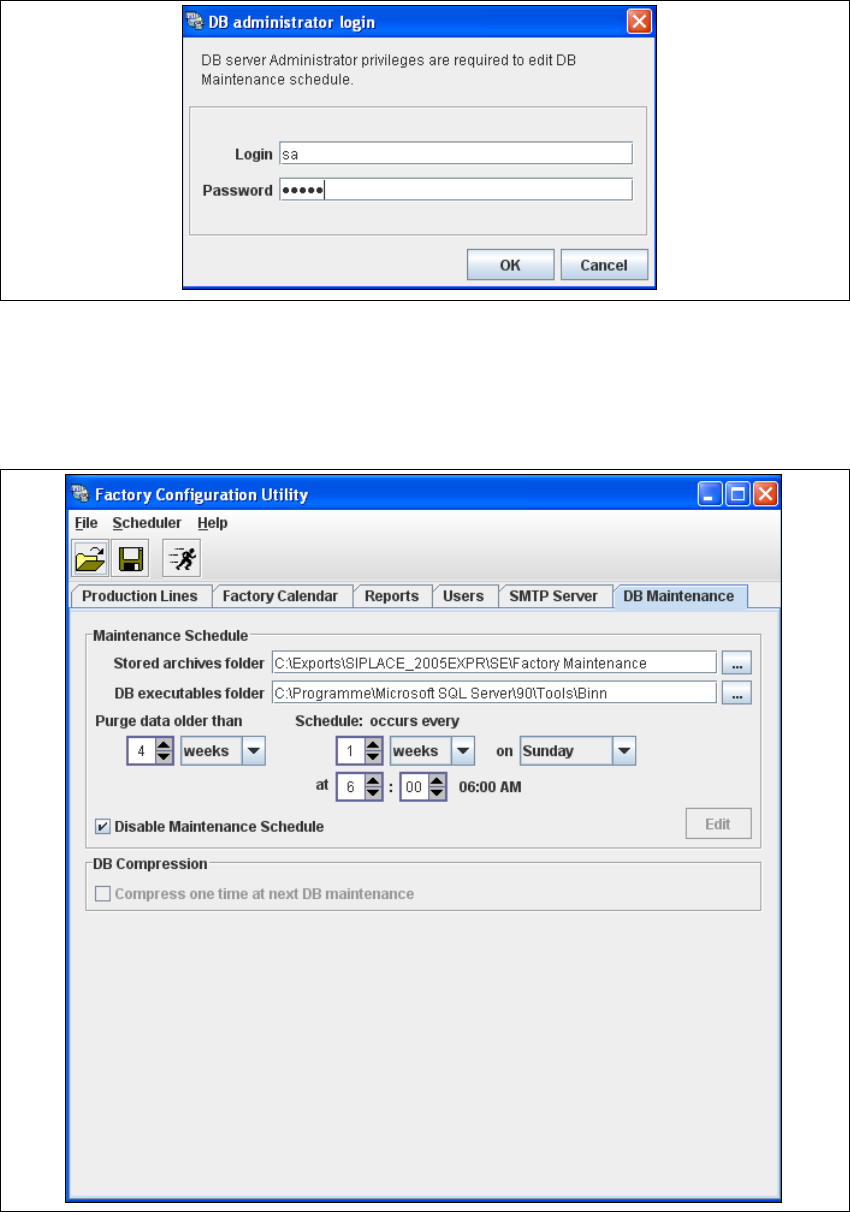
Fig. 4 - 47 DB administrator login
→ Enter the access data here and confirm your entries with OK.
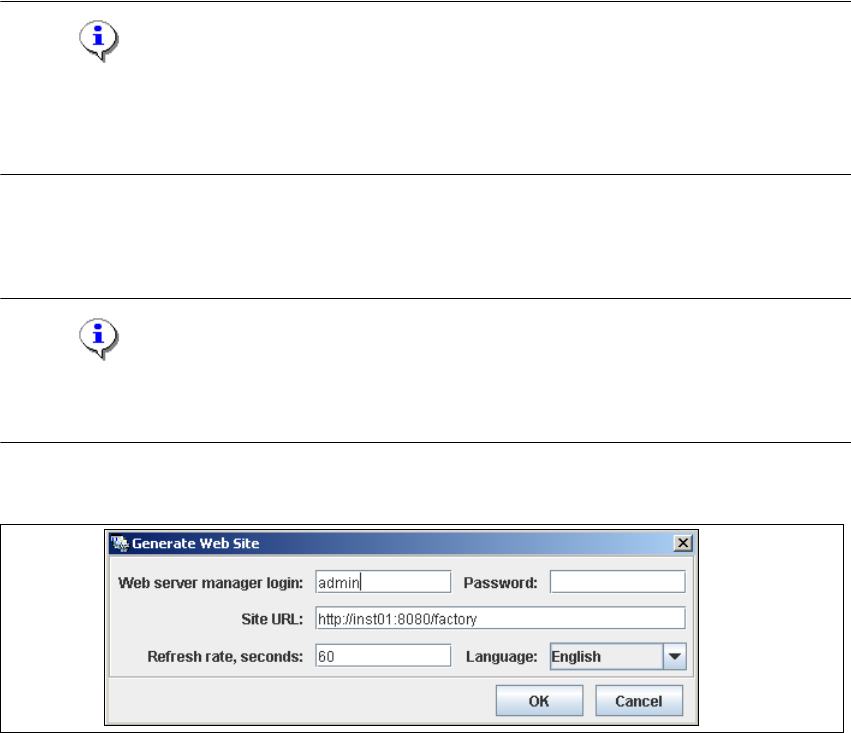
→ In the DB Maintenance dialog box, you can either create a new archiving schedule for the
factory database or edit the default maintenance schedule. The entry fields will be enabled.
4
Fig. 4 - 48 DB maintenance
4 Configuration Installation and Configuration Guide SIPLACE Explorer
4.2 Configuring the Factory Configuration Utility Edition 08/2008 EN
96
→ The following details can be defined:
– The file and path for the archived data
– A schedule specifying the intervals and times when data is to be removed from the line
system database and stored in the archive.
– When to execute the archiving schedule.
– The archiving schedule defined here will be stored in the database and can be called up
when required.
– Compress the database at next DB maintenance.
NOTE
Remember to regular perform a database backup for the factory database. This can be carried
out with the database tool on your computer e.g. with the Enterprise Manager for the MS SQL
server. 4
4.2.8 How to Generate a Factory Website
NOTE
To generate a factory website, you require web server manager privileges (Tomcat administrator)
and the corresponding password. 4
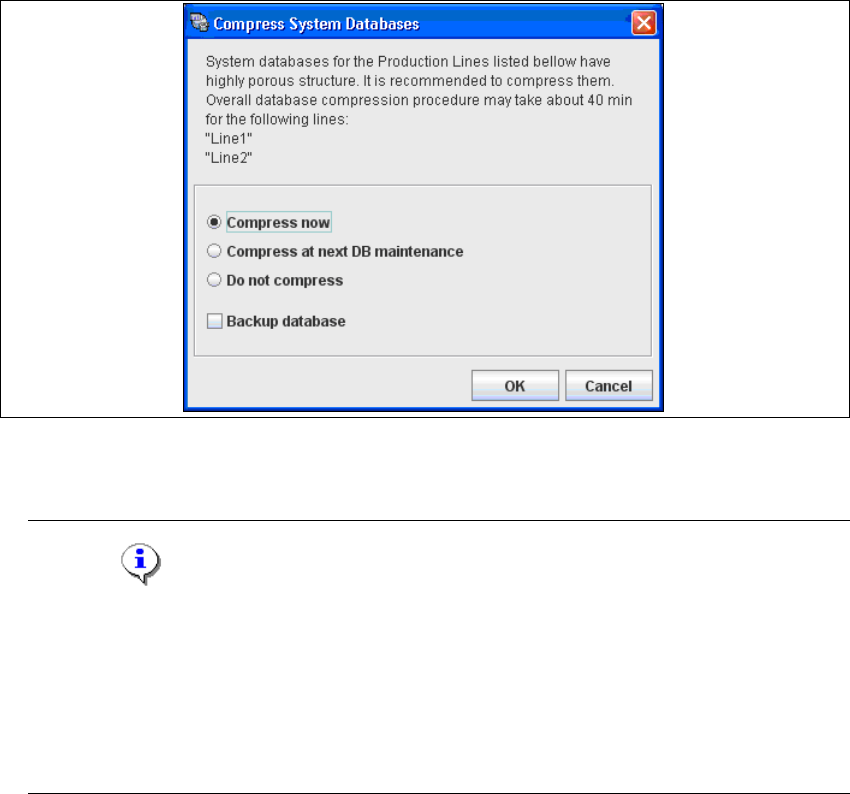
→ Select the function Generate Web Site ... from the File menu.
4
Fig. 4 - 49 Factory Configuration Utility - generate website
→ Specify the access data for the Tomcat administrator. If you entered admin and an empty
password during Tomcat configuration, this data will be automatically used as a default login.
If this is not the case, use the data you specified during Tomcat configuration.
Installation and Configuration Guide SIPLACE Explorer 4 Configuration
Edition 08/2008 EN 4.2 Configuring the Factory Configuration Utility
97
→ Please specify the following information:
–URL site
This URL contains a port number, which applies to the web server (Tomcat 5.5) e.g. "8080".
If you change the port number here, you will also need to update the port number of the web
server see “Port Configuration after Changing Tomcat Port Number” on page 55.
–Refresh rate
For capacity purposes, we recommend a refresh rate of at least one minute (60000 ms).
– Factory website language
→ Check your entries and confirm with OK.
→ Dependent of the database size, you can compress the database. The Compress System
Database dialog box will open.
4
Fig. 4 - 50 Compress DB
→ If you want to compress the DB now, select the Compress now option. Confirm with OK.
NOTE
We recommend activating this DB compression step, when the user has restored the
SIPLACE Explorer factory database or has moved the raw database files to another disk or
to another computer.
With the DB compression it is possible to avoid extended access times of the websites.
The DB compression may take up to one hour, this time depends on the size of the database
performance of the computer. 4