X3_X4_Series machine - 第145页
User manual SIPLAC E X-Series 3 Technical data Software Version SR.601.xx 11/2005 US Edition 3.9 Controls 145 3.9.2 Descri ption All the c ontrols can be r eached b y a 1.60 m tall perso n. Main power switch 3 The mai n …
3 Technical data User manual SIPLACE X-Series
3.9 Controls Software Version SR.601.xx 11/2005 US Edition
144
3.9 Controls
3.9.1 Controls and displays
3
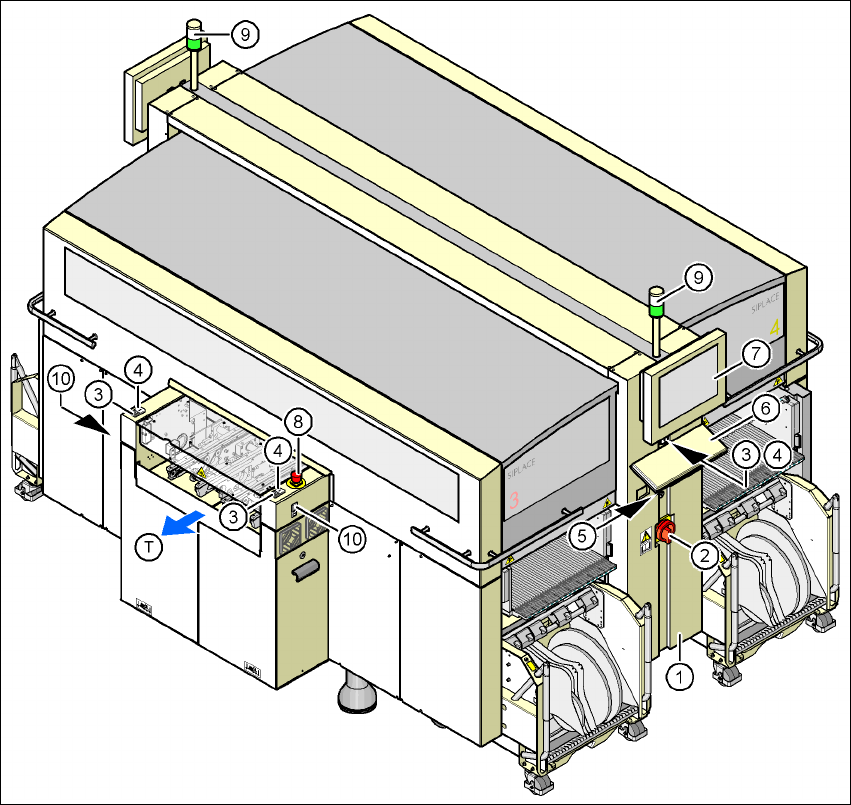
Fig. 3.9 - 1 Controls and displays
(1) Operator panel on the power supply side (7) LCD touchscreen
(2) Main power switch (8) Emergency stop button
(3) Stop button (black) (9) Indicator lamps
(4) Start button (white) (10) Buttons for docking the component
trolley in and out
(5) Component counter
(6) Keyboard (T) Direction of PCB transport

User manual SIPLACE X-Series 3 Technical data
Software Version SR.601.xx 11/2005 US Edition 3.9 Controls
145
3.9.2 Description
All the controls can be reached by a 1.60 m tall person.
Main power switch 3
The main power switch is used to switch the power supply to the placement machine on and off.
WARNING
Some parts inside the placement machine carry potentially lethal voltages - even when switched
off at the main power switch. 3
Stop button 3
This button is used to stop the placement machine.
Start button 3
This button starts the placement machine after it has been switched on or after faults have been
eliminated.
Emergency stop button 3
The emergency stop button latches in the ON position when pressed. The power supply to the
gantry axes, the component trolleys, conveyors and used tape cutters is interrupted and the volt-
age supplied to the star axes of the placement heads is reduced. Turn the button to release it.
Component counter 3
The component counter displays the number of components processed in increments of ten.
LCD touchscreen 3
There is a flat LCD screen with a touch-sensitive surface (touchscreen) on either side of the place-
ment machine.
Keyboard 3
The keyboard is located beneath the monitor.
Indicator lamps 3
The sequence of colors of the indicator lamps is white - green. These lamps are used to signal
operating statuses and malfunctions of the placement machine.

3 Technical data User manual SIPLACE X-Series
3.9 Controls Software Version SR.601.xx 11/2005 US Edition
146
Component barcode scanner 3
On each side of the middle console there is a bracket that holds the Datalogic DL 910 component
barcode scanner. The barcode scanner enables the components to be set up and topped up
quickly and reliably.
3.9.3 Ergonomic arrangement of the controls
Figure 3.9 - 1 on page 144 provides an overview of the position of the controls. They are subdi-
vided into the following groups:
Operator panel on the right-hand side (pneumatic unit) of the center console with 3
– LCD touchscreen
– Keyboard with trackball
– Start button, Stop button
Operator panel on the left-hand side (power supply unit) of the center console with 3
– LCD touchscreen
– Keyboard with trackball
– Component counter
– Start button
– Stop button
– Main power switch
Input / output side of the PCB conveyor with 3
– Emergency stop button
– Start button, Stop button
– Button for docking and undocking the component trolley