X3_X4_Series machine - 第171页
User manual SIPLAC E X-Series 3 Technical data Software Version SR.601.xx 11/2005 US Edition 3. 13 Flexible dual PCB conveyor 171 Restrictions 3 If the dual c onveyor i s operate d in sync hronous mod e, the ‘P CB whispe…
3 Technical data User manual SIPLACE X-Series
3.13 Flexible dual PCB conveyor Software Version SR.601.xx 11/2005 US Edition
170
If the placement sequence is interrupted, the conveyor interface will be disabled and the PCBs
currently on the processing belts will be completed.
The conveyor interface is disabled or enabled simultaneously for both transport tracks.
3
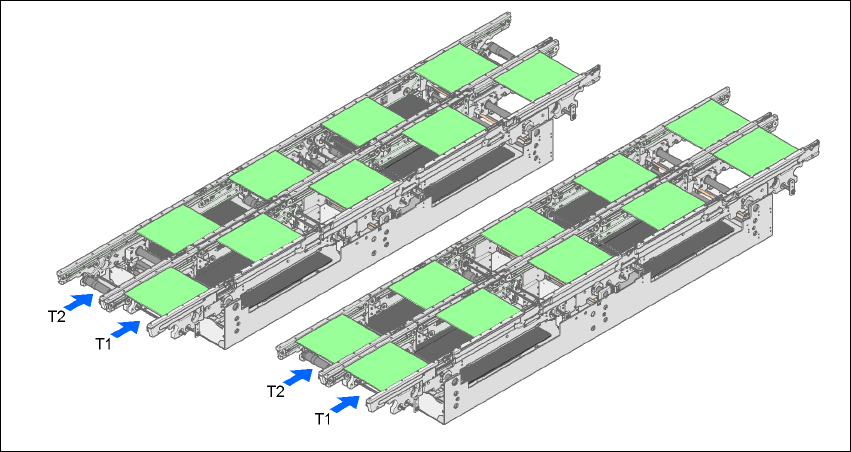
Fig. 3.13 - 3 Transport modes
3.13.7.2 Synchronous transport mode
Description 3
In synchronous mode, two PCBs of the same size are moved into the placement position at the
same time. They must be processed as a common panel.
In this way, the top and bottom of a PCB can be processed on a single line, and the time required
to transport the PCB is shorter since two PCBs are always transported at the same time. It also
ensures better utilization of the nozzle configuration.
Function 3
PCBs on conveyor tracks 1 and 2 are moved synchronously onto the conveyor sections (i.e. the
conveyors are controlled synchronously, but independently of one another). The components to
be placed on conveyor tracks 1 and 2 must be organized into a panel via two subpanels. (See the
SIPLACE Pro user manual).
If only one conveyor track (or center conveyor) is full when the placement sequence starts, the
subpanel on this section will be identified as “not for placement”.
Synchronous
transport mode
Asynchronous
transport mode

User manual SIPLACE X-Series 3 Technical data
Software Version SR.601.xx 11/2005 US Edition 3.13 Flexible dual PCB conveyor
171
Restrictions 3
If the dual conveyor is operated in synchronous mode, the ‘PCB whispering down the line’ option
is deactivated. PCB barcode operation is not supported in this mode. The "Global bad fiducial"
option cannot be used.
3.13.8 Changing transport mode
3
3
3.13.9 Controlling the dual conveyor using the Single Functions menu
The online help contains information on controlling the dual conveyor and on the Single Functions
menu.
3
3
3.13.10 Automatic width adjustment on the dual conveyor
When the command is received, the conveyors are set to the desired width one after another. Dif-
ferent widths are possible.
PLEASE NOTE 3
Automatic width adjustment is deactivated if “synchronous transport” is selected.
3
See the Online Help for detailed information about changing the conveyor track width.
3
Conveyor mode Entry in the SITEST program
Single conveyor 0
Dual conveyor, synchronous 1
Dual conveyor, asynchronous 2
3 Technical data User manual SIPLACE X-Series
3.13 Flexible dual PCB conveyor Software Version SR.601.xx 11/2005 US Edition
172