X3_X4_Series machine - 第178页
4 Setting up and commissioning User manual SIPLACE X-Series 4.2 Delivery configuration and transport Sof tware Version SR.601.xx 11/2005 US E dition 178 4.2.4.3 Point s for at taching t he fork-l ift on the placement mac…
User manual SIPLACE X-Series 4 Setting up and commissioning
Software Version SR.601.xx 11/2005 US Edition 4.2 Delivery configuration and transport
177
4.2.3.4 Fork-lift attachment points on the transport crate or pallet
Attach the fork-lift only at the points identified by (A) in Fig. 4.2 - 1. We recommend that you keep
the crate or the pallet for later use.
WARNING 4
If you still decide to transport the placement machine without a crate or pallet, you MUST follow
the instructions in the next section to avoid serious damage to your machine.
4
4
4
4.2.4 Transporting the placement machine without a crate or pallet
4.2.4.1 Safety instructions
WARNING 4
Æ The applicable accident prevention regulations concerning the transportation of heavy goods
must be followed.
Æ In particular, you should wear safety boots to minimize the risk of crushing your feet.
Æ Read this section in full before transporting the machine to avoid severe damage.
Æ When you are transporting the machine, make sure that all the feet are clear of the floor. If
they are not clear, the feet will drag along the floor and bump into obstacles. This could dam-
age the machine foot thread in the machine frame.
4.2.4.2 Means of transport
Use a fork-lift truck with the following specification to carry the machine:
Fork length Min. 1800 mm
Lifting power Min. 6000 kg
Distance between forks with the forks running parallel
to the direction of PCB transport
420 mm
Distance between forks with the forks running across
the direction of PCB transport
800 mm - 900 mm

4 Setting up and commissioning User manual SIPLACE X-Series
4.2 Delivery configuration and transport Software Version SR.601.xx 11/2005 US Edition
178
4.2.4.3 Points for attaching the fork-lift on the placement machine
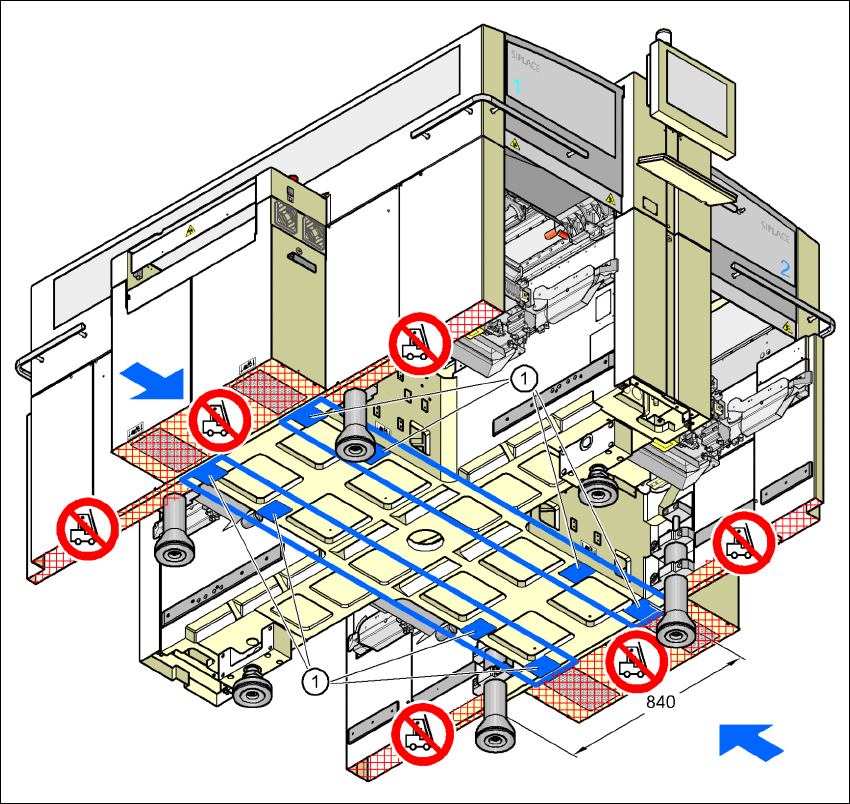
The next two diagrams show the fork-lift attachment points on the placement machine if you want
to lift the machine from the pallet or transport it without a pallet.
PLEASE NOTE 4
Always use a pallet and fork-lift to transport the placement machine over longer distances in
order to avoid damaging the machine.
Forks parallel to the PCB conveyor 4
WARNING 4
Please note the following points
before
you raise the placement machine in order to avoid irre-
versible damage to the machine:
– Open the forks just wide enough to position them between the two machine feet (the attach-
ment points are shown in Fig. 4.2 - 3
). The machine feet are 776 mm apart. NEVER increase
the distance between the forks so that the machine is lifted on the side parts of the machine
frame, since this would deform the machine frame.
Æ Make sure that the forks are evenly loaded when you lift the machine. A firm support between
the forks and placement machine will prevent the machine tilting when it is raised. This will
also prevent a one-sided load on the machine feet, which would deform the fixing of the ma-
chine feet. We recommend that a second person watch the machine as it is raised, and make
sure that the machine does not tip to one side when lifted with the fork-lift.
User manual SIPLACE X-Series 4 Setting up and commissioning
Software Version SR.601.xx 11/2005 US Edition 4.2 Delivery configuration and transport
179
4
Fig. 4.2 - 3 Contact surfaces - Forks parallel to the direction of PCB transport
(1) Contact surfaces for the forks of the fork-lift