X3_X4_Series machine - 第364页
6 Component handling User manual SIPLACE X-Series 6.10 Matrix tray changer Software Version S R.601.xx 11/2005 US Edition 364 6.10 Matrix tray changer The use of flatpack IC s is becom ing an increasi ngly signi ficant a…

User manual SIPLACE X-Series 6 Component handling
Software Version SR.601.xx 11/2005 US Edition 6.9 Used tape channel - component trolley docking unit SIPLACE HF
363
6.9.2 Removing the separating plate for tape pocket heights > 17 mm
If S feeder modules that process component tapes with a pocket height > 17 mm are used, such
as, for example, the 44 mm S DP feeder module, then the separating plate (item 3 in Fig. 6.9 - 1
)
must be removed.
WARNING 6
Æ Switch the placement machine off at the main switch to remove the dividing plate.
Æ Disconnect the machine from the power and compressed air supply.
Æ Secure the machine to prevent it being switched on again, as described in section 2.10, page
86
.
Æ Wait until the operating pressure for the tape cutter has dropped to 0 MPa.
Æ Wear robust protective gloves.
Æ Do not reach inside the used tape channel.
Æ Loosen the two slotted screws (item 4 in Fig. 6.9 - 1).
Æ Pull out the dividing plate.
PLEASE NOTE
Do not position feeder modules with shallow pockets immediately beside bar feeder modules
with deep pockets. The used tapes could overlap and build up.
6 Component handling User manual SIPLACE X-Series
6.10 Matrix tray changer Software Version SR.601.xx 11/2005 US Edition
364
6.10 Matrix tray changer
The use of flatpack ICs is becoming an increasingly significant aspect in the production of flat
modules. These components are now almost exclusively provided in waffle trays. The space re-
quired by waffle trays is relatively large in comparison to the component density, however. The low
component capacity also requires the waffle trays to be changed frequently, which means that the
placement sequence has to be interrupted if the trays are changed manually.
The use of a matrix tray changer eliminates this unnecessary time loss since the waffle trays are
stored and automatically changed. Programmable, random access to up to 100 x waffle-pack
trays also considerably increases the range of components that can be made available.
6.10.1 Description
The matrix tray changer can be used to store and change up to 100 waffle trays fully automatically.
The levels (storage locations in the towers) for the waffle trays are numbered consecutively in as-
cending order from bottom to top.
The towers move independently of one another in the vertical direction until the selected maga-
zine is within range of the feed axis. The horizontal feed axis transports the waffle-pack tray from
the tower into the access area of the placement head.
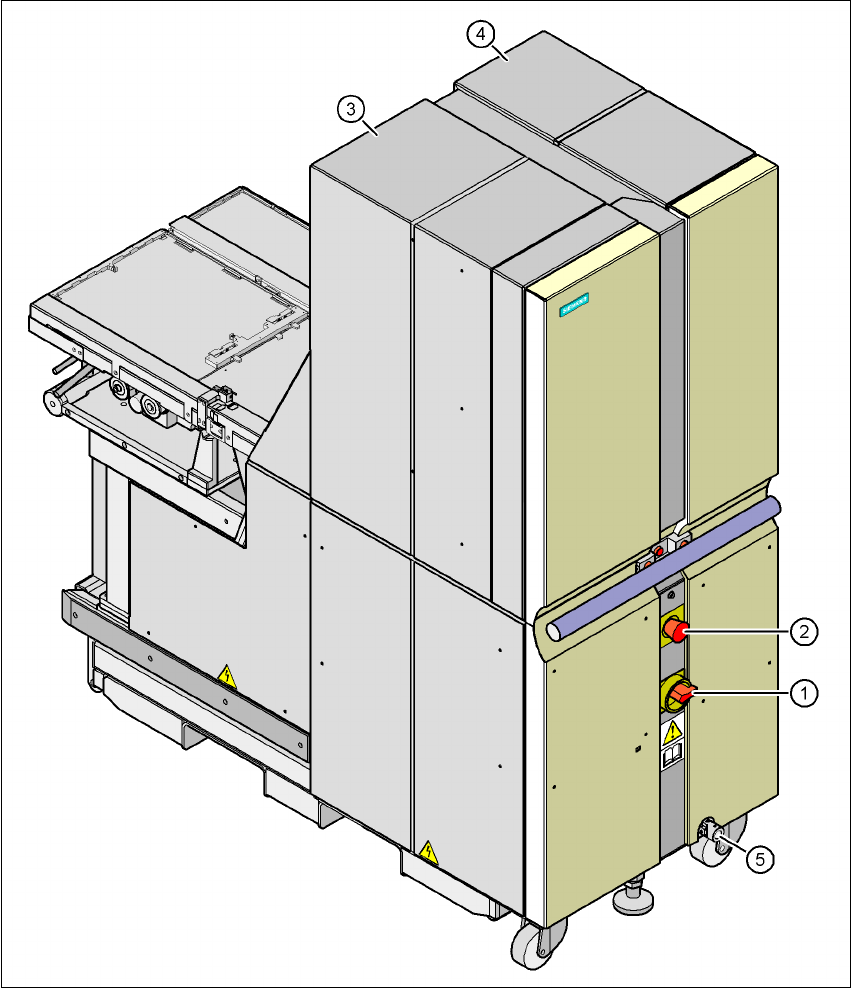
Tower 1 has 30 levels, each of which can hold 2 JEDEC trays or one large tray up to 240 x 340
mm² from the waffle-pack tray carriers.
Tower 2 has a capacity of 40 levels for JEDEC trays.
In place of a component trolley, a matrix tray changer may be docked into locations 2 and 4 on the
X2 machine, but only at location 2 on the X3 machine. The docking unit installed for the compo-
nent trolley can be replaced with the docking device for the matrix tray changer. Or conversely,
the matrix tray changer can be replaced with a component trolley.
The matrix tray changer has an integral chassis, and is therefore easy to move to other locations.
It is supplied with the PCB conveyor height implemented for X2/X3 machines, but can be adapted
for the 830, 900, 930 and 950 mm PCB conveyor heights with just a few simple operations.
User manual SIPLACE X-Series 6 Component handling
Software Version SR.601.xx 11/2005 US Edition 6.10 Matrix tray changer
365
6
Fig. 6.10 - 1 Matrix tray changer 2, back view
(1) Main power switch
(2) Emergency stop button
(3) Tower 1 for holding up to 30 waffle-pack tray carriers (up to 60 JEDEC trays)
(4) Tower 2 for holding up to 40 waffle-pack tray carriers (up to 40 JEDEC trays)
(5) Point for attaching the crank for adjusting the height of matrix tray changer 2