X3_X4_Series machine - 第399页
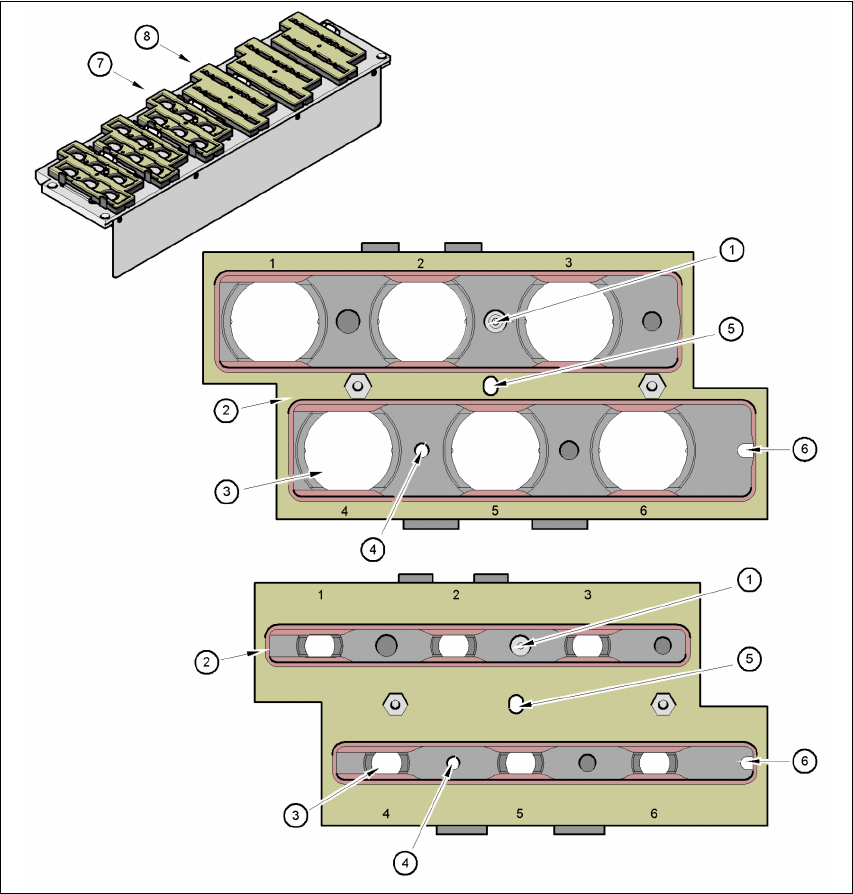
User manual SIPLAC E X-Series 7 Station extensions Software Vers ion SR.601.xx 11/ 2005 US Ed ition 7.1 Nozzle changer 399 7 Fig. 7.1 - 24 Magazine and noz zle holders (1) Posi tioning f iducial (2) Locki ng plat e (3) N…

7 Station extensions User manual SIPLACE X-Series
7.1 Nozzle changer Software Version SR.601.xx 11/2005 US Edition
398
7.1.3.6 Description of the functions
The nozzles are seated in nozzle holders and are held in place by a movable locking plate.
A pneumatic cylinder moves the locking plate 12 mm. All the nozzles are either clamped or re-
leased, depending on the position of the locking plate. The default position of the locking plate,
i.e. if there is no nozzle change in progress, is "closed".
Every magazine of the nozzle changer has a positioning fiducial for position detection. The mag-
azine locations are numbered consecutively from 1 - 6 for the "row 1" nozzle changers and from
7 - 12 for the "row 2" (see Figs. 7.1 - 22
, 7.1 - 21 and 7.1 - 20). The 6 nozzle holders in the mag-
azines are also numbered consecutively (see Fig. 7.1 - 24
).
PLEASE NOTE 7
Special magazines are available upon request (contact SIEMENS A&D for details) and will be
numbered differently.
Picking up a nozzle 7
– The Collect&Place head Z axis moves down.
– The locking plate (item 2 in Fig. 7.1 - 24
, page 399) opens and releases the nozzles.
– The nozzle is picked up by the sleeve of the Collect&Place head.
– The Z axis moves up.
Setting down a nozzle 7
– The locking plate (item 2 in Fig. 7.1 - 24, page 399) opens and releases the nozzles.
– The Collect&Place head Z axis moves down and sets the nozzle down.
– The locking plate closes.
– The Collect&Place head Z axis moves up.
Discarding defective nozzles 7
– The Collect&Place head Z axis moves down 14 mm towards the discarding device (item 4 in
Fig. 7.1 - 22
, 7.1 - 21 and 7.1 - 20) and thus moves the defective nozzle into the hole in the
discarding device.
– The Z axis moves up again and the nozzle is stripped from the sleeve by spring wires.
– The nozzle drops into the reject bin.
User manual SIPLACE X-Series 7 Station extensions
Software Version SR.601.xx 11/2005 US Edition 7.1 Nozzle changer
399
7
Fig. 7.1 - 24 Magazine and nozzle holders
(1) Positioning fiducial
(2) Locking plate
(3) Nozzle holder for type 9xx and 8xx nozzles
(4) Hole for the parallel pin for centering the magazines
(5) Hole for the parallel pin of the slide mechanism
(6) Slot for the parallel pin for centering the magazines
(7) Magazine for type 8xx nozzles
(8) Magazine for type 9xx nozzles

7 Station extensions User manual SIPLACE X-Series
7.1 Nozzle changer Software Version SR.601.xx 11/2005 US Edition
400
7.1.3.7 Notes on operation
Æ The magazines can be filled with different nozzle types within a nozzle family: 8x magazine,
for example, with nozzle types 821, 822, 823, 9x magazine with types 911, 914, etc.
PLEASE NOTE 7
Fill the magazines off the machine and always replace complete magazines. 7
Æ Open the locking plate and place the nozzles in the nozzle holders.
Æ Close the locking plate so that the nozzles cannot drop out of the magazines.
CAUTION 7
Before you fill magazine, make sure that all the nozzles on the Collect&Place head have
been returned to their magazines. 7
Æ Programming the nozzle changer is described in the SIPLACE Pro user manual.
PLEASE NOTE 7
Æ Do not allow components to drop onto the magazines. If they do, they could jam the locking
plate.
Æ Do not allow components to drop onto free feeder module locations. They will stick to the mag-
netic bar. Production may have to be interrupted if the feeder modules are not placed on the
component table correctly. You should therefore regularly clean the magazines and free loca-
tions.