D-serie level 1 EN.pdf - 第102页
C&P6/12 Placement Heads Placement Procedure Completing Board Placement S tuden t Guide Advanced Level 1 SIPLACE D-Series C&P6/12 Placement Heads EN 05/2007 6-22 6.2.19 Completing Board Placement The SIPLACE pla…
C&P6/12 Placement Heads
Placing Component 12 Placement Procedure
Student Guide Advanced Level 1 SIPLACE D-Series
EN 05/2007 C&P6/12 Placement Heads
6-21
6.2.16 Placing Component 12
6.2.17 Pickup and Placement Cycle For the Next Components
After all the components of the first head cycle have been placed on the board, the gantry axes move
the placement head to the pickup position of the next pickup cycle.
The next pickup cycle is performed for components 13 - 24 (7 - 12 for C&P6).
The subsequent pickup cycles follow the same procedure. If necessary the machine performs repair
cycles.
6.2.18 Segment with a "Defect Component"
If the optical centering of a component (ident. error) or the pre-placement vacuum check (alternatively,
component recognition before placement) fails, the component will not be placed and will remain on the
nozzle.
The turning station still rotates this nozzle into the pickup angle for the new component, if this
segment is in the rotary position.
If this segment is in the pickup position:
The reject procedure is activated and
The X/Y gantry axes move to the reject position for that gantry,
The star rotates the segment into the reject position,
The component is rejected with an air blast,
The new component is taken up.
The rejected component is then placed during a repair cycle, performed after all the set placement cycles
for this placement head have been completed.
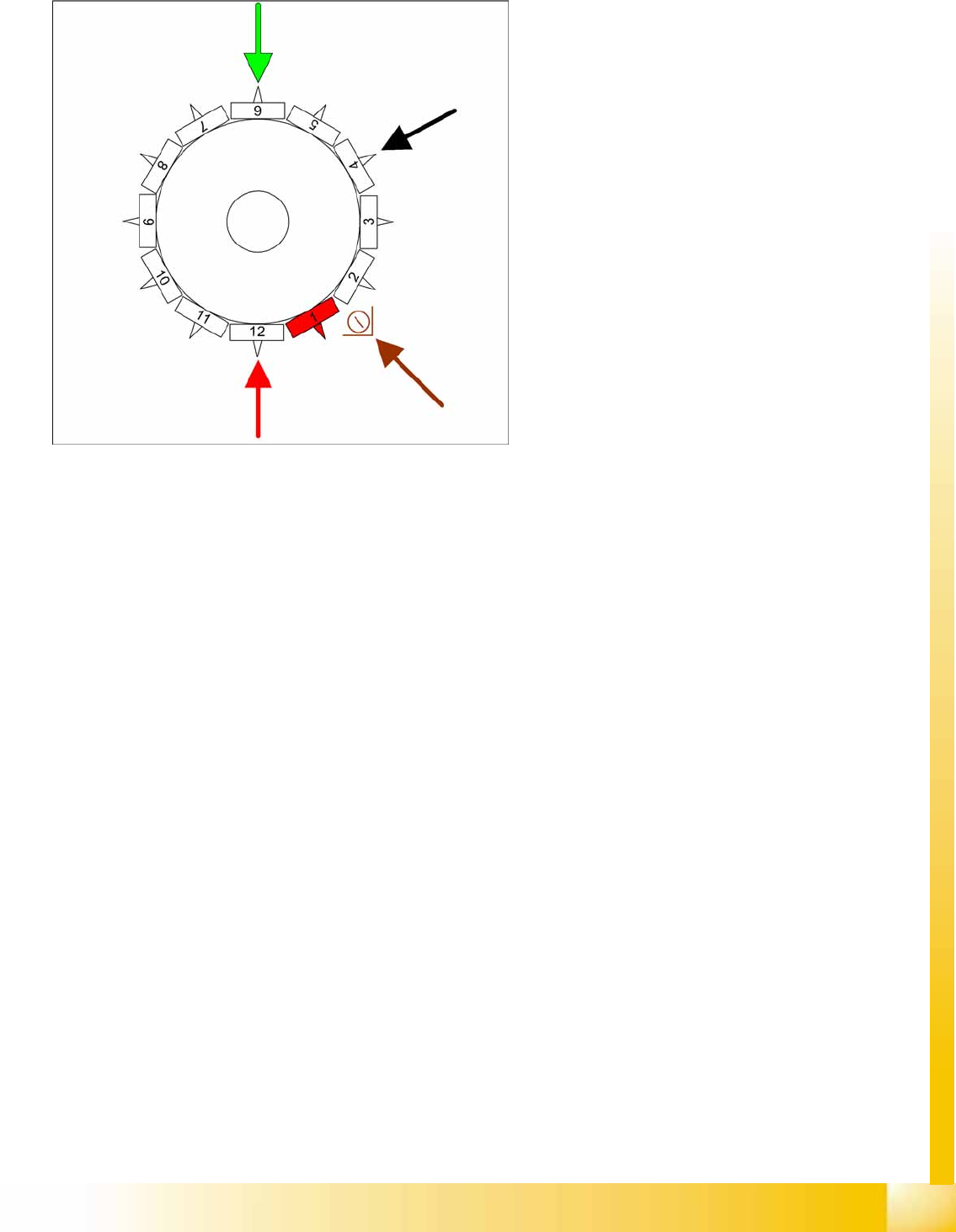
6-26: Placing component 12
Star position 330°
Vision system: optical centering of component
6 on other gantry
DP station rotation of nozzle 4 into the pickup
angle for the next placement cycle.
Pickup/placement station: Place component
12
Component sensor option: during the next star
step, the nozzle length is measured at
segment 2.
C&P6/12 Placement Heads
Placement Procedure Completing Board Placement
Student Guide Advanced Level 1 SIPLACE D-Series
C&P6/12 Placement Heads EN 05/2007
6-22
6.2.19 Completing Board Placement
The SIPLACE placement station activates the conveyor system and moves the board into the output
conveyor.
Finally, the SIPLACE placement station reports the number of components consumed (placed and
rejected) to the line control computer (LC) SIPLACE Pro.
The OIS (Operator Information System) compiles the placement statistics which relate to the data
set at the station, the programed panels or the last reset time. This data is used for optimizing the
process.
The machine is now ready for the next board.
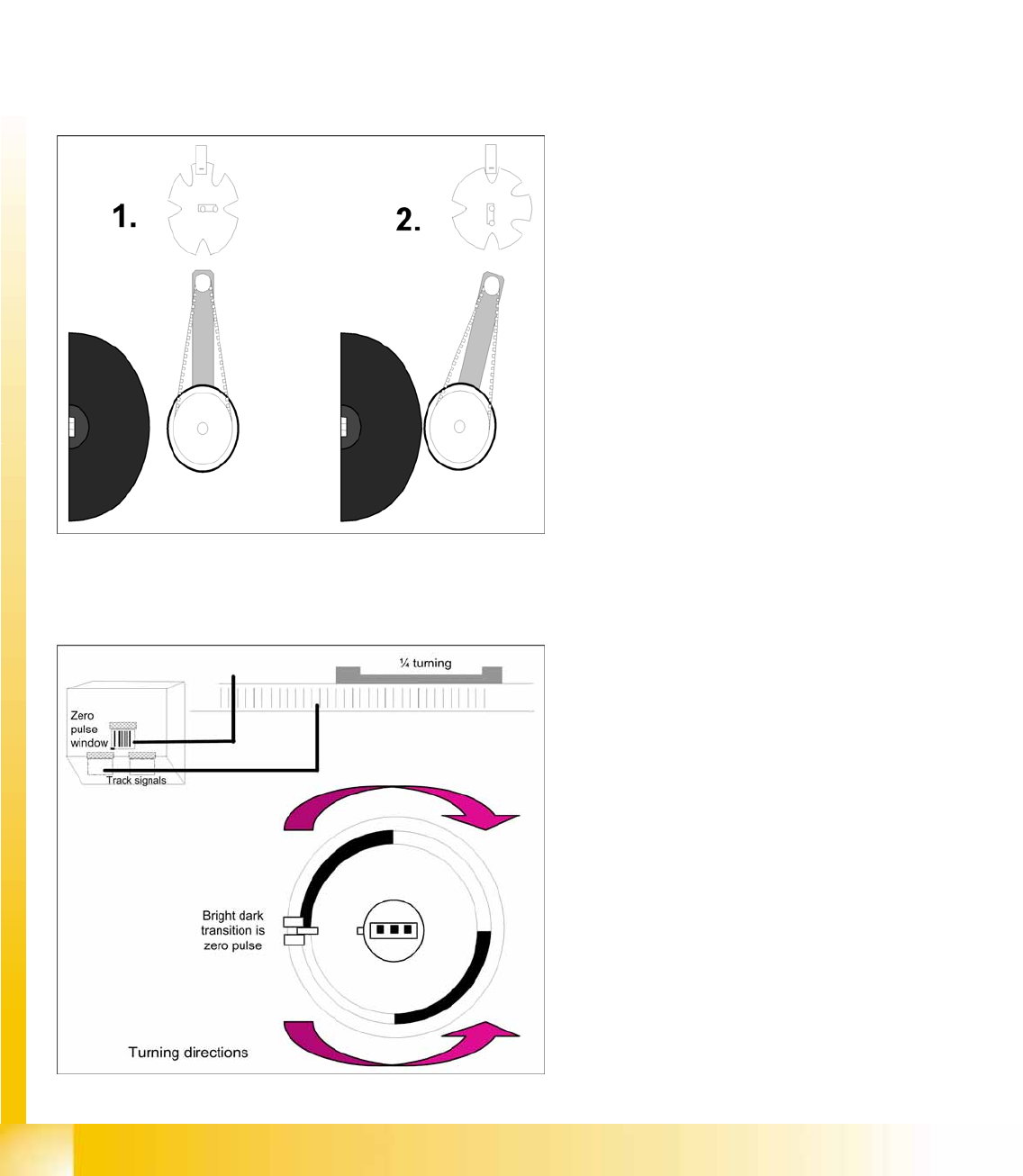
6.2.20 Detailed Rotation of DP Station 1. Swivel In
6.2.21 Positioning into Pickup Angle
6-27: Detailed rotation of DP station, 1. Swivel in
Diagram 1 shows the initial position (state after
reference run).
From the initial position, the stepping motor
rotates by 90° for swivel-in.
The DP station swivels in and contacts the
sleeve (incremental disk).
The stepping motor is monitored by the light
barrier on the cam disk.
Diagram 2 shows the status after swiveling in.
This is the start command for the DP axis
drive.
6-28: Detailed rotation of DP station, positioning into pickup angle
The DP axis positions the segment to the
relevant zero pulse and checks the signal level
at a distance of 3 digits.
An end position signal is emitted if the actual
position deviation is within the permitted
tolerance.
There is no difference between the 0° and
180° or 90° and 90° pickup angle.
C&P6/12 Placement Heads
Positioning into Placement Angle Placement Procedure
Student Guide Advanced Level 1 SIPLACE D-Series
EN 05/2007 C&P6/12 Placement Heads
6-23
6.2.22 Positioning into Placement Angle
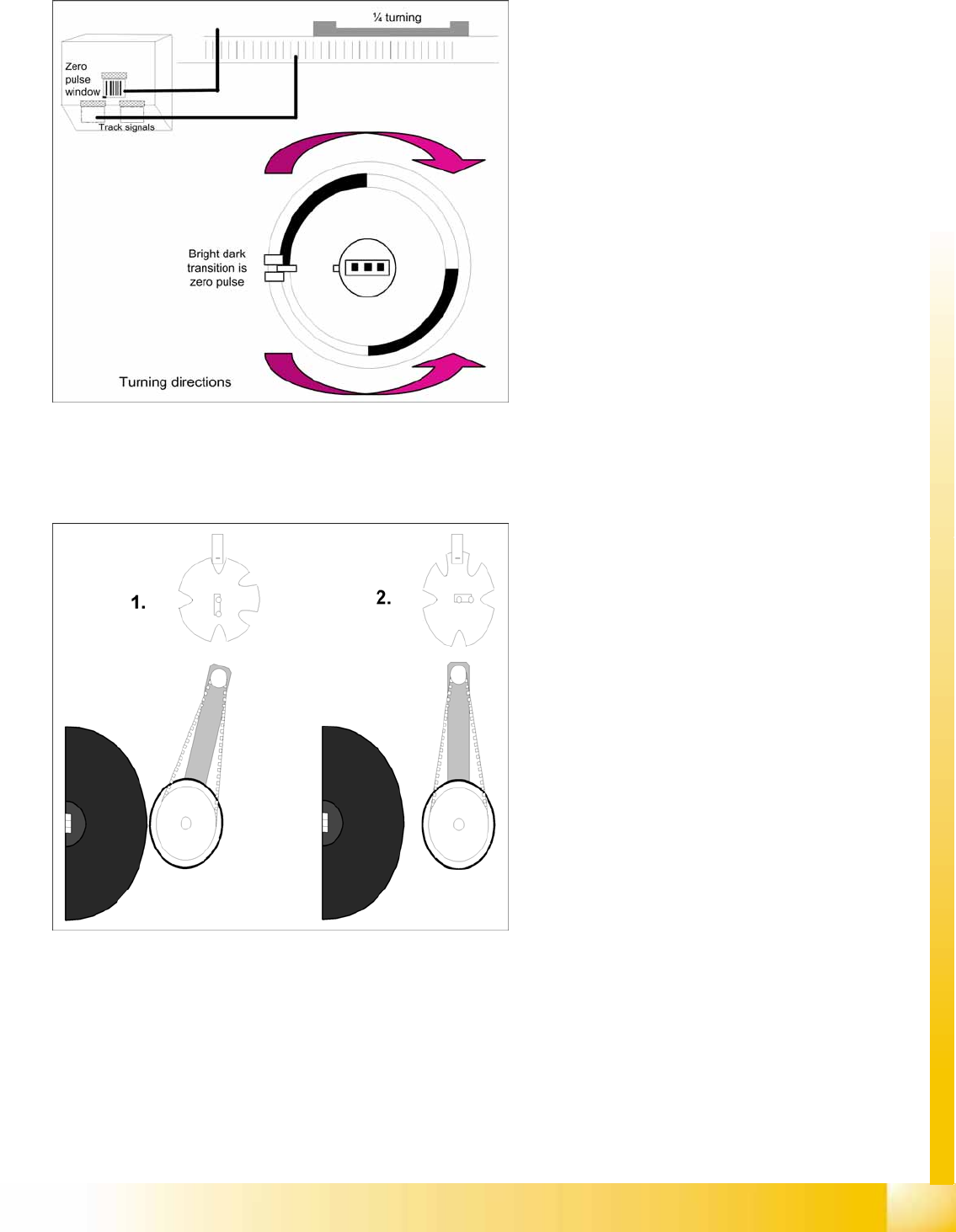
6.2.23 Detailed rotation of DP station, 3. Swivel Out
6-29: Detailed rotation process at DP station, positioning into placement
angle
When positioning begins, the actual position of
the axis is set to 0 by setting the position
counter of the DP axis to 0.
The DP drive is operated in relative positioning
mode.
The DP axis starts to move towards the target
position which is calculated from the station
calibration values, the line computer
programming values and the centering values
of the placement procedure.
An end position signal is emitted as soon as
the actual position deviation is within the
permitted tolerance.
6-30: Detailed rotation of DP station, 3. Swivel out
The command to start swiveling out is the end
position signal from DP positioning.
The DP drive is still located at the sleeve.
Diagram 1 shows the status when swiveled in.
The stepping motor is controlled by the light
barrier on the cam disk.
From its swiveled-in status, the stepping motor
rotates by 90° in a counterclockwise direction,
to swivel out.
Diagram 2 shows the status when swiveled
out.