D-serie level 1 EN.pdf - 第133页
Component Handling Changeover Table Construction Overview S tude nt Guide Advanced Level 1 SIPLACE D-Series EN 05/2007 Component Handling 8-3 8.1.3 Changeover T able Construction The S feeder changeover tables on the 4 m…
Component Handling
Overview Changeover Table
Student Guide Advanced Level 1 SIPLACE D-Series
Component Handling EN 05/2007
8-2
8.1.2 Changeover Table
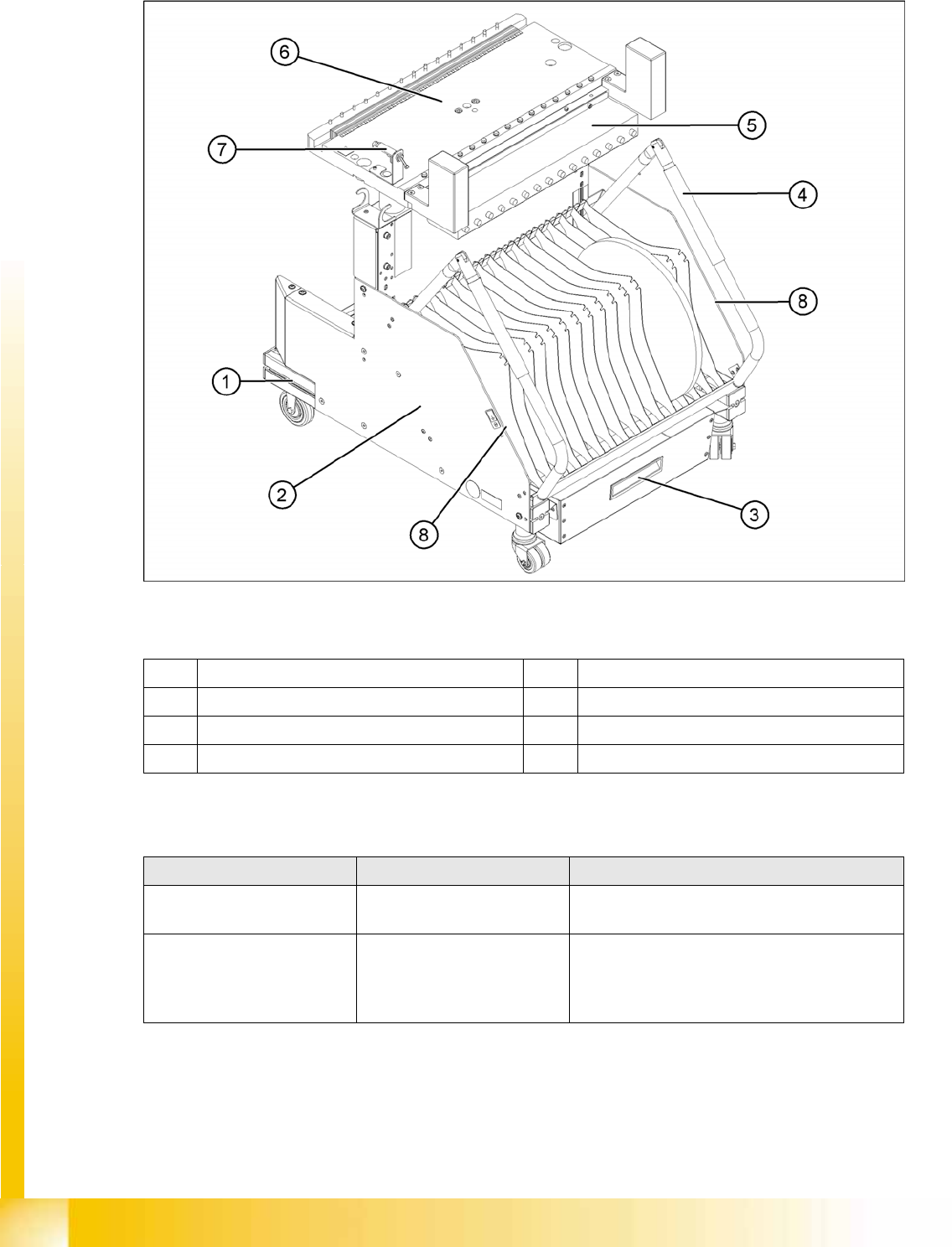
8-1: Overview: Changeover table design (D1/D2)
Legend
Overview of settings
1 Moveable base with fixed and guide castor 5 Communication unit
2 Tape reels container 6 Table plate
3 Tape waste container 7 Switch for lowering the changeover table
4 Handle 8 Area for excess partition plates or setup lists
Description Tools &Equipment Adjustments
Setting the changeover tables
to the machine height.
Suitable lifting device and
eyebolt
See D1/D2 operating manual.
Relocate the changeover table
supply cable for the correct
location.
Changeover table option
equipment: The table can only
be raised and lowered when it
is connected to the machine.
The table supply cable is hooked up to the correct
table side before lowering, the table is moved into
the machine, is connected and then lowered.

Component Handling
Changeover Table Construction Overview
Student Guide Advanced Level 1 SIPLACE D-Series
EN 05/2007 Component Handling
8-3
8.1.3 Changeover Table Construction
The S feeder changeover tables on the 4 machine types in the D-series have the following common/
different features:
Assembly D4 D3 D2 D1
Feeder table plate HS x0 compatible
(440 mm)
X machine with S
table, compatible
Widened table, new (562 mm)
Changeover table
position in the
machine
1 Location 1 D2 pos. Location 1 D1 pos.
Magnetic strip Glued and screwed Glued and screwed
Connection type Harting plug on
flexible connection
ODU connector, fixed
- as central front plug.
Harting plug on flexible connection
Different coding to D4
Feeder location 12 15
CAN Bus 500kbit/s 1 Mbit/s 1Mbit/s
Fitting the
changeover table
See D2/1 Table automatically
connected by table
docking unit
Move in table; connect table; lower table and
close feeder cover flap
Pneumatic switch See D2/1 ---- In the machine, always in lowered position
and track 1 always with feeder / safety cover
(if fitted) ensures safe table position; safety
cover is always on table plate.
Table plate for WPC
option
--- Yes for STP 1
Options
Feeder cover flap Yes Option for DLM PA Yes No
Holder for 3rd tape
reel
12 locs.(HS50
compatible?)
15 locs.(HF
compatible?)119623
15 locations
Bulkcase feeder
pneumaticsupply
12 locations 15 locations142335 15 locations
"Feeder claw" 12 locations 15 locations
Powersupply
Feeder-Control-Unit
(FCU)
8 VDC for control logic
30 VDC for feeder power supply including all linear feeders
(24 VAC not required any more)
S feeder up to 32 mm
S feeder C&P12 up to 32 mm
S feeder C&P6 up to 44mm
S feeder P&P All up to 19 mm
component height
S feeder TWIN All up to 25 mm
component height
Component Handling
Overview Assembly Description
Student Guide Advanced Level 1 SIPLACE D-Series
Component Handling EN 05/2007
8-4
8.1.4 Assembly Description
The moveable base can be easily moved and maneuvered.
The handles can be swung up or down.
The changeover table has a maximum capacity of 12 locations for feeder modules with a width of
30 mm. These feeder modules are mechanically centered on the table with the help of centering pins
and alignment pins.A separate compressed air strip supplies the bulkcase feeder modules with
compressed air.
The interface connection to the machine is via a cable. This supplies the power, communication and
emergency stop circuits. The compressed air supply for the bulkcase feeder modules is also fed via this
interface.
The communication unit supplies the feeder modules with the required voltages and control signals.
The tape reel container accepts tape reels up to a size of 19" (483 mm). The extendible tape reel
container is on the underside of the base. The tape cuttings are sent via a slide into the waste container,
which needs to be emptied on a regular basis.
8.1.5 Docking and Undocking the Changeover Table
Undocking the component trolley
X Select the menu
MAIN VIEW
and then the icon
Stop processing PCB
.
The board currently in process will be finished. The icons for the individual menus are then activated.
X Select the required icon
Gantry single functions
.
X Select
Gantry Functions
.
X In this menu, select the button
Go to setup position
.
All placement heads are moved over the PCB conveyor, so that they are not damaged when the
component trolley is changed.
X Open the protective cover above the selected gantry.
X Open the cover flap over the height adjustment button for the changeover table plate.
X Switch the pneumatic switch on the changeover table up, to deactivate the venting function for
lowering the table.
X Press the pneumatic button on the machine frame until the changeover table plate has reached its
top position.
X If the "lower table only with connected compressed air supply" option is installed at the changeover
table, lower the table. (Prevents it from tipping over.)
X Unplug the component trolley supply cable from the socket at the station.
X Swing both handles up (1).
ATTENTION: OPERATIONAL SAFETY
Make sure that all component trolleys are docked onto the machine before you operate the
machine. If this is not the case, the machine will remain in emergency stop mode and the
placement process will be interrupted.
CAUTION:
Unused locations need to be occupied with dummy feeders, to ensure that the machine is
protected against unauthorized access.
DANGER:
When raising the changeover table plate, never reach into the gap between the feeder modules
and the empty tape duct.