00197496-01_UM_SiClusterMultiline_DE_EN.pdf - 第149页
How to Configure a Multi Line Job 4.8.1 Dialog Box: Settings Calculating the Line Production Time SIPLACE SiCluster Multiline SIPLACE SiCluster Multiline 149 4.11 4 . 1 1 C a lc u la t in g t h e L in e P r o d u c t io …
How to Configure a Multi Line Job
Defining Individual Line Settings 4.8.1 Dialog Box: Settings
148 SIPLACE SiCluster Multiline SIPLACE SiCluster Multiline
Correction Factor Ide-
al Cycle Time
This correction factor specifies how long the optimized production times will ac-
tually be, based on the ideal cycle times. The factor 1.05, for example, speci-
fies that the time needed will be estimated as 5% higher.
Recommended value: 1.05 to 1.1 (5 - 10%)
NOTICE!
This is an individual parameter for your production. Enter the value if you know
or can estimate these times and if you want to take them into account for the
optimization.
Minimum Recipe Cy-
cle Time [s]
Shows the minimum possible cycle time for all recipes on the line which are re-
stricted by cycle times from other systems (e.g. furnace, screen printer etc.).
The Minimum Recipe Cycle Time is the "bottleneck" in a completed production
line. If the value is higher than the ideal cycle time, this value will be used for
the calculation.
This is how these times work interact with the optimized cycle times:
If the Line Cycle Time or the Recipe-Line Specific Cycle Time is higher than
the optimized Ideal Cycle Time, the higher cycle time will be used to estimate
the production times, as the production can only be run with the higher cycle
time.
This optimization parameter can be globally set and individually changed in the
dialog box Optimization Parameters => Cluster Parameters => Minimum reci-
pe cycle time of the line .
NOTICE!
This is an individual parameter for your production. Enter the value if you know
or can estimate these times and if you want to take them into account for the
optimization.
Recipe Change Time
[min]
You can enter the amount of time needed in your production for changing from
one recipe to be produced to the next (conversion time). This value is an aver-
age value, which should cover both the occasional changeover for family set-
ups and unscheduled delays during recipes changes.
NOTICE!
This is an individual parameter for your production. Enter the value if you know
these times and if you want to take them into account for the optimization.
Only enter this value if the recipe changeover time are not negligible. As a pos-
sible result, you will be shown that the lines have too many individual jobs and
that the optimized solution cannot be realized in the intended time due to too
many recipe changes.
WARNING
Settings in the optimization parameters
Line settings which are defined in the optimization parameters are only applied if the line is add-
ed to SiCluster Multiline after the setting is defined.
Parameter Description
How to Configure a Multi Line Job
4.8.1 Dialog Box: Settings Calculating the Line Production Time
SIPLACE SiCluster Multiline SIPLACE SiCluster Multiline 149
4.11
4.11 Calculating the Line Production Time
Calculating the Line Production Time
As a prerequisite for the optimization, you need to prescribe the available production time for the line. If
you do not know exactly how much time you need to produce the jobs, you can calculate an estimate
with SiCluster Multiline.
The production time is the total time available for production, in which all recipes for this job should be
produced. If a valid allocation of recipes to line is not possible within the prescribed timeframe and pa-
rameters, SiCluster Multiline will terminate with the corresponding error message.
If you know this time for your production, you can enter this value manually. For example, you can enter
the amount of time you have to produce all the recipes in this job (this could be based on the shift sched-
ule).
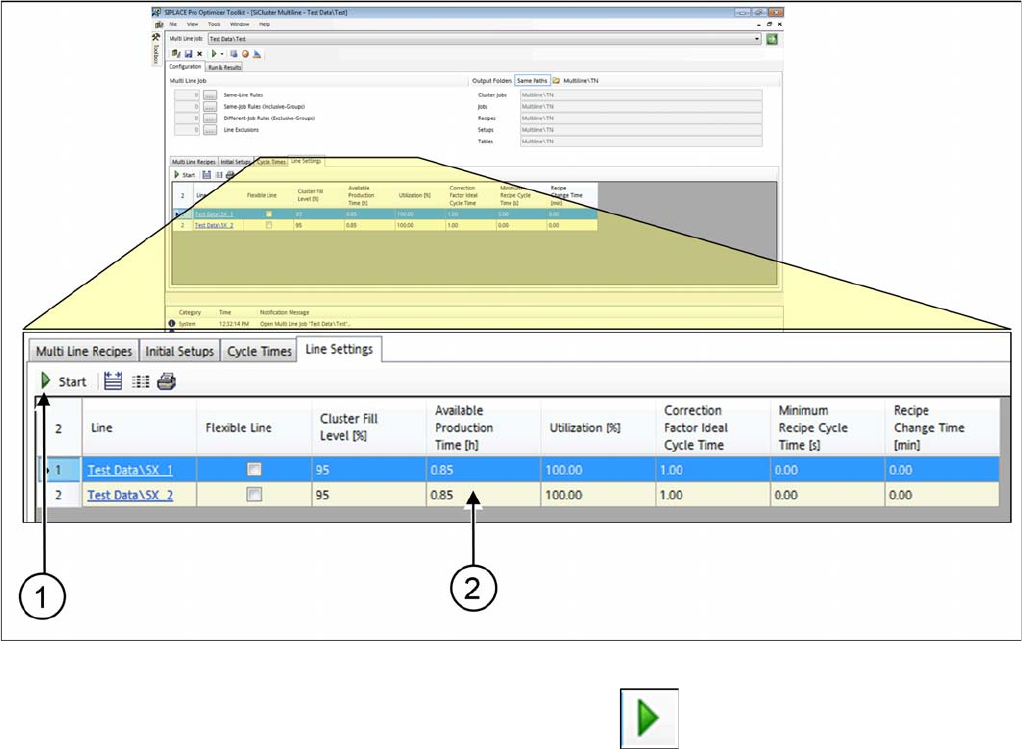
► Go to Configuration and select the Line Settings tab.
Tab: line settings: determining production time of line
► Start calculation of the line production time with Start .
⇨ The result is entered in the Available Production Times (2) column.
⇨ Any values entered manually will be overwritten.
How to Configure a Multi Line Job
Calculating the Line Production Time 4.8.1 Dialog Box: Settings
150 SIPLACE SiCluster Multiline SIPLACE SiCluster Multiline