00197496-01_UM_SiClusterMultiline_DE_EN.pdf - 第152页
How to Perform Multiline Clustering Performing Multi Line Clustering 152 SIPLACE SiCluster Multiline SIPLACE SiCluster Multiline 5.2 5 . 2 P e r f o r m in g M u lt i L in e C lu s t e r in g Performing Multi Line Cluste…

How to Perform Multiline Clustering
Defining the Optimization Strategy
SIPLACE SiCluster Multiline SIPLACE SiCluster Multiline 151
5
5 How to Perform Multiline Clustering
How to Perform Multiline Clustering
► Perform the following steps, which are described in this chapter using an example, to perform Mul-
tiline Clustering.
▪ Optimization parameters
– Defining the Optimization Strategy
▪ Run & Results tab
– Creating Cluster Jobs
– Performing Clustering Within Lines
– Changing the Optimization Strategy (Optional)
– Optimizing Cluster Jobs in Multi Job Optimization
– Results of Cluster Job Optimization
5.1
5.1 Defining the Optimization Strategy
Defining the Optimization Strategy
Define the optimization strategy with the help of the optimization parameters, before performing Multiline
Clustering. These settings will then be automatically transferred to the cluster jobs for the lines, which
are then generated as the Multiline Clustering results.
► Go to the SiCluster Multiline toolbar and select the icon.
⇨ The Optimization Parameters dialog box will open.
⇨ Select Cluster Parameters and define the required settings. See also "7.2 Optimization Parameters:
Cluster Parameters" [ ➙ 173].
How to Perform Multiline Clustering
Performing Multi Line Clustering
152 SIPLACE SiCluster Multiline SIPLACE SiCluster Multiline
5.2
5.2 Performing Multi Line Clustering
Performing Multi Line Clustering
The multi line job has been created. The ideal cycle times and the available production times have now
been calculated for the lines.
► Create individual cluster jobs from the multi line job.
⇨ The Multi Line Clustering generates the cluster jobs for the individual lines with the recipes allocated
to these lines.
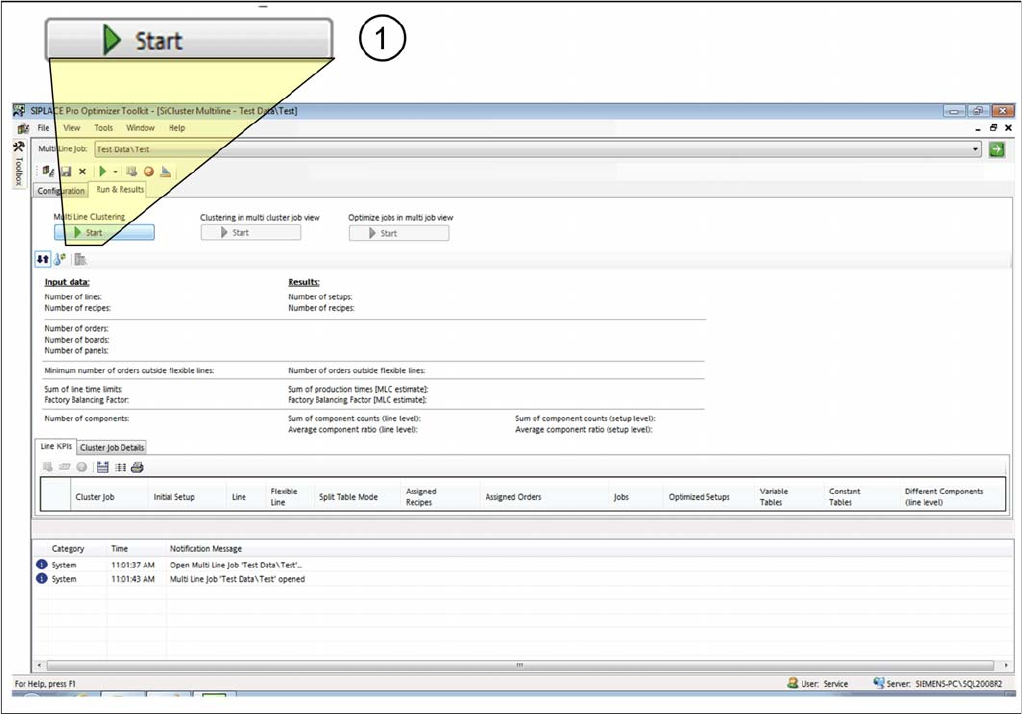
► Select the Run & Results tab.
► As a first step, start the Multi Line Clustering (1).
Creating cluster jobs
⇨ The recipes contained in the multi line job are assigned to the lines through the SiCluster Multiline
clustering procedure. The cluster jobs have been distributed across the lines in accordance with the
settings.
⇨ The cluster jobs for the individual lines and the recipes in them are available as the result.
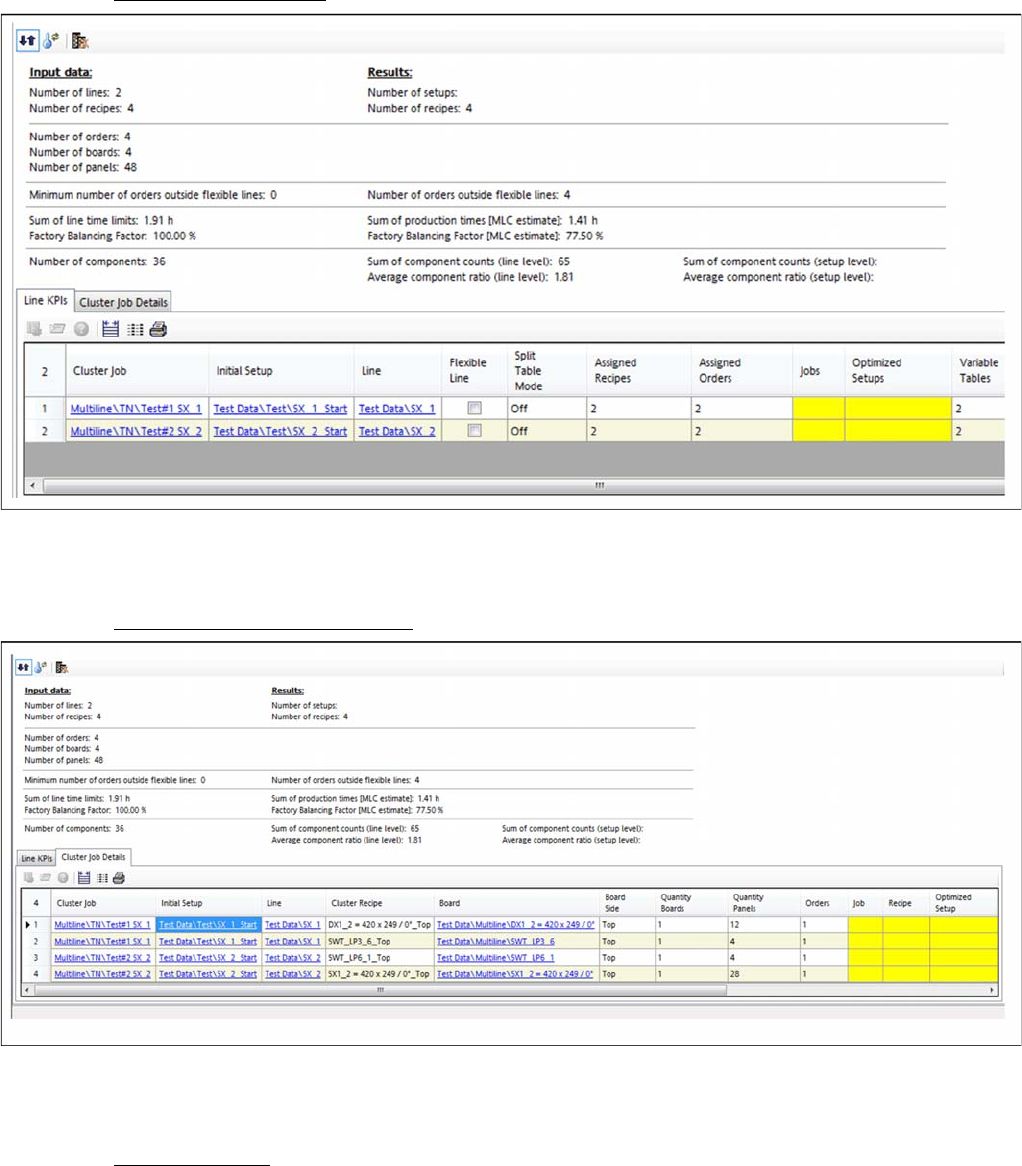
⇨ The results will be shown in the Line KPIs and Cluster Job Details tabs.
How to Perform Multiline Clustering
Performing Multi Line Clustering
SIPLACE SiCluster Multiline SIPLACE SiCluster Multiline 153
Result: tab: Line KPIs
Tab: line KPIs: cluster jobs created
▪ One cluster job has been created per line.
Result: tab – cluster job details
Tab: line KPIs: cluster jobs created
▪ Four cluster recipes have been distributed across the two cluster jobs.
Additional steps
▪ The results still missing will be marked yellow and determined in the following steps.