00197496-01_UM_SiClusterMultiline_DE_EN.pdf - 第168页
Working with Process Requirements and Process Capabilities Process Capabilities for Lines in SiCluster Multiline 168 SIPLACE SiCluster Multiline SIPLACE SiCluster Multiline 6.4 6 . 4 P r o c e s s C a p a b ilit ie s f o…
Working with Process Requirements and Process Capabilities
Process Requirements for Recipes in SiCluster Multiline
SIPLACE SiCluster Multiline SIPLACE SiCluster Multiline 167
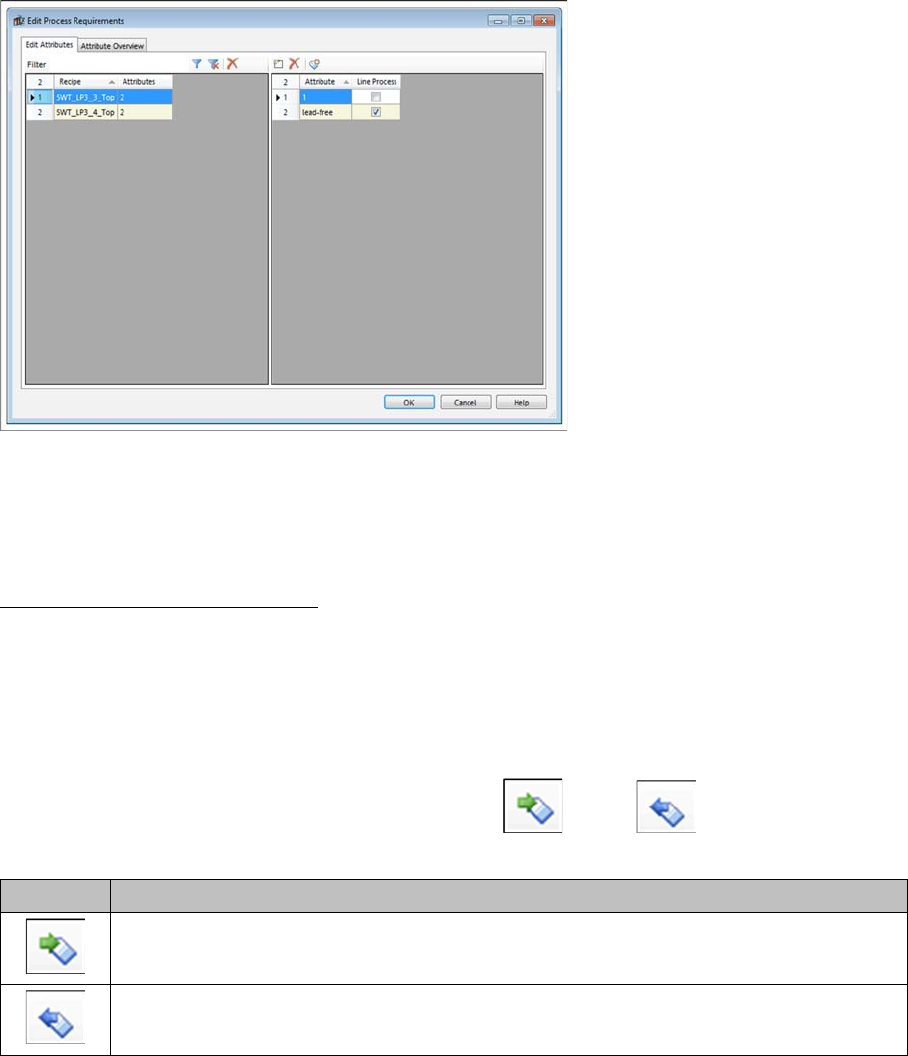
⇨ The Edit Process Requirements dialog box will open.
Edit process requirements - tab: edit attributes
Line Process enabled: The corresponding process capability must be present in the line for this process
requirement. The recipe can only be produced on lines which have this process capability.
► For more details about the individual functions, refer to the SiCluster Multiline Online Help.
Changing process requirements
You can make changes to the process requirements for the recipes in the multi line job, without the need
to make the same changes in the SIPLACE Pro board descriptions. This enables you to make changes
for test purposes without modifying the underlying data in SIPLACE Pro.
If the production planer then wants to use the original process requirements from the SIPLACE Pro
board descriptions, these can be reimported. The modified data in the multi line job will then be overwrit-
ten.
► Manage the process requirements with the functions (2) and (3) from the toolbar of
the Multi Line Recipes tab.
Icon Description
If you have changed the process requirements in the SIPLACE Pro Board Editor, these
changes will be imported into the multi line job from SIPLACE Pro.
If you have changed the process requirements in SiCluster Multiline, these changes can
then be exported to the SIPLACE Pro board descriptions.
Working with Process Requirements and Process Capabilities
Process Capabilities for Lines in SiCluster Multiline
168 SIPLACE SiCluster Multiline SIPLACE SiCluster Multiline
6.4
6.4 Process Capabilities for Lines in SiCluster Multiline
Process Capabilities for Lines in SiCluster Multiline
You can edit the Process Capabilities for the line.
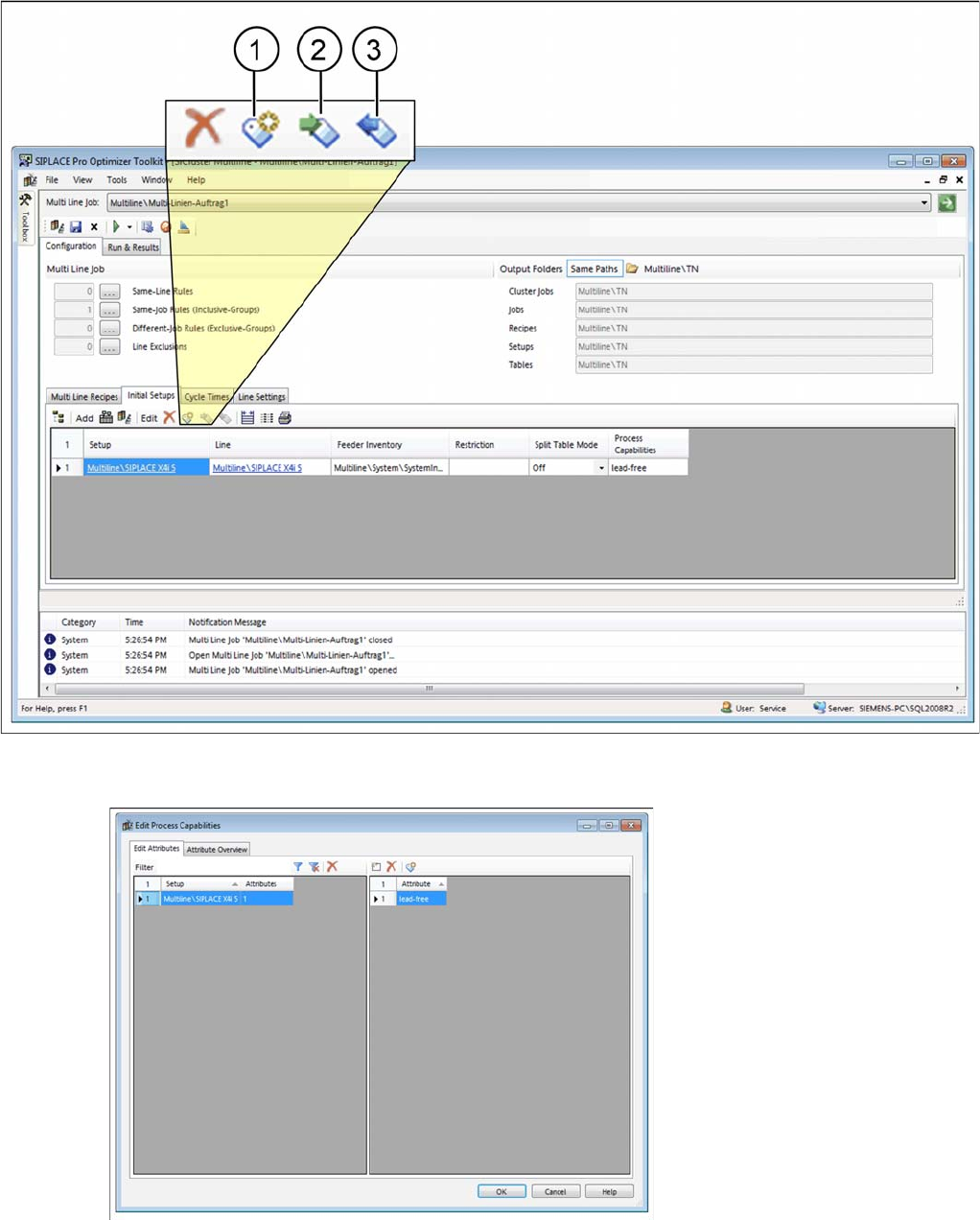
► Go to Configuration and open the Initial Setups tab.
► Mark the initial setup and select the (1) icon form the toolbar.
SiCluster Multiline: tab: initial setups
⇨ The Edit Process Capabilities dialog box will open.
Edit process capabilities: tab: edit attributes
Working with Process Requirements and Process Capabilities
Adding Attributes
SIPLACE SiCluster Multiline SIPLACE SiCluster Multiline 169
► For more details about the individual functions, refer to the SiCluster Multiline Online Help.
Changing process capabilities
You can make changes to the process capabilities for the lines in the multi line job, without the need to
make the same changes in the SIPLACE Pro line descriptions. This enables you to make changes for
test purposes without modifying the underlying data in SIPLACE Pro.
If the production planer then wants to use the original process capabilities from the SIPLACE Pro line
descriptions, these can be reimported. The modified data in the multi line job will then be overwritten.
► Manage the process capabilities with the functions (2) and (3) from the toolbar of the
Initial Setup tab.
6.5
6.5 Adding Attributes
Adding Attributes
You can add process requirement and process capability attributes.
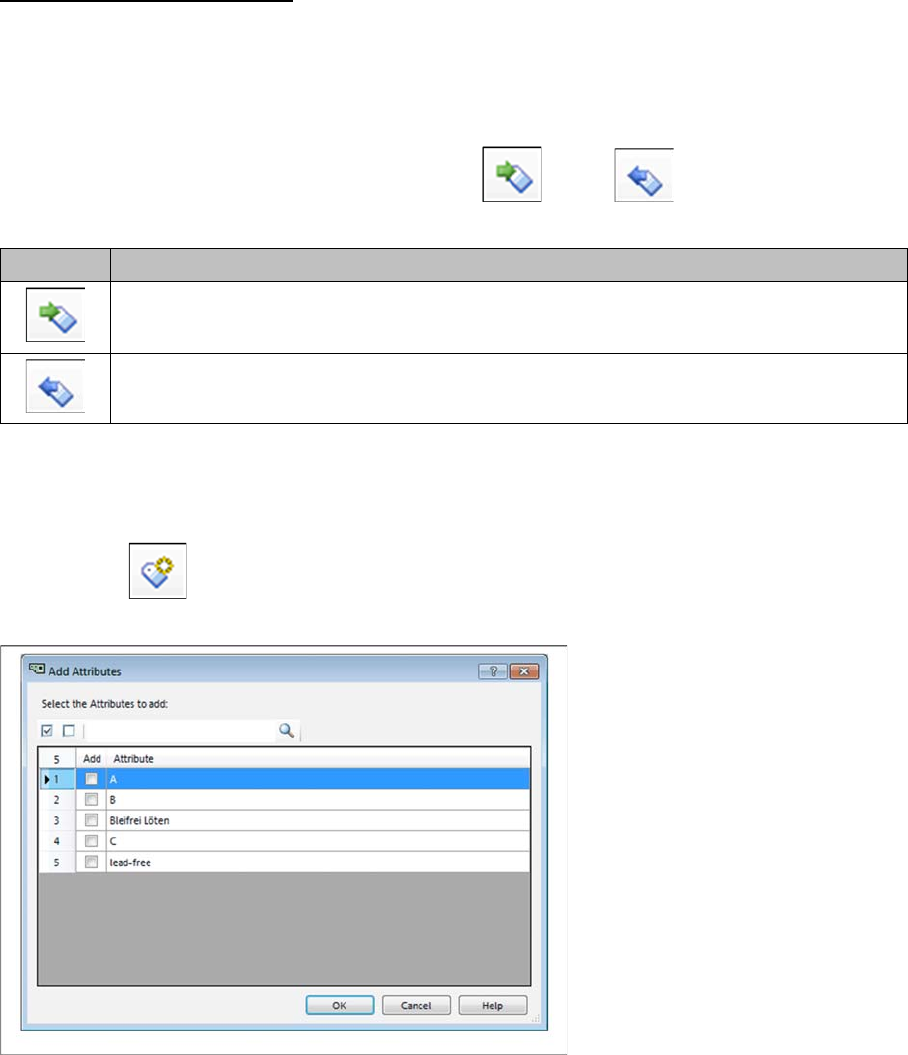
► Select the icon form the toolbar of the Edit Attributes tab.
⇨ The Add Attributes dialog box will open.
Dialog box: add attributes
The Add Attributes dialog lists all the existing attributes (process capabilities in the line and process re-
quirement for the board). You can select one or more attributes to be entered in the boards.
Icon Description
If you have changed the process capabilities in the SIPLACE Pro Line Editor, these chang-
es will be imported into the multi line job from SIPLACE Pro line.
If you have changed the process capabilities in SiCluster Multiline, these changes can then
be exported to the SIPLACE Pro line descriptions.