00197496-01_UM_SiClusterMultiline_DE_EN.pdf - 第171页
Overview of Optimization Parameters Optimization Parameters: Multi Line Parameters SIPLACE SiCluster Multiline SIPLACE SiCluster Multiline 171 7 7 O v e r v ie w o f O p t im iz a t io n P a r a m e t e r s Overview of O…
Working with Process Requirements and Process Capabilities
Adding Attributes
170 SIPLACE SiCluster Multiline SIPLACE SiCluster Multiline
Overview of Optimization Parameters
Optimization Parameters: Multi Line Parameters
SIPLACE SiCluster Multiline SIPLACE SiCluster Multiline 171
7
7 Overview of Optimization Parameters
Overview of Optimization Parameters
7.1
7.1 Optimization Parameters: Multi Line Parameters
Optimization Parameters: Multi Line Parameters
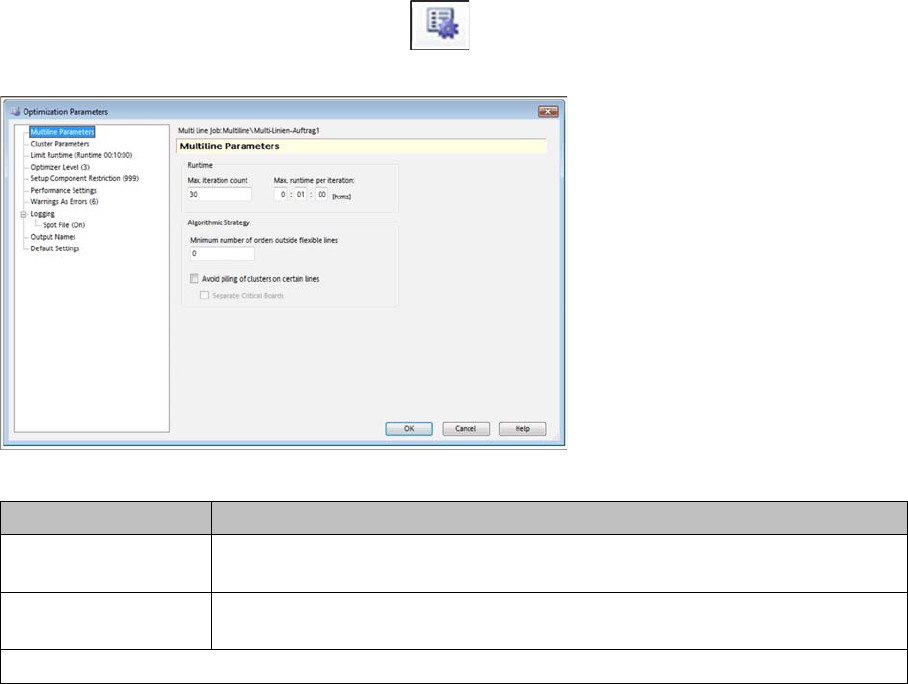
► Go to the Configuration tab and select the icon.
⇨ The Optimization Parameters => Multi-Line Parameters dialog box will open.
Optimization parameters - dialog box: multi line parameters
Parameter Description
Max. Iteration Count Specifies the number of individual calculation steps performed during multi line
optimization. The progress is shown after each step (iteration).
Max. runtime per itera-
tion
This shows the maximum time available to the multi line optimization for each
individual iteration.
Algorithmic strategy

Overview of Optimization Parameters
Optimization Parameters: Multi Line Parameters
172 SIPLACE SiCluster Multiline SIPLACE SiCluster Multiline
Minimum number of
orders outside flexible
lines
Restricts the number of production jobs to flexible lines by defining a minimum
number of jobs which must be allocated to other lines.
The lines seen as flexible are those which are marked in the line settings as
"flexible lines".
The number of production jobs takes into account the adjustable number of
jobs in the overview of multi line recipes.
Background:
Frequently reoccurring jobs should preferably be produced with fixed setups so
that these jobs do not require constant setup work. More infrequently used
products/jobs should preferably be produced on a "flexible line" as it would be
too "expensive" to configure the components for these rare products in fixed
setups.
This function is handled at the following places:
▪ The Production Jobs column in the Multi Line Recipes tab.
▪ The Flexible Line option in the Line Settings tab.
The algorithm can only apply the strategy and assign infrequent products to the
flexible line is at least one line is defined as a Flexible Line in the Line Settings.
Application example:
There are 5 lines in the production. Four of these lines are operated with fixed
setups. The setups on the fifth line are prepared as required and only used
once. The fifth line is marked as "flexible". The aim of the planing is to use the
flexible line primarily for infrequent and not for frequently used jobs. The lower
threshold for jobs, which are assigned to lines with fixed setups, helps avoid
the need to assign too many multiple jobs to the variable line, which would in-
crease the setup work.
Calculation example:
A multi line job has 3 recipes (A: recipe size 500, 1 job; B: recipe size 100, 10
jobs; C: recipe size 200, 10 jobs) and two lines (L1: not flexible, L2: flexible).
When using the prescribed value of at least 0 jobs on lines which are not flex-
ible, you can assign all 21 jobs to the flexible line L2.
If the lower threshold is raised to at least 15 jobs which are not on flexible lines,
the algorithm will assign jobs B and C to line L1, which is marked as not flexible.
Avoid piling of clusters
on certain lines
When using this option, the algorithm avoids forming a higher number of clus-
ters on "non-flexible" lines.
This option requires additional calculation times and, in individual cases, can
lead to an increased number of common components on different lines.
Separate Critical
Boards
By using this option, the algorithm avoids the common allocation of board pairs
to lines which makes it more difficult to form constant tables.
The option re-
quires additional calculation time and improves the potential for constant tables
within the lines.
Parameter Description