德森印刷机说明书之操作手册-4d1321fc284ac850ac024234 - 第17页
深圳德森精密设备有限公司 Shenzhen Desen Pre cision Machine Co., Ltd. - 17 - 2-4 印刷机外形图 Fig ure 2-4 O utside V iew of P rinting Mac hine 2.6 2.6 2.6 2.6 软件安 装 2.6 2.6 2.6 2.6 Softwar e Softwar e Softwar e Softwar e Installation Insta…
深圳德森精密设备有限公司
Shenzhen Desen Precision Machine Co., Ltd.
- 16 -
level of the machine with the adjustable feet ( Adjustable range: ± 20mm ) .
2.4
2.4
2.4
2.4
电源气源
2.4
2.4
2.4
2.4
Power
Power
Power
Power
supply
supply
supply
supply
and
and
and
and
air
air
air
air
source
source
source
source
1)
请使用 AC 220V 、 50/60H
Z
具有额定电流的稳定电源,用户在使用本机器过程中如电
压不稳定,应自备稳压电源。
Please use AC 220V, 50/60HZ regulated power supply with rated current. If the
voltage is unstable in application of the machine , please work together with the UPS .
2)
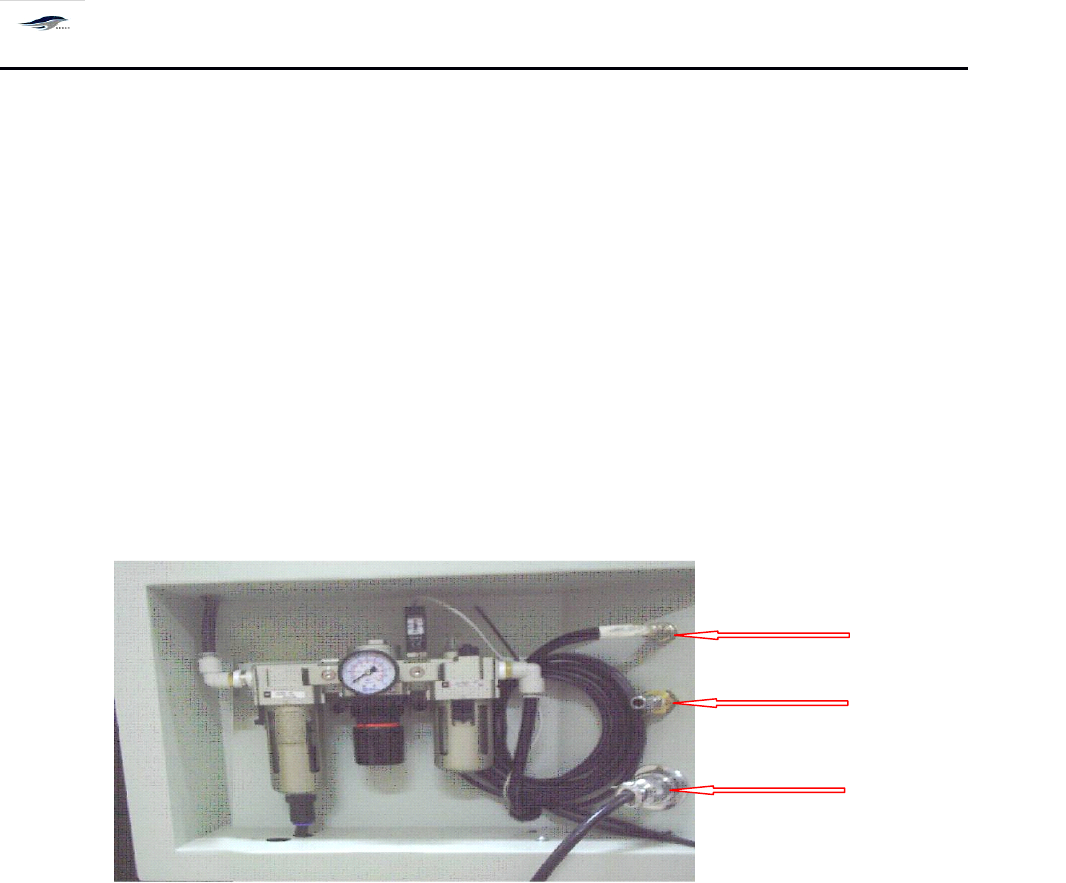
请使用稳定的压力为 4.5 ~ 6kgf/cm2 的工业气源。
Please use the air source with stable air pressure of 4.5~6kgf/ cm2 .
图 2-3 电气源接口位置图
Figure 2-3 Position of Power Supply Interface
2.5
2.5
2.5
2.5
工控机控制系统安装
2.5
2.5
2.5
2.5
Control
Control
Control
Control
System
System
System
System
Installation
Installation
Installation
Installation
of
of
of
of
Industry
Industry
Industry
Industry
Control
Control
Control
Control
Computer
Computer
Computer
Computer
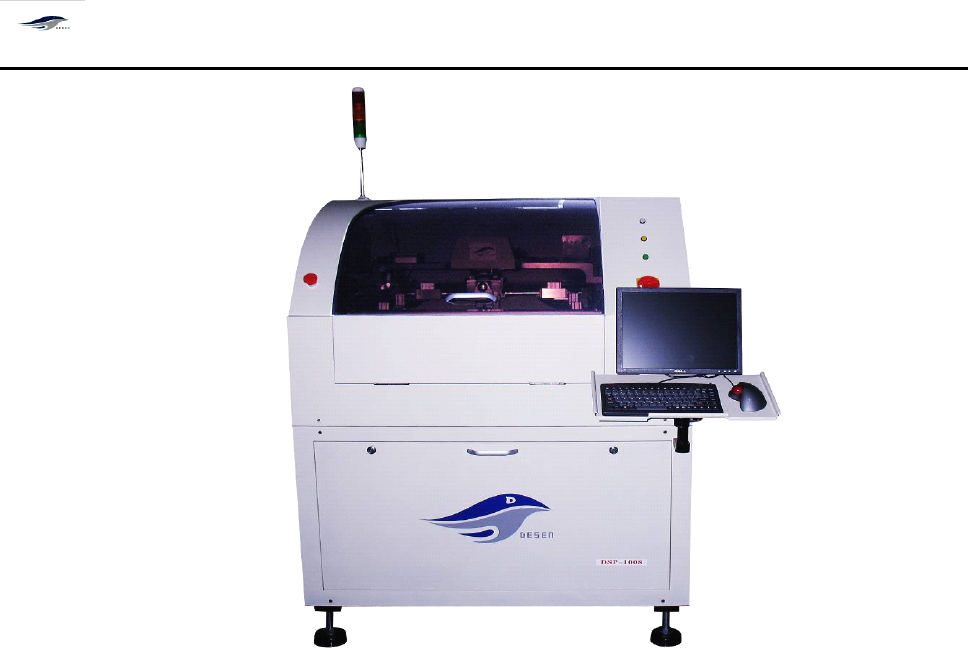
按图 2-4 将工控机控制系统中显示器、键盘及鼠标等安装到印刷机主机上,并与工控机
连接,然后接通电源。
Equip the monitor, the keyboard and the mouse in the control system of the industry control
computer with the main machine of the printing machine , also connect them with the
industry control computer, and then connect power supply. S ee Figure 2-4.
FMI interface
Compressed air
dddddpplug
Power cable
深圳德森精密设备有限公司
Shenzhen Desen Precision Machine Co., Ltd.
- 17 -
2-4 印刷机外形图
Figure 2-4 Outside View of Printing Machine
2.6
2.6
2.6
2.6
软件安装
2.6
2.6
2.6
2.6
Software
Software
Software
Software
Installation
Installation
Installation
Installation
2.6.1
2.6.1
2.6.1
2.6.1
本机器所用软件具有如下一些功能
2.6.1
2.6.1
2.6.1
2.6.1
Software
Software
Software
Software
functions
functions
functions
functions
:
:
:
:
1)
印刷参数设定 Printing Parameter Setting
2)
机器参数设定 Machine Parameter Setting
3)
导轨宽度自动调节 Automatic Control of Guide Rail Width
4)
视觉系统辨识及钢网与 PCB 板自动对准 PCB / Stencil Vision Positioning
5)
网板与 PCB 板自动夹紧 PCB / Stencil Handling
6)
网板自动清洗 Stencil Cleaning System
7)
I/O 故障自动检测并声光报警、提示故障原因 I/O problem inspection, monitoring,
diagnosis
8)
报警记录 Warning System
9)
生产设置 Production System
10)
自动归零操作 Reset Operation

深圳德森精密设备有限公司
Shenzhen Desen Precision Machine Co., Ltd.
- 18 -
11)
在线 PCB 板计数 PCB Courting
12)
2D 检测和 CPK 分析 2D Inspecting and CPK analysis
2.6.2
2.6.2
2.6.2
2.6.2
软件安装
2.6.2
2.6.2
2.6.2
2.6.2
Software
Software
Software
Software
Installation
Installation
Installation
Installation
机器出厂前已经安装了驱动软件和操作系统软件。在使用过程中,如须重新安装,请按
下列步骤进行。 (详细信息请参考随机 CD 中 ” 安装说明 .txt ” )
The software is installed b efore the machine shipment . If the software must be install ed
again , please follow the step s below: (see “ Installation instruction.txt ” on the CD delivered
together with the printing machine for detailed information).
1)
在驱动器中放入随机的 CD 盘。
Put the installation CD into the driver.
2)
打开 CD 盘,把 printer 文件复制到计算机 C 盘的根目录下。
Copy “ Printer ” directory into the root directory.
3)
然后打开 printer 文件,点击 文件来注册。
Enter into “ printer ” , click “ regni ” to install the files.
4)
完成后把文件 printer.exe 发送快捷方式放到桌面上。
Create short cut of “ printer.exe ” on desktop.
5)
在桌面上双击 printer.exe 即可打开 DSP-1008 主程序。
Double click printer.exe to enter the main program DSP-1008.