德森印刷机说明书之操作手册-4d1321fc284ac850ac024234 - 第31页
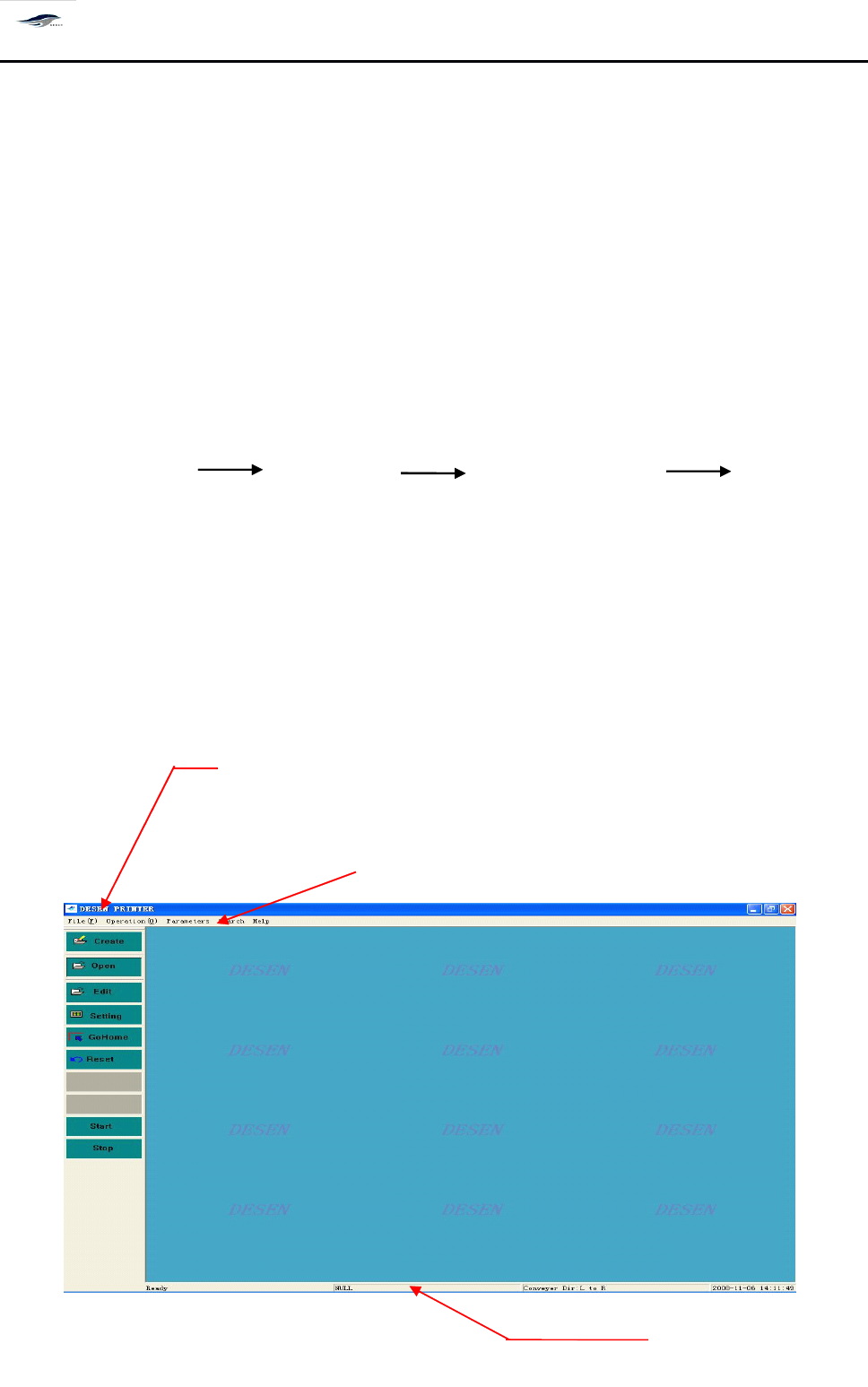
深圳德森精密设备有限公司 Shenzhen Desen Pre cision Machine Co., Ltd. - 31 - 图 4-1 主窗口画面 Fig ure 4- 1 M ain Interface 主窗口包括三部分: The m ai n inter face c onsists of thr ee pa rts a s f ollows: 主菜单栏 M ain menu bar 主工具栏 M ain too…
深圳德森精密设备有限公司
Shenzhen Desen Precision Machine Co., Ltd.
- 30 -
主工具栏
第四章 操作系统说明
Chapter
Chapter
Chapter
Chapter
IV
IV
IV
IV
Description
Description
Description
Description
of
of
of
of
Operating
Operating
Operating
Operating
System
System
System
System
4.1
4.1
4.1
4.1
系统启动
4.1
4.1
4.1
4.1
System
System
System
System
startup
startup
startup
startup
打开机器主电源开关,将自动进入主窗口画面。操作程序如下:
Switch on the main power switch of the printing machine to enter the main interface
automatically . T he operating sequence is as bellow:
打开总电源开关 打开气源开关 打开机器主电源开关 进入机器主画
面(主菜单)
Switch on the main power switch, switch on the air supply switch, switch on the main power
switch of printing machine, enter the main interface (main menu) of printing machine
4.2
4.2
4.2
4.2
主窗口组成
4.2
4.2
4.2
4.2
Composition
Composition
Composition
Composition
of
of
of
of
main
main
main
main
interface
interface
interface
interface
Main tool bar
主菜单栏
Main menu
信息栏
Information bar
深圳德森精密设备有限公司
Shenzhen Desen Precision Machine Co., Ltd.
- 31 -
图 4-1 主窗口画面
Figure 4-1 Main Interface
主窗口包括三部分:
The main interface consists of three parts as follows:
主菜单栏
Main menu bar
主工具栏
Main tool bar
信息栏
Information bar
4.2.1
4.2.1
4.2.1
4.2.1
归零操作
4.2.1
4.2.1
4.2.1
4.2.1
Return-to-zero
Return-to-zero
Return-to-zero
Return-to-zero
operation
operation
operation
operation
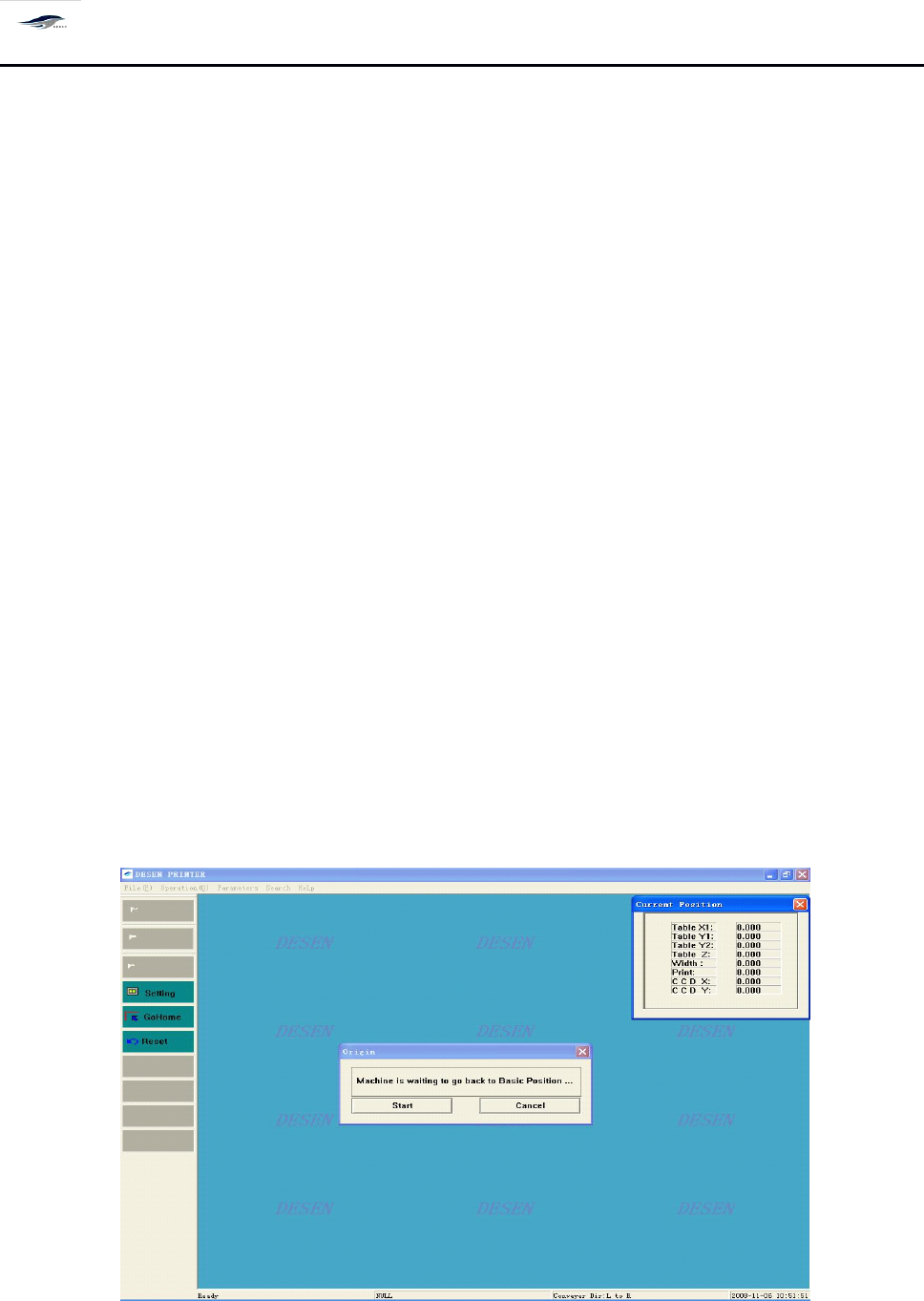
在主窗口显示的 “ 现在进行归零操作吗? ” 对话框中,选择 “ 否
”
,机器仍回到主窗口画
面;选择 “ 是
”
,机器进行归零操作,出现如图 4 – 2 画面,并显示 [ 当前位置 ] 对话框,显示 各
运动轴当前的坐标值:
Choosing “ No ” in the dialog box read as “ Return-to-zero now? ” in the main interface will make the
printing machine return to the main interface; and choose “
Yes
” will make the printing machine take
the return-to-zero operation. F or the latter circumstance, Figure 4-2 will emerge and display the
“ Current location ” dialog box, with the current coordinate values of kinematical axes displayed.
图 4-2 归零操作
Figure 4-2 Return-to-zero Operation
深圳德森精密设备有限公司
Shenzhen Desen Precision Machine Co., Ltd.
- 32 -
对话框进入方式:单击主工具栏中的归零
To
enter the dialog box, click “ Return to zero ” in the main tool bar.
4.2.2
4.2.2
4.2.2
4.2.2
主菜单栏
4.2.2
4.2.2
4.2.2
4.2.2
Main
Main
Main
Main
menu
menu
menu
menu
bar
bar
bar
bar
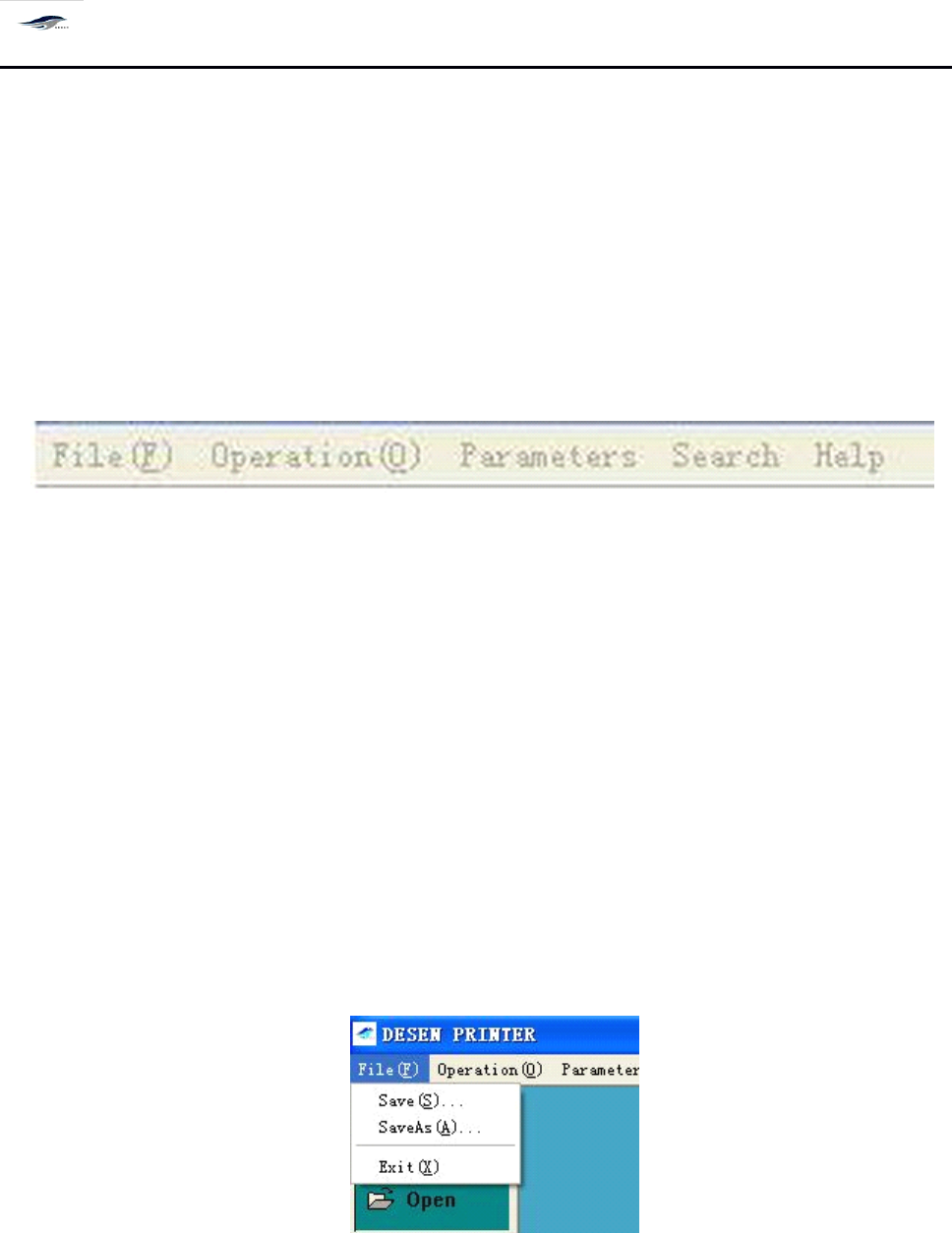
如图 4 – 3 所示、主菜单包含 [ 文件 ] 、 [ 操作 ] 、 [ 设置 ] 、 [ 查看 ] 、 [ 帮助 ] 所有的控制命令。
A
s
shown in Figure 4-3, the main menu contains all control commands including File, Operate,
Set, View and Help.
图 4-3 主菜单栏
Figure 4-3 Main Menu Bar
单击主菜单中的每一项均有下拉菜单出现, 如单击 [ 文件 ] , 出现下拉菜单, 可以进行文 件
[ 新建 ]
、
[ 打开 ]
、
[ 保存 ]
、
[ 保存为 ]
、
[ 退出 ] 等项操作,如图 4 – 4 所示。选择 “ 新建
”
按
钮,
输入密码后再输入新建文件目录名( Prj 文件形式) ,在以后的操作中所有设置即保存在
此文件名下。
Clicking each sub-menu in the main menu bar will show a pull-down menu . F or instance, click
File, there will be a pull-down menu emerging for file operations such as Create new, Open,
Save, Save as and Exit. S ee Figure 4-4. Choose “ Create new ” and input password and the
directory name of the created new file ( Prj file layout). A ll settings in the operations afterwards
will be saved under this directory name.
图 4-4 〈档〉下拉菜单
Figure 4-4 (File) Pull-down Menu
单击主菜单中的 [ 操作 ] ,出现下拉菜单,可以进行 [ 开始生产 ]
、
[ 停止生产 ]
、
[ I/O 检测 ]
、
[ 归零操作 ] 、 [ 过板 ] 、 [ 复位 ] 、 [ 联机工作 ] 、 [ 产量清零 ] 、 [ 生产设置 ] 、 [ 刮刀后退 ] [ 刮刀前