德森印刷机说明书之操作手册-4d1321fc284ac850ac024234 - 第32页
深圳德森精密设备有限公司 Shenzhen Desen Pre cision Machine Co., Ltd. - 32 - 对话框进入方式:单击主工具栏中的归零 T o e nter the d ialog box, c lick “ Retur n t o zero ” i n the m ain tool bar . 4.2.2 4.2.2 4.2.2 4.2.2 主菜单栏 4.2.2 4.2.2 4.2.2 4.2.2 M a…
深圳德森精密设备有限公司
Shenzhen Desen Precision Machine Co., Ltd.
- 31 -
图 4-1 主窗口画面
Figure 4-1 Main Interface
主窗口包括三部分:
The main interface consists of three parts as follows:
主菜单栏
Main menu bar
主工具栏
Main tool bar
信息栏
Information bar
4.2.1
4.2.1
4.2.1
4.2.1
归零操作
4.2.1
4.2.1
4.2.1
4.2.1
Return-to-zero
Return-to-zero
Return-to-zero
Return-to-zero
operation
operation
operation
operation
在主窗口显示的 “ 现在进行归零操作吗? ” 对话框中,选择 “ 否
”
,机器仍回到主窗口画
面;选择 “ 是
”
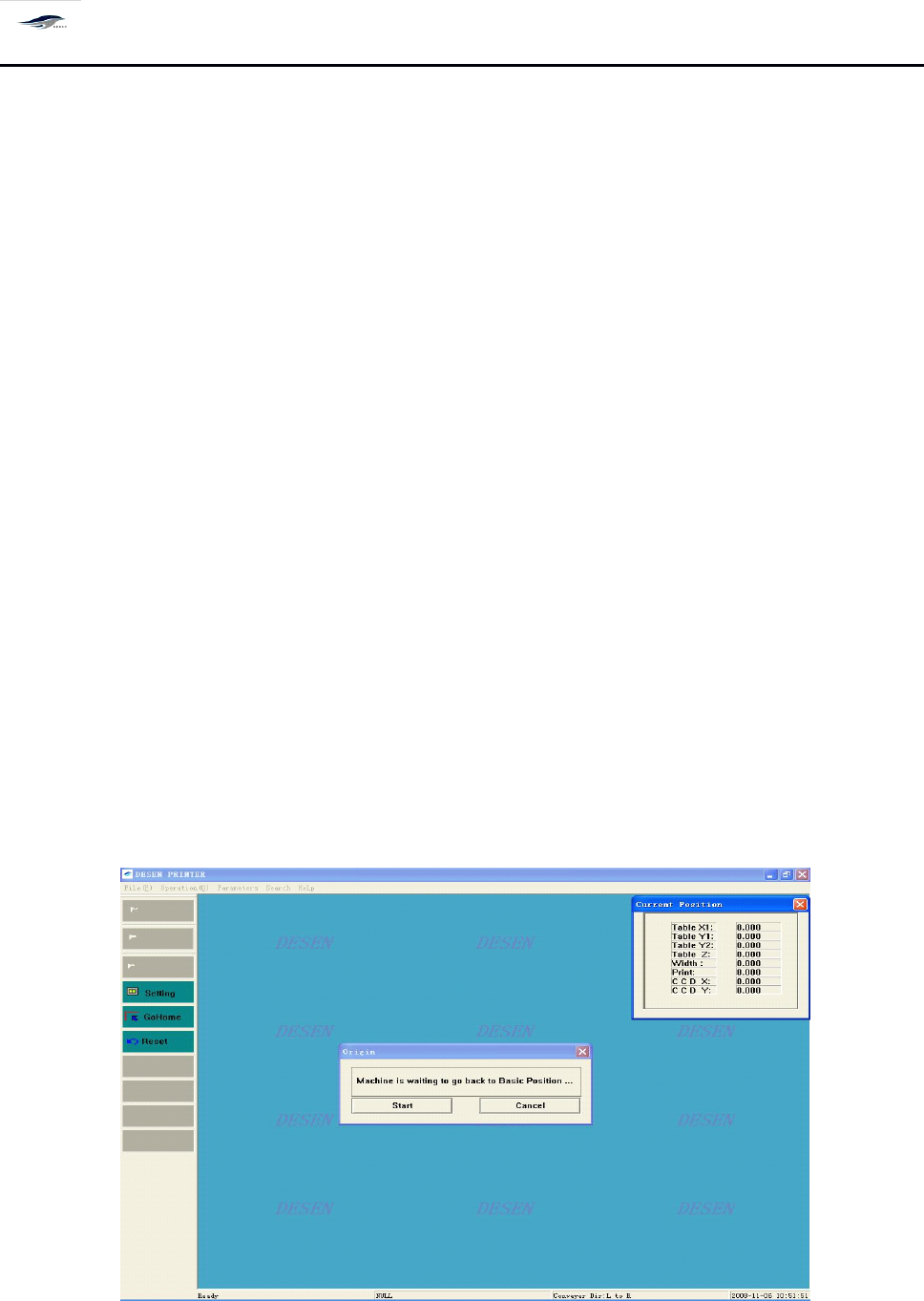
,机器进行归零操作,出现如图 4 – 2 画面,并显示 [ 当前位置 ] 对话框,显示 各
运动轴当前的坐标值:
Choosing “ No ” in the dialog box read as “ Return-to-zero now? ” in the main interface will make the
printing machine return to the main interface; and choose “
Yes
” will make the printing machine take
the return-to-zero operation. F or the latter circumstance, Figure 4-2 will emerge and display the
“ Current location ” dialog box, with the current coordinate values of kinematical axes displayed.
图 4-2 归零操作
Figure 4-2 Return-to-zero Operation
深圳德森精密设备有限公司
Shenzhen Desen Precision Machine Co., Ltd.
- 32 -
对话框进入方式:单击主工具栏中的归零
To
enter the dialog box, click “ Return to zero ” in the main tool bar.
4.2.2
4.2.2
4.2.2
4.2.2
主菜单栏
4.2.2
4.2.2
4.2.2
4.2.2
Main
Main
Main
Main
menu
menu
menu
menu
bar
bar
bar
bar
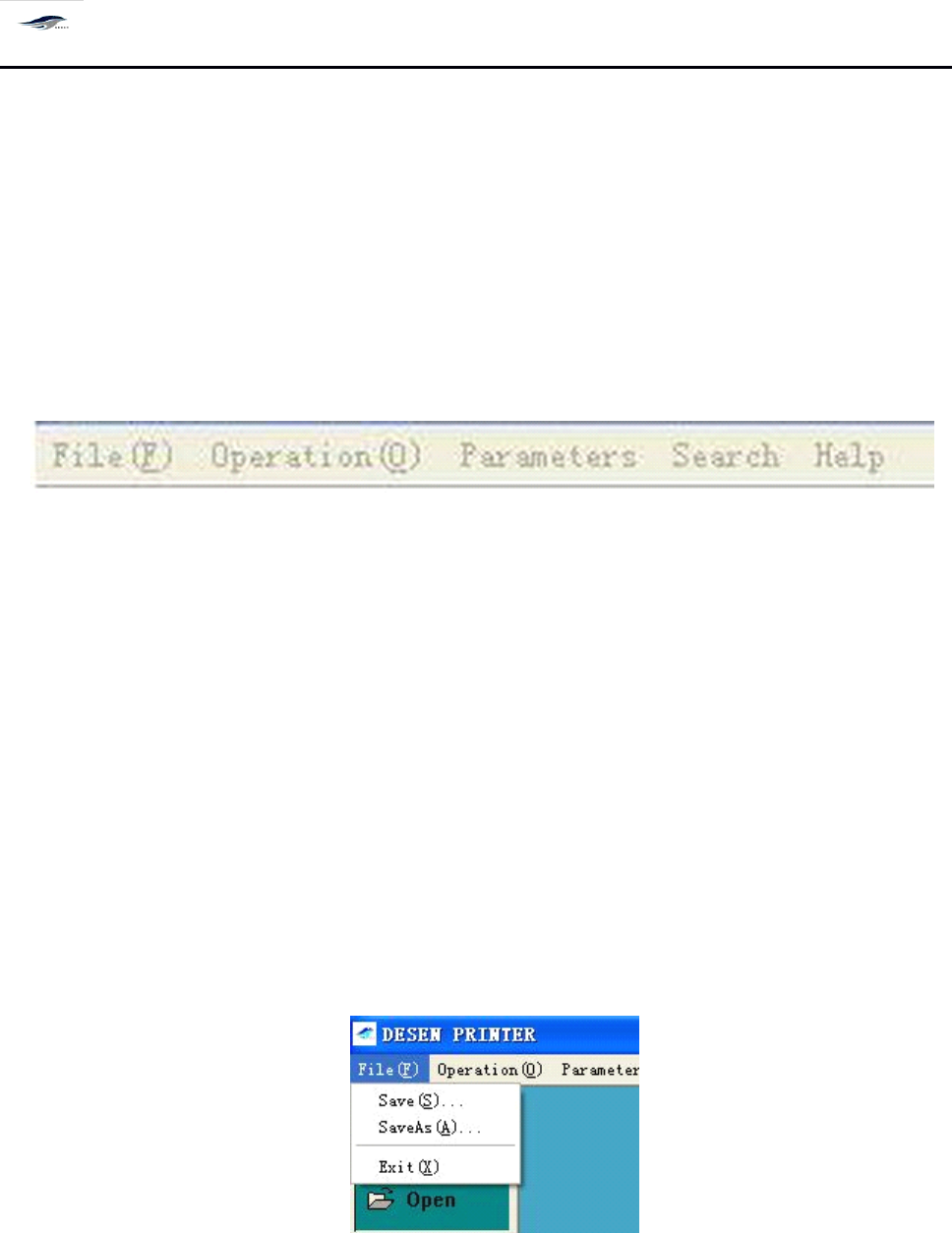
如图 4 – 3 所示、主菜单包含 [ 文件 ] 、 [ 操作 ] 、 [ 设置 ] 、 [ 查看 ] 、 [ 帮助 ] 所有的控制命令。
A
s
shown in Figure 4-3, the main menu contains all control commands including File, Operate,
Set, View and Help.
图 4-3 主菜单栏
Figure 4-3 Main Menu Bar
单击主菜单中的每一项均有下拉菜单出现, 如单击 [ 文件 ] , 出现下拉菜单, 可以进行文 件
[ 新建 ]
、
[ 打开 ]
、
[ 保存 ]
、
[ 保存为 ]
、
[ 退出 ] 等项操作,如图 4 – 4 所示。选择 “ 新建
”
按
钮,
输入密码后再输入新建文件目录名( Prj 文件形式) ,在以后的操作中所有设置即保存在
此文件名下。
Clicking each sub-menu in the main menu bar will show a pull-down menu . F or instance, click
File, there will be a pull-down menu emerging for file operations such as Create new, Open,
Save, Save as and Exit. S ee Figure 4-4. Choose “ Create new ” and input password and the
directory name of the created new file ( Prj file layout). A ll settings in the operations afterwards
will be saved under this directory name.
图 4-4 〈档〉下拉菜单
Figure 4-4 (File) Pull-down Menu
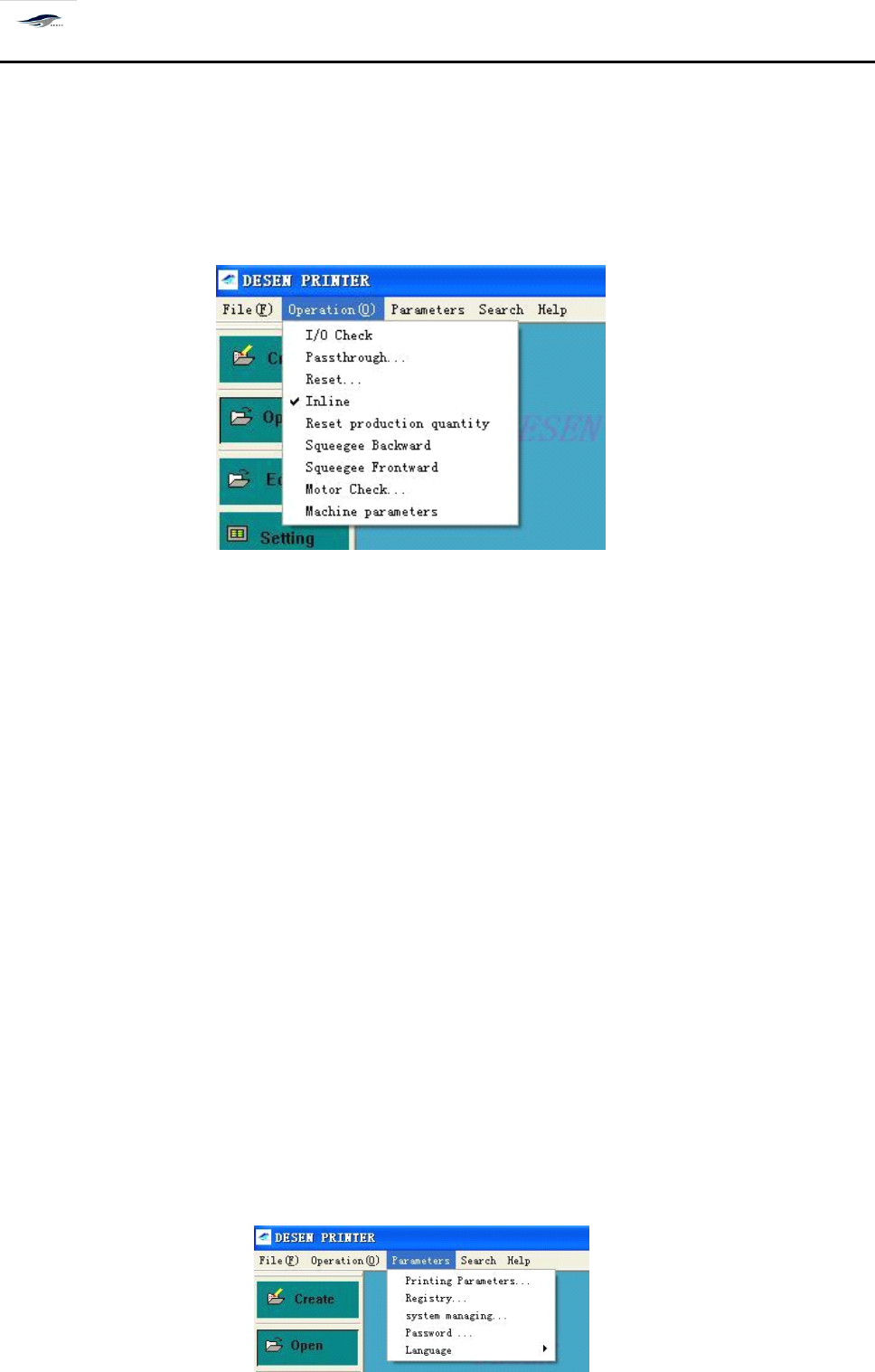
单击主菜单中的 [ 操作 ] ,出现下拉菜单,可以进行 [ 开始生产 ]
、
[ 停止生产 ]
、
[ I/O 检测 ]
、
[ 归零操作 ] 、 [ 过板 ] 、 [ 复位 ] 、 [ 联机工作 ] 、 [ 产量清零 ] 、 [ 生产设置 ] 、 [ 刮刀后退 ] [ 刮刀前
深圳德森精密设备有限公司
Shenzhen Desen Precision Machine Co., Ltd.
- 33 -
进 ] [ 运动测试 ] [ 机器参数 ] 等项操作,如图 4 – 5 所示。
Click “ Operate ” in the main menu, there will be a pull-down menu for operations such as Start
production, Stop production, I/O test, Return-to-zero operation, Transfer board, Reset, On-line
working, Output reset, Production setting, Squeegee back, Squeegee forward, Moti on test and
Machine parameters. S ee Figure 4-5.
图 4-5 〈操作〉下拉菜单
Figure 4-5 (Operation) Pull-down Menu
注意:
其中的 [ 机器参数 ] 设置,在机器出厂前均已设定好,用户不须重新设定。特殊情况 下
用户可以更改机器参数值。
Note: The Machine parameters sub-menu has been well set before the delivery of printing machine
and no re-setting shall be done by users. F or particular circumstances, users can change the values of
the sub-menu.
选择所要进行的操作并单击 [ 确定 ] ,系统保存此次设置,回到主窗口画面,并执行此次
设置;单击 [ 取消 ] ,取消此次设置,仍回到主窗口画面。
Choose an operation and click OK, then the system will save the setting, return to the main
interface and execute the setting; and click Cancel, the system will cancel the setting and return to
the main interface too.
单击主菜单中的 [ 设置 ]
, 出现下拉菜单, 可进行
[ 印刷参数设置 ]
、
[ 信息设置 ] [ 系统管理 ][ 密
码设置 ] [ 语言 ] 等项操作,如图 4 – 6 所示。
A
pull-down menu will emerge after Setting in the main menu is clicked. T he pull-down menu
contains operations such as Print parameter settings, Information setting, System management,
Password setting and Language. See Figure 4-6.