德森印刷机说明书之操作手册-4d1321fc284ac850ac024234 - 第58页
深圳德森精密设备有限公司 Shenzhen Desen Pre cision Machine Co., Ltd. - 58 - 图 4-3 3 图 4-3 4 Fig ure 4 - 33 Fig ure 4-34 2) 单击 [ 是 ] ,回到主窗口画面,进行 [ 归零 ] 操作。操作步骤见第 4.3.1 节 “ 归零操作 ” 。 2) Click “ Y es ” to r eturn t o the m ain inte rfac…
深圳德森精密设备有限公司
Shenzhen Desen Precision Machine Co., Ltd.
- 57 -
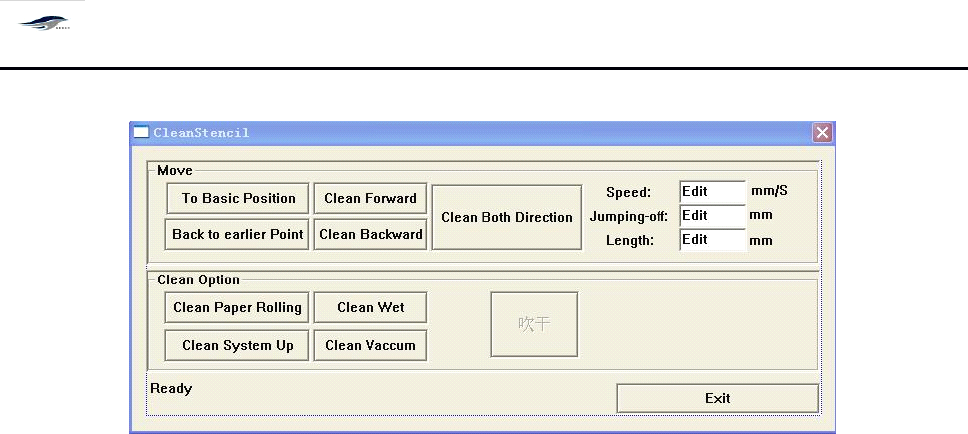
box as shown in Figure 4-32 will emerge.
图 4-3 2 〈网板清洗〉对话框
Figure 4-32 “ Screen Cleaning ” Dialog Box
对话框进入方式:单击主工具栏上 [ 钢网清洗 ]
To
enter the dialog box, click the “ Screen Cleaning ” in the main tool bar.
2.
输入清洗速度、 清洗起点、 清洗长度等参数后; 根据需要单击 “ 往前清洗
”
、
“ 往后清 洗
”
或 “ 来回清洗 ” 确定清洗方向。
2. After parameters such as cleaning rate, cleaning start point and cleaning length are inputted, click
“ Forward cleaning ”
,
“ Backward cleaning ” or “ Come-and-go cleaning ” according to need to set the
cleaning direction.
3.
根据需要单击 [ 转纸 ] 、 [ 喷洒 ] 、 [ 提升 ] 、 [ 真空吸 ] 、 [ 吹干 ] 按钮,进行清洗。
3. Click “ Turn paper ”
,
“ Spray ”
,
“ Lift ”
,
“ V acuumized absorption ” or “ Blow-dry ” according to need
for cleaning.
4.
单击 [ 退出 ] ,停止清洗,回到主窗口画面。
4. Click “ Exit ” to stop the cleaning and to return to the main interface.
4.5.4
4.5.4
4.5.4
4.5.4
开始生产
4.5.4
4.5.4
4.5.4
4.5.4
Start
Start
Start
Start
Production
Production
Production
Production
快捷按钮式控制开关,控制生产的开始。操作步骤如下:
I
t
is a quick button-like control switch for controlling the commencement of production. T he
operating steps are as follows:
1)
单击主窗口工具栏中的 [ 开始生产 ] 图标按钮,显示 “ 现在进行归零操作吗 ”
对话框,
如图 4-3 3 所示:
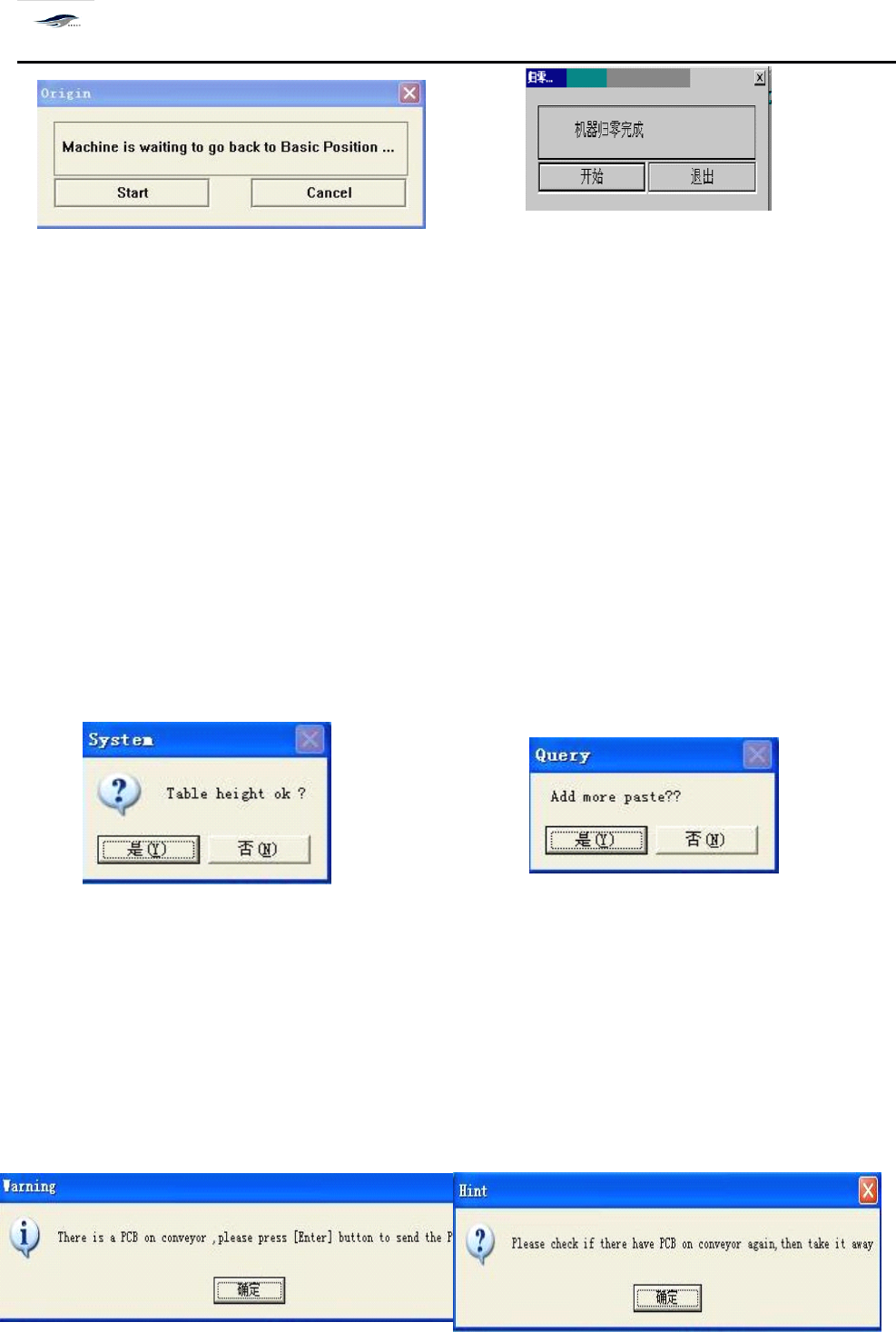
1) Click the “ Start Production ” button in the tool bar of main interface, then “
To
return to zero
now? ” dialog box will emerge. S ee Figure 4-33.
深圳德森精密设备有限公司
Shenzhen Desen Precision Machine Co., Ltd.
- 58 -
图 4-3 3 图 4-3 4
Figure 4-33 Figure 4-34
2)
单击 [ 是 ] ,回到主窗口画面,进行 [ 归零 ] 操作。操作步骤见第 4.3.1 节 “ 归零操作
”
。
2) Click “
Yes
” to return to the main interface for “ Return-to-zero ” operation. S ee 4.3.1 “ Return-to-
zero Operation ” for the operating steps.
3)
归零完成单击图 4-3 4 [ 开始 ] ,回到主窗口画面。
3) After the return-to-zero operation is finished, click “ Start ” in Figure 4-34 to return to the main
interface.
4)
再单击 [ 开始 ] ,显示 “ 在开始生产前请确认生产文件或数据是否正确 ” 的生产提问对
话框,如图 4-3 5 所示:
4) Clicking “ Start ” again will make dialog box “ Do you want to inspect whether the production
files or data are correct before start the production? ” as shown in Figure 4-35 emerge.
图 4-3 5 图 4-3 6
Figure 4-35 Figure 4-36
5)
单击 [ 否 ] ,回到主窗口画面,打开正确的生产档或进行参数设置;单击 [ 是 ] ,出现提 问
对话框 “ 是否要添置锡膏? ” 如图 4-3 6 所示。
5) Clicking “ No ” will return to the main interface. A
t
this time, open the correct production files or
set parameters; and clicking “
Yes
” will make the dialog box “
To
add solder paste or not? ” as shown
in Figure 4-36 emerge.
深圳德森精密设备有限公司
Shenzhen Desen Precision Machine Co., Ltd.
- 59 -
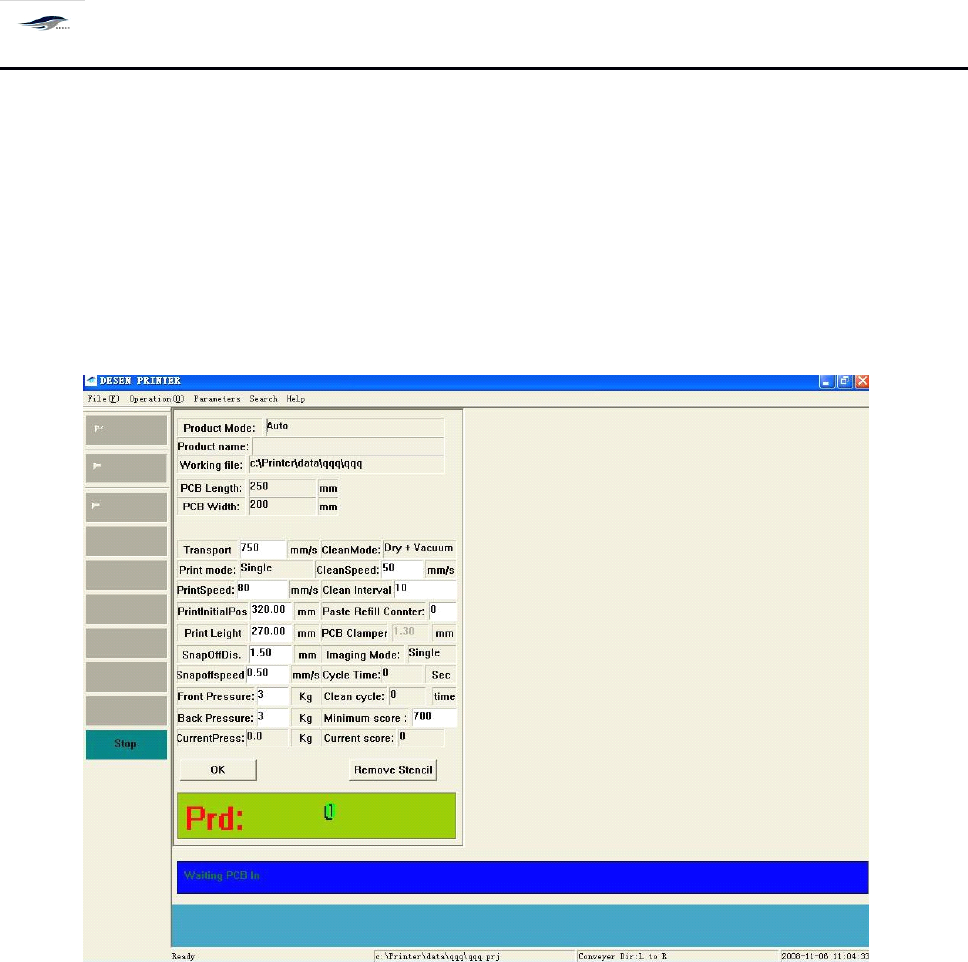
图 4-3 7 图 4 -38
Figure 4-37 Figure 4-38
6)
单击 “ 是 ” 进入运输宽度调节;
6) Clicking “
Yes
” will enter the transport width adjustment interface.
7)
单击 “ 否 ” 在主窗口画面上显示 [ 生产状态 ] 对话框,如图 4- 39 所示:
7) Clicking “ No ” will make the dialog box “ Production Status ” as shown in Figure 4-39 emerge in
the main interface.
图 4- 39 生产状态 对话框
Figure 4-39 “ Production Status ” Dialog Box
对话框进入方式:开始生产 + 生产档正确与否? / 正确 + 运输宽度调节否
T
o enter the dialog box, click “ Start Production ”
,
“
Yes
” in the dialog box “ Are the production files
are correct? ” and “ No ” in the dialog box “ Do you want to adjust the transport width? ” respectively.
8)
机器开始生产,并在上图对话框的下面一栏动态显示机器当前状态: “ 等待进板 -------
”
8) The printing machine starts the production and the lower column of the above dialog box shows
the current status of printing machine: “ waiting for incoming board ” .
9)
在生产状态桌面上,可以直接修改运输速度、印刷、脱模、清洗的速度和长度,以及
刮刀压力、导轨夹紧等参数,不必停止生产;确定好下一个生产周期生效。
9) In the “ Production Status ” dialog box,
it
is allowed to directly amend parameters such as
transport rate, printing, demoulding and cleaning rates and lengths as well as squeegee pressure and