NPM-D3维修手册.pdf - 第291页
NPM-D3 SERVICE MANUAL 7.2 System Version Up EJM6D3-MB-07SM-00( 編集中 ).DOC Page 7-31 7.2.4 Updating the Machine System Software マシンシステムソフトのアップデート 机器系统软件的更新 Machine system software is to be install ed from the SD card. Inse…
NPM-D3
SERVICE MANUAL
7.2 System Version Up
Page 7-30 EJM6D3-MB-07SM-00(
編集中
).DOC
7.2.3 Saving the Machine Data
マシンデータの保存
机器数据的保存
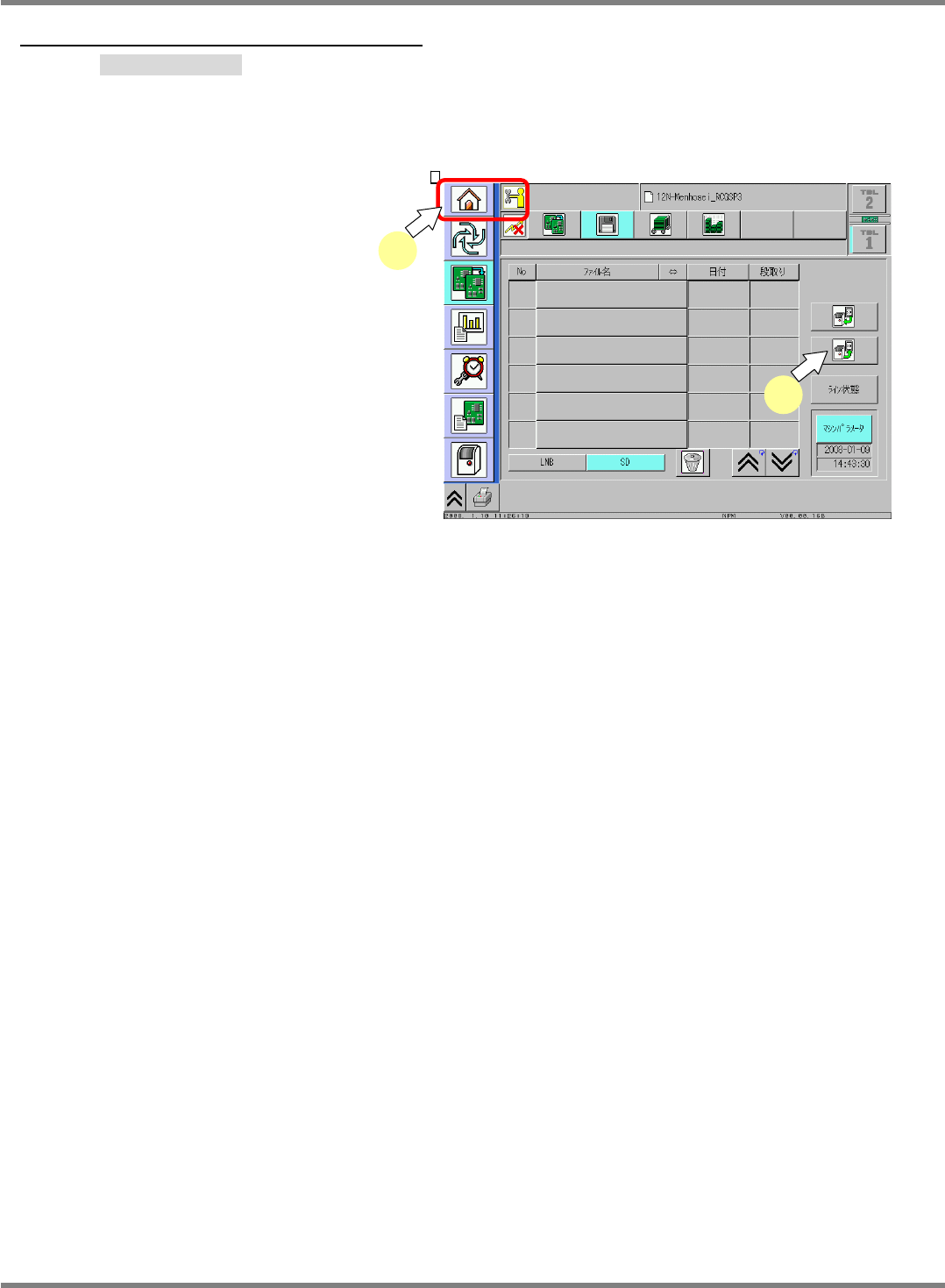
To be safe, the machine data should be saved before updating the system.
念のため、システムバージョンアップ前にマシンデータの保存を行っておきます。
为了慎重起见,在系统版本升级之前进行机器数据的保存。
5.
1. Change the engineer mode or
service mode.
エンジニアモードまたはサービスモードを変更します。
变更为工程师模式或者服务模式。
2. Insert the SD card to save data.
保存用 SD カードを挿入します。
插入保存用 SD 卡。
3. A message appears to confirm the
saving.
保存確認が表示されます。
将会显示保存的确认信息。
Press [Yes] to start saving the data.
[はい] にて保存を開始します。
按下[是],开始保存。
1
3
NPM-D3
SERVICE MANUAL
7.2 System Version Up
EJM6D3-MB-07SM-00(
編集中
).DOC Page 7-31
7.2.4 Updating the Machine System Software
マシンシステムソフトのアップデート
机器系统软件的更新
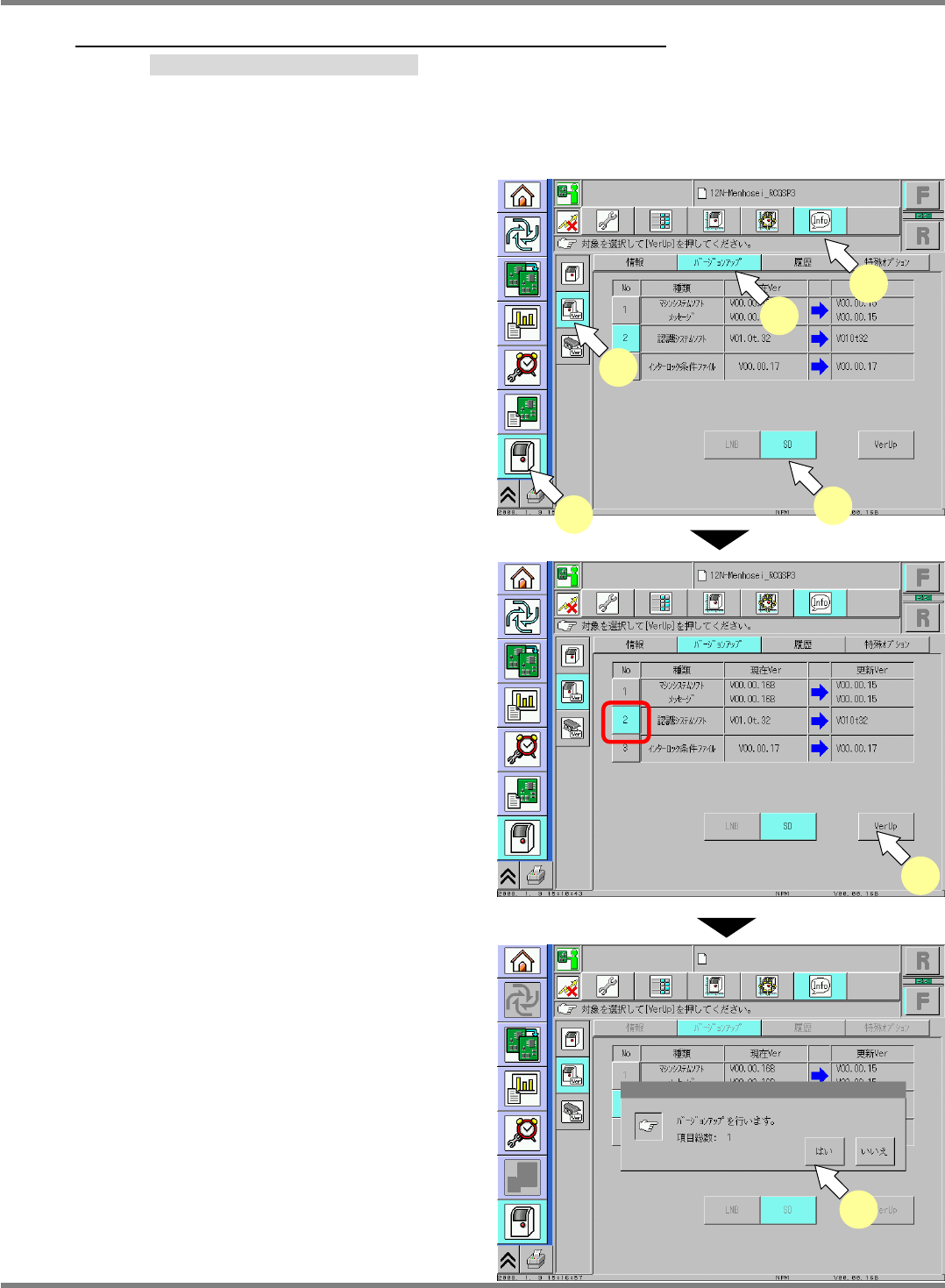
Machine system software is to be installed from the SD card. Insert the SD card containing the system folder
in the SD slot in advance.
マシンシステムソフトは、SD カードからインストールされます。事前にシステムの入った SD カードを挿入してください。
机器系统软件是从 SD 卡下载的。请事前插入装有系统的 SD 卡。
6.
1. Change to the engineer mode or the
serviceman mode. Press (1) to (5) in order.
エンジニアモードまたはサービスモードを変更して、(1) ~ (5) の順に選択します。
变更工程师模式或者服务模式,按照(1) ~ (5) 的顺序选择。
2. Select the firmware to update, and press
[VerUp].
バージョンアップ対象を選択、[VerUp] を押します。
选择版本升级对象后,按下[VerUp]。
Any firmware of version newer than the
current one will be selected automatically.
SD カード内に現 Ver.より、新しい Ver.がある場合は自動選択されます。
如果在 SD 卡内有比现在的 Ver.新的 Ver.,机器会自动选择新的 Ver.。
* Deselect the number button of the
firmware not to be updated.
バージョンアップしない場合は選択を外す。
不进行版本升级时,清除选择。
3. A message appears to confirm the version up.
バージョンアップ確認が表示されます。
将会显示版本升级的确认信息。
Press [Yes] to start the updating process.
[はい] にてアップデート処理がスタートします。
如果按下[是] ,就会开始更新处理。
=NOTE=
Do not turn OFF the machine until the
completion message is displayed.
システムのアップデート開始から完了のメッセージが表示されるまで、マシン
の電源を OFF しないでください。
从系统的更新开始到完成的信息被显示出来为止,请不要将机器的电源置
于 OFF。
2
(1)
(2)
(3)
(4)
(5)
3
NPM-D3
SERVICE MANUAL
7.2 System Version Up
Page 7-32 EJM6D3-MB-07SM-00(
編集中
).DOC
7.2.5 Updating the Configuration Units
構成ユニットのアップデート
构成装置的更新
Followings are the configuration units to be updated:
アップデートの対象となる構成ユニットは、以下の通りです。
成为更新对象的构成装置,如下所示。
Head
ヘッド
头
Lights (Head, line camera)
照明 (ヘッド・ラインカメラ)
照明 (头和线性照相机)
ILK board
ILK ボード
ILK 板
NC
Ring I/O
リング I / O
环 I / O
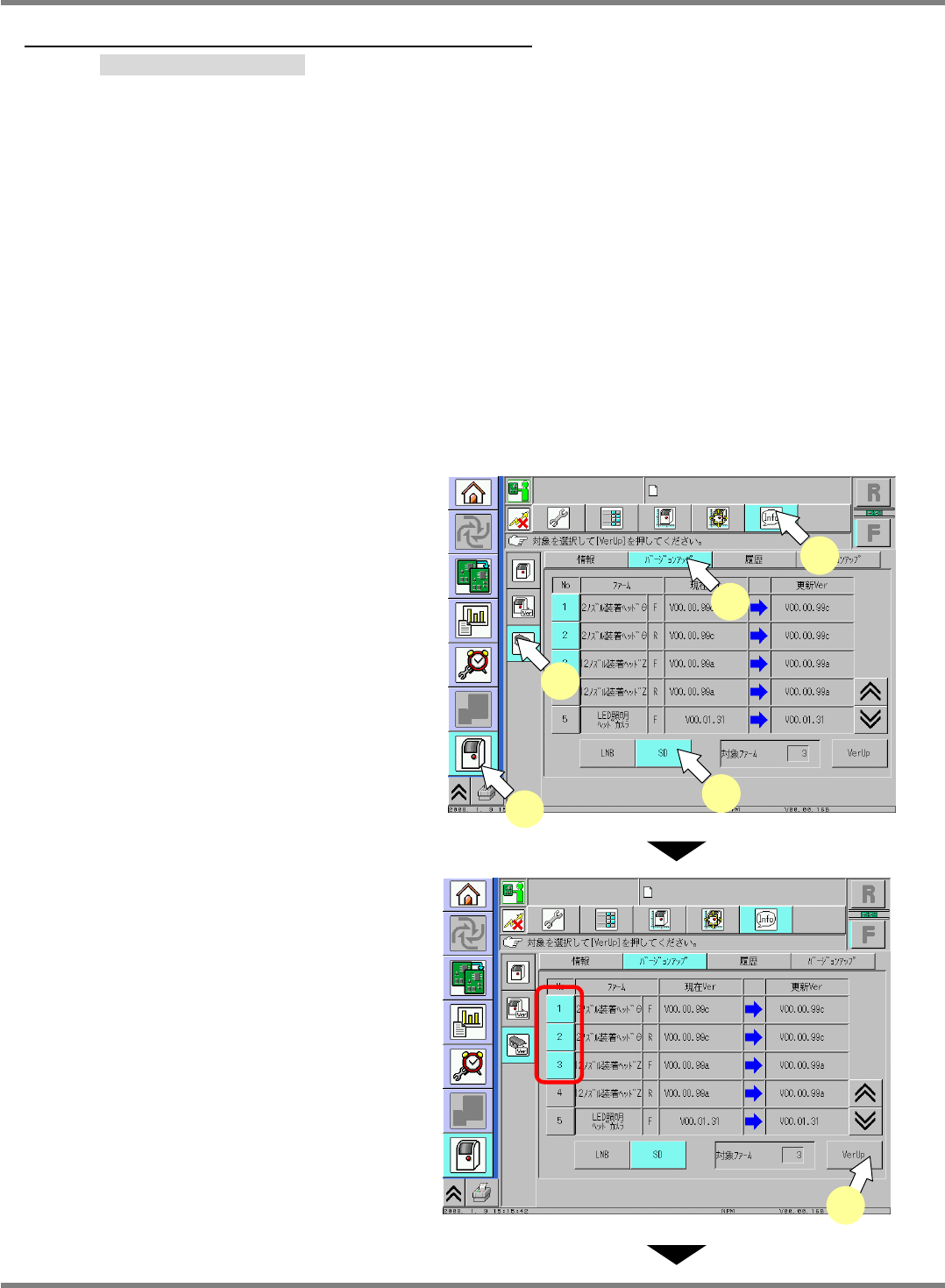
The configuration unit system is to be installed from the SD card. Insert the SD card containing the system
software for the units to be updated in the SD slot in advance.
構成ユニットのシステムは、SD カードからインストールされます。事前にアップデートの対象となる構成ユニットのシステムが入った SD カードを挿入してください。
构成装置的系统是从 SD 卡下载的。请事前插入装有成为更新对象的构成装置系统的 SD 卡。
7.
1. Change to the engineer mode or the service
man mode. Press (1) to (5) in order.
エンジニアモードまたはサービスマンモードに変更して、(1) ~(5) の順に選択しま
す。
变更为工程师模式或者服务工程师模式后,按照(1) ~(5) 的顺序选择。
2. Select a file to update, and press [VerUp].
バージョンアップ対象を選択し、[VerUp] を押します。
选择版本升级对象后,按下[VerUp]。
Any firmware of version newer than the
current one will be selected automatically.
SD カード内に現 Ver.より、新しい Ver.がある場合は自動選択されます。
如果在 SD 卡内有比现在的 Ver.新的 Ver.,机器会自动选择新的 Ver.。
* Deselect the number button of the
firmware not to be updated.
バージョンアップしない場合は選択を外します。
不进行版本升级时,清除选择。
(1)
(4)
(3)
(5)
(2)
2