NPM-D3维修手册.pdf - 第47页
NPM-D3 SERVICE MANUAL 4.2 XY Drive Axes EJM6D3-MB-04SM-02.DOC Page 4-9 7. When [Signal adjust start] is clicked, an attenti on dialog opens up. Click [Start]. (Fig. 7, Fig 8) [ 信号調整 S tart] をクリックすると、注意ウィンドウが開くので、 [ 開始 ] …
NPM-D3
SERVICE MANUAL
4.2 XY Drive Axes
Page 4-8 EJM6D3-MB-04SM-02.DOC
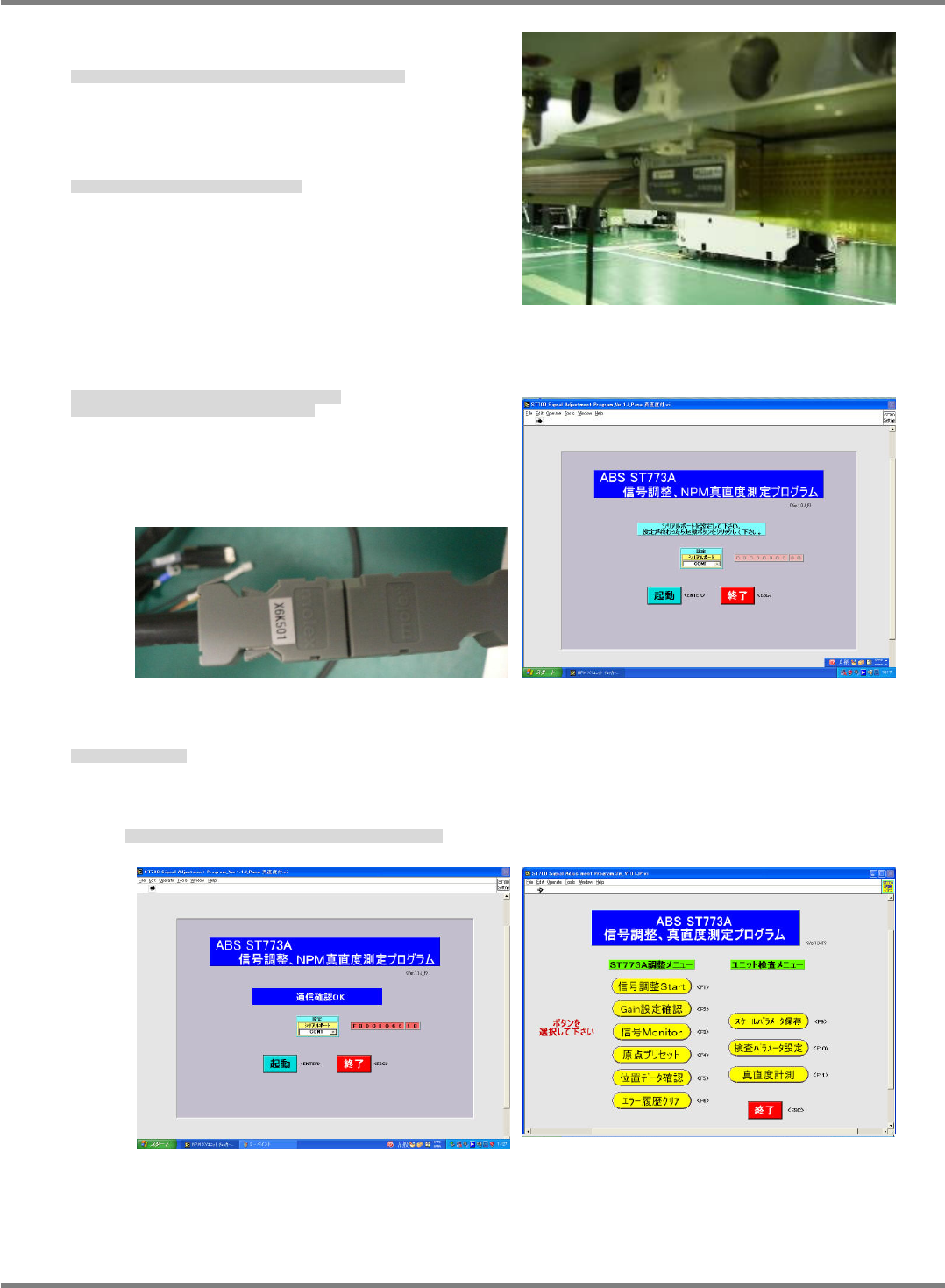
3. Connect the PC to the linear head and start up the
signal adjustment program. (Fig. 3)
PC をリニアヘッドに接続し、信号調整プログラムを起動する。(Fig. 3)
将 PC 连接到线性头上,启动信号调整程序。(Fig. 3)
4. Turn ON the power and air, and start the system.
電源・エアーを ON にし、設備を立ち上げます。
将电源和空气置于 ON,启动设备。
5. Launch the signal adjustment program and check (adjust) the data.
Connect the encoder cable to the connector. (Fig. 3, Fig 4)
信号調整プログラムのを立ち上げ、確認する(調整する)。
エンコーダ線のコネクタに接続する。(Fig. 3, Fig. 4)
启动信号调整程序,进行确认(调整)
将编码器线连接到连接器。(Fig. 3, Fig. 4)
6. Click [Start].
[起動] をクリックする。
单击[启动]。
When the message indicating that the communication check is OK appears, the display changes
to the menu screen. (Fig. 5, Fig 6)
通信確認
OK
が表示されると画面が切り替わります。
(Fig. 5, Fig. 6)
显示通信确认
OK
后画面会切换。
(Fig. 5, Fig. 6)
Fig. 2
Fig. 4
Fig. 3
Fig. 5
Fig. 6
NPM-D3
SERVICE MANUAL
4.2 XY Drive Axes
EJM6D3-MB-04SM-02.DOC Page 4-9
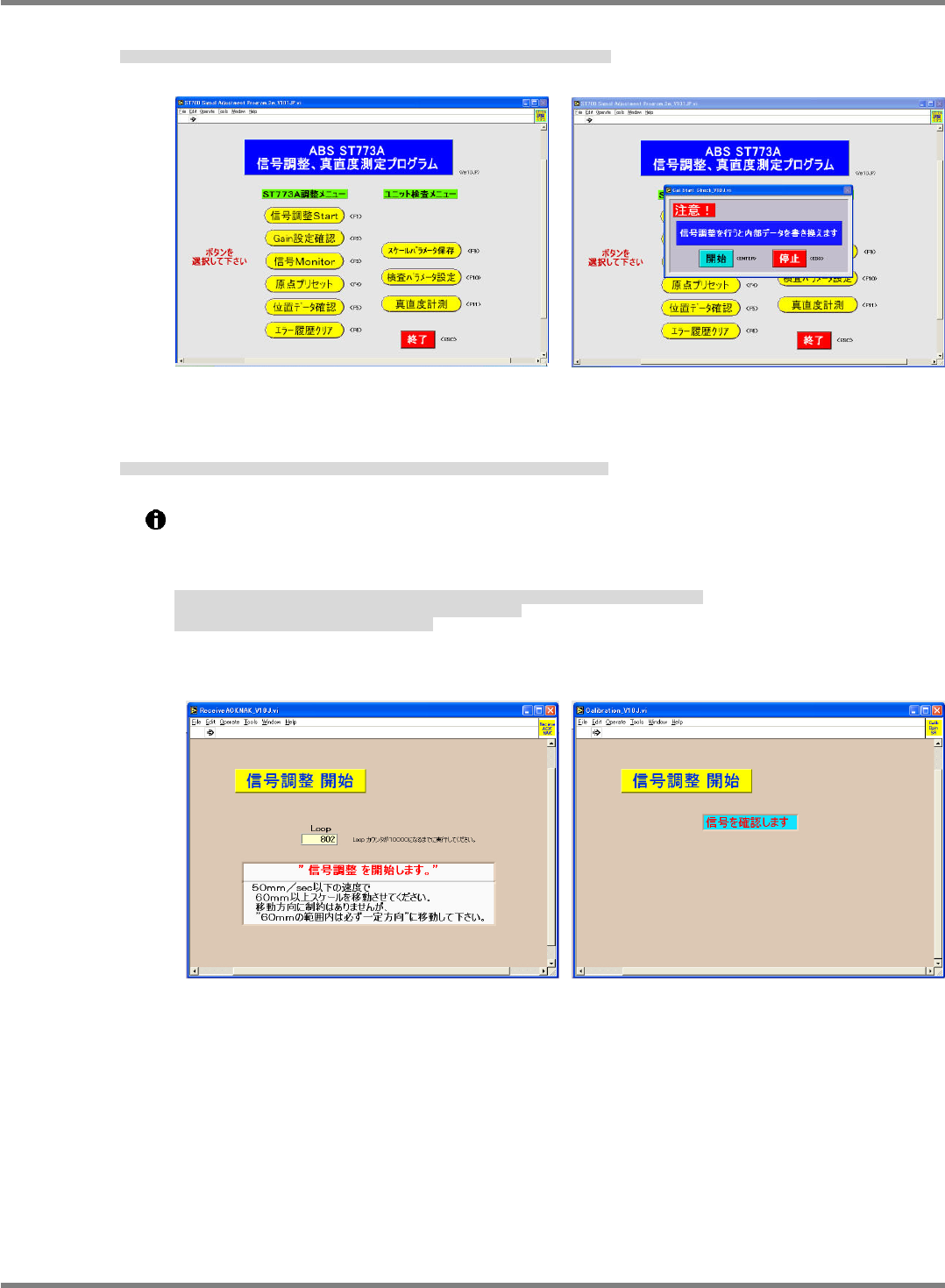
7. When [Signal adjust start] is clicked, an attention dialog opens up. Click [Start]. (Fig. 7, Fig 8)
[信号調整 Start] をクリックすると、注意ウィンドウが開くので、[開始] をクリックする。(Fig. 7, Fig. 8)
单击[信号调整 Start]后会打开注意窗口,此时单击[开始]。(Fig. 7, Fig. 8)
8. When the signal adjustment start screen appears, move the axis to be checked until the message ‘Starts
signal check’ is displayed.
信号調整開始の画面が出たら、確認する軸を、‘信号を確認します’と画面に表示されるまで動かします。
显示信号调整开始的画面后,一直移动要确认的轴,直到画面上显示‘确认信号’为止。
If the X axis is to be checked, move it in either left or right direction, and in either before or after
in case of the Y axis. (Fig. 4)
When the beam is actuated, follow the instructions on the screen.
If the result is NG, redo the procedure from step 6.
確認する軸が
X
軸の場合は、左右どちらか一方向に、
Y
軸の場合は、前後どちらか一方向に動かします。
(Fig. 4)
また、ビーム動作時、画面に表示されている指示にしたがってください。
NG
が表示された場合は、
6
からやり直してください。
如确认的轴是
X
轴时,向左或右的某一个方向移动,是
Y
轴时,向前或后的某一个方向移动。
(Fig. 4)
当臂动作时,请服从画面上显示的指示。
如显示
NG
时,请从
6
开始重新实施。
Fig. 7
Fig. 8
Fig. 9
Fig. 10
NPM-D3
SERVICE MANUAL
4.2 XY Drive Axes
Page 4-10 EJM6D3-MB-04SM-02.DOC
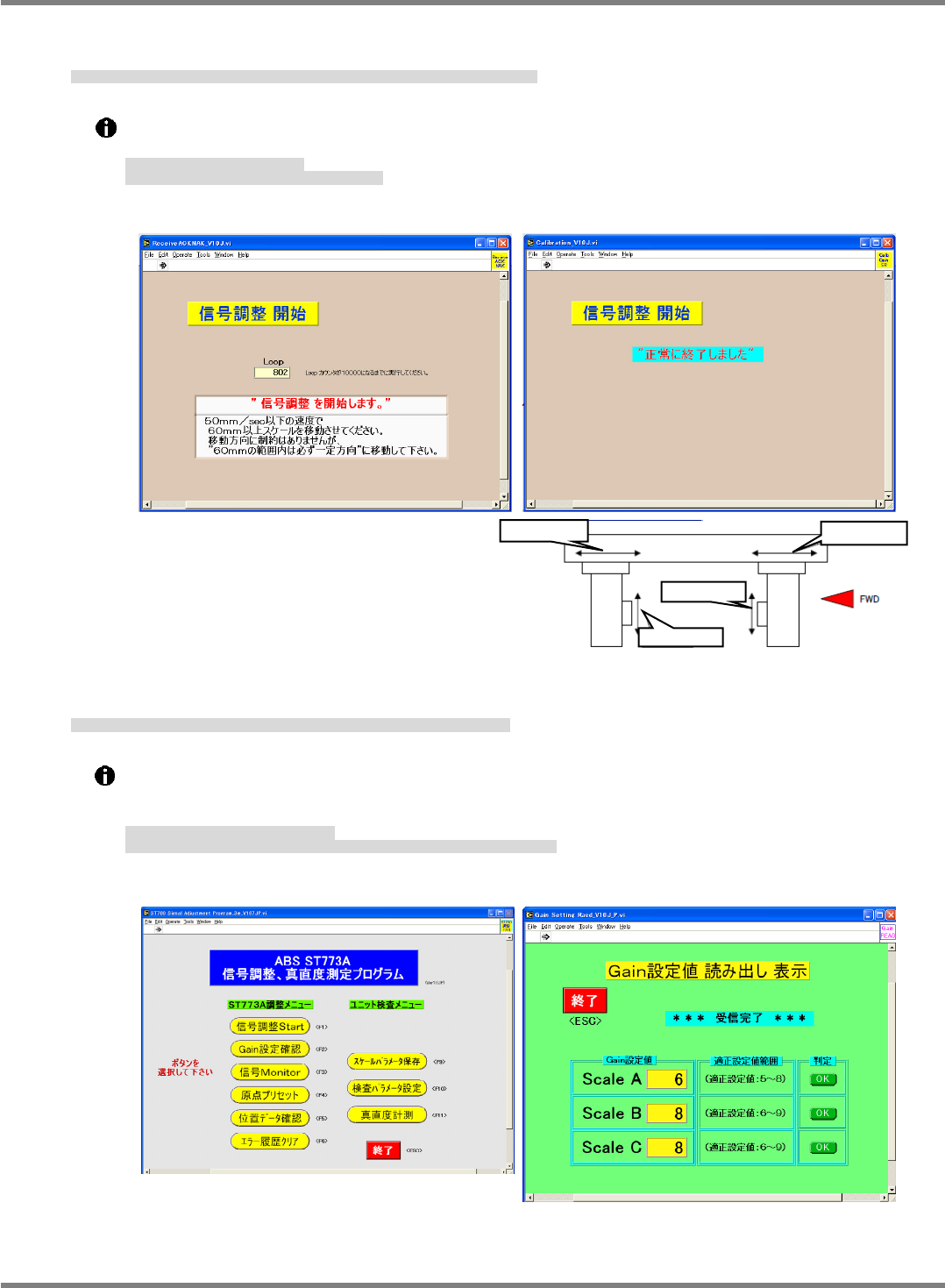
9. When the message ‘Starts signal check’ appears again, move the axis in the opposite direction until the
message appears.
再び ‘信号調整を開始します’ の画面が表示されるので、先とは逆の方向に表示が出るまで動かす。
会再次显示 ‘信号调整开始’ 的画面,请一直移动到显示出与刚才相反的方向为止。
Follow the instructions on the screen.
If the result is NG, redo the procedure from step 6.
画面表示の指示にしがってください。
NG
が表示された場合は、
6
からやり直してください。
请服从画面中显示的指示。
如显示
NG
时,请从
6
开始重新实施。
10. Click [Gain set check] and check the judgment of the scales A, B and C, then click [Finish].
[Gain 設定確認] をクリックして、Scale A、B、C の判定を確認し、[終了] をクリックする。
单击 [Gain 设定确认],确认 Scale A、B、C 的判定后单击 [结束]。
If all scales are judged to be OK, proceed to the next step.
If NG is detected, check the clearance between the linear head and scale again and reconfirm
the judgment.
判定がすべて
OK
の場合、次の項目に進む。
判定に
NG
がある場合は、リニアヘッドとスケールのスキマを再確認し、再度確認を行う。
如果判定都
OK
的话,进入到下一个项目。
判定中有
NG
的话,再次确认线性头和标尺的间隙后,再次进行确认。
Fig. 12
Fig. 11
Fig. 14
Fig. 15
Fig. 13
Y axis
X axis
X axis
R side
F side
Moving direction
Moving direction
Moving direction
Moving direction