NPM-D3维修手册.pdf - 第83页
NPM-D3 SERVICE MANUAL 4.5 Sensors EJM6D3-MB-04SM-02.DOC Page 4-45 4. Attach the flash drive in position. フラッシュドライ ブを取り付ける。 安装闪存驱动器。 Lower the PC board along the guide and connect it to the connector. ガイドに沿って基板に平行に降ろして、コネ…
NPM-D3
SERVICE MANUAL
4.5 Sensors
Page 4-44 EJM6D3-MB-04SM-02.DOC
From Type II to Type III
Type
Ⅱから
Type
Ⅲへの改造
从
Type
Ⅱ到
Type
Ⅲ的改造
1.
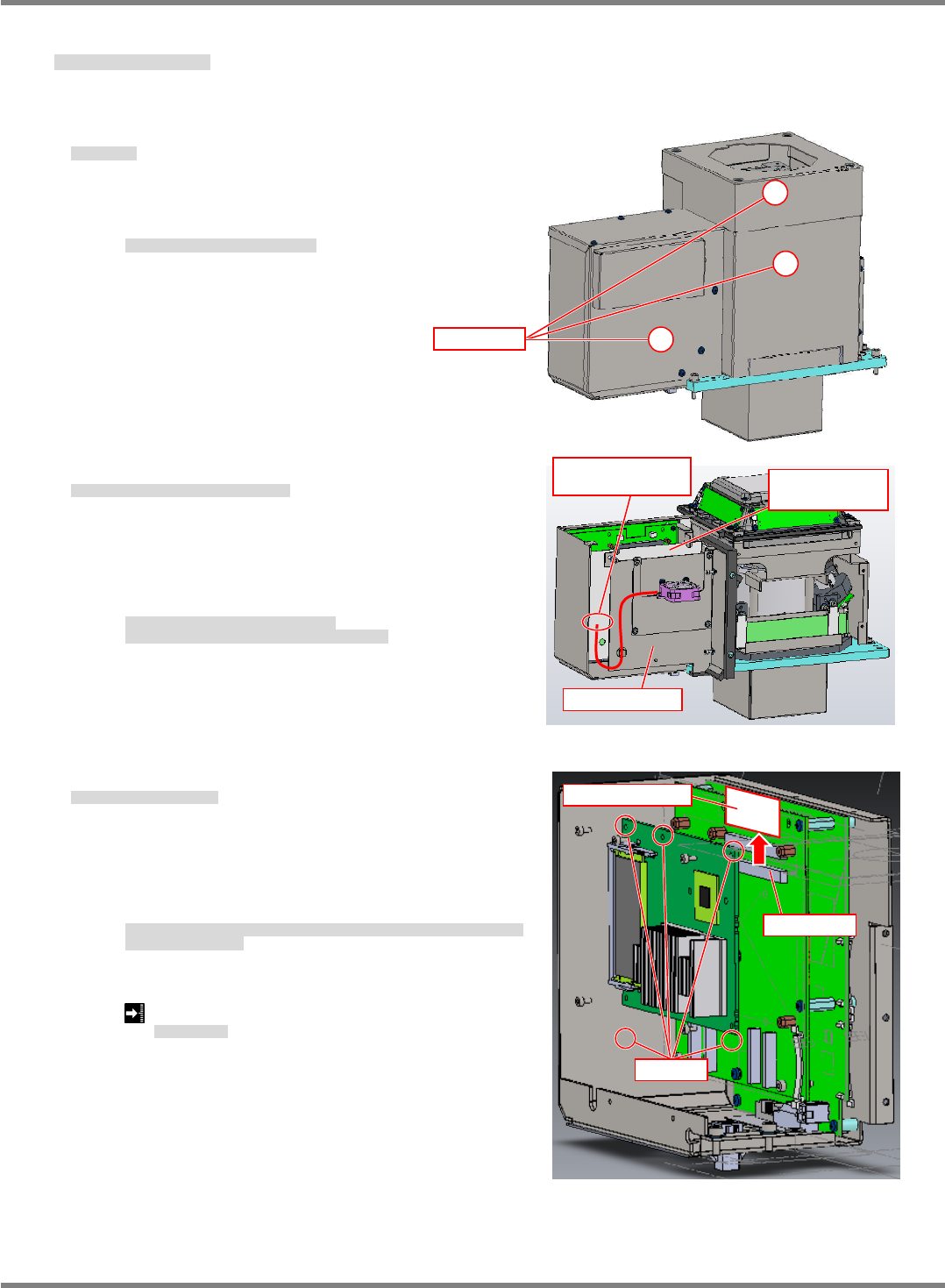
1. Detach the covers.
カバーを外す。
拆下盖。
Detach the three covers in the
ascending order (1) to (3).
3
つのカバーを
~
の順番で外します。
按照
~
的顺序拆下
3
个盖。
2. Remove the sheet metal where the fan is mounted.
ファンが取り付けられている板金部分を取り外す。
拆下装有风扇的金属板。
Before removing the sheet metal, disconnect the
connector of the fan.
After removing the sheet metal, remove the
electrostatic sheet as well.
取り外す際、ファンのコネクタを外します。
板金部分を取り外した後、静電シートも取り外します。
拆卸时要拆下风扇的连接器。
拆下金属板后,也要拆下静电片。
3. Attach the CPU board to the machine.
CPU ボードを本体に取り付ける。
将 CPU 板装到主体上。
(1) When attaching the CPU board, push it straight to
avoid damaging the connector.
(2) Secure the bolts at five positions.
(1) CPU
ボードを取り付ける際、コネクタを壊さないよう、まっすぐ押し込みます。
(2) 5
か所を固定します。
(1)
安装
CPU
板时,注意不要损坏连接器,要笔直按入。
(2)
在
5
处固定。
Tightening torque: 50 cN
・
m
締め付けトルク
拧紧扭矩
Connector cover
Connector
M2 x 5
Cover
1
2
3
Sheet metal
Electrostatic
sheet
Disconnect the
connecto
r
NPM-D3
SERVICE MANUAL
4.5 Sensors
EJM6D3-MB-04SM-02.DOC Page 4-45
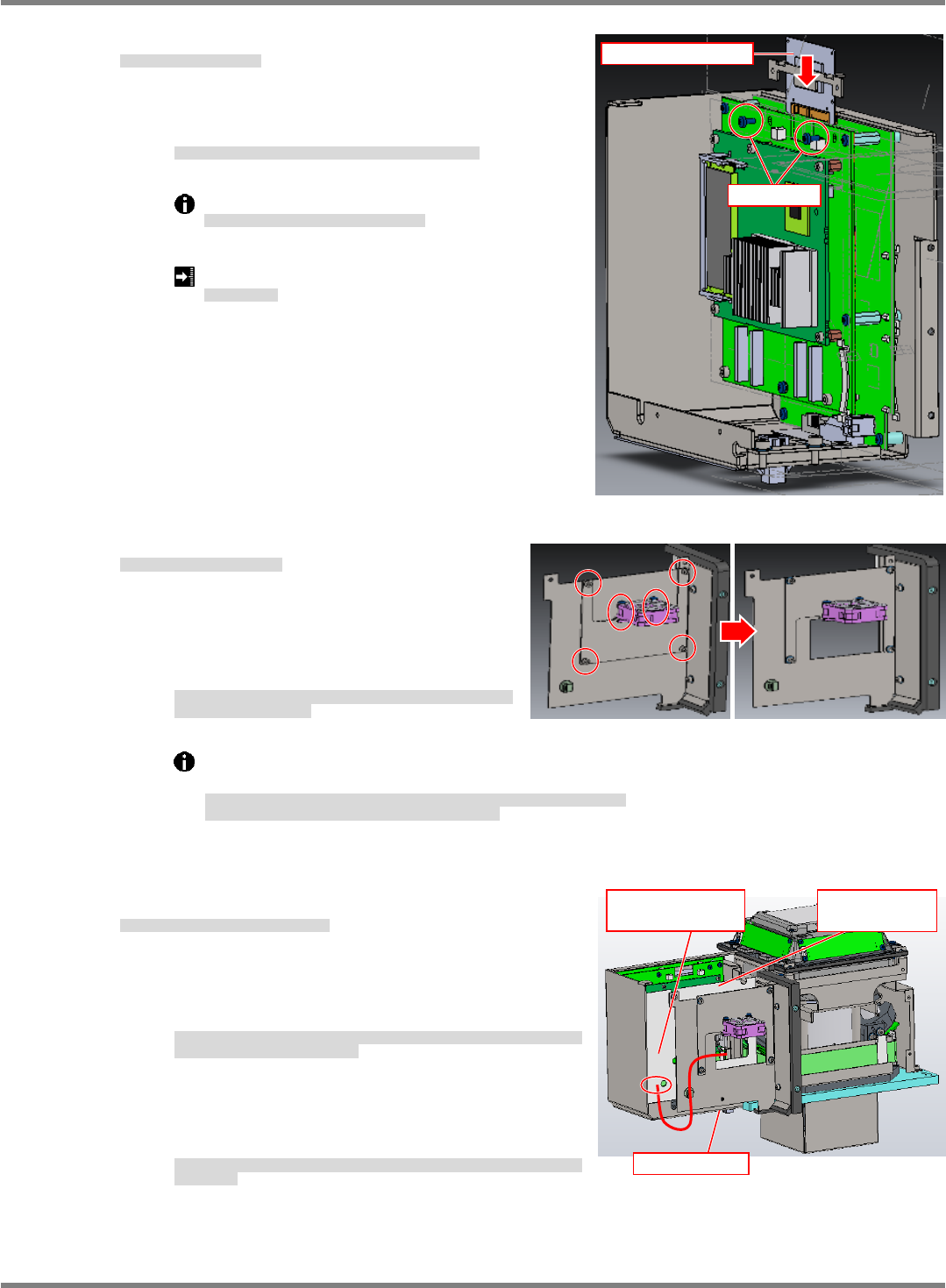
4. Attach the flash drive in position.
フラッシュドライブを取り付ける。
安装闪存驱动器。
Lower the PC board along the guide and connect it
to the connector.
ガイドに沿って基板に平行に降ろして、コネクタに接続します。
沿着导轨,与基板平行地插到下面,与连接器连接。
Take care not to damage the connector.
コネクタを壊さないよう気をつけてください。
请注意不要损坏连接器。
Tightening torque: 50 cN
・
m
締め付けトルク
拧紧扭矩
5. Turn the fan upside down.
ファンの取り付け方向を反対にする。
将风扇的安装方向反过来。
Remove the sheet metal and the fan
mounted on the sheet metal, then turn only
the sheet metal by 180 degrees and attach
them.
ファンが取り付けてある板金およびファンを外して、板金のみを
180
度
回転させて、取り付けます。
拆下装有风扇的金属板和风扇,仅仅将金属板转动
180
度后再装上。
Make sure the cable comes to the left so that the arrow engraved in the fan faces downward.
Check that the nameplate of the fan comes to the bottom side.
ファンに刻印された矢印が下方向になるように、配線が左側に出るようにしてください。
ファンの銘板が下側になっていることを確認してください。
请使风扇的有刻印箭头处朝下方向,并使电线从左侧出来。
请确认风扇的铭板应位于下侧。
6. Attach the sheet metal where the fan is mounted.
ファンが取り付けてある板金部分を取り付ける。
将装有风扇的金属板装上。
Before attaching the sheet metal, fit the electrostatic
sheet aligning with the holes. Then, connect the
connector of the fan to CN1 port.
板金部分を取り付ける前に、穴に合わせて静電シートを取り付けます。それから、ファ
ンのコネクタを
CN1
に取り付けます。
在安装金属板部分之前,请对准孔安装静电片。然后,将风扇的连接器装到
CN1
上。
When the fan is stopped or the connector is not
connected, an alarm message appears on the
screen.
ファンが停止、またはコネクタが未接続の場合は、ファンアラームが設備の画面に表
示されます。
如果风扇停止、或者连接器未连接时,会在设备画面中显示风扇的警报。
Flash drive
Screw x 2
Connect the
connector
Sheet metal
Electrostatic
sheet
NPM-D3
SERVICE MANUAL
4.5 Sensors
Page 4-46 EJM6D3-MB-04SM-02.DOC
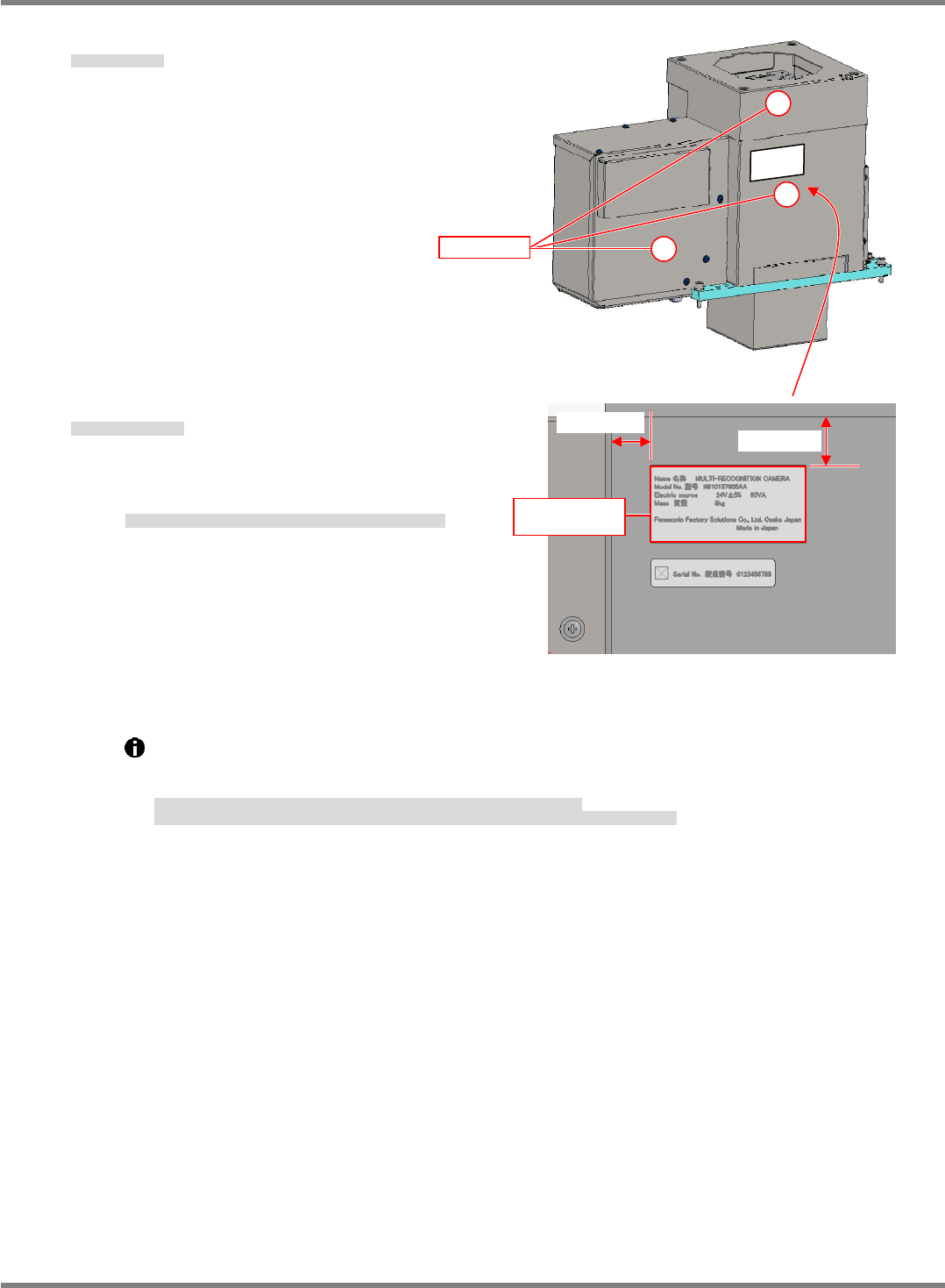
Cover
1
2
3
7. Reattach the covers.
カバーを取り付ける。
安装盖。
8. Change the nameplate with a new one.
銘板ラベルを貼り替える。
换贴铭板标签。
Peel off the nameplate label for Type II and affix
the one for Type III.
Type
Ⅱの銘板ラベルを剥がして、
Type
Ⅲの銘板ラベルを貼ります。
剥下
Type
Ⅱ的铭板标签,贴上
Type
Ⅲ的铭板标签。
To build up the multi recognition camera from Type II to Type III, calibration is not required.
However, note that calibration will be required if the multi recognition camera is to be built up
from Type I to Type III.
Type
Ⅱから
Type
Ⅲへビルドアップする場合は、キャリブレーションの必要はありません。
ただし、
Type
Ⅰから
Type
Ⅲにビルドアップする場合は、キャリブレーションが必要です。注意してください。
从
Type
Ⅱ装配成
Type
Ⅲ时,不需要校准。
但请注意,从
Type
Ⅰ装配成
Type
Ⅲ时需要校准。
15
1 mm
15
1 mm
Nameplate
label