00198055-01_IM_Taceability5.0_EN.pdf - 第17页
Installation of Trace Service and Monitor 4.1.3 Software Components and Configuration System Requirements and Softwar e Components for Traceability Modules Installation Manual SIPLACE Traceability 5.0 17 4.1.3 4 . 1 . 3 …
Installation of Trace Service and Monitor
System Requirements and Software Components for Traceability Modules 4.1.2 System Requirements for Trace Monitor
16 Installation Manual SIPLACE Traceability 5.0
4.1.2
4.1.2 System Requirements for Trace Monitor
System Requirements for Trace Monitor
The following hardware and software requirements must be fulfilled, before Trace Monitor can be in-
stalled.
The following software is not supplied on the Support Media DVD and must be acquired separately, if
needed:
▪ MS Excel (to visualize exported CSV files)
▪ SQL Supported Versions:
– SQL 2008 Express SP3
– SQL 2008 Express SP3 x64
– SQL 2005 Express SP4
– SQL 2005 Express SP4 x64
– SQL 2008R2 SP 2 Express
– SQL 2008R2 SP 2 Express x64
– SQL 2012 SP 1 CU2 Express
– SQL 2012 SP 1 CU2 Express x64
– SQL Server 2005 SP 4
– SQL Server 2005 SP 4 x64
– SQL Server 2008 SP 3
– SQL Server 2008 SP 3 x64
– SQL Server 2008R2 SP 2
– SQL Server 2008R2 SP 2 x64
– SQL Server 2012 SP 1 CU2
– SQL Server 2012 SP 1 CU2 x64
NOTICE
System Requirements
The Support Media DVD included in the installation package checks the necessary system re-
quirements of your system and installs these. Amongst others e.g. Microsoft .NET Framework,
the License Manager, SIPLACE Studio and the Error Reporting tool. The use of the Support
Media V2.2 is obligatory.
The system requirements (supported operating systems and database variants) and an over-
view of the interoperable products can be found in the SIPLACE Support Media Installation
Manual, item no. [00197214-xx].
NOTICE
Support Media DVD
Perform the Prerequisite Installation for the product SIPLACE Traceability 5.0 from the Support
Media DVD. See the "Prerequisite Analyzer" chapter in the Support Media Getting Started
[00195490-xx].
NOTICE
SIPLACE Studio
SIPLACE Studio must be installed.
Installation of Trace Service and Monitor
4.1.3 Software Components and Configuration System Requirements and Software Components for Traceability Modules
Installation Manual SIPLACE Traceability 5.0 17
4.1.3
4.1.3 Software Components and Configuration
Software Components and Configuration
4.1.3.1
4.1.3.1 Software Components
Software Components
The SIPLACE Traceability installation CD contains the following software components:
▪ Trace Service 5.0
▪ Trace Monitor 5.0
4.1.3.2
4.1.3.2 Configuration
Configuration
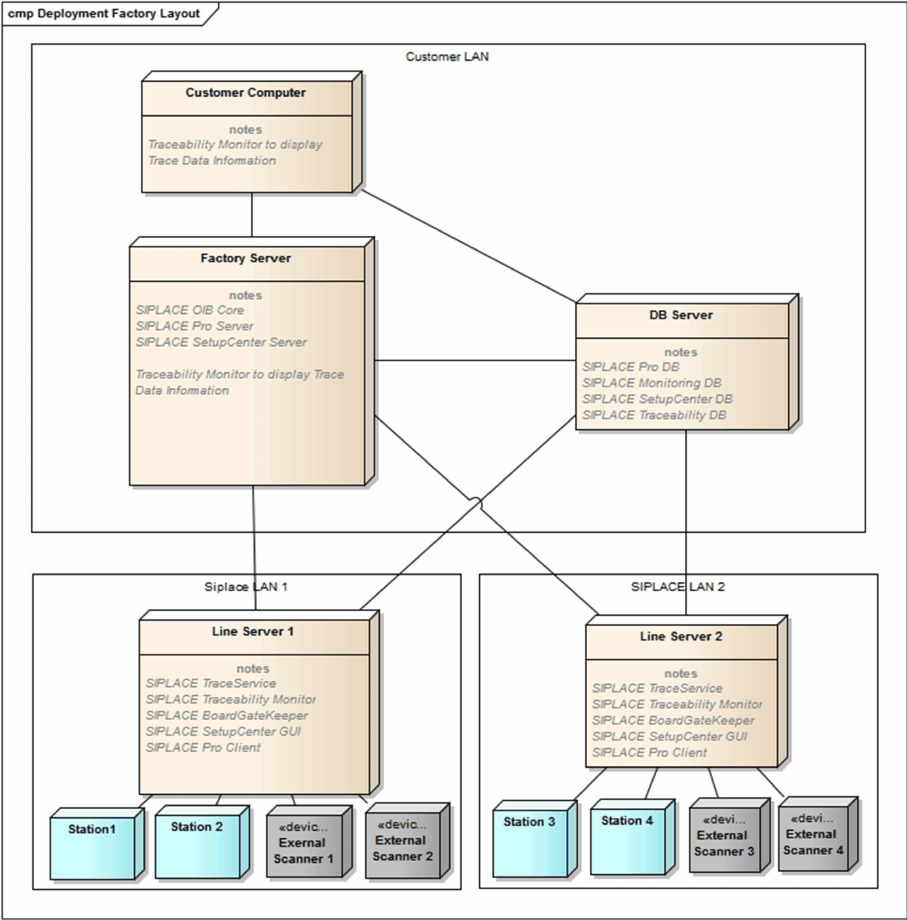
Trace Service can either be installed in SIPLACE LAN or distributed via SIPLACE and client LANs. The
following configuration options exist for SIPLACE Traceability:

Installation of Trace Service and Monitor
System Requirements and Software Components for Traceability Modules 4.1.3 Software Components and Configuration
18 Installation Manual SIPLACE Traceability 5.0
1. SIPLACE Traceability on one Computer
This option involves installing all SIPLACE Traceability software components on one computer.
However, the database server can be on a separate computer.
2. SIPLACE Traceability distributed across several computers:
This option involves installing the SIPLACE Traceability software components on multiple comput-
ers, according to your system requirements:
▪ Traceability or Line Computer
The following components need to be installed on this computer:
– SIPLACE Traceability with the components:
Trace Service
– Microsoft.NET 4.0 Framework
– Microsoft Internet Explorer
– SIPLACE Pro Client installation (for SPI XML Adapter)
– SIPLACE Setup Center GUI (if Line based Traceability mode is used with “Remove unused
charges” option)
▪ SIPLACE Studio (for Trace Monitor)
▪ Database server
– SQL Supported Versions:
SQL 2008 Express SP3
SQL 2008 Express SP3 x64
SQL 2005 Express SP4
SQL 2005 Express SP4 x64
SQL 2008R2 SP 2 Express
SQL 2008R2 SP 2 Express x64
SQL 2012 SP 1 CU2 Express
SQL 2012 SP 1 CU2 Express x64
SQL Server 2005 SP 4
SQL Server 2005 SP 4 x64
SQL Server 2008 SP 3
SQL Server 2008 SP 3 x64
SQL Server 2008R2 SP 2
SQL Server 2008R2 SP 2 x64
SQL Server 2012 SP 1 CU2
SQL Server 2012 SP 1 CU2 x64
–
NOTICE
SQL Server Installation Manual
For a detailed description of the SQL Server installation, refer to the SQL Server Installation
Manual (Item No.: 00196824-xx) which can be found on the Support Media DVD. The SQL
Server itself is not part of the Support Media DVDs.