00198055-01_IM_Taceability5.0_EN.pdf - 第26页
Uninstalling 26 Installation Manual SIPLACE Traceability 5.0
Uninstalling
Installation Manual SIPLACE Traceability 5.0 25
5
5 Uninstalling
Uninstalling
Trace Monitor or Trace Service from Control Panel
NOTICE
Requirement
You need administrator privilege for your operation system in order to perform this steps.
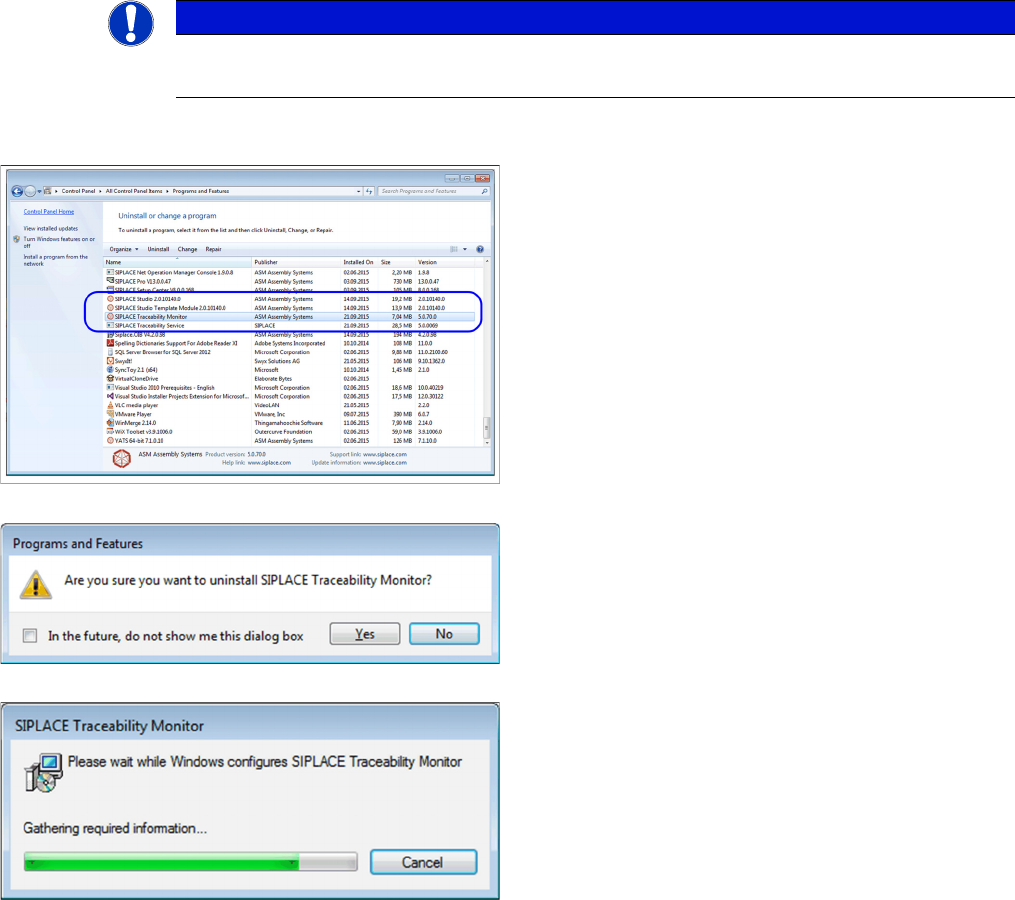
► In the Control Panel -> All Control Panel Items ->
Programs and Features dialog select the application
SIPLACE Traceability Monitor or SIPLACE
Traceability Service , right-click and select Remove in
the context menu.
You are prompted to confirm uninstalling Trace Monitor.
► Confirm with Yes.
► The Install Shield Wizard will start and uninstalling
Trace Monitor or Trace Service will be prepared. un-
installing Trace Monitor or Trace Service will be unin-
stalled.
► Monitor or Trace Service is no longer available.
Uninstalling
26 Installation Manual SIPLACE Traceability 5.0
Upgrade
Database Upgrade Information
Installation Manual SIPLACE Traceability 5.0 27
6
6 Upgrade
Upgrade
6.1
6.1 Database Upgrade Information
Database Upgrade Information
▪ It is not possible to upgrade a SIPLACE Trace database version <= 3.2 to version 5.x!
▪ SIPLACE Trace-Monitor 5.x is not able to handle SIPLACE Trace databases <= version 3.2.
– If the customer is using a SIPLACE Traceability database version <= 3.2 the new SIPLACE
Trace database version 5.x has to be installed parallel to the old database.
▪ To query the Trace database version <= 3.2 the SIPLACE Trace-Monitor 3.5 must be used.
▪ To query the Trace database version 3.3 – 3.5, the database has to be converted to version 4.x.
– This upgrade will be possible with SIPLACE Traceability 3.6 Hotfix1 (or higher).
▪ To query the Trace database version 5.0 the SIPLACE Trace-Monitor 5.0 has to be used.
6.2
6.2 New database concept introduced from Traceability version 3.3
New database concept introduced from Traceability version 3.3
From version 3.3 Traceability comes with a new database concept which has significant impacts on the
deployment and the DBView interface.
The following has changed:
▪ The "Trace Host" Service was removed. Trace Service replaces the functionality and data will direct-
ly be exported to the database without detouring through the file system.
▪ The database schema was completely redesigned (see advantages).
This new concept has the following advantages for the customer:
▪ one service less needed for the traceability solution (less configuration options, less administrative
overhead)
▪ XML file export / file shares are not longer needed to store the traceability data to the database (al-
though XML file export is still an available export option in Trace Service for archiving purposes)
▪ less complexity, higher performance and improved reliability in the new database model compared
to the old solution
▪ the new DBView Interface is easier to comprehend than the old one
▪ The Trace Monitor supports the upgraded database from 3.3 up to the current one. The only data-
base version with what Trace Monitor works is the latest one but there are upgrade possibilities from
databases => 3.3 to 5.x.
The following restrictions exists":
▪ The old DBView Interface will not longer be supported. Customers have to adapt their own SQL
statements
▪ A database migration will only be supported as part of a customer project. We always recommend
to create a new database.
Please see the User Guide for further information about configuring the new traceability database.