MEC-CP842-1.0E.pdf - 第71页
Maintenance >> Cleaning MEC-CP842-1.0E 5-11 5.1.9 Part Height Check Sensor Lens (Weekly) Point The lenses should be cleaned periodically to ensure accuracy duri ng part height an d nozzle length measurement. Proced…
Maintenance >> Cleaning
5-10 MEC-CP842-1.0E
5.1.8 Machine Interior (Weekly)
Point
Chip parts and other foreign objects will accumulate in the machine during operation.
Such objects should be removed from the machine to keep the machine in good work-
ing order.
Procedure
1 Use a vacuum cleaner to remove the foreign objects from the machine interior.
2 Use a dry cloth to wipe grease off of all areas that do not require lubrication.
Caution:Do not use an air blower to clean the machine interior because dust or small objects may be
blown into and damage other areas of the machine.
WARNING
Turn the main power off before performing this procedure.
Maintenance >> Cleaning
MEC-CP842-1.0E 5-11
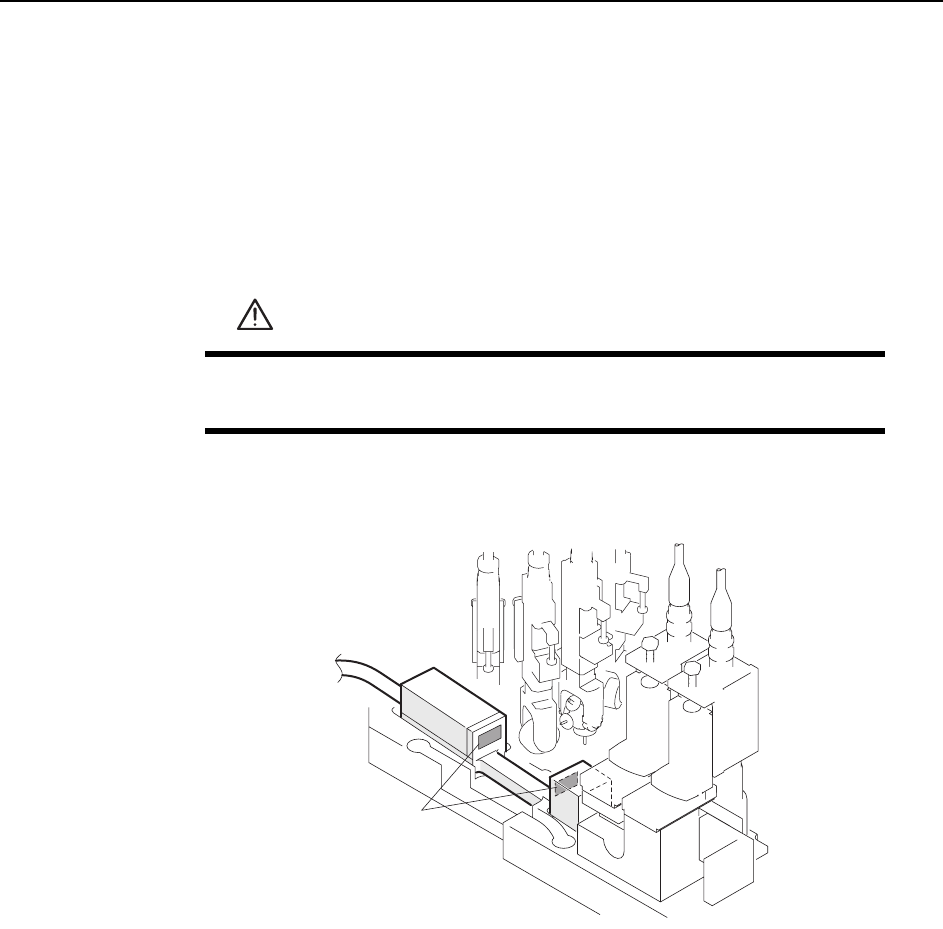
5.1.9 Part Height Check Sensor Lens (Weekly)
Point
The lenses should be cleaned periodically to ensure accuracy during part height and
nozzle length measurement.
Procedure
Use a soft brush (such as those used to clean camera lenses) to clean the sensor lens.
If the lens is excessively dirty, then use a commercially available lens cleaner.
WARNING
Be sure to turn the main power off before performing this proce-
dure.
C746M3011
Sensor lens

Maintenance >> Cleaning
5-12 MEC-CP842-1.0E
5.1.10 Fluorescent Nozzle Stickers (Monthly)
Point
Dust and other particles adhere to the nozzle fluorescent sticker, reducing the amount
of light reflected to the ST5 parts camera. Reduced reflection can prevent proper part
imaging, resulting in vision errors.
Procedure
If repeated vision errors occur for a particular nozzle, use a soft brush (such as those
used to clean camera lenses) to wipe the sticker clean.
Note: Do not rub the fluorescent seal with cloth, because this may cause dust to adhere to it. If the
dust cannot be removed, replace the fluorescent seal.