MEC-CP842-1.0E.pdf - 第9页
About This Manual >> Notation Conventions Used in this Manual MEC-CP842-1.0E 1-3 1.3 Not ation Conventions Used in this Manual The names of operation buttons, touch s creen titles and comma nds, and keyboard keys a…
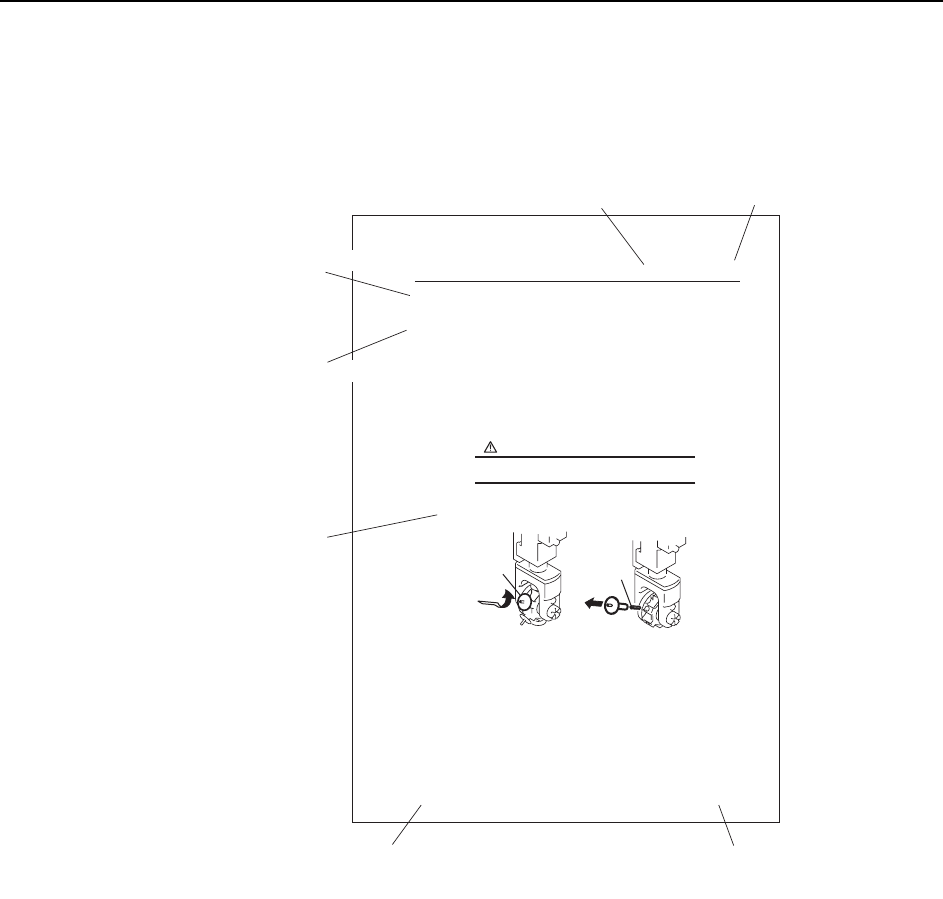
About This Manual >> Page Layout
1-2 MEC-CP842-1.0E
1.2 Page Layout
In addition to the main body of the manual, each page includes chapter title, section title,
page number, and the manual title.
Body: Text and illustrations are used to explain procedures.
Chapter Title: The chapter number and title are shown on the header of each page.
Section Title: Section number and title. A chapter consists of multiple sections,
and the section is also shown on the header.
Manual Title: This identifies the machine and type of manual.
Page Number: This numbers consists of the chapter number and the page number
within that chapter. “1-1” indicates chapter 1, page 1.
Note: The reference numbers at the bottom right of the illustrations are for administrative purposes
only, and are not directly related to the content of the manual.
6. Replacing Consumable Parts
6.1 Nozzles
Point
Procedure
Press EMERGENCY STOP before performing this procedure.
WARNING
Replacing Consumable Parts >> Nozzles
CP-842E Mechanical Reference 1.0E
6-1
C842M1000
Section title
Chapter title
Manual title Page numbe
r
Body
A nozzle that is bent, deformed, or clogged can cause part pick-up errors and should be
replaced. When replacing a nozzle, use care to avoid losing the nozzle spring..
1 Remove the nozzle and spring as shown in the figure below.
2 Reverse the removal procedure to attach a new nozzle.
Caution
1. When removing the nozzle, take care not to lose the internal spring. Also check that
the spring is not left within the nozzle holder.
2. To avoid nozzle bend, do not hold the nozzle at the tip during removal.
C746M4001
Press and turn
Remove slowly
Nozzle
Spring
Chapter title
Section title

About This Manual >> Notation Conventions Used in this Manual
MEC-CP842-1.0E 1-3
1.3 Notation Conventions Used in this Manual
The names of operation buttons, touch screen titles and commands, and keyboard
keys are enclosed in brackets [ ].

About This Manual >> Notation Conventions Used in this Manual
1-4 MEC-CP842-1.0E
MEMO: