2500_Users_Manual - 第116页
Operation 4-2 ProMa ster 25 00 U ser Ma nual What Is a Task? A Task is a job se tup containin g all the informat ion necessary f or programming a nd/or testing a particular part. A Task records all the parameters of the …
ProMaster 2500 User Manual 4-1
4
Operation
For System Operators and Administrators
Before you read this chapter, be familiar with the information in Chapter
1, especially the major components on the 2500. Chapter 1 has detailed
drawings of the beam, track sections, and labeler that identify parts that
will be referred to in this chapter. Chapter 1 also introduces TaskLink
concepts and describes how to move around between items on the screen.
This chapter describes actions an operator will perform during a typical
day operating the ProMaster 2500 system. Some of the topics covered in
this chapter include:
What Is a Task?........................................................................................4-2
Overview: Starting a New Task.............................................................4-2
Reconfiguring the System for a New Device.......................................4-7
Running a Task......................................................................................4-23
Aligning a Device to a PLCC Programming Module.......................4-27
Aligning a Device to a DIP/SOIC/32-pin PLCC
Programming Module ..........................................................................4-32
Introduction to Kits...............................................................................4-36
Adjusting Track Air...............................................................................4-40
WARNING:Handler components travel at high speeds and with
sufficient force to cause personal injury. The ProMaster
2500 has a safety interlock switch that prevents handler
components from moving while the hood is up.
Do not attempt to bypass this safety feature and operate
the handler with the hood raised.

Operation
4-2 ProMaster 2500 User Manual
What Is a Task?
A Task is a job setup containing all the information necessary for
programming and/or testing a particular part. A Task records all the
parameters of the job setup from the device type and data file used to the
label text printed and placed on the device. Once a Task has been
selected, TaskLink performs most of the system setup automatically and
prompts the operator to insert devices to begin processing.
Overview: Starting a New Task
There are several steps that you will routinely need to perform each time
you select a device that uses a different package type or size. These steps
are listed below and can be used as an overview of the process for new
operators and as a refresher for experienced users. Each step has its
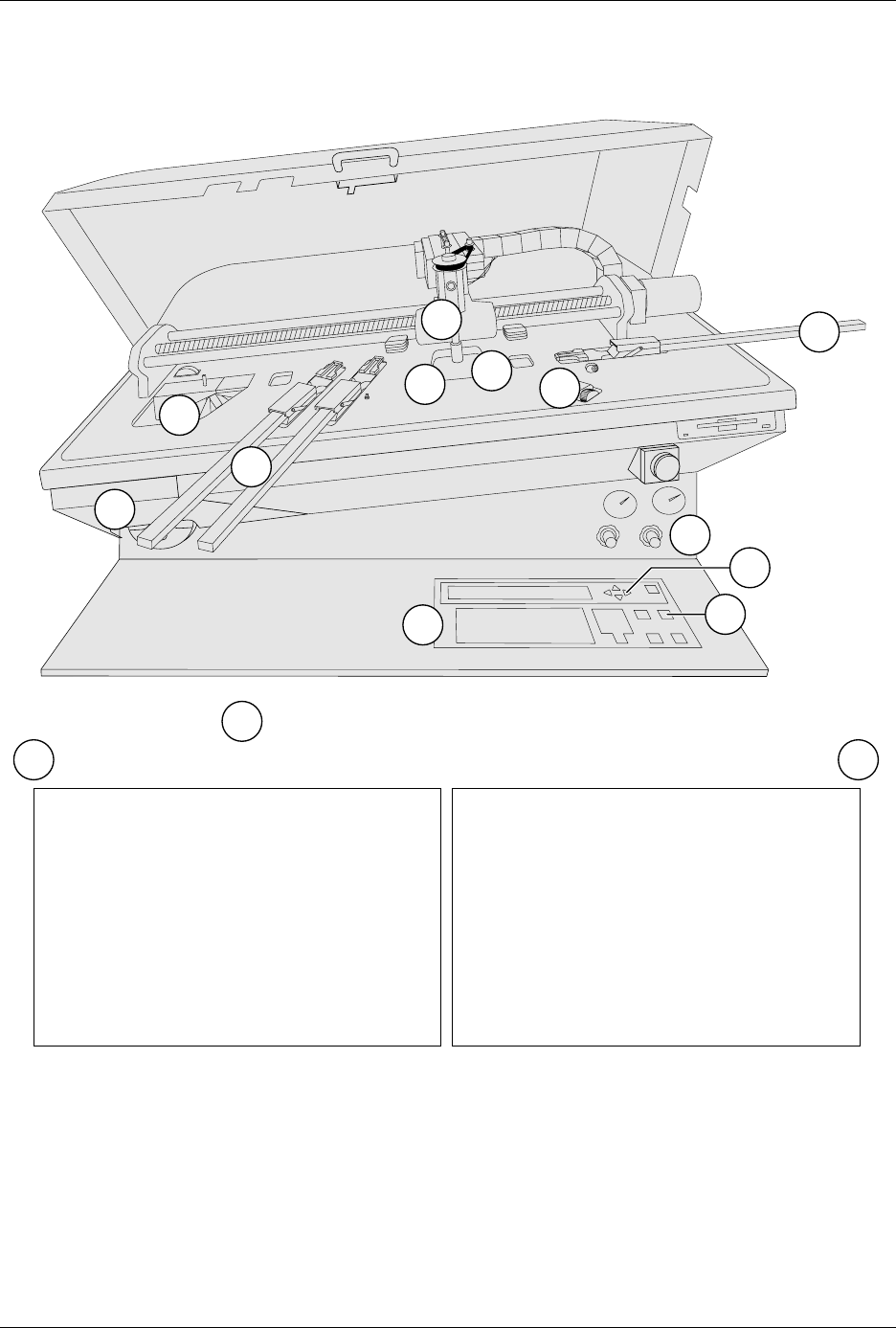
number called out in Figure 4-1.
1. Configure and install a new programming module (page 4-8).
2. Adjust track width (page 4-12).
3. Install new chuck (page 4-16).
4. Check high and low air pressure (page 4-17).
5. Install new labels (page 4-18).
6. Perform an ADC label calibration (pages 4-19 and 4-22).
7. Insert an input tube and two empty output tubes (page 4-22).
8. Start TaskLink (page 4-23).
9. Select a Task from the screen list (page 4-24).
10. Select device from the choices on the screen (page 4-24).
11. Align the beam-to-device and the device-to-module (page 4-27).
12. Press
START
to start the Task.
13. If needed, check the track air during operation (page 4-40).
Operation
ProMaster 2500 User Manual 4-3
Figure 4-1
Overview of the Procedure for Starting a Task
1950-3
2
4
5
6
8
9
10
7
1
3
Type "tl " on the PC keyboard
7
6
11
b
a
a
b
11
12
a
b
(Insert Screen)
(Insert Screen)