2500_Users_Manual - 第156页
Preven tive Maint enance 5-2 ProMa ster 25 00 U ser Ma nual Theory of Oper ation This se ction describes t he operation of ea ch of the ProMast er 2500’s maj or components. TaskLink You will normally operate the 2500 und…

ProMaster 2500 User Manual 5-1
5
Preventive Maintenance
This chapter describes ProMaster 2500 theory of operation, diagnostics,
and preventive maintenance procedures. Diagnostic tests are described
for the motors, solenoids, optics, switches, and programming electronics.
The information in this chapter is presented in the following order:
Theory of Operation................................................................................5-2
Conditions Requiring Corrective Action ...........................................5-21
Corrective Adjustments........................................................................5-24
Diagnostics .............................................................................................5-30
Preventive Maintenance Procedures For Operators ........................5-55
Preventive Maintenance Procedures For Service Technicians........5-60
WARNING:Performing some of the diagnostic procedures in this
chapter will expose you to harmful high voltage. To avoid
electrical shock or mechanical injury, only a service
technician trained on electromechanical equipment
should perform the diagnostic tests that require lifting the
main plate while the 2500 is on.

Preventive Maintenance
5-2 ProMaster 2500 User Manual
Theory of Operation
This section describes the operation of each of the ProMaster 2500’s major
components.
TaskLink
You will normally operate the 2500 under the system control of the
TaskLink software program, running on a personal computer (PC).
TaskLink uses a set of computer remote control commands to
communicate with the 2500. These commands control the programming,
handling, labeling, and binning operations of the 2500.
During a typical communication sequence between TaskLink and the
2500, TaskLink issues a command to a subsystem, then yields control to
that subsystem and waits for a reply. The communication sequence will
usually occur in the following manner:
1. TaskLink sends a program command to the Programming Electronics
(PE) subsystem and waits for the PE to complete the procedure.
2. When the PE has completed the procedure, it sends a signal to
TaskLink indicating whether the device has passed or failed.
3. If the device passed, TaskLink looks at the task to determine what
additional procedures need to be performed. TaskLink then sends
the next command to the 2500.
If the device failed, TaskLink displays an error message on your PC
monitor. If the error is related to device testing or programming, the
error code is recorded in a log file on the hard disk of your PC.
Error messages are described in Chapter 6.
4. When a device passes the programming/verify operation, TaskLink
receives a category signal from the programming electronics, and
sends it to the 2500. The 2500 checks the signal against the bin map
and processes the device accordingly.
Device Processing
This section describes the flow of a device through the 2500. A device
travels from the input tube to the programming station, then to the
labeling station (if the device passes the verification tests), and then to
one of two output tubes.
Device Moves to
Programming Station
A device travels from the input tube to the programming station in the
following manner:
1. When TaskLink runs a task, it prompts the handler to perform a brief
self-calibration initializing routine before loading the first device.
One of the checks performed during this routine is to see if the hood
is raised. If the hood is raised, the handler displays a warning
message prompting the operator to lower the hood before continuing
the task.
2. The operator inserts a tube containing blank (unprogrammed)
devices into the input tube holder. This action is detected by the
input tube holder microswitches (19 in Figure 5-3).
Preventive Maintenance
ProMaster 2500 User Manual 5-3
3. The tube is shaken by the input orbital assembly to help devices slide
from the tube onto the input track. The base of the input tube clamp
is mounted to a plate. The orbital disk mounting shaft is drilled off-
center and acts as a cam against the plate.
The disk, which is clamped to the motor, rotates causing the plate to
jog back and forth (following the slight cam). As the input orbital
motor rotates at speed, it generates vibration to prod devices from the
input tube.
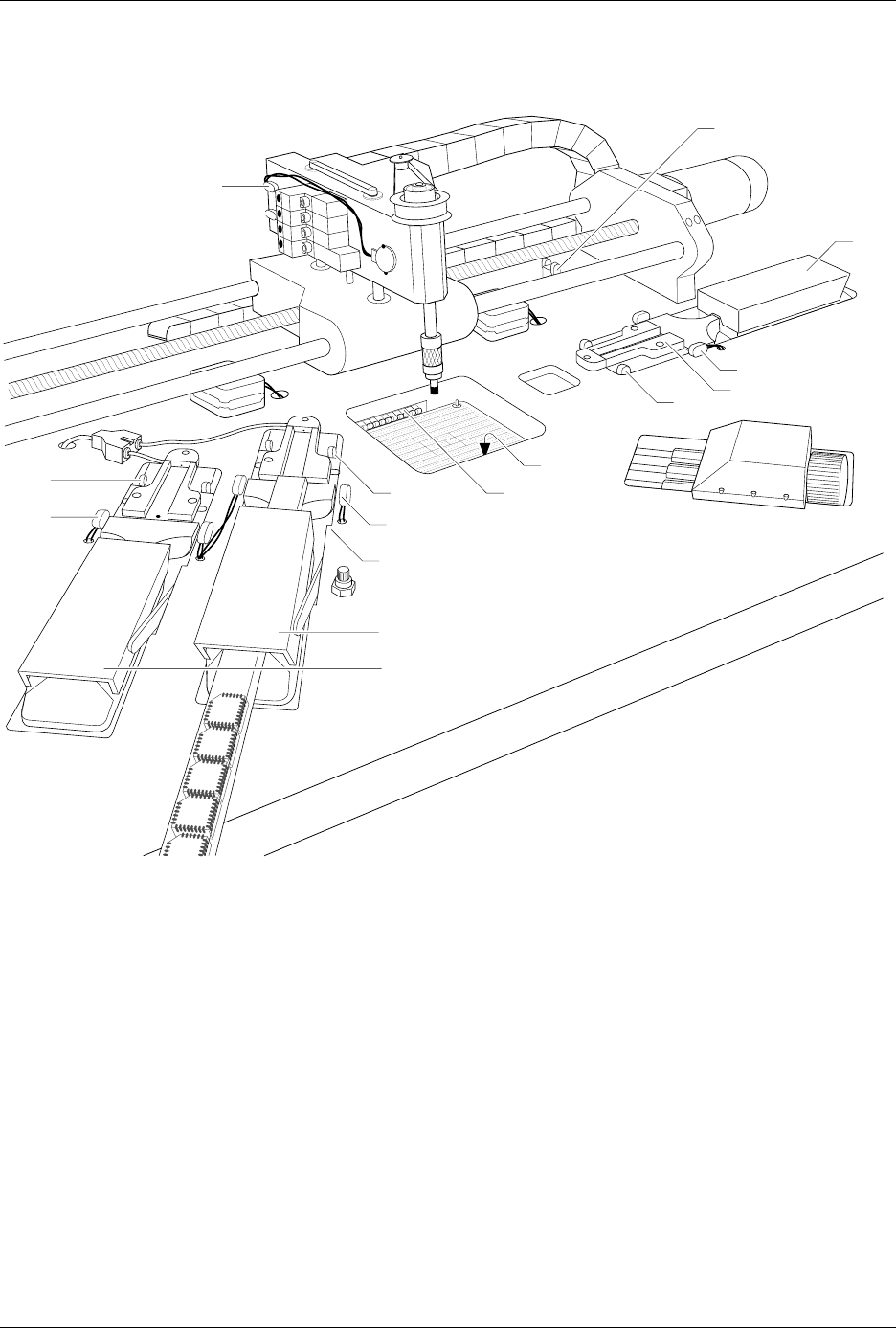
Figure 5-1
Optic and Microswitch Locations
1939-1
1
15 (Under main plate)
2
17
3
4
13
14
20 (Output tube 1)
21 (Output tube 2)
19
11
12
16 (Under main plate)
22
23