2500_Users_Manual - 第158页
Preven tive Maint enance 5-4 ProMa ster 25 00 U ser Ma nual 4. A device, positioned a gainst the program ming station sto p guide, blocks the beam of the part detect optic. The handler detects the blocked optic and advan…
Preventive Maintenance
ProMaster 2500 User Manual 5-3
3. The tube is shaken by the input orbital assembly to help devices slide
from the tube onto the input track. The base of the input tube clamp
is mounted to a plate. The orbital disk mounting shaft is drilled off-
center and acts as a cam against the plate.
The disk, which is clamped to the motor, rotates causing the plate to
jog back and forth (following the slight cam). As the input orbital
motor rotates at speed, it generates vibration to prod devices from the
input tube.
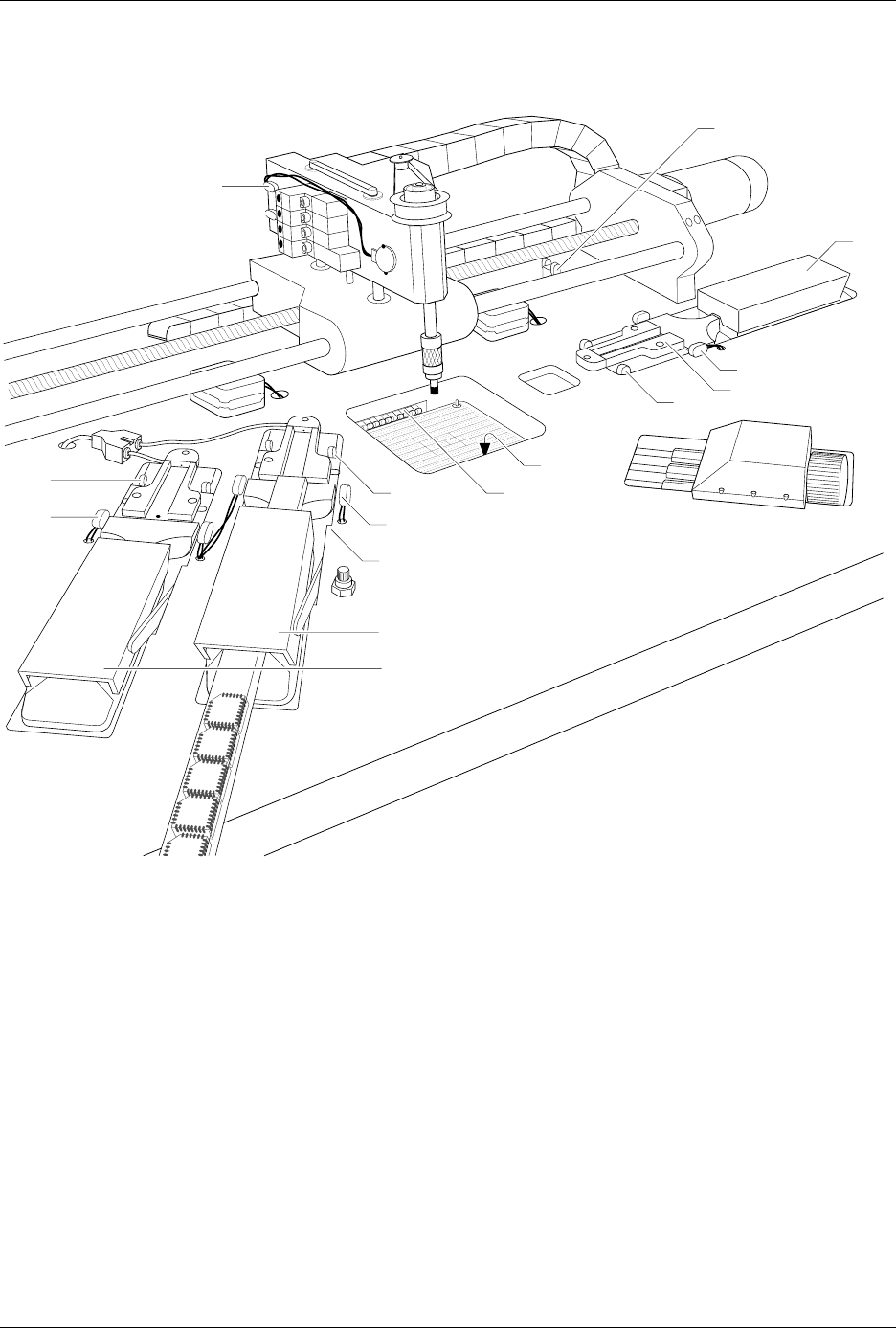
Figure 5-1
Optic and Microswitch Locations
1939-1
1
15 (Under main plate)
2
17
3
4
13
14
20 (Output tube 1)
21 (Output tube 2)
19
11
12
16 (Under main plate)
22
23

Preventive Maintenance
5-4 ProMaster 2500 User Manual
4. A device, positioned against the programming station stop guide,
blocks the beam of the part detect optic. The handler detects the
blocked optic and advances the beam until it is centered over the
device (the location is determined by the pre-defined package size
downloaded by TaskLink). The handler’s firmware stores the
package dimensions for all supported package types. The firmware
prompts the operator to align the first device in a run. The beam’s
traverse motor advances the number of motor steps necessary to
align the chuck over the center of the waiting device.
5. The beam up/down solenoid (solenoid test 4 in Figure 5-16) switches
on the low pressure air to lower the beam. The beam down optic (3 in
Figure 5-1), mounted on the side of the beam, senses the vertical
position of the beam and triggers the high pressure solenoid to
complete the lowering of the beam to the device.
Device Is Inserted into
Programming Module
The rubber chuck tip creates a vacuum seal on the device. When the
vacuum seal has been created, a switch on the left side of the beam is
triggered. The 2500 detects the vacuum and the beam picks up the device.
The beam rises with the device on its tip, moves to the programming
station, pauses so that the operator can align the first device in a run, and
lowers the device into the programming module.
Device Is Programmed
Before the device is programmed, TaskLink and the PE perform several
device tests. Each device-related operation performed by the PE is part of
a programming algorithm specified by the device manufacturer. In most
cases these specifications instruct the PE to perform the following
procedures:
1. A pre-programming check of the device
2. The programming of the device
3. A post-programming data verification cycle
A typical pre-programming sequence includes the following steps:
•
Check for presence of a device in the programming module
—This
verifies that a device is in the programming block.
•
Continuity test
— This confirms that the device pins have continuity
with the module’s contacts. Dirty module contacts or a misaligned
device can cause the handler to fail this test. In case of failure,
TaskLink displays
CONTINUITY TEST FAIL
and records the test result
in the log file.
•
Check for misjustified device
—This confirms that the device
ground and VCC pins match the programming module’s ground and
VCC. (Refer to the device alignment procedure, beginning on page
4-22.) This test also detects devices that have been installed
backwards. When this test fails, TaskLink displays
CONTINUITY TEST
FAIL
.

Preventive Maintenance
ProMaster 2500 User Manual 5-5
•
Security fuse check
—Some devices have a security fuse feature that,
when programmed, prevents the reading of the main fuse pattern.
Some semiconductor manufacturers allow the programmer to check
the fuse before trying to program the fuses in the main array. If the
security fuse is blown, the device cannot be read or programmed and
TaskLink displays
SECURITY FUSE VIOLATION
.
•
Check silicon ID
—Many devices have internal identification
numbers (an electronic I.D.) that the PE can read. These numbers
allow the PE to determine the manufacturer of the device, the part
number, and the type. For example, if the Task identifies a device
from manufacturer A (requiring a specific programming algorithm)
and a tube of devices from manufacturer B (requiring a different
programming algorithm) is mistakenly inserted, TaskLink displays
ELECTRONIC ID ERROR
and the handler routes these devices to an
output tube specified in the Task setup before a programming pulse
has been applied.
•
Blank check
—This checks to ensure that all the fuses in the device’s
main array are blank (unprogrammed). Most devices allow the
programming cycle to continue even when a programmed fuse has
been detected. If the Task is configured to reject devices with any
programmed fuses, TaskLink displays
NON-BLANK
and the handler
routes these devices to an output tube specified in the Task setup.
•
Illegal bit check
—Some devices that are programmable by the
system are not electrically erasable. The PE can erase only electrically
erasable devices. The PE checks each fuse to make sure the fuse is
unprogrammed (blank). If the PE finds a programmed fuse in the
device and its RAM data indicates that the fuse should be
unprogrammed, TaskLink displays
ILLEGAL BIT
. Most erasable/
programmable devices cannot be erased in the socket. The system
routes these devices to an output tube specified in the binning setup.
If the device passes all these pre-programming tests, the PE begins
programming, using the manufacturer’s programming algorithm. Some
algorithms require that the PE apply a single programming pulse to the
fuse, and then immediately check the fuse to see if it’s programmed
before continuing. This type of algorithm normally specifies a maximum
number of times that the PE can try to program a fuse. If the fuse fails to
program after the maximum number of pulses have been applied,
TaskLink fails the device and displays
PROGRAM FAIL
.