2500_Users_Manual - 第205页
Preventi ve Mai nten ance ProM aster 25 00 User Manua l 5-51 Checking the Reference Points The programming electronics (PE) assembly in the ProMaster 2500 has no service calibration potentiometers that need to be adjust …

Preventive Maintenance
5-50 ProMaster 2500 User Manual
Press a key on the terminal keyboard. If the port is operating properly,
the character you typed appears on the terminal display. If random
characters are displayed, the baud rates may not match, or there may be a
problem in the handler or terminal port. Press any key to end the test and
return to the Communications Diagnostic menu.
Programming
Electronics Self-test
The programming electronics assembly goes through a complete self-test
on powerup, or when you select self-test from a special menu in
TaskLink. The self-test command allows you to test portions of the
programming electronics (PE) to verify proper operation or to isolate a
problem.
The 2500 verifies internal voltages every time it is powered up and every
time a complete self-test is run. The voltage verification is performed by
software and is compared to a precision, laser-trimmed +10 volt
reference. Data I/O recommends that you cycle
and
run a complete self-
test cycle at least every three months so that the PE remains within its
specified operating range.
To ensure that your 2500 continues to meet product performance
specifications, Data I/O recommends a complete, preventive
maintenance check and performance evaluation every three months.
Powerup Self-test
During powerup, the PE performs self-test diagnostics, including a
performance verification of its internal power supplies and a test of the
microprocessor’s kernel components (EPROM, ID PAL, system RAM,
DUART, and decode circuits).
When the kernel tests are complete, the PE reads the system files on the
disk drive and loads them into its system RAM. Then it completes self-
test by checking its major boards and assemblies. The PE’s completion of
the self-test indicates only that the main components are functioning
enough for the PE to complete the self-test; it does not necessarily indicate
the absence of errors.
ESD Precautions
The circuit boards in the 2500 are susceptible to electrostatic discharge
(ESD), which can damage the circuitry in the programming electronics.
The easiest way to prevent damage from ESD is to make sure a common
static potential (ground) exists between the static-sensitive device, its
environment, and you. Use an antistatic strap to ground yourself to an
antistatic workstation.
WARNING:To avoid electric shock, the antistatic wrist strap must
contain a 1 M
Ω
(minimum) to 10 M
Ω
(maximum)
isolating resistor.
If you don’t have an antistatic work station available, you can wear an
antistatic wrist strap and connect it to the banana plug on the 2500.

Preventive Maintenance
ProMaster 2500 User Manual 5-51
Checking the Reference
Points
The programming electronics (PE) assembly in the ProMaster 2500 has
no service calibration potentiometers that need to be adjusted. The
procedure described below explains how you can confirm the critical
reference levels that must be present for the programming electronics
assembly to run its performance verification and self-test accurately.
If any of the checks described below are outside the specified ranges,
contact Data I/O Customer Support as listed in the Preface.
WARNING:This procedure should be performed only by trained
electronics service personnel. When servicing the
ProMaster 2500, there is significant risk of electric shock
and injury from moving parts (mechanical injury). Do not
attempt this procedure unless you have been trained and
are qualified to do so.
Note: All instruments used for calibrating the ProMaster 2500 must be
maintained under a normal calibration validation cycle.
You will need the following tools and equipment:
• Hex wrench set
• Grounded wrist strap
• Antistatic workstation
• Digital multimeter, accurate to two decimal places
• Oscilloscope or frequency counter
Note: To access the programming electronics, refer to the “Programming
Electronics Assembly Replacement” section in Chapter 7.
Follow the steps below to check the mandatory reference elements used
by the software in the programming electronics assembly during its
performance validation:
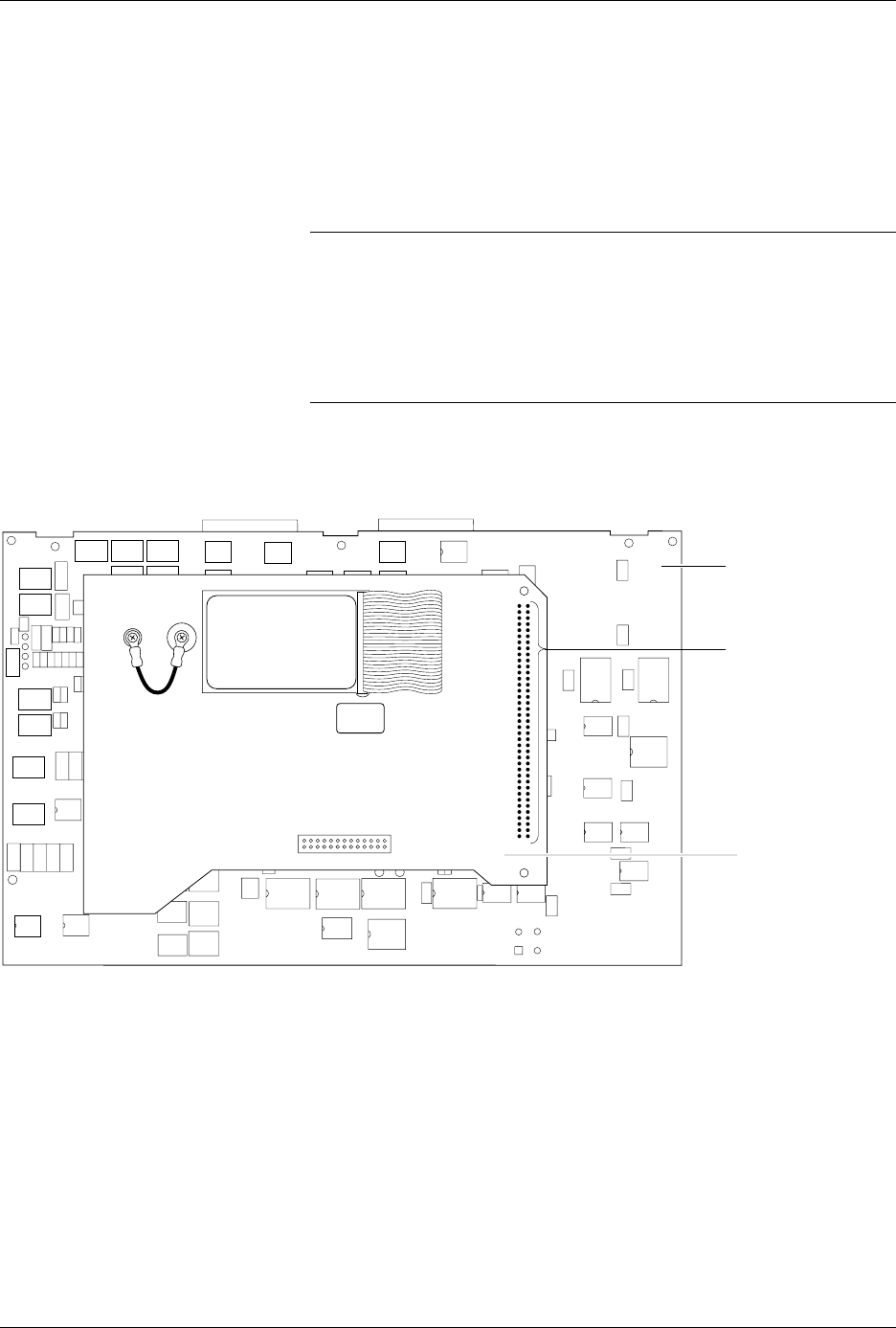
1. Locate the 78-pin connector on the mass storage module (MSM)
board (see Figure 5-21). Pins 1 and 78 are located on the lower end of
the connector; pins 39 and 40 are at the high end, near the RS-232C
connectors on the controller/waveform board.
The pins that you will be checking for this procedure are shown in
Figure 5-21 and are listed below:
•Pin 1: Ground
• Pin 24: +15V input supply voltage
• Pin 28: 8 MHz programming electronics clock
• Pin 78: +10V precision reference voltage
Preventive Maintenance
5-52 ProMaster 2500 User Manual
2. Check the 8 MHz programming electronics clock frequency by
placing the ground probe of your scope (or frequency counter) on
pin 1 (ground) and the input probe on pin 28 (see Figure 5-22).
The clock frequency should read between the minimum and
maximum values shown below:
3. Check the +10V precision reference by reading pin 78 (+10V) using
your digital multimeter (see Figure 5-14). The +10V signal should
read between the minimum and maximum values shown below:
Minimum Nominal Maximum
7.999 MHz 8.000 MHz 8.001 MHz
Minimum Nominal Maximum
+9.090V 10.000V 10.010V
Figure 5-21
Position of the 78-pin Connector on the Mass Storage Module
2142-1
WAVEFORM BOARD
78-PIN CONNECTOR
MASS STORAGE
MODULE