2500_Users_Manual - 第219页
Preventi ve Mai nten ance ProM aster 25 00 User Manua l 5-65 Adjusting t he Track Width Cables All three tracks shou ld have the same tra ck width a nd be adjusted equally. If on e of the tracks is out of adjustment wi t…
Preventive Maintenance
5-64 ProMaster 2500 User Manual
Track Adjustments
Adjusting Track
Height
You may have to adjust the track height to compensate for the varying
thickness of different device tubes. Use a 50-mil hex wrench to raise or
lower the height of the track. Follow the steps below.
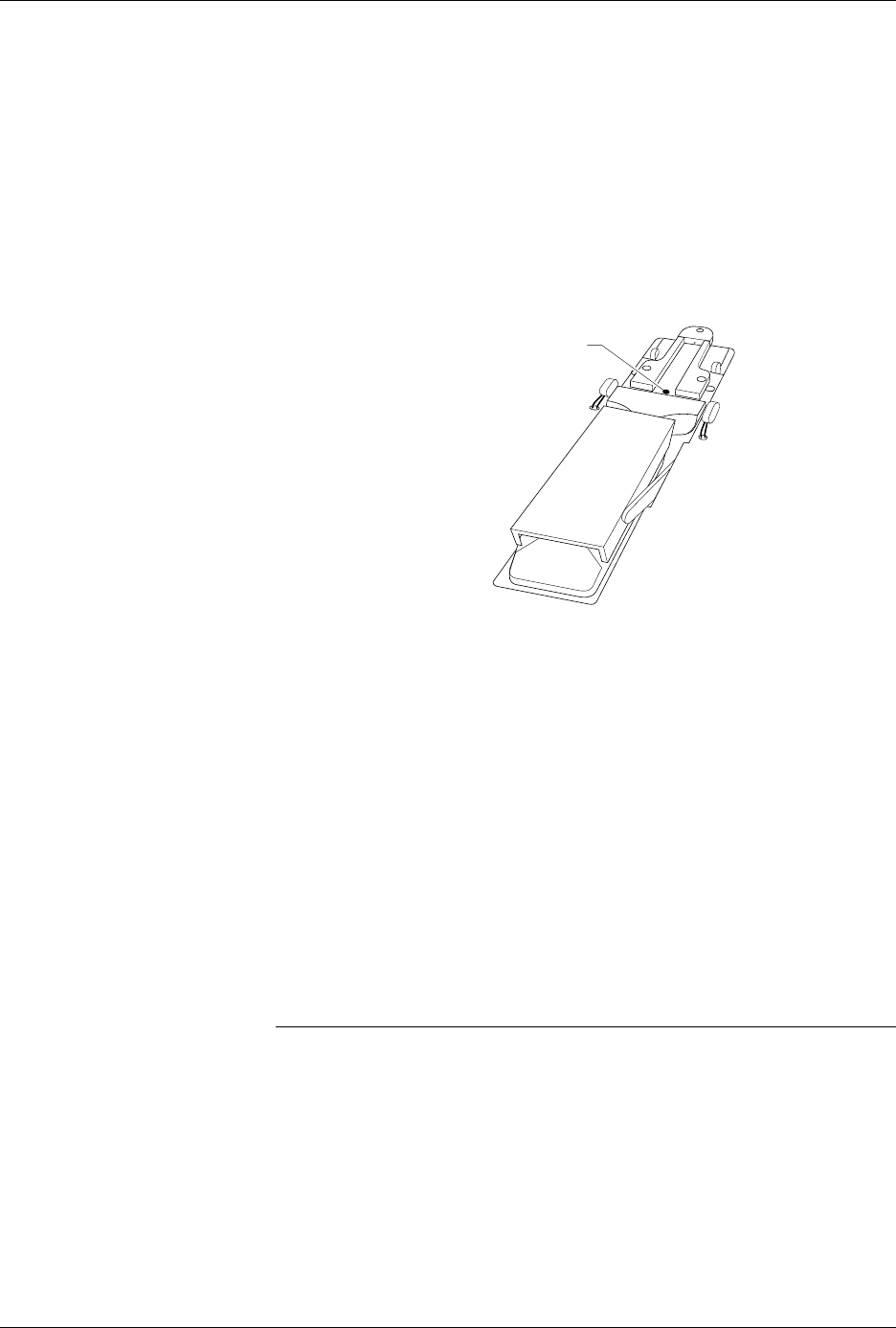
1. Insert the 50-mil hex wrench into one of the track height adjustment
screws (see Figure 5-27).
2. Turn the track height adjustment screw clockwise to raise the track
height, or counterclockwise to lower the track height.
Adjusting the Angle of
the Track Walls
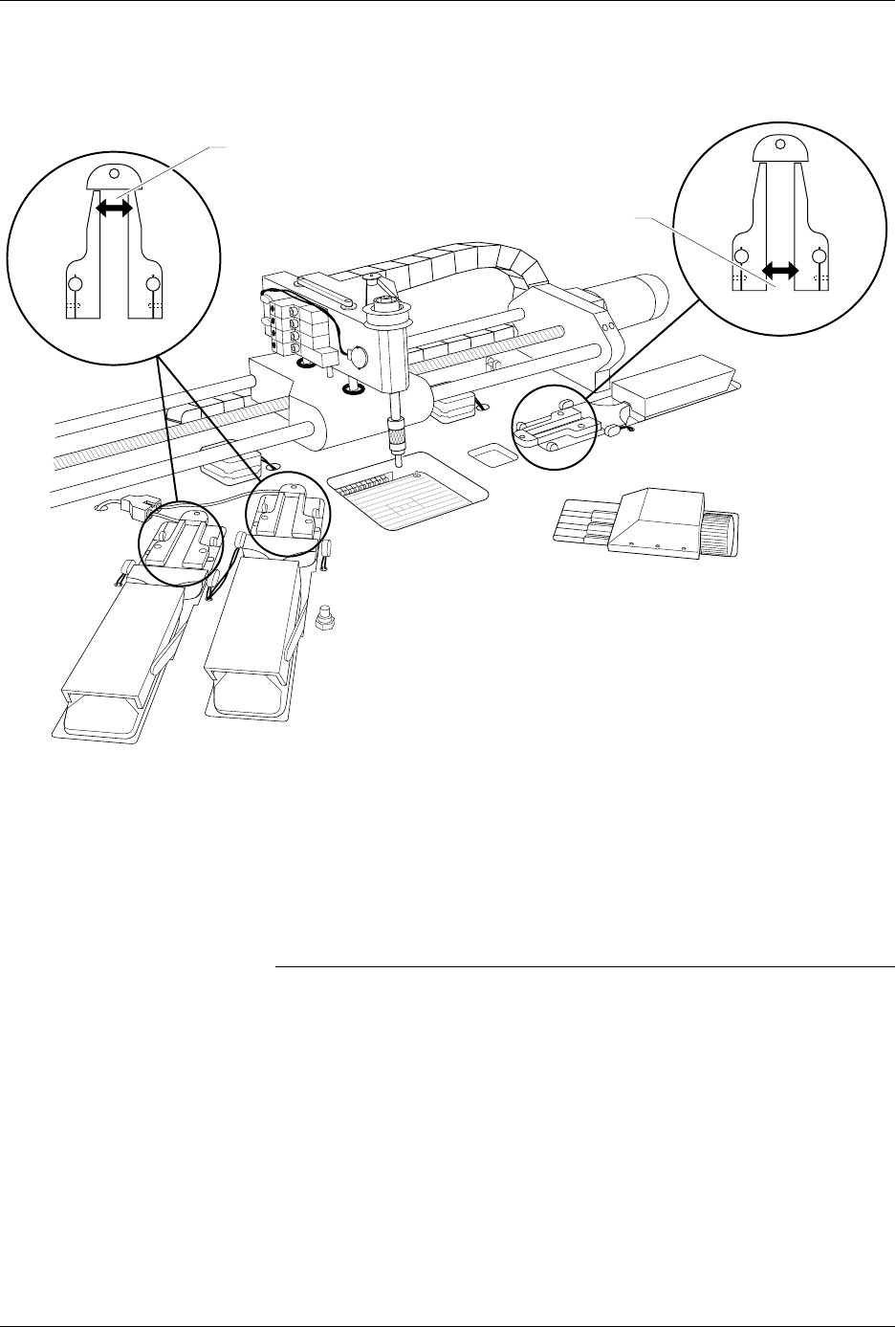
The entrance to the input track should be approximately 0.010 inch wider
than the pick-up point of the input track. The exit point of each output
track should be approximately 0.010 inch wider than the pick-up point of
the input track. If the 2500 is having difficulty picking up a device from
the input track or if devices flip up during operation, you may need to
perform a funnel adjustment.
To perform a funnel adjustment, follow the steps below.
1. Use a 3/32-inch hex wrench to loosen the set screws on the input
track front wall and rear wall.
2. Adjust each of the input track walls evenly to create a gap at the pick-
up point that is approximately 0.010 inch narrower than the entrance
to the input track.
Note: You may want to use a caliper to ensure that the gap at the pick-up point
is approximately 0.010 inch narrower than the gap at the entrance to the
input track.
3. When the input track is correctly adjusted, use a 3/32-inch hex
wrench to tighten the set screws on the input track front wall and rear
wall.
4. The output track funnel adjustment procedure is identical to the
input track procedure, except that the exit point of each output track
should be approximately 0.010 inch wider than the pick-up point of
the input track.
Figure 5-27
Adjusting the Track Height
2288-1
TRACK HEIGHT
ADJUSTMENT SCREW
Preventive Maintenance
ProMaster 2500 User Manual 5-65
Adjusting the Track Width
Cables
All three tracks should have the same track width and be adjusted
equally. If one of the tracks is out of adjustment with the others, you may
have to perform the track width adjustment procedure. To perform the
track adjustment procedure, follow the steps below.
Note: Under normal circumstances the tracks should stay in adjustment and
you should not have to perform this procedure. Make sure you have
correctly determined that one of the tracks is out of adjustment before you
proceed.
1. Turn off the 2500 and remove the power cord.
2. Loosen the two screws in the corners of the main plate.
3. Lift the main plate until it stops in the fully upright position.
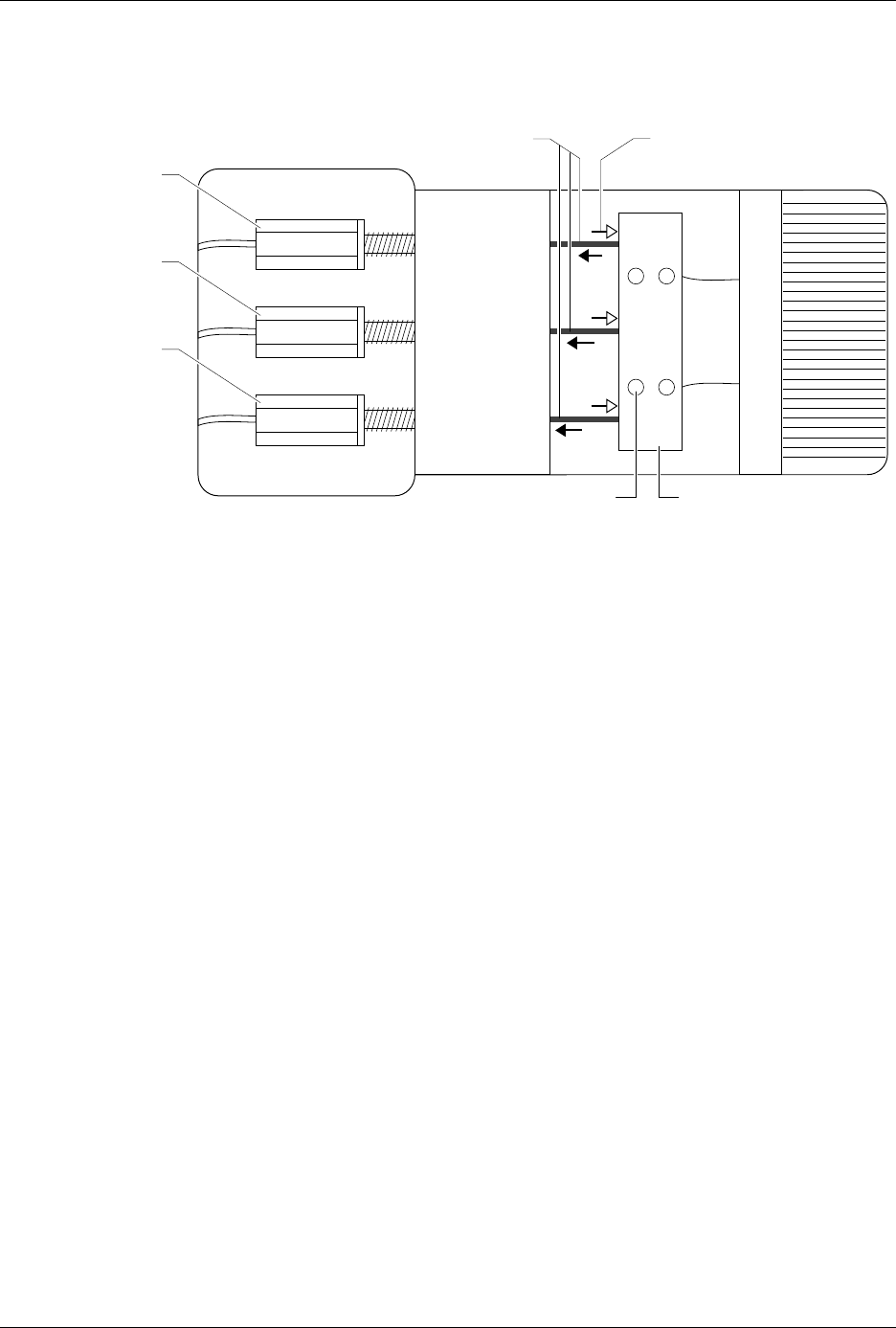
4. To perform a fine track width adjustment, use an adjustable wrench
to tighten or loosen one of the track adjustment nuts (see Figure 5-29).
Turn the nut clockwise to make the track wider or counter-clockwise
to make the track narrower.
Figure 5-28
Input and Output Track Funnel Adjustment
2284-2
OUTPUT TRACK
TRACK ENTRANCE
(Make wider by .010")
TRACK ENTRANCE
(Make wider by .010")
INPUT TRACK
Preventive Maintenance
5-66 ProMaster 2500 User Manual
5. To perform a coarse track width adjustment, use a 3/32-inch hex
wrench to loosen the four set screws in the cable pinch block (see
Figure 5-29). Use calipers or a device to set a constant width for all
three track sections. Use a needle-nose pliers to pull one of the cables
away from the adjustment nuts to make the track wider, or push the
cable toward the adjustment nuts to make the track narrower.
6. Tighten the four set screws to lock the cable(s) in their new position.
Recheck the track width by opening the track to its widest setting
and then closing it down to the width used in step 5.
7. Apply a drop of silicone-based glue (such as RTV™) where the cable
enters the cable pinch block.
Figure 5-29
Adjusting the Track Width Cables
2285-1
PULLING THE CABLES
WILL WIDEN THE TRACK
PUSHING THESE CABLES
WILL NARROW THE TRACK
or
INPUT TRACK *
OUTPUT TRACK 1 *
(Right track)
OUTPUT TRACK 2 *
(Left track)
Turn clockwise to make
tracks wider
Turn counter-clockwise
to make tracks narrower
*
SET SCREW (1 of 4)
CABLE PINCH BLOCK