2500_Users_Manual - 第244页
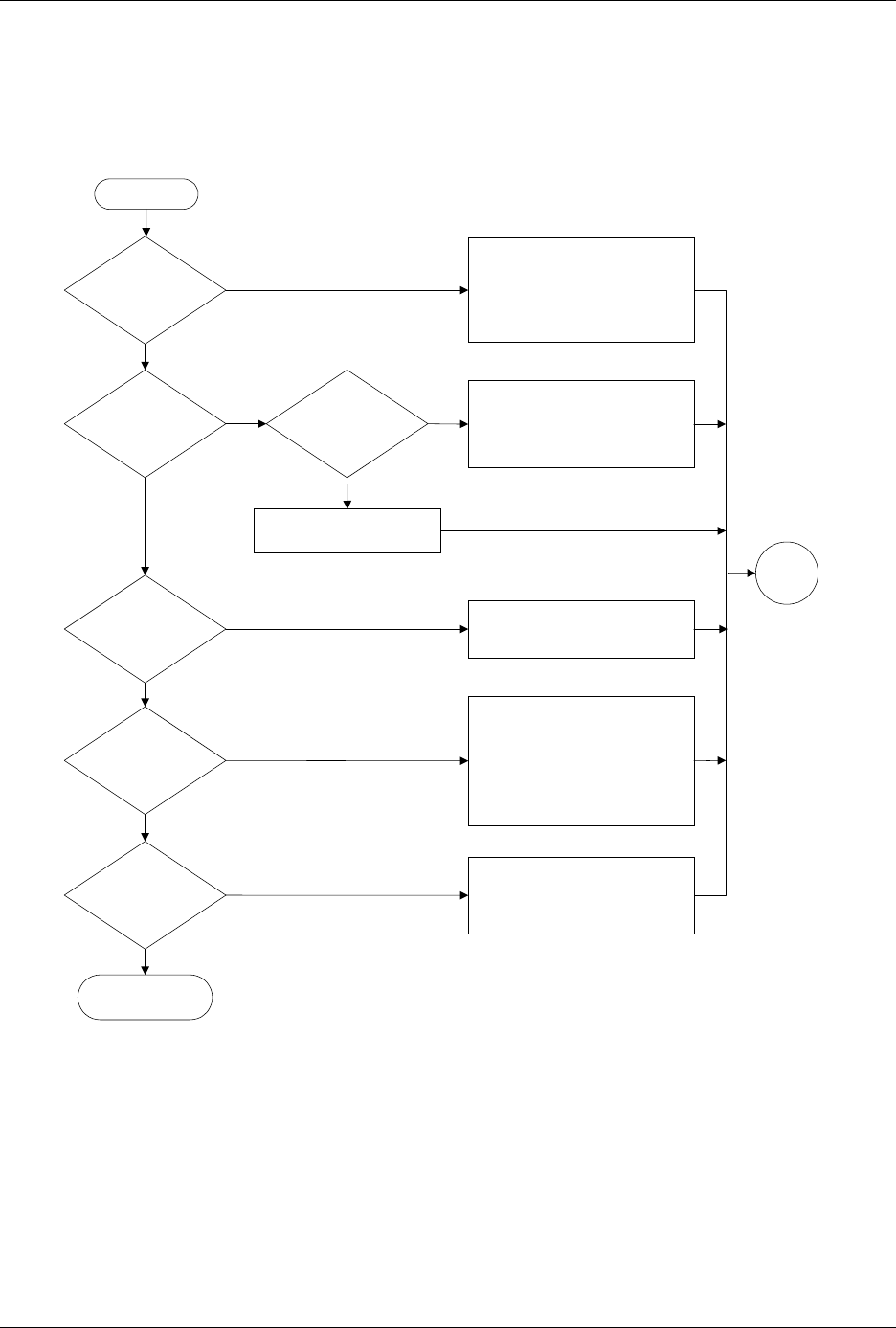
Troubleshootin g 6-22 ProMa ster 25 00 U ser Ma nual Figure 6-7 The B eam Does Not De liver the Dev ice Co rrectl y (page numbers are in pare nthese s) Does beam release devices? Does the device arrive at the output trac…

Troubleshooting
ProMaster 2500 User Manual 6-21
Troubleshooting
6-22 ProMaster 2500 User Manual
Figure 6-7
The Beam Does Not Deliver the Device Correctly (page numbers are in parentheses)
Does
beam release
devices?
Does the
device arrive at the
output track?
Does
beam lower to
output track
?
Does an
object block
beam?
Do
devices
move down
track?
Do devices
slide into output
tubes?
End
No
Yes
No
Yes
No
Yes
No
Yes
No
Yes
Clear the beam's vertical path
Yes
No
Check high air pressure (2-7)
Check vacuum generator (B-2)
Clean & chalk chuck tip (5-56)
Adjust track width (4-12)
Jog chuck position over track using
2500 keyboard arrow keys
Perform output track funnel
adjustment (5-64)
Adjust track air (4-38)
Check output orbital motor (5-40)
Check devices for label residue
Check for mechanical obstructions
Check +90V beam voltage (5-13)
Check flex coupler (7-21)
Clean & lubricate lead screw (5-63)
Reduce beam motor speed (B-3)
Check wiring & connectors
Check low pressure air (2-7)
Check beam up/down solenoid (5-38)
Check beam down optic test (5-32)
Clean & lubricate beam shafts (5-63)
Check wiring & connectors
Ensure that output tubes are correct
size, undamaged, & oriented correctly
Adjust track height (5-64)
Check devices for label residue
Start
Go to
Start
ProMaster 2500 User Manual 7-1
7
Repair and Replacement
Procedures
This chapter contains instructions for replacing failed components. These
component replacement procedures should be performed by qualified
service personnel only. Please refer to Chapter 6, “Troubleshooting,” to
determine which ProMaster 2500 component may be malfunctioning and
may require replacement. The flow chart in Chapter 6 will help you
identify a specific component failure and direct you to the appropriate
cleaning, adjustment, or replacement procedure.
The replacement procedures are divided into several sections and
presented in the following order:
Fuse Replacement....................................................................................7-2
Programming Electronics Assembly Replacement ............................7-3
Motor Replacement.................................................................................7-8
Mechanical Assembly Removal...........................................................7-16
Solenoid Replacement...........................................................................7-19
Power Supply Replacement.................................................................7-19
System Fan Replacement......................................................................7-21
Controller Board Replacement............................................................7-21
Beam Assembly Component Replacement........................................7-22
Disk Drive Replacement.......................................................................7-28
Keyboard/Display Assembly Replacement......................................7-29
Programmer Module Replacement.....................................................7-29
Assembly Drawings..............................................................................7-40