2500_Users_Manual - 第250页
Repair and Repl acement Procedures 7-6 ProMa ster 25 00 U ser Ma nual 10. Holding the programming electronics from the bottom, remove the last two screws . Lower the pro gramming module clam p assembly and let it rest on…
Repair and Replacement Procedures
ProMaster 2500 User Manual 7-5
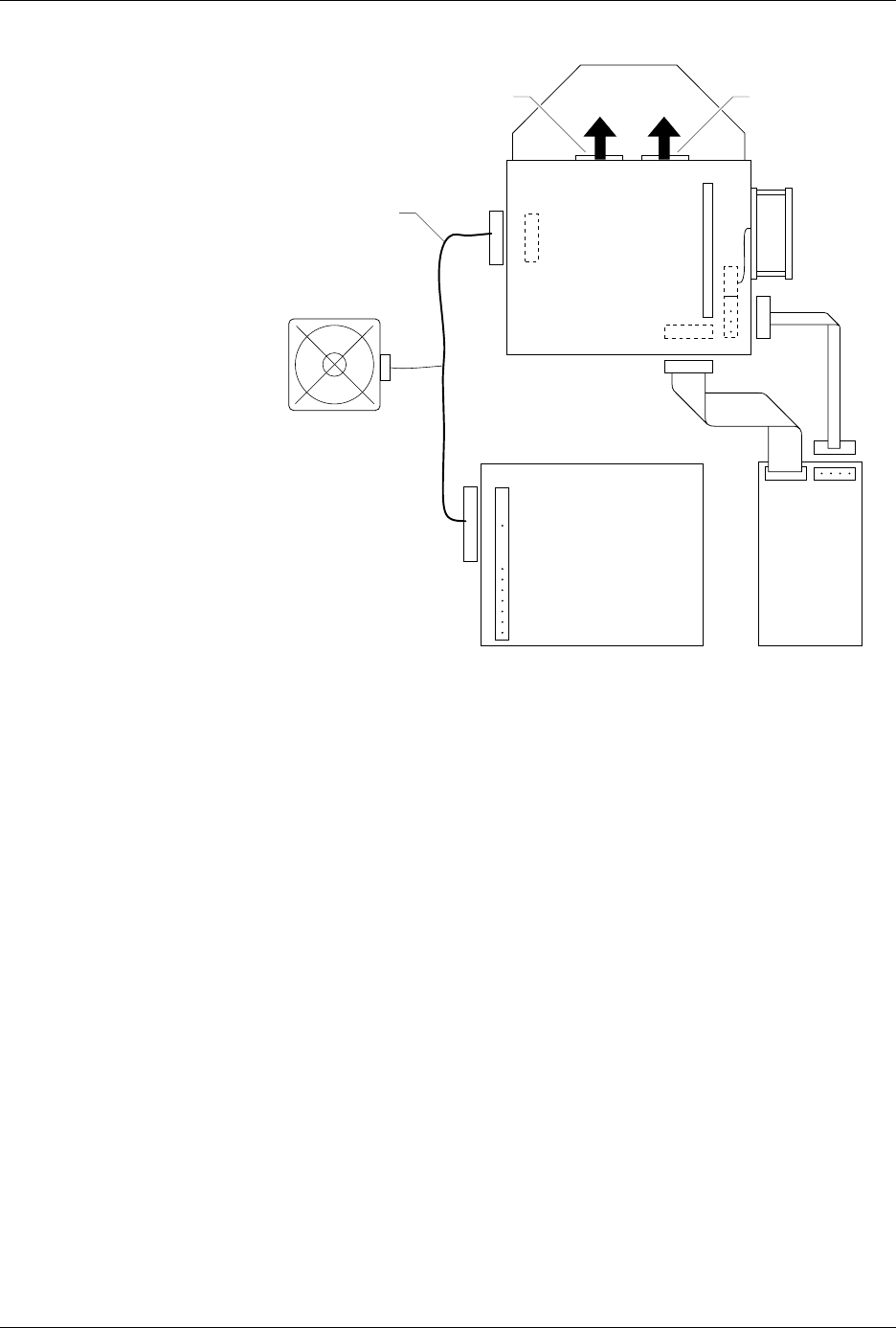
6. Locate the wide ribbon cable that connects the controller/waveform
board with the disk drive. (This is the wider of two ribbon cables
running between the controller/waveform board and the disk drive.)
Mark the polarity of this cable to the connector on the controller/
waveform board so you can reinstall it correctly later. Disconnect this
cable from the connector on the controller/waveform board.
7. Mark the polarity and location of the narrow ribbon cable connecting
the controller/waveform board with the disk drive. Disconnect this
cable from the connector on the controller/waveform board.
8. Locate and label the two RS-232C ribbon cables (terminal and remote
cables) on the controller/waveform board. These are indicated by
two black arrows in Figure 7-4. Mark their connector locations so you
will be able to reinstall them correctly. Disconnect these cables from
their connectors on the controller/waveform board.
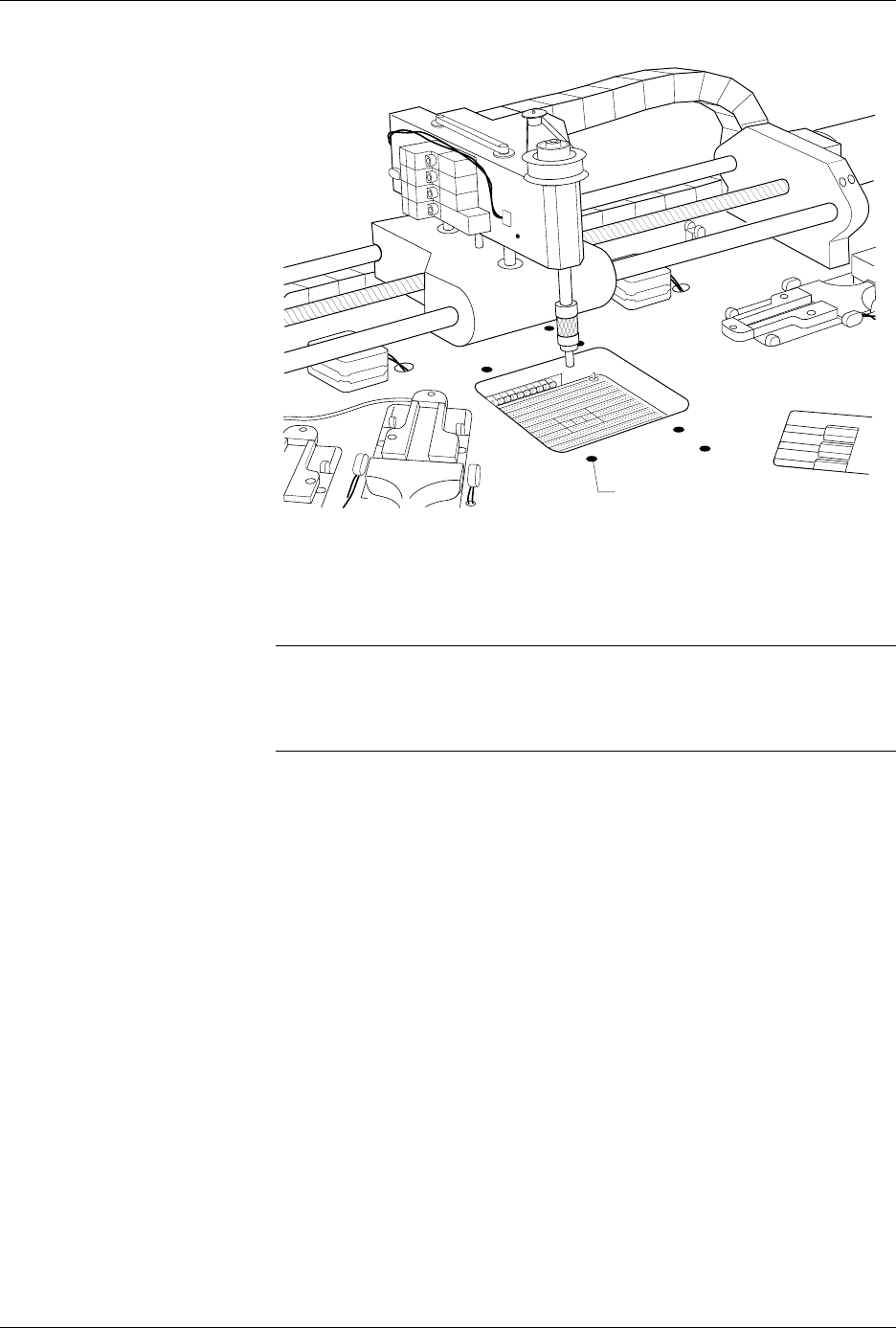
9. From above the main plate, locate the six 7/64-inch hex screws that
hold the programming module clamp assembly to the main plate (see
Figure 7-5).
Remove two of the screws holding the back of the assembly and two
of the screws holding the front. Loosen the other two screws, but do
not remove them.
Figure 7-4
Polarity of the Cables on the
Programming Electronics
Assembly
2056-2
DISK
DRIVE
PROGRAMMING
ELECTRONICS
POWER SUPPLY
TO MAIN
CONTROLLER
BOARD
R
R
B
B
R
R
R
(BOTTOM)
(TOP)
B
B
B
BL
R
SYSTEM FAN
CONTROLLER/
WAVEFORM
BOARD
TERMINAL REMOTE
RED AND BLACK
POWER CABLE
TO TERMINAL PORT
Repair and Replacement Procedures
7-6 ProMaster 2500 User Manual
10. Holding the programming electronics from the bottom, remove the
last two screws. Lower the programming module clamp assembly
and let it rest on the black protective shield.
Note: Hold the programming module clamp assembly in place (from below the
main plate) when you remove the assembly from the main plate.
11. Disconnect the two optic cables (S-24 and C-25).
Note: Before removing the air lines as described in the next step, mark the hoses
for proper reinstallation.
12. Remove the two blue and two red air lines from the four quick
connects on the programming module clamp assembly (see Figure
5-2).
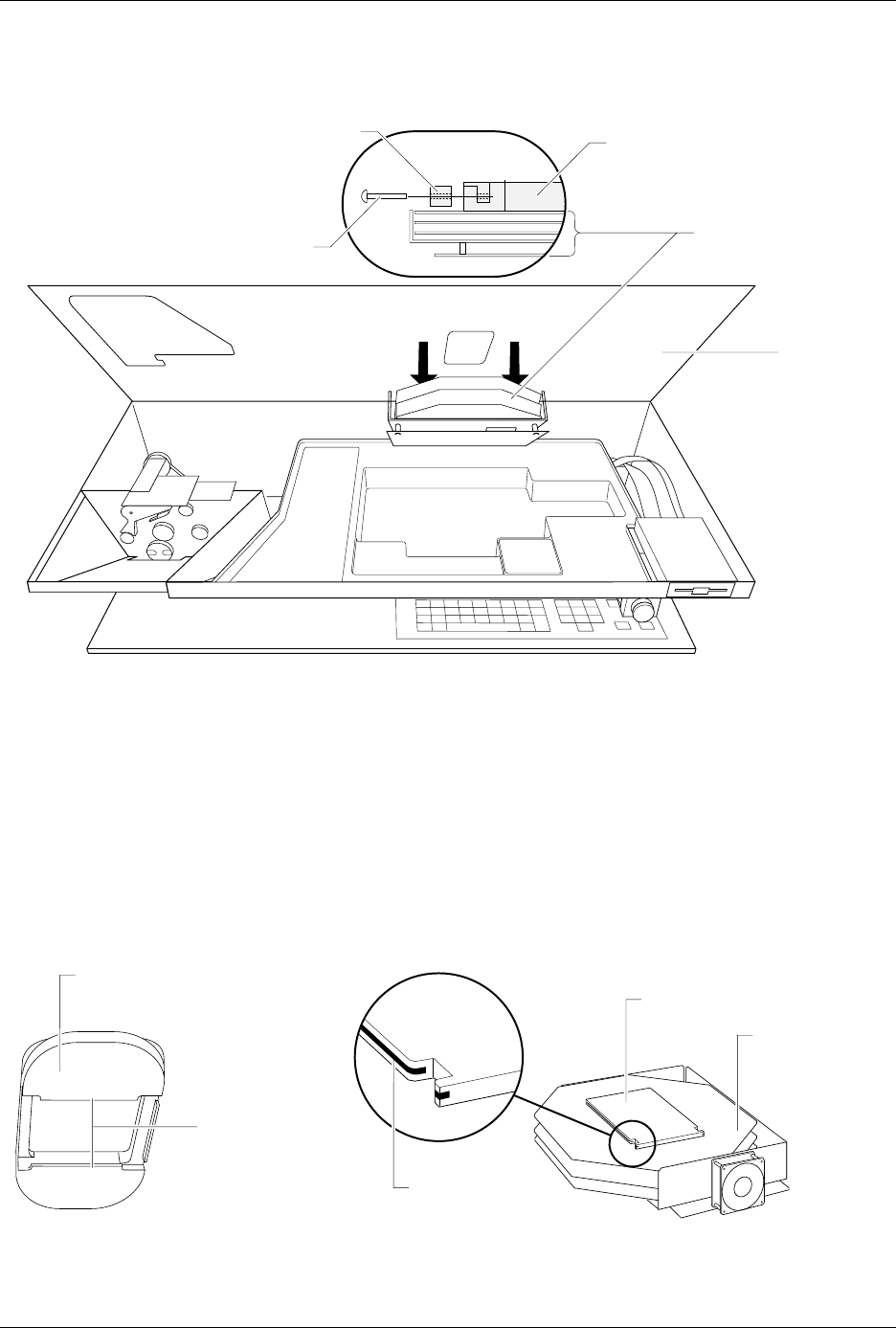
13. Remove the retaining bar that holds the PE assembly in place on the
underside of the main plate (see Figure 7-6). Use a 7/64-inch hex
wrench to remove the two hex screws that hold the bar in place. Set
these in a safe place so you can use them to reinstall the PE assembly.
Figure 7-5
Remove the Module Clamp
Assembly Screws
2313-1
SCREW LOCATION (1 of 6)
Repair and Replacement Procedures
ProMaster 2500 User Manual 7-7
14. Carefully slide the programming electronics assembly away from the
clamp assembly. Figure 7-7 shows the two tracks on the clamp
assembly that fit into grooves on the pin block. The track and grooves
hold the assembly to the underside of the main plate. Do not twist the
programming electronics assembly as you slide it away from the
clamp assembly; doing so may damage the pin block.
15. Set the programming electronics assembly on an antistatic surface.
Figure 7-6
Lower the Clamp Assembly and Remove the Retaining Bar
Figure 7-7
Programming Electronics Assembly Alignment
2070-2
MAIN PLATE
(Underside)
PROGRAMMING
ELECTRONICS
ASSEMBLY
PROGRAMMING MODULE
CLAMP ASSEMBLY
HEX HEAD SCREW
RETAINING BAR
A
J
S
SHIFT
B
K
T
DEL
C
L
U
D
M
V
E
N
W
F
O
X
SHIFT
G
P
Y
H
Q
Z
I
R
ENTER
1
4
7
2
5
8
3
6
9
0
LOW
CASE
RESET
STOP
CAL
START
2066-2
GROOVE
TRACKS
PIN BLOCK
PROGRAMMING
ELECTRONICS
ASSEMBLY
BOTTOM SIDE OF PROGRAMMING
MODULE CLAMP ASSEMBLY