2500_Users_Manual - 第264页
Repair and Repl acement Procedures 7-20 ProMa ster 25 00 U ser Ma nual Replacing the PE Power Supply If the programming electronics powe r supply fails, follow the steps below to replace it. 1. Turn off the 2500 a nd rem…
Repair and Replacement Procedures
ProMaster 2500 User Manual 7-19
Solenoid Replacement
This procedure describes the steps required to remove and replace a
solenoid. You can use this procedure to replace any of the solenoids in the
2500.
Replacing a Solenoid
If a solenoid fails, follow the steps below to replace it.
1. Turn off the 2500 and remove the power cord.
2. Disconnect the source air line and the input air line from the 2500 (as
described on page 2-6).
3. Disconnect the signal cable from the solenoid.
4. Use a small Phillips screwdriver to remove the two screws that
connect the solenoid to the manifold.
Note: As you remove the solenoid, make sure you don’t drop or lose the gasket
that is mounted between the solenoid and the manifold.
5. When you install the new solenoid on the manifold, make sure the
gasket stays in place between the solenoid and the manifold, then
reconnect the signal cable.
Power Supply Replacement
These procedures describe the steps required to remove and replace a
failed power supply.
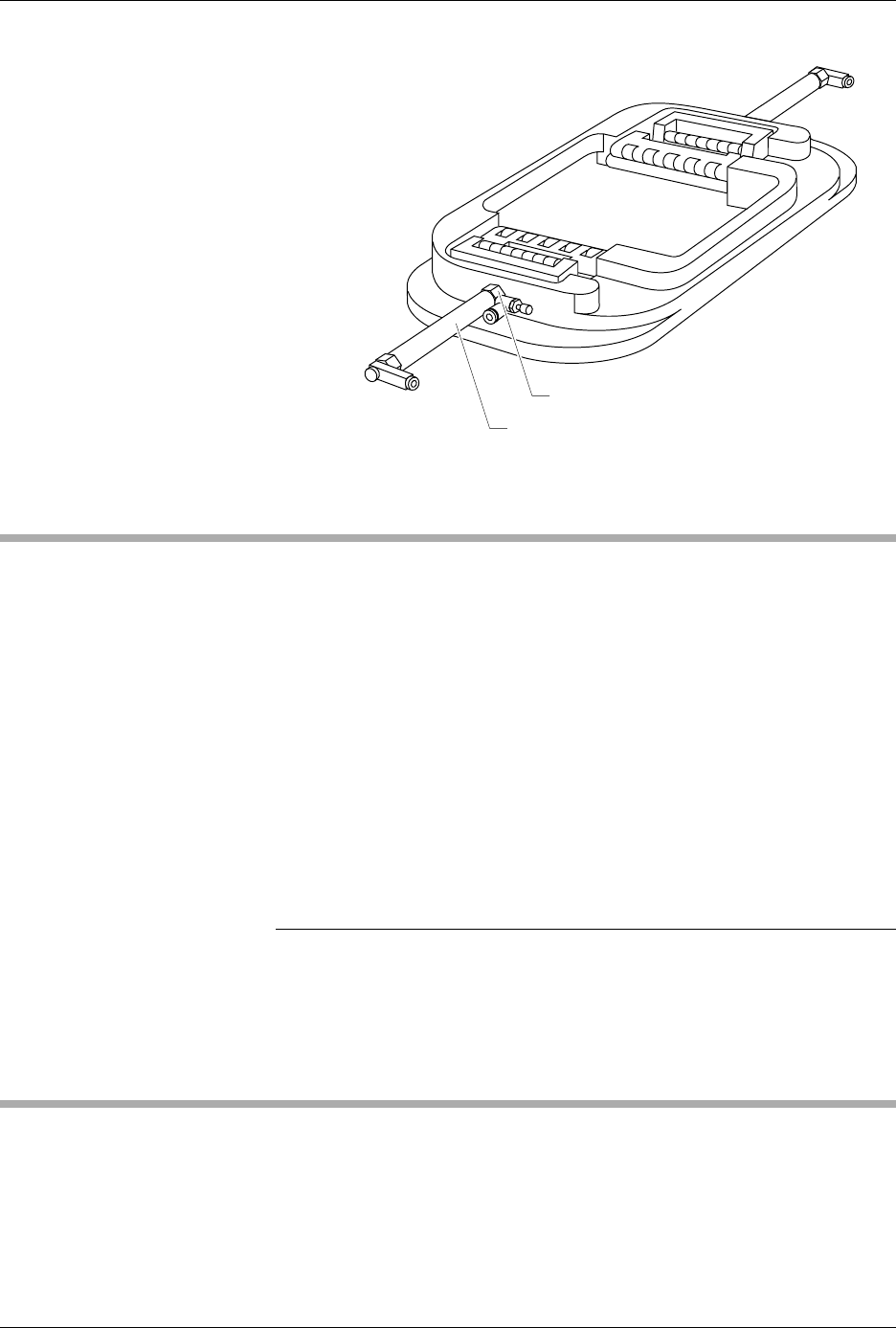
Figure 7-15
Removing the Air Cylinder
2312-1
AIR CYLINDER NUT
AIR CYLINDER

Repair and Replacement Procedures
7-20 ProMaster 2500 User Manual
Replacing the PE
Power Supply
If the programming electronics power supply fails, follow the steps below
to replace it.
1. Turn off the 2500 and remove the power cord.
2. Disconnect the two cable connectors.
3. Remove the four 1/4-inch hex nuts at the corners of the assembly.
4. Carefully lift out the PE power supply assembly.
5. Install the new PE power supply and reconnect the cables.
Replacing the Toroid
Transformer
If the Toroid transformer fails, follow the steps below to replace it.
1. Turn off the 2500 and remove the power cord.
2. Disconnect the two cable connectors J1 and J3.
3. Remove the single 3/16-inch hex mounting screw.
4. The Toroid transformer is heavy; lift it out carefully.
5. Install the new Toroid transformer and reconnect the cables.
Replacing the Toroid
PCB
If the Toroid PCB fails, follow the steps below to replace it.
1. Turn off the 2500 and remove the power cord.
2. Disconnect the four cables in connectors J-1 through J-4.
3. Remove the four 1/4-inch hex nuts at the corners of the board.
4. Hold the edges of the board, do not touch the capacitors, and lift the
board straight up. You may damage the capacitors if you apply
pressure to them.
5. Install the new Toroid PCB power supply board and reconnect the
cables.
6. Check the voltage selection switch.
Replacing the
Controller Power
Supply
If the controller power supply fails, follow the steps below to replace it.
1. Turn off the 2500 and remove the power cord.
2. Disconnect the two cable connectors.
3. Remove the four 1/4-inch hex nuts at the corners of the board.
4. Carefully lift out the controller power supply board.
5. Install the new controller power supply and reconnect the cables.
6. Check the voltage selection jumper.

Repair and Replacement Procedures
ProMaster 2500 User Manual 7-21
Replacing the Labeler
Power Supply
If the labeler power supply fails, follow the steps below to replace it. Be
sure to note the direction of rotation before you remove the fan so that
you can reinstall it correctly.
1. Turn off the 2500 and remove the power cord.
2. Disconnect the three AC input cables on the right side of the power
supply assembly.
3. Disconnect the two output cables on the left side of the power supply
assembly.
4. Use a 3/32-inch hex wrench to remove the two mounting screws
from the back panel of the 2500.
5. Carefully lift out the labeler power supply assembly.
6. Install the new labeler power supply assembly, reconnect the cables,
and reinstall the mounting screws.
System Fan Replacement
This procedure describes the steps required to remove and replace the
system fan.
Replacing the
System Fan
If the system fan fails, follow the steps below to replace it.
1. Turn off the 2500 and remove the power cord.
2. Remove the four 7/64-inch hex screws.
3. Carefully lift out the system fan.
4. Install the new system fan and reconnect the power cable.
Controller Board Replacement
This procedure describes the steps required to remove and replace the
controller board.
Replacing the
Controller Board
If the controller board fails, follow the steps below to replace it. Make sure
you observe all static safety precautions.
1. Turn off the 2500 and remove the power cord.
2. Note the positions and polarities of all of the cables connected to the
controller board before you disconnect any of the cable connectors.
3. Disconnect all of the cable connectors.