2500_Users_Manual - 第71页
Insta llatio n and Se tup 2-28 ProMa ster 25 00 U ser Ma nual Print Shif t Change this value using the S TOP comma nd described in the fo llowing procedure. 1. Pr ess STOP to pause the 2500 whil e a Task is running. 2. P…
Installation and Setup
ProMaster 2500 User Manual 2-27
4. Enter a new value from the 2500’s keyboard and press
ENTER
to
save the new dot split value.
5. Press
START
to print and examine the next sample label.
6. Closely examine the vertical stroke on the letter E to see if it is clear
and formed from a single column of dots (see Figure 2-17). Repeat
this process until you are satisfied with the quality of the printed
character.
Additional Commands for the Thermal Printer
Two commands, Intensity and Print Shift, are specific to the thermal
printer.
•
Print Shift
allows you to adjust the vertical position of the characters
on the label.
•
Intensity
allows you to adjust the darkness of text or graphics on the
label.
The values for these parameters can be changed using the STOP
command while the 2500 is processing devices. Each parameter, along
with the STOP command for changing its current setting, is described in
the following sections.
Adjusting Print
Quality and Position
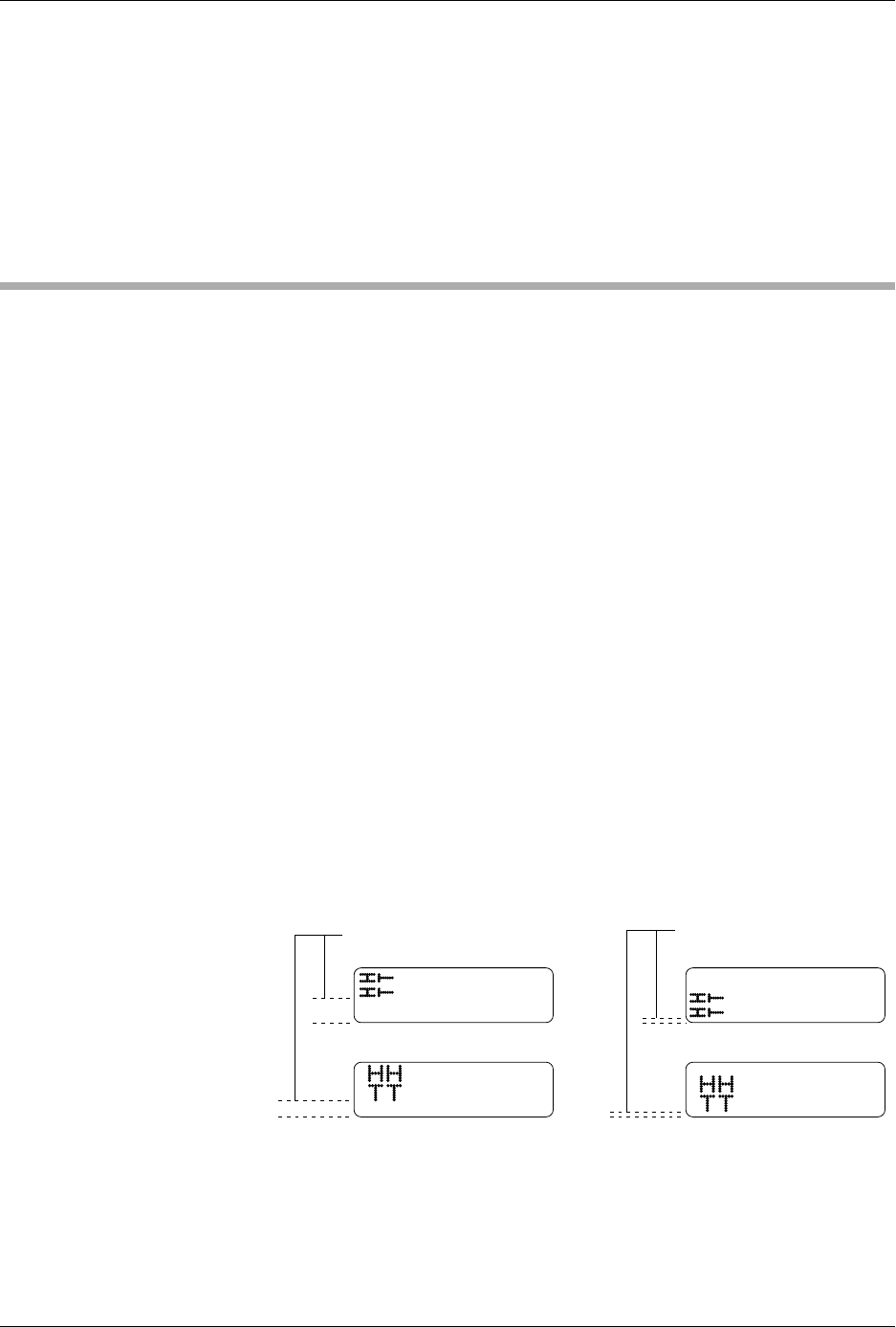
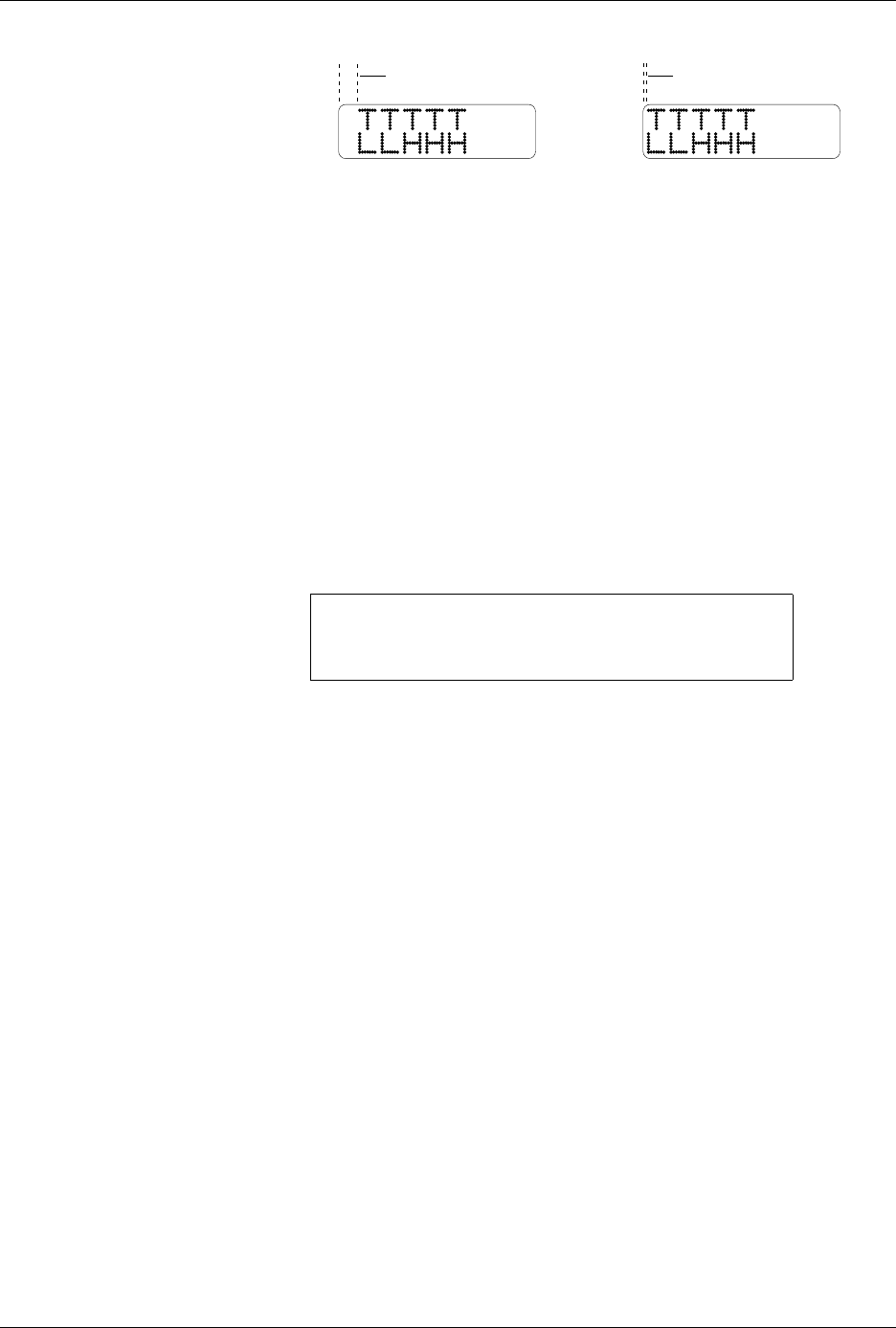
Two parameters control the position of text and graphics on the label. By
adjusting the values of these parameters, accurate placement of text and
graphics on the label can be achieved.
•The
print shift
value affects the vertical position of the printed image,
moving the position of characters or graphics from the top to bottom
of the label (Y axis) on the label (see Figure 2-18).
•The
label calibration
value affects the horizontal position of the
printed image on the label, moving the position of the text or
graphics from left to right (see Figure 2-19).
Figure 2-18
Print Shift (affects vertical
position)
1656-2
INCREASE DECREASE
Installation and Setup
2-28 ProMaster 2500 User Manual
Print Shift
Change this value using the STOP command described in the following
procedure.
1. Press
STOP
to pause the 2500 while a Task is running.
2. Press
LOWER CASE
+
P
. The display on the 2500 prompts you to
enter a new value.
3. Press
↑
and
↓
to enter a new print shift value between 0 and 16.
Entering a larger numeric value moves the printed character higher
on the label.
4. Press
START
to continue running the Task.
Label Calibration
Change the label calibration value using the STOP command described in
the following procedure:
1. Press
STOP
to pause the 2500 while a Task is running.
2. Press
LOWER CASE
+
C
. The 2500 displays:
where
XXX
represents a numeric value for the current setting.
3. Press
↑
and
↓
to change the label calibration value (the range is from
0 to 255). Entering a larger numeric value moves the printed
characters closer to the leading edge of the label.
4. Press
START
to continue running the Task.
Label Advance
The label advance value defines how far a label extends above the
application plate before it is applied to a device.
The value can be changed by pressing
STOP
and
LOWER CASE
+
W
.
Increasing the numeric value advances the label farther above the
application plate.
Figure 2-19
Label Calibration
(affects horizontal position)
PROGRAM/TEST LABEL
SLAVE MODE PART TYPE: DIP 24-.3
PART TOTAL: 251 PART LENGTH: 1.250
LABEL CAL: (XXX)
2177-1
NORMAL
HIGHER VALUE
Installation and Setup
ProMaster 2500 User Manual 2-29
Adjusting the Print
Intensity of the
Thermal Printer
You can change the factory default setting for print intensity by using the
STOP command while the 2500 is processing devices.
Note: The print head uses more energy when the intensity value is increased.
The life expectancy for the print head is shorter when this setting is set to
a high value. Select a print intensity value that produces a legible label
while not creating excessive wear.
The range for intensity is from 1 to 21. The darkest character is printed
when intensity is set to 21.
Follow the procedure below to change the current thermal intensity
value.
1. Press
STOP
. The 2500 pauses while it is running a Task.
2. Press
LOWER CASE
+
I
. The display on the 2500 prompts you to
enter a new value.
3. Press
↑
and
↓
to enter a new thermal intensity value between 1 and 21
(as described above).
4. Press
START
to continue running the Task.
Updating the 2500
Three different updates are periodically distributed for the 2500:
•
ProMaster 2500 Algorithm/System Software
— This software
updates the programming algorithms and the programming
electronics system files. It is installed from update disks inserted in
the 2500’s disk drive.
•
TaskLink Software
— This update to TaskLink is inserted in the PC’s
floppy disk drive and installed onto the hard drive.
•
Firmware
— This is an EPROM update of the operating system
firmware on the 2500 controller board.
The installation procedures for the Algorithm/System and TaskLink
software updates are included with the User Notes that are distributed
periodically. The firmware update installation procedures are described
in the following section (see Figures 2-20 and C-2).
ENTER THERMAL INTENSITY (X):