SM-131-006.pdf - 第168页
Device Name Chip Mounter Block Name Page No. Unit Name Revision Model Item GXH-1 Chapter 7 Transfer Section 3. Setting of PCB Detection Sensor Amplifiers in NA and NC Sections 3.4 Table of Each Item for Settings Table G2…
Device
Name
Chip Mounter
Block Name
Page No.
Unit Name
Revision
Model ItemGXH-1
Chapter 7 Transfer Section
3. Setting of PCB Detection Sensor Amplifiers in NA and NC Sections
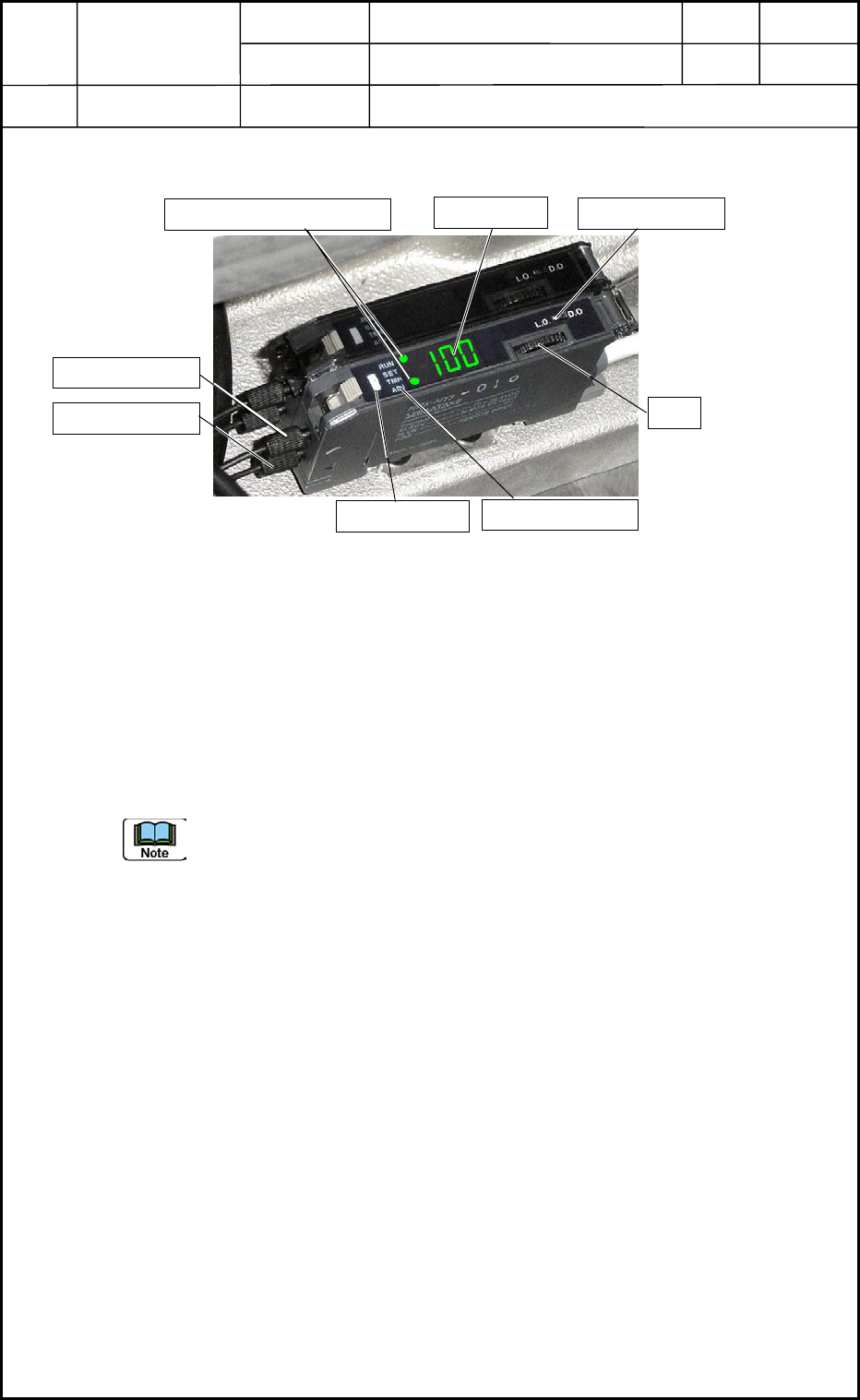
3.1 Name of Each Section in PCB Detection Sensor Amplifier
3.2 Basic Operations of PCB Detection Sensor Amplifier
(1) When the power is supplied, the amplifier is set in the "RUN" mode and the "RUN"
indicator lamp illuminates.
(2) When the D-SW is pressed, the "RUN" indicator lamp flickers, indicating that the
mode selection is set ready.
Rotate the D-SW to change the mode.
(3) When the D-SW is pressed at the point where the desired mode indicator lamp
flickers, the amplifier is set in the selected mode.
When the mode indicator lamp is kept intact (flickering) for 60 seconds, the
amplifier is reset to the "RUN" mode.
3.3 Mode Types
RUN Mode : Normal Detection Mode
SET Mode : In this mode, the detection function can be set and the sensitivity can be
adjusted.
TMR Mode : In this mode, the timer function can be set and the time of the timer can be
adjusted.
ADJ Mode : In this mode, the threshold value can be changed. When the maximum
sensitivity is set (factory-adjusted at shipment), the amplifier cannot be set
in the "ADJ" mode.
Light Receiving Side
Fi
g
. G19 PCB Detection Sensor Amplifier
Light Emitting Side
OPN Mode Lamp
Auxiliary Mode Indicator Lamps
Digital Display
L-ON/D-ON Switch
D-SW
Mode Indicator Lamp
0406-001
7-6
Device
Name
Chip Mounter
Block Name
Page No.
Unit Name
Revision
Model ItemGXH-1
Chapter 7 Transfer Section
3. Setting of PCB Detection Sensor Amplifiers in NA and NC Sections
3.4 Table of Each Item for Settings
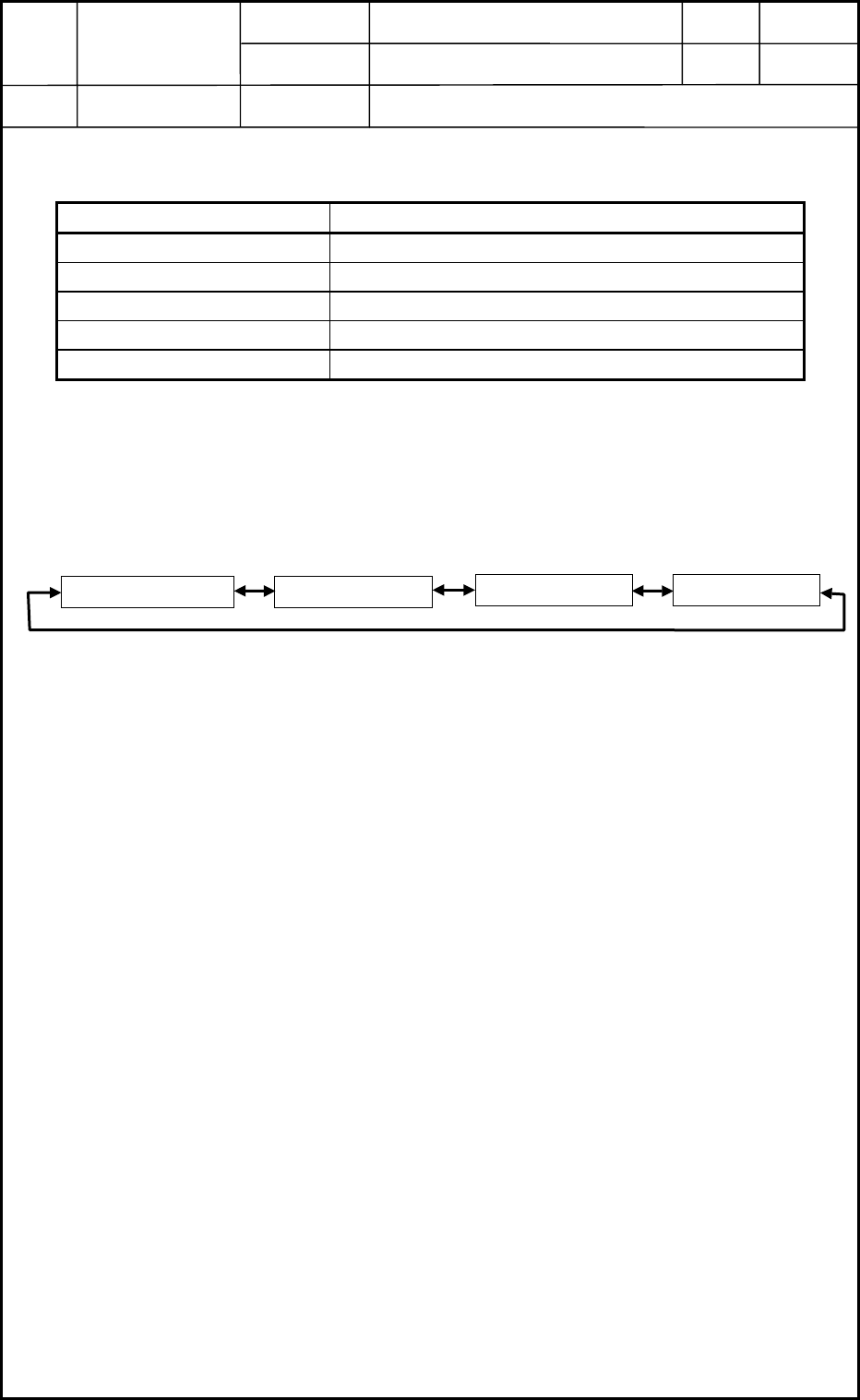
Table G2
Item Settings
L-ON/D-ON Switch D-ON
Received Light Level Indicator AA (Standard)
Detection Function HP (Super-Long Distance)
Sensitivity Setting PH (Percent Sensitivity Setting)
Timer Function Setting t0 (Momentary)
3.5 Confirmation of Settings for Each Item
Every time the D-SW is rotated with the amplifier in the "RUN" mode, the digital indicator
indicates the set condition of the following items according to the rotation.
Detection FunctionReceived Light Level
Timer Function Sensitivity Setting
0406-001
7-7
Device
Name
Chip Mounter
Block Name
Page No.
Unit Name
Revision
Model ItemGXH-1
Chapter 7 Transfer Section
3. Setting of PCB Detection Sensor Amplifiers in NA and NC Sections
3.6 Setting of Each Item
(1) Set the L-ON/D-ON switch to "D-ON".
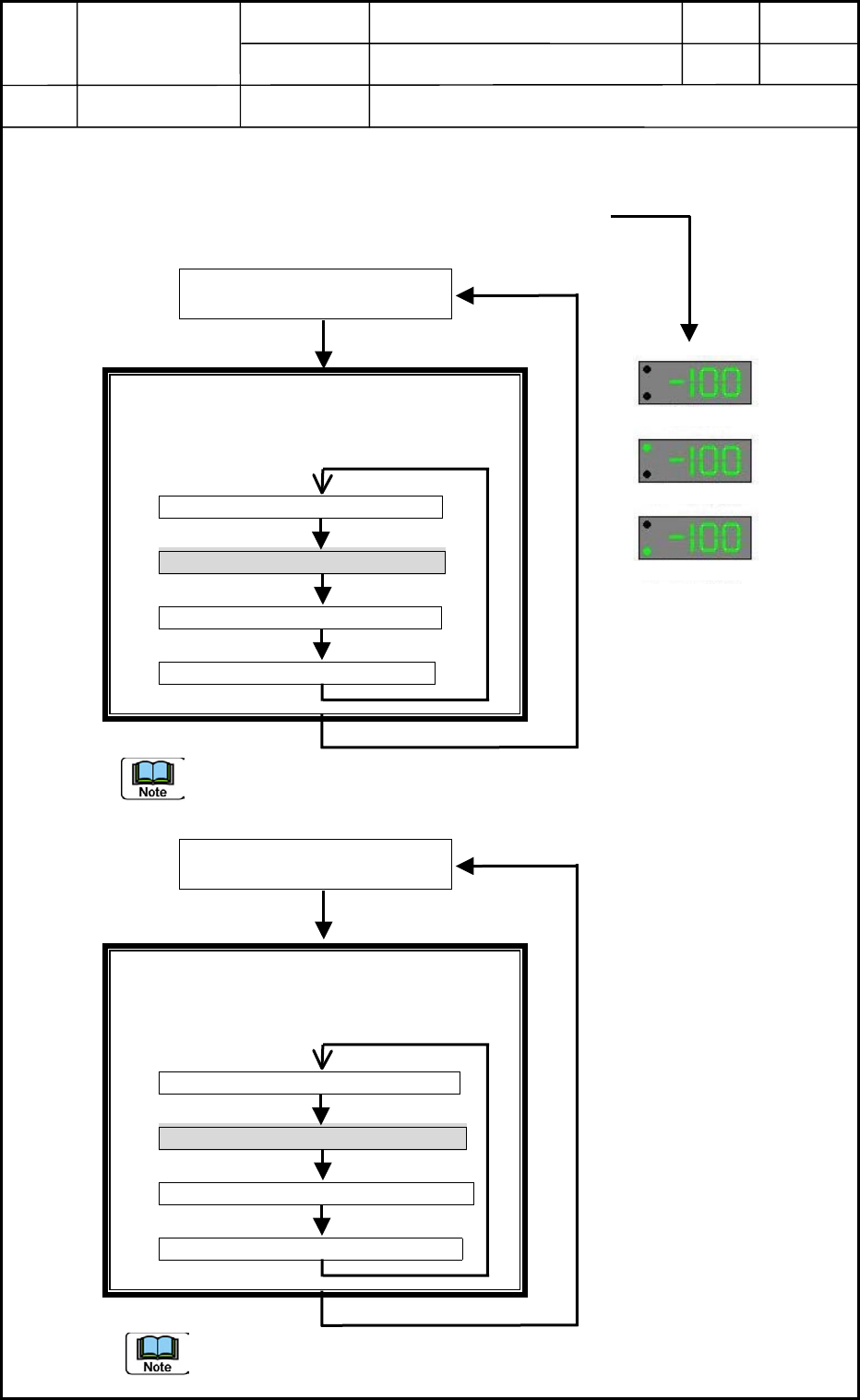
(2) Check the level of the received light.
(Check only if "AA (Standard)" is displayed or not.)
Mode Indicator Lamps: All OFF
Auxiliary Mode Indicator Lamps: ON
When the D-SW is rotated in this mode, the
indication changes as follows.
Peak Indication (PP Flickering)
Standard Indication (AA Flickering)
Bottom Indication (bb Flickering)
Cancel (-- Flickering)
Press the D-SW.
To interrupt the setting change, select "Cancel".
(3) Set the detection function. (Set to HP "Super-Long Distance".)
Mode Indication: "SET" ON
Auxiliary Mode Indicator Lamps: ON
When the D-SW is rotated in this mode, the
indication changes as follows.
Standard (nL Flickering)
Super-Long Distance (HP Flickering)
High-Speed Response (HS Flickering)
Cancel (-- Flickering)
Press the D-SW.
(a) When the detection function is selected, the sensitivity setting is reset.
(b) To interrupt the setting change, select "Cancel".
"RUN" Lamp Flickering in
"Mode Selection" Mode
Hold down the D-SW for
more than 3 seconds.
Standard Indication
Standard IndicationPeak Indication
Bottom Indication
"SET" Flickering in "Mode
Selection" Mode
Hold down the D-SW for
more than 3 seconds.
0406-001
7-8