SM-131-006.pdf - 第181页
Device Name Chip Mounter Block Name Page No. Unit Name Revision Model Item GXH-1 Chapter 8 Component Supply 4. Replacement of Batch Connector Cable 4.2 Attachment of Batch Connector Cable (1) Follow the reverse order of …
Device
Name
Chip Mounter
Block Name
Page No.
Unit Name
Revision
Model ItemGXH-1
Chapter 8 Component Supply
4. Replacement of Batch Connector Cable
4.1 Detachment of Batch Connector Cable
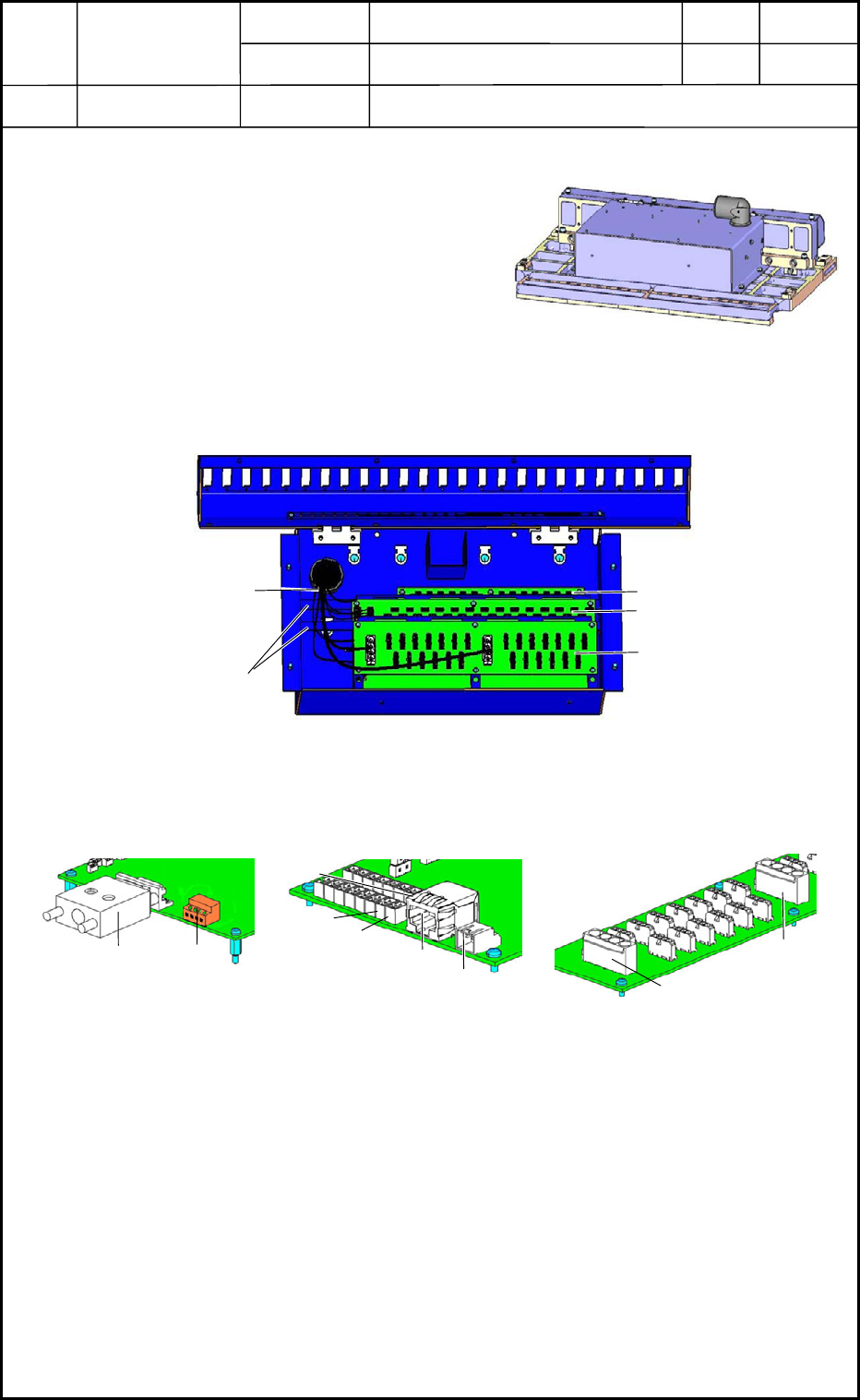
(1) Pull out the feeder cart from the main
machine.
(2) Place the feeder base on the work bench as
shown in Fig. H18.
(3) Open the electrical box of the feeder base
and place the electrical box on the work
bench as shown in Fig. H19.
(4) Disconnect the connector on the PCB side of the batch connector cable. (Fig. H19)
(5) Loosen the PCB holding bar in Fig. H19 and detach the PCB.
(6) Disconnect the connectors from each PCB in Fig. H20 and pull out the batch connector
cable.
0406-001
8-7
Fig. H18
UB16
Fig. H19
UB24
UB17
Batch Connector
Cable
PCB Holding Bar
UB16
CN27
CN29
Fig. H20
UB24
CN80
CN70
CN40
CN60
CN61
UB17
X100
X101

Device
Name
Chip Mounter
Block Name
Page No.
Unit Name
Revision
Model ItemGXH-1
Chapter 8 Component Supply
4. Replacement of Batch Connector Cable
4.2 Attachment of Batch Connector Cable
(1) Follow the reverse order of detachment to attach the batch connector cable.
Check to see that no wires are trapped (pinched) and no air hoses are bent during the
attachment.
(2) Place the feeder base on the feeder cart and insert the cart into the main machine.
After that, check the performance.
• Check the upward and downward movement of the feeder base.
• Check the clamping of the feeders.
• Check that the power is supplied to the feeders.
0406-001
8-8
Device
Name
Chip Mounter
Block Name
Page No.
Unit Name
Revision
Model ItemGXH-1
Chapter 8 Component Supply
5. Setting of Lifted Feeder Detection Sensor
5.1 Attachment of Lifted Feeder Detection Sensor
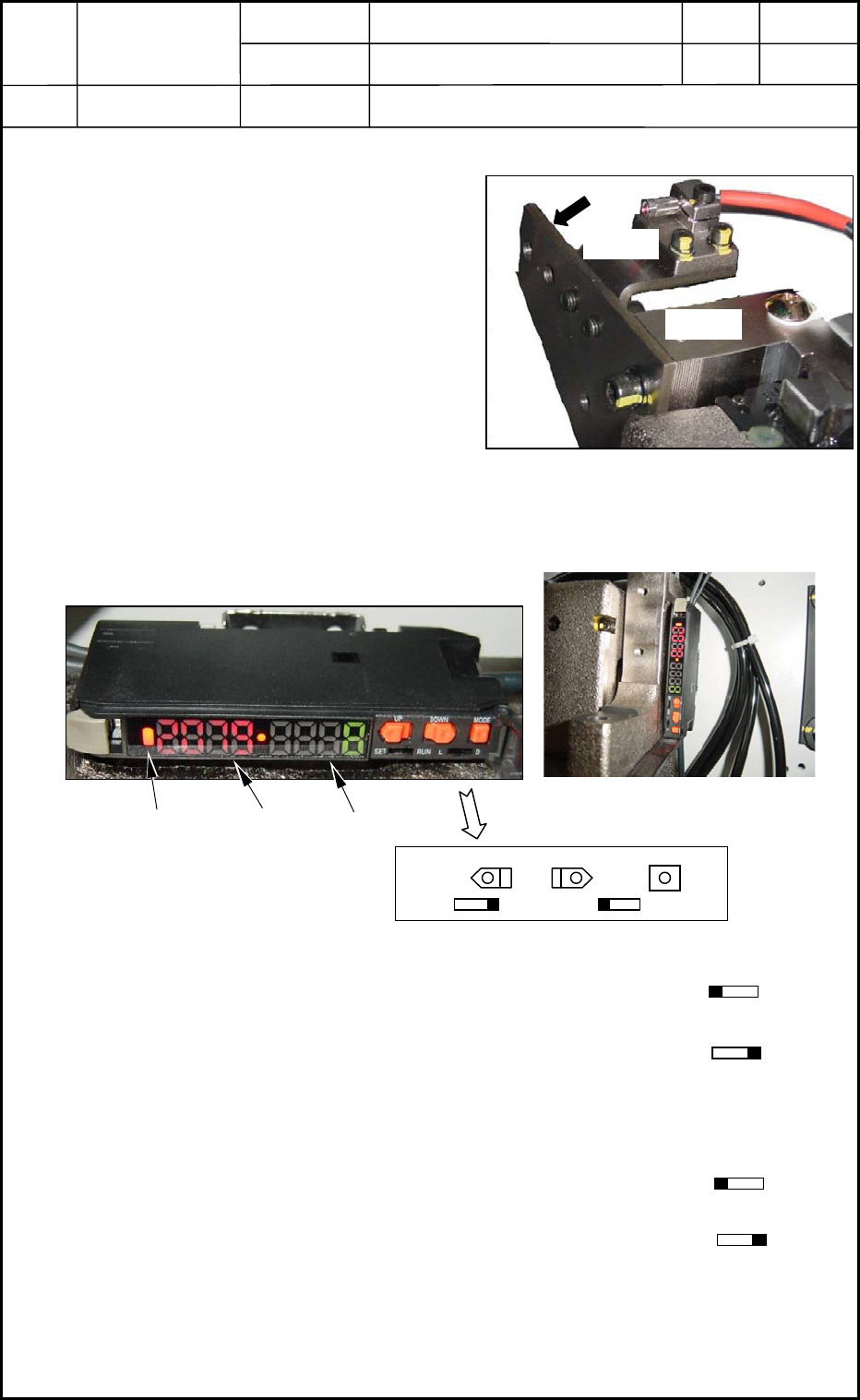
(1) Attach the lifted feeder detection sensor
so that Plane A can be aligned with
Plane B. See Fig. H21.
(2) Plane A should be attached parallel to
Plane C. See Fig. H21.
At this time, the brackets should be
centered (up, down, right, and left) at
the idle hole. (Visual Check)
5.2 Adjustment of Lifted Feeder Detection Sensor Amplifier
(1) Set the mode switch to "L-ON".
(2) Adjust the emitting strength (power) of the light to emit the optimum amount of light.
(2.1) Set the [SET/RUN] switch to "RUN".
(2.2) Hold down the [MODE] button for 3 seconds.
(A numerical value appears in the sub display.)
(2.3) Confirm that the main display indicates a point close to "2000".
(3) Adjust the sensitivity on the light receiving side for the maximum one.
(3.1) Set the [SET/RUN] switch to "SET".
(3.2) Hold down the [UP] or the [DOWN] button for 3 seconds.
(A numerical value appears in the sub display.)
(3.3) Set the [SET/RUN] switch to "RUN".
(4) Check the performance of the lifted feeder detection sensor.
Use an auxiliary jig (or a block gauge) for adjustment of the lifted feeder detection
sensor and confirm at both ends of the feeder base that the emitted light can be received
at 107 mm and cannot be received at 108. 5mm.
0406-001
8-9
Plane A
Fig. H21 Attachment Position of Lifted Feeder
Detection Sensor
Plane
Plane B
Mode Display Main Display Sub Display
Fig. H23 Attachment Position
UP
DOWN
MODE
SET
RUN L D
Fig. H22 Lifted Feeder Detection
Sensor Amplifier
Fig. H26 Details of Lifted Feeder Detection
Sensor Amplifier Switch
SET
RUN
L D
SET RUN
SET RUN