SM-131-006.pdf - 第263页
Device Name Chip Mounter Block Name Page No. Unit Name Revision Model Item GXH-1 Chapter 17 Servo Alarm 1. Troubleshooting on Servo Alarm [4] Date and Time Displayed are the date and time of error occurrence. [5] Number …
Device
Name
Chip Mounter
Block Name
Page No.
Unit Name
Revision
Model Item GXH-1
Chapter 17 Servo Alarm
1. Troubleshooting on Servo Alarm
1.1 "ERROR" Window for Servo Alarm
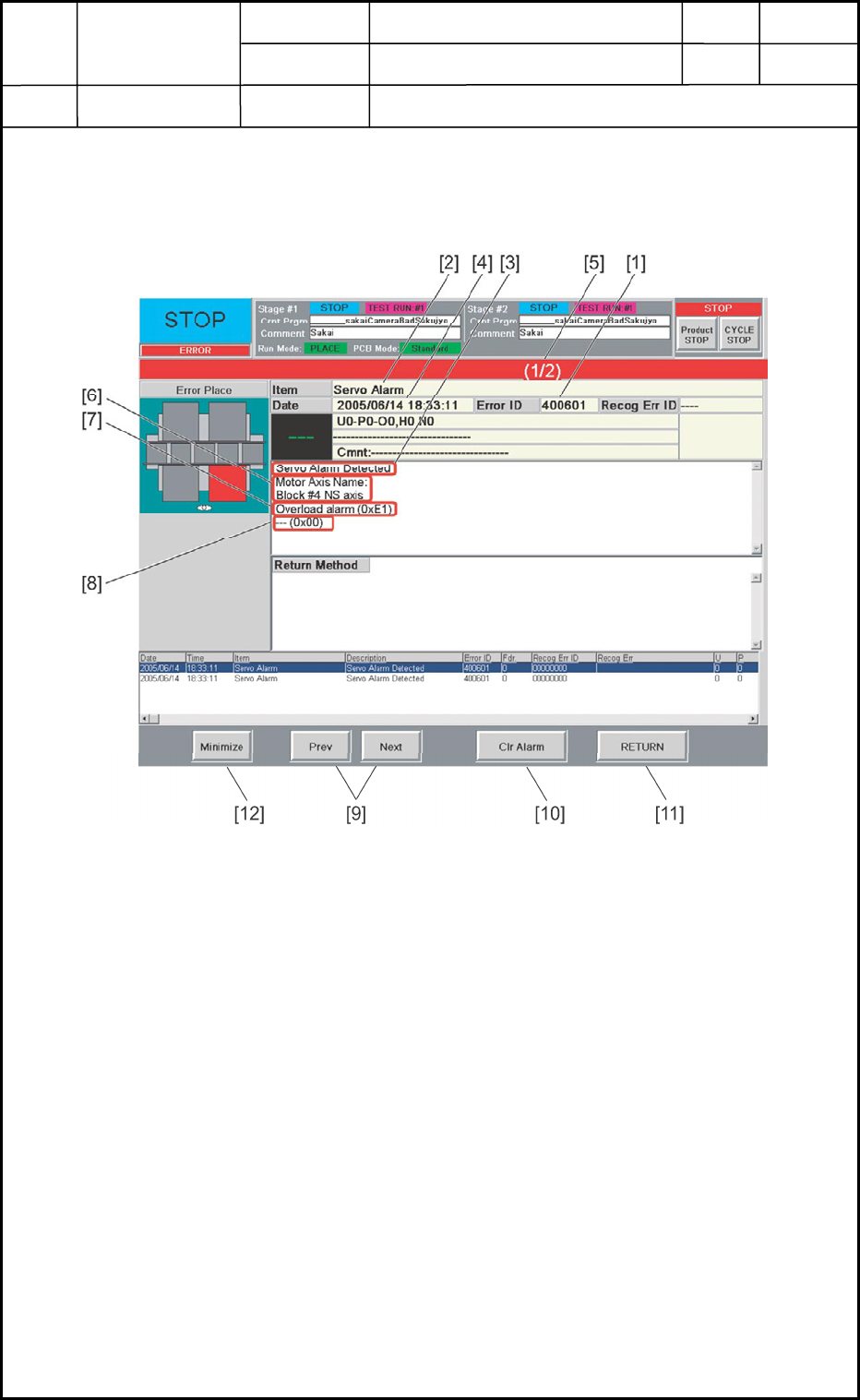
When a servo alarm error has occurred, the following window opens.
Fig. Q1 "ERROR" Window
[1] Error ID
Displayed is a string of alphanumeric characters (6 characters) that identifies an error.
When a servo alarm occurs, "400601" or "400602" will be displayed.
When an error has occurred, check the contents of the servo and operational alarms
and refer to "1.4 Servo Alarm Remedy Table" and "1.5 Operational Alarm Remedy
Table" for the remedial procedures. The contents of each alarm can be used as indices.
[2] Item
Displayed is a name of the classified element that caused an error.
When a servo alarm has occurred, "Servo Alarm" appears.
[3] Description
Displayed are the description of the error and the remedial procedures.
When a servo alarm has occurred, "Servo Alarm Detected (400601)" or "AP1 Error
Detected during Resetting of All Axes (400602)" is displayed.
17-1
0506-001
Device
Name
Chip Mounter
Block Name
Page No.
Unit Name
Revision
Model Item GXH-1
Chapter 17 Servo Alarm
1. Troubleshooting on Servo Alarm
[4] Date and Time
Displayed are the date and time of error occurrence.
[5] Number of Pages
Displayed are the total number of pages and the number of the current page.
Example: (3/5)
Total Number of Pages : 5
Current Page : 3
[6] Error-Caused Axis Name
Displayed is the name of the axis on which a servo alarm has occurred.
Refer to "1.2 List of Servo-Alarm-Caused Axes Names" for each axis on which a
servo alarm has occurred.
[7] Contents of Servo Alarm
Displayed are the contents of the servo alarm (alarm generated by the servoamplifier)
and the alarm record (hexadecimal number).
Refer to "1.4 Servo Alarm Remedy Table" for the contents of servo alarms.
[8] Contents of Operational Alarm
Displayed are the contents of the operational alarm (alarm generated by the motion
controller) and the alarm record (hexadecimal number).
Refer to "1.5 Operational Alarm Remedy Table" for the contents of operational
alarms.
[9] [Prev] and [Next] Buttons
[Prev] Button : When pressed, this button opens the previous page.
[Next] Button : When pressed, this button opens the next page.
[10] [Clear Alarm] Button
When pressed, this button cancels an alarm (sound) only.
[11] [RETURN] Button
When pressed, this button cancels an alarm (sound) and closes the "ERROR" window.
The original window resumes.
[12] [Minimize] Button
When pressed, this button minimizes the "ERROR" window and moves to the bottom
left of the window.
Double-click the minimized window to return it to the size before it was minimized.
17-2
0506-001
Device
Name
Chip Mounter
Block Name
Page No.
Unit Name
Revision
Model Item GXH-1
Chapter 17 Servo Alarm
1. Troubleshooting on Servo Alarm
• Reset Procedure from "ERROR" Window
(1) Take notes of the descriptions under "Error ID", "ITEM", "DESCRIPTION", "Error-
Caused AXIS Name", "CONTENTS OF SERVO ALARM", and "CONTENTS OF
OPERATIONAL ALARM".
When you have forgotten an error message, refer to the list of errors in the "Machine
Error Recall" window. (Operation Sequence: [RECALL MSG.] Button (Submenu)
→ "Machine Error Recall" Window).
(2) Press the [RETURN] button to resume the original window.
(3) Use the error ID and the contents of the servo and operational alarms as indices and refer
to "1.4 Servo Alarm Remedy Table" or "1.5 Operational Alarm Remedy Table" for
correct remedial procedures.
17-3
0506-001