Utah-94-721002-System-Manual.pdf - 第163页
System Manual = lñÑçêÇ=fåëíêìãÉåíë=mä~ëã~= qÉÅÜåçäçÖó= mä~ëã~ä~Ä Particle descri ptions When they most often occur Possible causes Remedy/Quick Fix –Test Particles or marks, which appear randomly on the wafer, but look a…

mä~ëã~ä~Ä= lñÑçêÇ=fåëíêìãÉåíë=mä~ëã~=qÉÅÜåçäçÖó= System Manual
PKPKQ= mb`sa=é~êíáÅäÉë=
Please note that once particles have been noticed, all wafers should be examined under a strong light
source at various angles of incidence, say a microscope light source, to really be sure there are no particles
still present in the wafer. This is by no means a comprehensive list of all the particles, which can occur in a
PECVD process chamber, but is intended as a helpful guide to quickly eliminate the common problems.
Particle descriptions When they most
often occur
Possible causes Remedy/Quick Fix –Test
Small particles less than 5um,
which appear in concentrated,
clusters. These clusters appear
in a pattern, which mirrors
that of the showerhead holes.
They are concentrated mainly
in one focal plane of the
microscope and appear to be
at the bottom of the film.
The first run after a
clean
Running the machine too soon after
the completion of a clean process.
Silane forms particles when it reacts
with residual oxygen in the gas lines
(remember all of the gas line up to the
normally open, hardware interlock
nupro valve is incorporated in the
chamber vacuum and needs to de-gas
at the end of a long clean run).
Wait 30 minutes before
running a deposition process
using Silane after finishing a
clean. Or run pump/purge
cycles with N2 gas.
Small particles less than 5um,
which appear in concentrated,
clusters. These clusters appear
in a pattern, which mirrors
that of the showerhead holes.
They are concentrated mainly
in one focal plane of the
microscope and appear to be
at the bottom of the film.
The first run after a
long period of
machine disuse (say
overnight)
A small leak in the Silane line,
particularly around the mass flow,
allowing a build-up of Silane dust,
which is blown though on to the first
wafer.
Fix the leak in the Silane line.
Flow Silane gas after a
significant period of machine
disuse without a wafer in the
chamber to clear the dust.
Small particles less than 5um,
which appear in concentrated,
clusters. These clusters appear
in a pattern, which may or
may not mirror that of the
showerhead holes.
They appear in many different
focal planes of the
microscope, at regular
intervals throughout the film.
Every run A leak in the gas in-let assembly or a
severe leak in the Silane line.
Plasma forming behind the
showerhead or in the gas inlet
assembly.
Leak check chamber and gas
line. If both less than 1mT
per minute contact Oxford
service department and give
this description. If greater
than 1 mTorr per minute
take apart gas inlet assembly
and clean O-rings and PTFE
part.
First run after a clean Residual particles not etched during
the cleaning process
Vacuum the chamber inside,
this is necessary periodically
after cleaning. It may be a
good idea to cool the
chamber first to prevent risk
of injury with the hot table.
After a power failure
or other reason
which caused a
significant drop in
table temperature
When the lower electrode cools
deposited film, particularly around the
edges, cracks and is blown on to the
wafer during subsequent deposition
runs.
Clean the chamber.
After a certain
amount of deposition
on the chamber, but
it varies when they
occur.
If you are depositing films of many
different chemistries and stresses,
particularly those with high stress,
then the film will flake off much
earlier than expected.
Clean more regularly.
Flakes or larger non-metallic
particles
After a certain
amount of deposition
but it seems to be
getting less and less
after every clean.
The films are not adhering to the
showerhead very well. Someone has
cleaned the showerhead using solvent,
leaving behind a residue that is giving
poor adhesion for the deposited films.
The showerhead has become dirty and
the clean process is unable to clean it –
the showerhead is ready for its
periodic maintenance.
Bead blast the showerhead.
Metal particles, which shine
under normal clean room light
and are greater than 20um in
maximum dimension.
Mostly all the time Showerhead holes may be lighting-up
or the showerhead holes have become
damaged due to normal wear and
tear.
Bead blast the showerhead.
Process Information (Information contained in this document is confidential)
Issue 1: December 03 Page 20 of 30 Printed: 08 January 2006 09:37

System Manual= lñÑçêÇ=fåëíêìãÉåíë=mä~ëã~=qÉÅÜåçäçÖó= mä~ëã~ä~Ä
Particle descriptions When they most
often occur
Possible causes Remedy/Quick Fix –Test
Particles or marks, which
appear randomly on the
wafer, but look as if they are
underneath the film.
Every run The wafer has been cleaned using
solvents, which have not been
properly washed off with de-ionised
water.
Use a fresh wafer straight
from a new box.
As part of the regular maintenance of the system the showerhead (and doughnut ring) must be bead
blasted. This is the only Oxford Instruments Plasma Technology approved way of cleaning a showerhead.
The use of solvents and ultra-sonic baths is strongly discouraged. Scrubbing with Scotchbrite is also not
recommended. OIPT will not be able to support you if you use these alternative cleaning methods and still
experience problems the problems described in the above table with showerhead particles.
Recommended bead blasting specification:
Bead blast using alumina powder (aluminium oxide beads) of 180 grit size or less - maybe 120. Do not use
any solvents. Clean the showerhead after bead blasting using compressed air only. Hold the showerhead
up to the light to check that none of the holes are blocked by any grit from the bead blasting. Clean out
holes with paper clip or similar if blocked.
PKPKR= båä~êÖáåÖ=çÑ=ëÜçïÉêÜÉ~Ç=ÜçäÉë=
PECVD showerhead holes can become enlarged during use. This is caused during high-power processing
(on an 80 Plus this is typically during plasma cleaning). Any holes, which have slightly sharper edges, will
form an intense discharge over the hole (due to the high fields generated by the sharper edges). This can
be seen as a 'bright spot' in the plasma located over the hole during the clean process.
This can cause some erosion of the hole and widening of the hole opening (on the outlet side only).
Eventually, the bright spot burning itself out, i.e. the erosion removes the sharp edges and hence the
bright spot no longer occurs at that hole. This may happen for several holes during the initial run-up of
the system, until the showerhead 'stabilises' itself.
The bright spot may also result in some black/brown polymer deposition around the holes which, can
cause premature flake-off of deposited films. It is recommended that the showerhead is bead-blasted
clean to remove such residues.
The bright spots should not be observed during low power (<50W) 80 Plus deposition processes. If they
are, it is recommended that the showerhead is plasma cleaned and bead-blasted cleaned until the bright
spots are eliminated. If bright spots are still present then it may be necessary to obtain a replacement
showerhead.
The effect of the enlarged holes on the deposition results should be minimal, since they only enlarge the
outlet of the hole, hence they do not affect the gas flow.
PKPKS= léíáÅ~ä=Éãáëëáçå=ÉåÇéçáåí=ÇÉíÉÅíçê=Ñçê=ÅÜ~ãÄÉê=ÅäÉ~å=éêçÅÉëë=
Oxford Instruments Plasma Technology has integrated its optical emission spectroscopy (OES) end-point
detector with the mä~ëã~ä~Ä=standard PC 2000 operating software. This provides a real-time display of
detector signal, and allows for automatic process end-point detection or user terminated end-point.
Part No. 81-12-70
The end-point detector is a fixed, single wavelength detector with a narrow bandpass optical filter and
high sensitivity photodiode. The kit includes a KF40 process window and detector mount assembly.
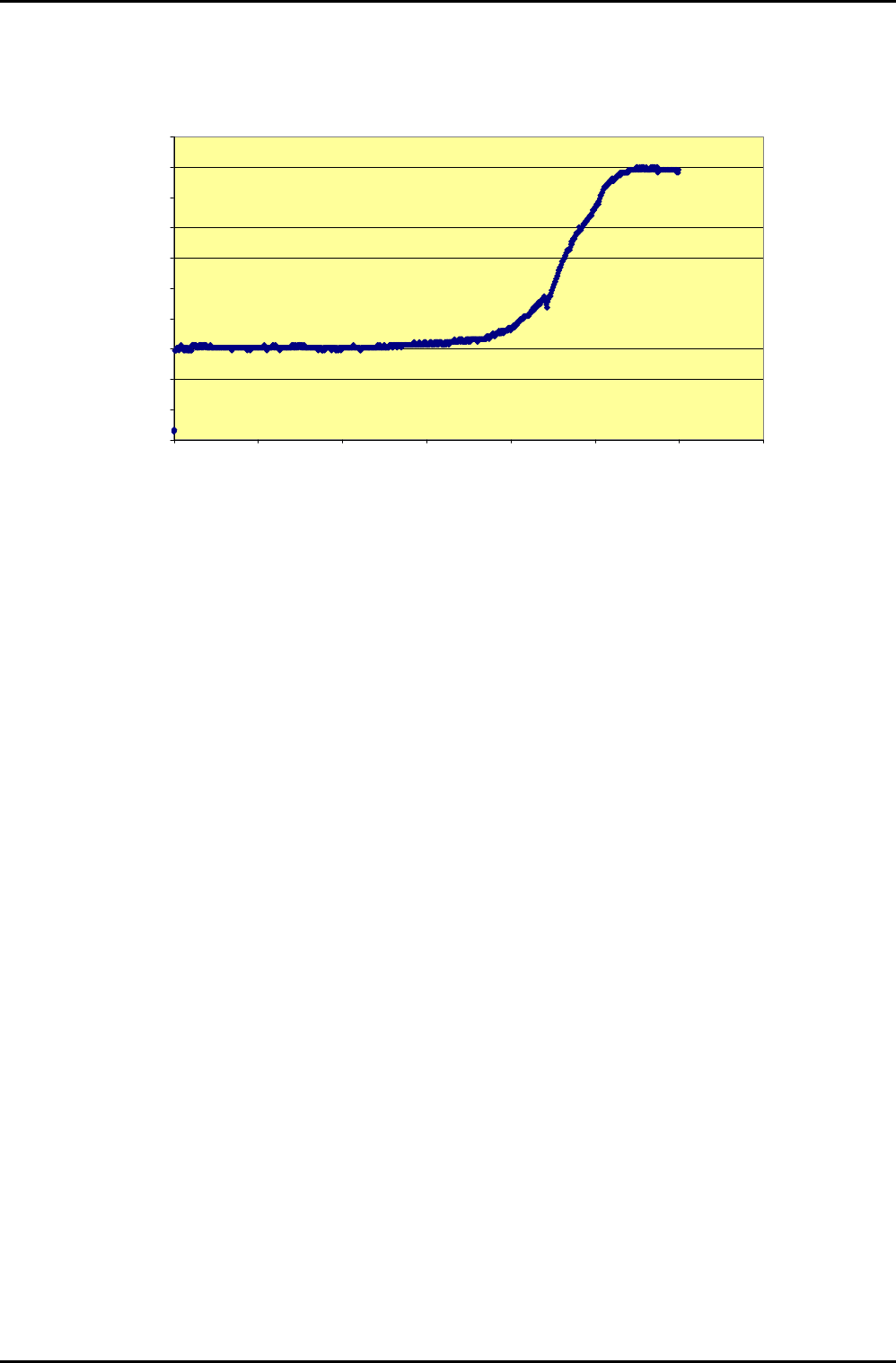
The system monitors the 704 nm wavelength (atomic fluorine) emission. This fluorine is consumed while
the deposited material in the chamber is clearing and rises at endpoint, indicating the completion of the
chamber plasma cleaning process. An example of clearing a thick film (100um) deposition is shown in the
following graph.
Process Information (Information contained in this document is confidential)
Printed: 08 January 2006 09:37 Page 21 of 30 Issue 1: December 03
mä~ëã~ä~Ä= lñÑçêÇ=fåëíêìãÉåíë=mä~ëã~=qÉÅÜåçäçÖó= System Manual
END POINT SIGNAL : SiO2 CLEANING
(100 microns deposition)
0
10
20
30
40
50
60
70
80
90
100
0 50 100 150 200 250 300 350
TIME (MIN)
SIGNAL
Process Information (Information contained in this document is confidential)
Issue 1: December 03 Page 22 of 30 Printed: 08 January 2006 09:37