Utah-94-721002-System-Manual.pdf - 第195页
System Manual lñÑç êÇ=fåë íêìãÉåíë =mä~ë ã~=qÉÅ ÜåçäçÖó== mä~ëã~ä~Ä=~åÇ=fçåÑ~Ä (15) When the restore operation is comp lete, the following message is displayed: Clone Comple te (1 912) Clone Completed Success fully Con t…
mä~ëã~ä~Ä=~åÇ=fçåÑ~Ä lñÑçêÇ=fåëíêìãÉåíë=mä~ëã~=qÉÅÜåçäçÖó== System Manual
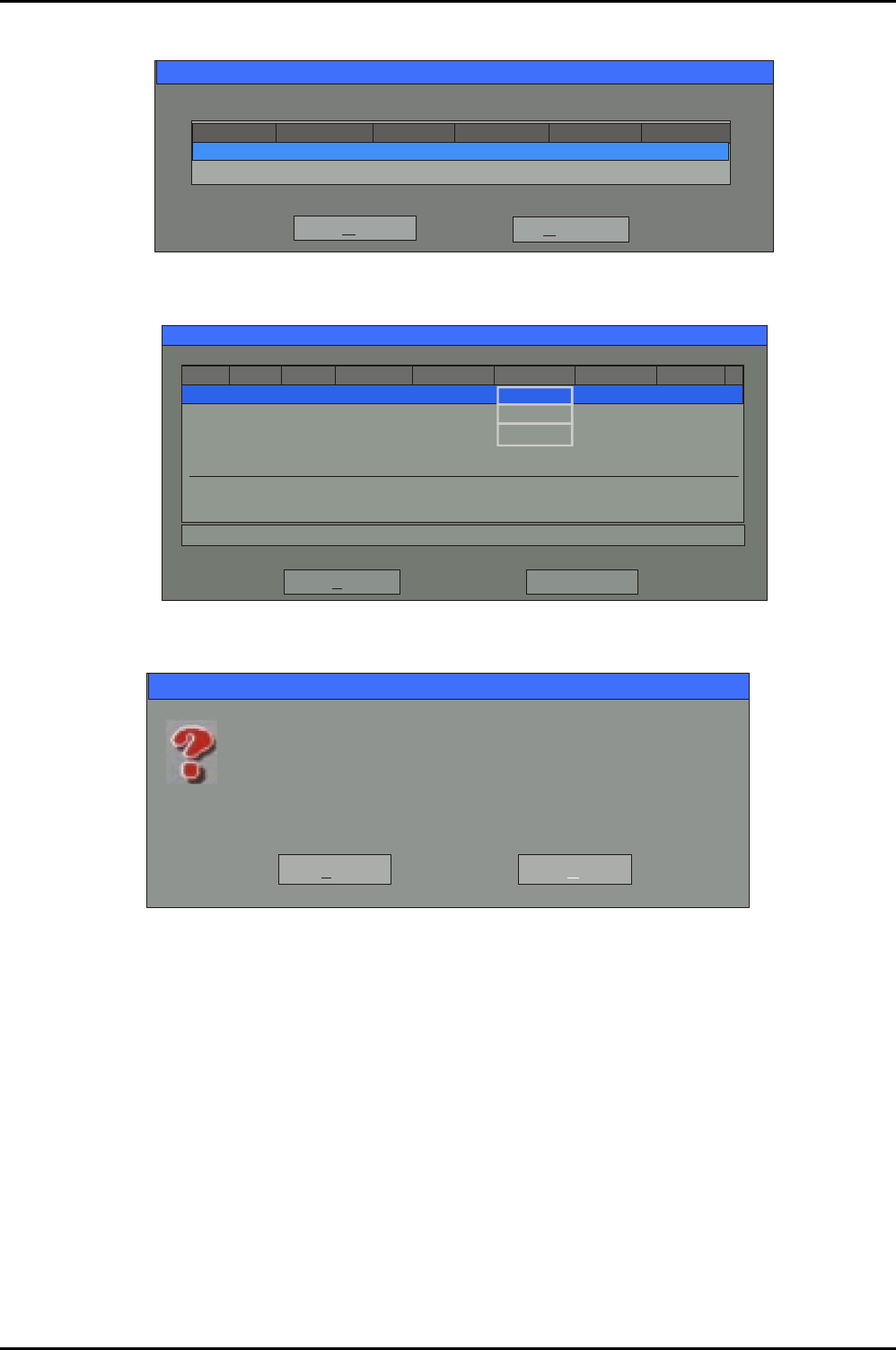
(10) The next screen displays the destination drive already selected; click on the OK button.
Drive Size(MB) Cylinders Heads SectorsType
381661 Basic 5169 240 63
OK
Select local destination drive by clicking on the drive number
Cancel
(11) The ‘Destination Drive Details’ dialogue is displayed, click on the OK button.
Destination Drive Details
Part Type ID
OK
Cancel
Description Label New Size Old Size Data Size
Primary
Logical
Logical
New Volume
New Volume
1
2
3
07
07
07
NTFS
NTFS extd
NTFS extd
No name 34086
2037
2037
2037
2037
12
12
Free
Total 38166 38166 1711
12
45
34086 1686
3
(12) The following message is displayed:
Question: (1822)
Proceed with disk restore?
Yes
No
Destination drive will be permanently overwritten.
(13) Click on the YES button to start the restore operation.
(14) Details of the restore progress are displayed. The restore operation will take approximately
five minutes (depending on the speed of the hard disk).
Restoring a Hard Drive
Issue 1: March 04 Page 6 of 8 Printed: 24-Feb-05, 8:50

System Manual lñÑçêÇ=fåëíêìãÉåíë=mä~ëã~=qÉÅÜåçäçÖó== mä~ëã~ä~Ä=~åÇ=fçåÑ~Ä
(15) When the restore operation is complete, the following message is displayed:
Clone Complete (1912)
Clone Completed Successfully
Continue
Reset Computer
(16) Remove the floppy disk and DVD from their respective drives.
(17) Click on the Reset Computer button.
(18) The PC will now boot from the system hard drive. Note that the system may run ‘Scandisk’ at
this time, if so do not interfere. Microsoft Windows™ will automatically start up.
The PC has now been to restored to the state it was in when it was shipped from OIPT. If you
have received any software updates from OIPT since the system was shipped, you can install
them now.
(19) If necessary, switch off the system PC and connect it to the OIPT system. The PC can now be
switched on to control the OIPT system.
Restoring a Hard Drive
Printed: 24-Feb-05, 8:50 Page 7 of 8 Issue 1: March 04

mä~ëã~ä~Ä=~åÇ=fçåÑ~Ä lñÑçêÇ=fåëíêìãÉåíë=mä~ëã~=qÉÅÜåçäçÖó== System Manual
NOTES:
Restoring a Hard Drive
Issue 1: March 04 Page 8 of 8 Printed: 24-Feb-05, 8:50