Utah-94-721002-System-Manual.pdf - 第251页
Equipment Manual lñÑçêÇ=fåëíêìãÉåíë=mä~ëã~=qÉÅÜåçäçÖó== mä~ëã~ä~Ä= f`m=NUM QK= fåëí~ää~íáçå= This section applies if the mä~ëã~ä~Ä =f`mNUM= so urce is supplied as an upgrade, or as an exchangeable plasma source. The ICP1…
mä~ëã~ä~Ä=f`m=NUM lñÑçêÇ=fåëíêìãÉåíë=mä~ëã~=qÉÅÜåçäçÖó== Equipment Manual=
Operating window
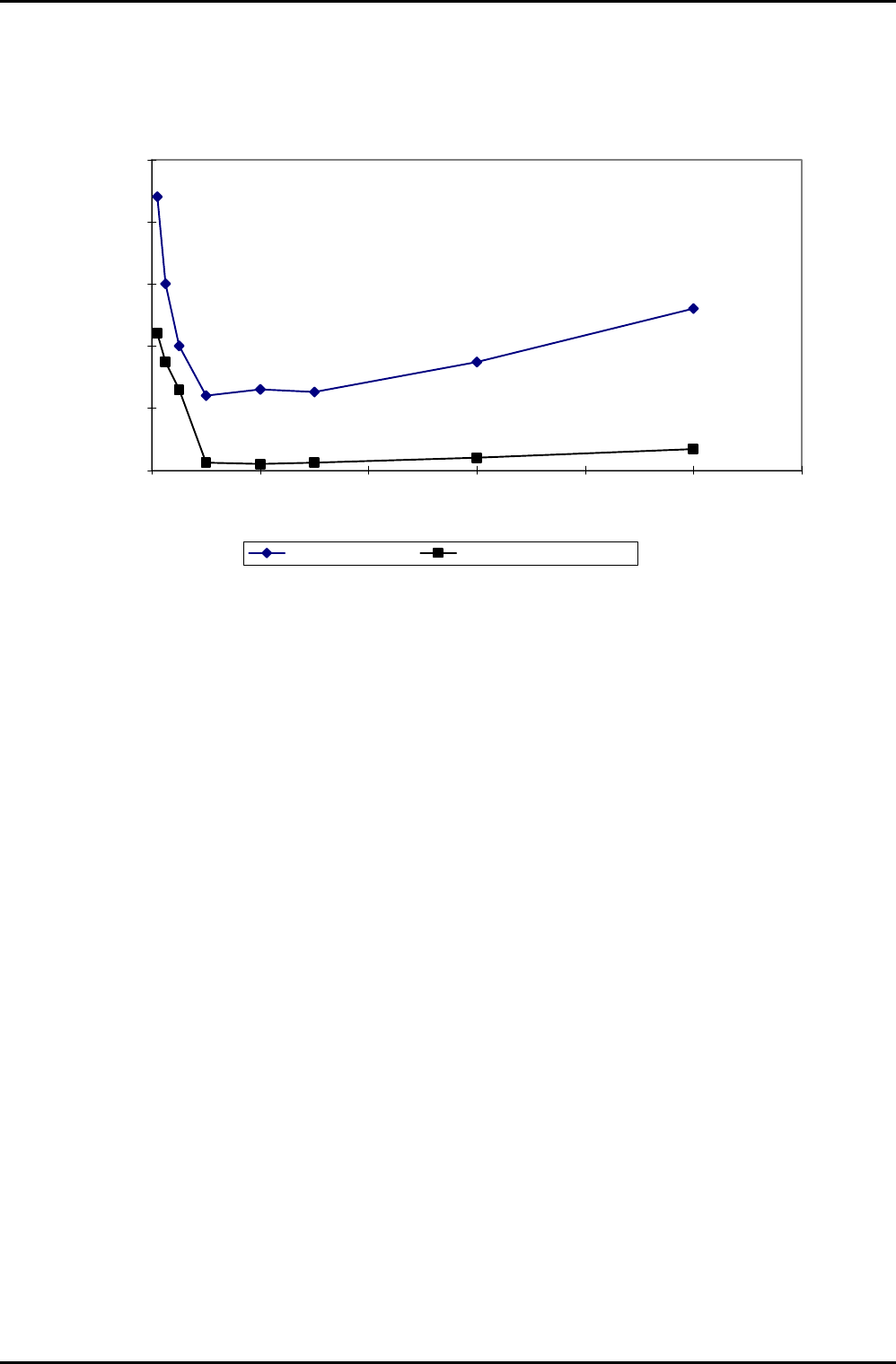
The operating window of the ICP 180 source in nitrogen is shown in Fig 4.
0
500
1000
1500
2000
2500
0 20 40 60 80 100 120
Pressure mtorr
ICP RF power W
ICP strike power W Minimum plasma power W
Fig 4: Operating window
ICP 180 Source
Issue 4: January 06 Page 10 of 26 Printed: 18-Jan-06, 8:44
Equipment Manual lñÑçêÇ=fåëíêìãÉåíë=mä~ëã~=qÉÅÜåçäçÖó== mä~ëã~ä~Ä=f`m=NUM
QK=fåëí~ää~íáçå=
This section applies if the mä~ëã~ä~Ä=f`mNUM=source is supplied as an upgrade, or as an exchangeable
plasma source.
The ICP180 is installed as the entire top lid to a mä~ëã~ä~Ä
=
póëíÉã=NMM, with a vacuum O ring on the
underside of the ICP180 chamber lid. The chamber lid is secured by hinges which enable access to the
process chamber interior for maintenance.
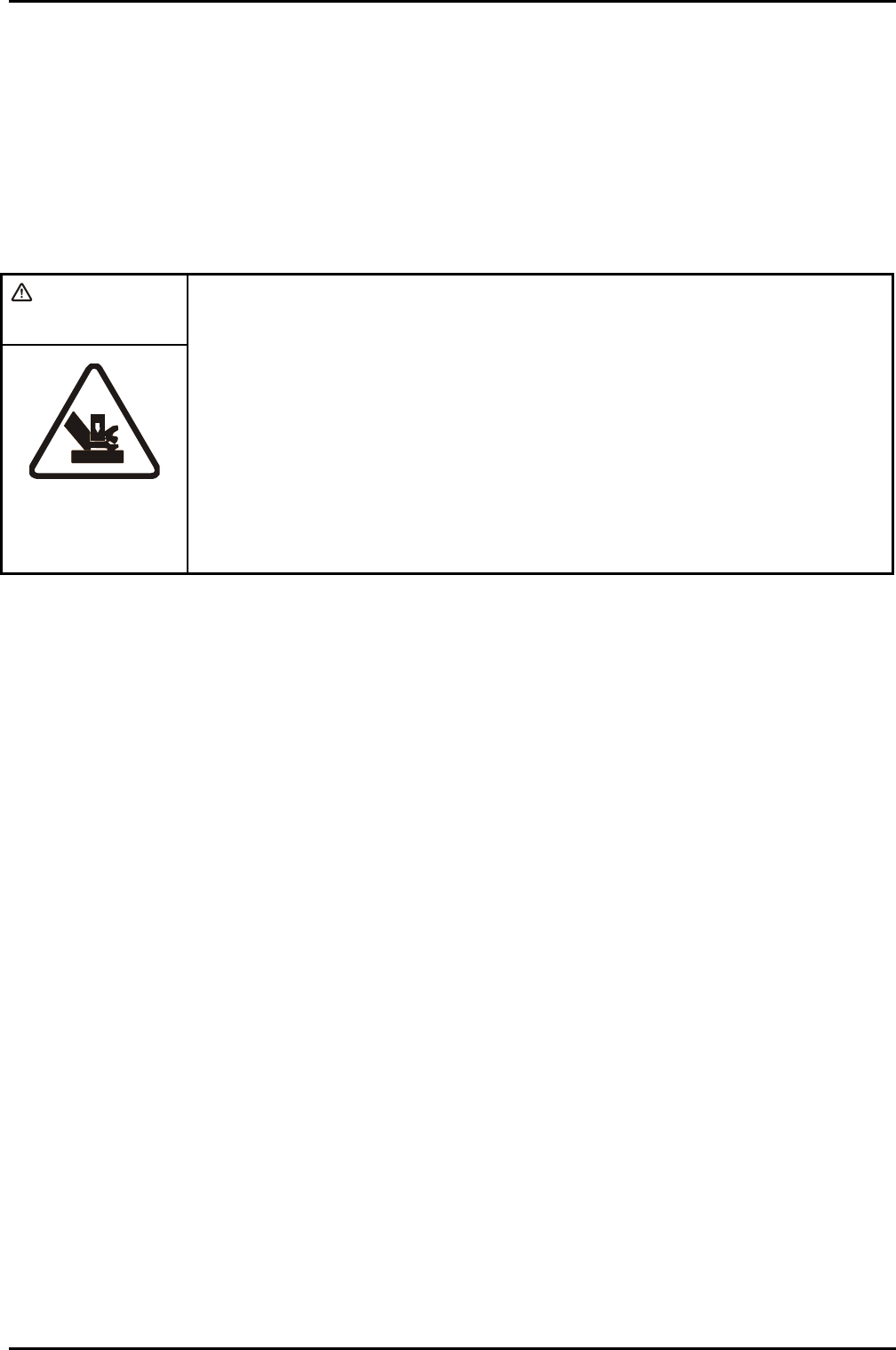
WARNING
PINCH POINT – WHEN THE CHAMBER LID IS OPENED OR CLOSED, LIMBS,
FINGERS ETC CAN BECOME TRAPPED BETWEEN THE LID AND THE PROCESS
CHAMBER BASE RESULTING IN SEVERE INJURY.
Ensure that all personnel are kept clear of the chamber lid when it is
opened or closed.
When opening or closing the chamber lid, ensure that both of your hands
are kept clear of the pinch point.
When the process chamber lid is to be kept in its raised position for
prolonged periods, ensure that it is held safely in its open position
without relying entirely on the gas support struts.
After mechanical mounting, connect the services detailed in Section 2 of this manual.
The RF generator services should be connected according to the manufacturer’s manual supplied with the
generator.
ICP 180 Source
Printed: 18-Jan-06, 8:44 Page 11 of 26 Issue 3 : December 00
mä~ëã~ä~Ä=f`m=NUM lñÑçêÇ=fåëíêìãÉåíë=mä~ëã~=qÉÅÜåçäçÖó== Equipment Manual=
RK=léÉê~íáåÖ=fåëíêìÅíáçåë=
RKN= fåíêçÇìÅíáçå=
WARNING
BEFORE POWERING UP THE SOURCE, ENSURE THAT ALL COVERS AND SCREENS ARE
FITTED CORRECTLY. DO NOT REMOVE THE COVERS OR SCREENS WHILST THE
SOURCE IS UNDER VACUUM.
The only controls on the mä~ëã~ä~Ä
=
f`m=NUM are the Automatch Unit (AMU) control switches, mounted on
the system console.
RKNKN= j~åì~ä=~ÇàìëíãÉåí=çÑ=íÜÉ=^ìíçã~íÅÜ=råáí=
NOTE: The following text refers to systems fitted with an Automatch Unit manual adjustment
panel. For systems having software control of the Automatch Unit, refer to Section 5
(Operating Instructions) of your system manual and the Automatch Unit’s Equipment
Manual.
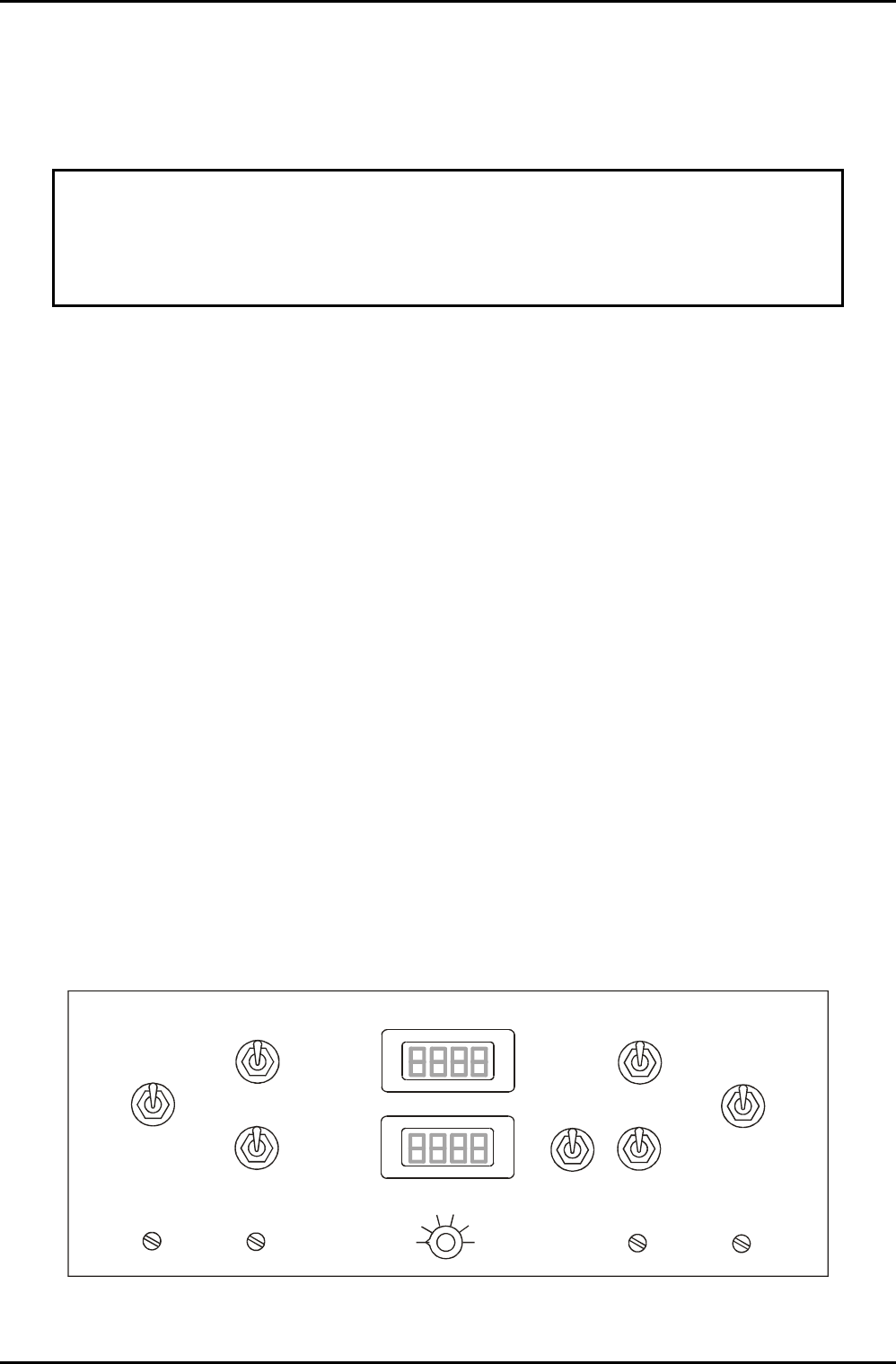
A manual adjustment panel, shown in Fig 5, is located behind a flap in the front of the equipment rack. It
comprises the following controls and indicators:
Auto / Manual switch: Sets the operating mode of the RF matching unit.
C1 MAX / MIN: Manual adjustment of RF matching capacitor C1. (Rotating its shaft clockwise or
counter clockwise.)
C2 MAX / MIN: Manual adjustment of RF matching capacitor C2. (Rotating its shaft clockwise or
counter clockwise.)
C1 PARK: Park position potentiometer for C1.
C2 PARK: Park position potentiometer for C2.
RF Interlock ON/OFF: Disables the RF interlock. RF generators deliver no power if the interlock is off.
Capacitor positions for C1 and C2 are displayed as numbers from 000 (minimum) to 999 (maximum).
AUTO
AUTO
MANUAL
MANUAL
C1 MAX
C1 MAX
C1 MIN
C1 MIN
C2 MAX
C2 MAX
C2 MIN
C2 MIN
C1 PARK
C1 PARK
C2 PARK
C2 PARK
ON
OFF
RF
Interlock
C1
C2
1
2
3
4
5
6
DISPLAY SELECTO
R
Fig 5: Typical AMU control panel
ICP 180 Source
Issue 4: January 06 Page 12 of 26 Printed: 18-Jan-06, 8:44