Utah-94-721002-System-Manual.pdf - 第271页
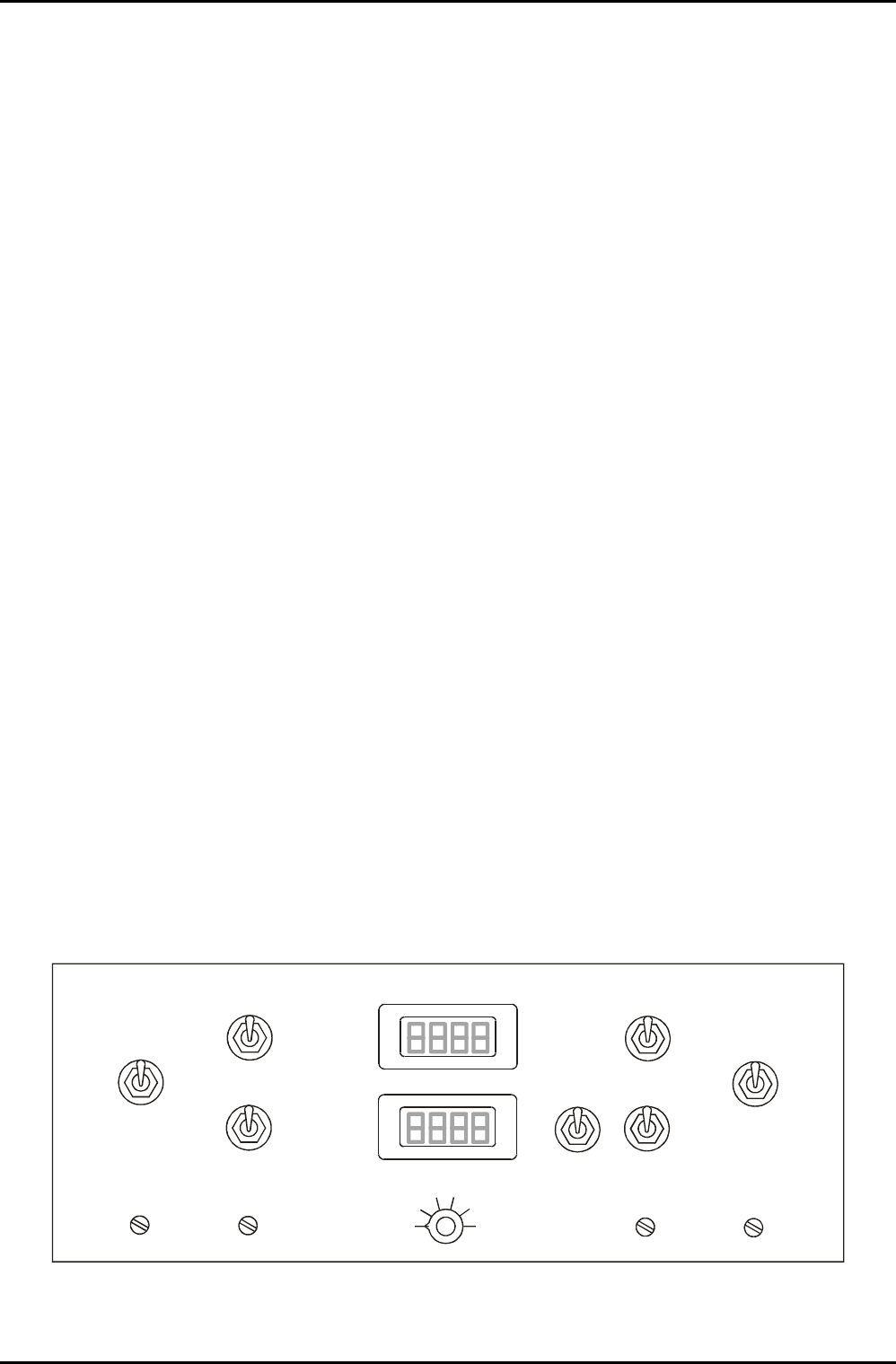
System Manual lñÑçêÇ=fåëí êìãÉåíë=mä~ëã~=qÉÅÜåçäçÖó== ^ää=lfmq=póëíÉãë Note that shows an AMU control panel with control facilities for two AMUs. The left-hand side controls are for AMU1 and the right-hand side controls …
^ää=lfmq=póëíÉãë lñÑçêÇ=fåëíêìãÉåíë=mä~ëã~=qÉÅÜåçäçÖó== System Manual
OKO= j~àçê=ÅçãéçåÉåíë=
The AMU comprises:
a) an input section with a type N coaxial connector, and a coupler giving ‘out of match’
error signals when the reflected power is greater than 1% of the forward power.
b) an RF section containing two motor-driven variable capacitors, together with a coil
where necessary.
c) a DC bias / Peak to peak, set by local switch, signal path. (Only fitted to AMUs used
for matching to a powered wafer table.)
d) an electronic control board, which uses the error signals to drive the variable
capacitors towards match.
e) a manual drive panel with capacitor position readings, for manual adjustments.
OKOKN= ^ìíçã~íÅÜ=Åçåíêçä=é~åÉä=
A manual adjustment panel, shown in Fig 2 , is located behind a flap in the front of the
equipment rack. It comprises:
Auto / Manual switch: Sets the operating mode of the RF matching unit.
C1 MAX / MIN: Manual adjustment of RF matching capacitor C1. (Rotating its shaft
clockwise or counter clockwise.)
C2 MAX / MIN: Manual adjustment of RF matching capacitor C2. (Rotating its shaft
clockwise or counter clockwise.)
C1 PARK: Park position potentiometer for C1.
C2 PARK: Park position potentiometer for C2.
RF Interlock ON/OFF: Disables the RF interlock. RF generators deliver no power if the
interlock is off.
Capacitor positions for C1 and C2 are displayed as numbers from 000 (minimum) to 999
(maximum).
AUTO
AUTO
MANUAL
MANUAL
C1 MAX
C1 MAX
C1 MIN
C1 MIN
C2 MAX
C2 MAX
C2 MIN
C2 MIN
C1 PARK
C1 PARK
C2 PARK
C2 PARK
ON
OFF
RF
Interlock
C1
C2
1
2
3
4
5
6
DISPLAY SELECTOR
Fig 2: Typical AMU control panel
OIPT Automatch Unit
Issue 6: February 05 Page 4 of 20 Printed: 5-Jan-06, 8:03

System Manual lñÑçêÇ=fåëíêìãÉåíë=mä~ëã~=qÉÅÜåçäçÖó== ^ää=lfmq=póëíÉãë
Note that shows an AMU control panel with control facilities for two AMUs. The left-hand
side controls are for AMU1 and the right-hand side controls are for AMU2. The LCD displays
are switched using the DISPLAY SELECTOR switch as shown in the following table.
DISPLAY SELECTOR
POSITION
LCD 1 (UPPER) LCD 2 (LOWER)
1 AMU 1 C1 POSITION AMU 1 C2 POSITION
2 RF 1 FORWARD POWER RF 1 REFLECTED POWER
3 RF 1 SETPOINT RF 1 Hi/Lo
4 RF 2 FORWARD POWER RF 2 REFLECTED POWER
5 RF 2 SETPOINT SPARE
6 AMU 2 C1 POSITION AMU 2 C2 POSITION
For a circuit diagram of the AMU control panel, refer to drawing 94-SE00C23249.
OKP= j~íÅÜáåÖ=ÅçãéçåÉåí=ä~óçìíë=
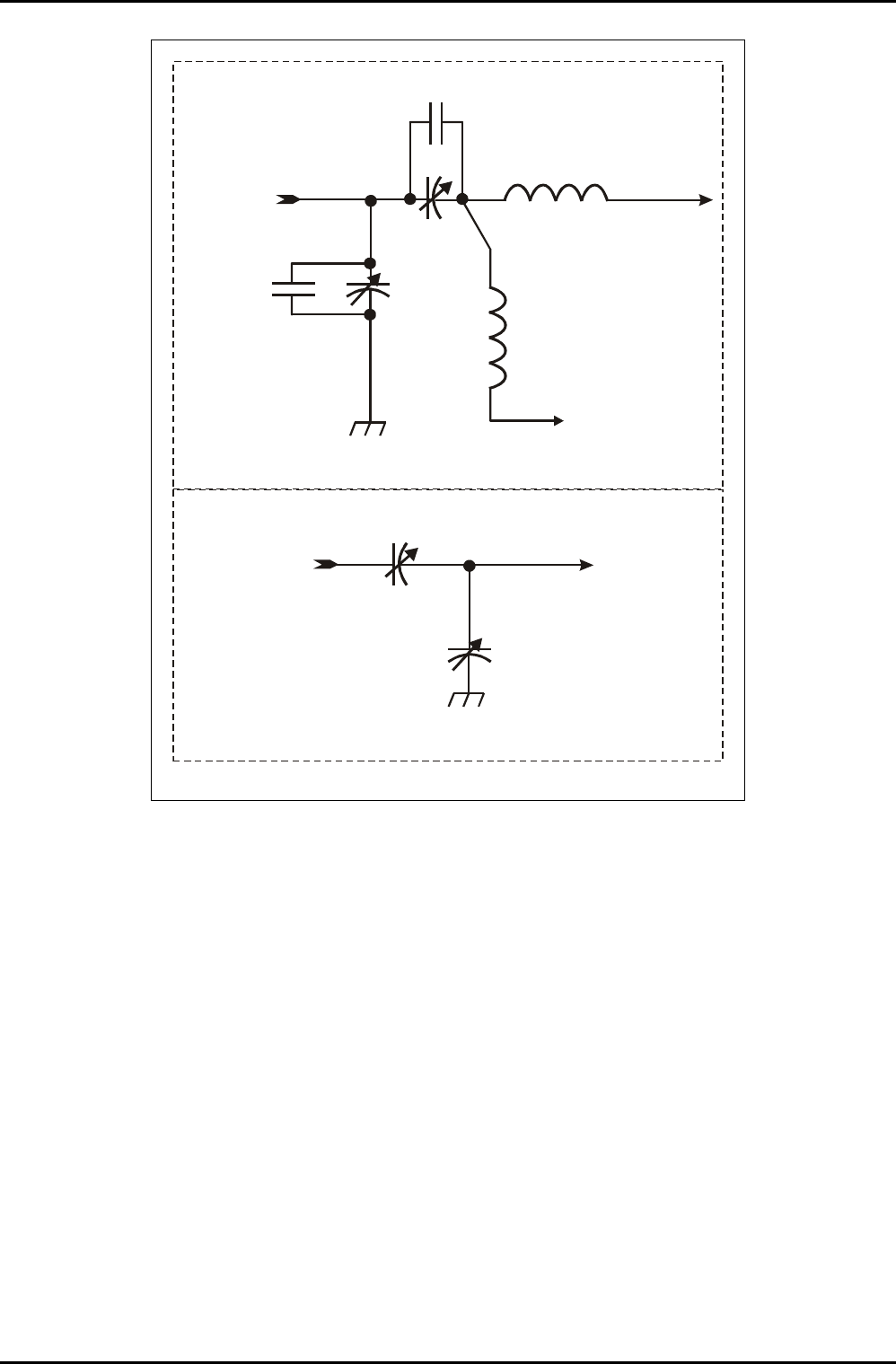
The layout of the matching components depends on the device to be matched to the RF
Generator to ensure maximum power transfer. Typical layouts of the components are shown
in Fig 3.
Note that in the typical layout, padding capacitors can be added in parallel with C1 and C2 to
modify their capacitance ranges. Refer to sub-section 6.3 (page 19) for details.
OIPT Automatch Unit
Printed: 5-Jan-06, 8:03 Page 5 of 20 Issue 6: February 05
^ää=lfmq=póëíÉãë lñÑçêÇ=fåëíêìãÉåíë=mä~ëã~=qÉÅÜåçäçÖó== System Manual
RF IN
RF OUT
DC BIAS
COIL
C1
COIL
C2
C2 PADDING
CAPACITORS
C1 PADDING
CAPACITORS
TO DC BIAS
CIRCUIT
TYPICAL MATCHING COMPONENTS
(LAYOUT 1)
RF IN RF OUT
C1
C2
ALTERNATIVE MATCHING COMPONENT LAYOUT
(LAYOUT 2)
NOTE: In some systems the circuit labels C1 and C2 are reversed.
Fig 3: Matching component layouts
OIPT Automatch Unit
Issue 6: February 05 Page 6 of 20 Printed: 5-Jan-06, 8:03