Utah-94-721002-System-Manual.pdf - 第274页
^ää=lfmq=póëíÉãë l ñÑçêÇ =fåëíê ìãÉåíë =m ä~ëã~=q ÉÅÜåçäçÖó== System Manual PK= qÉëí=~åÇ=ëÉííáåÖ=ìé= WARNING HAZARDOUS RF VOLT AGE - CONTACT CAN CAUSE DE ATH, SEVERE INJ URY OR BURNS. ANY WORK REQUIRING THE REMOVAL OF CO…
System Manual lñÑçêÇ=fåëíêìãÉåíë=mä~ëã~=qÉÅÜåçäçÖó== ^ää=lfmq=póëíÉãë
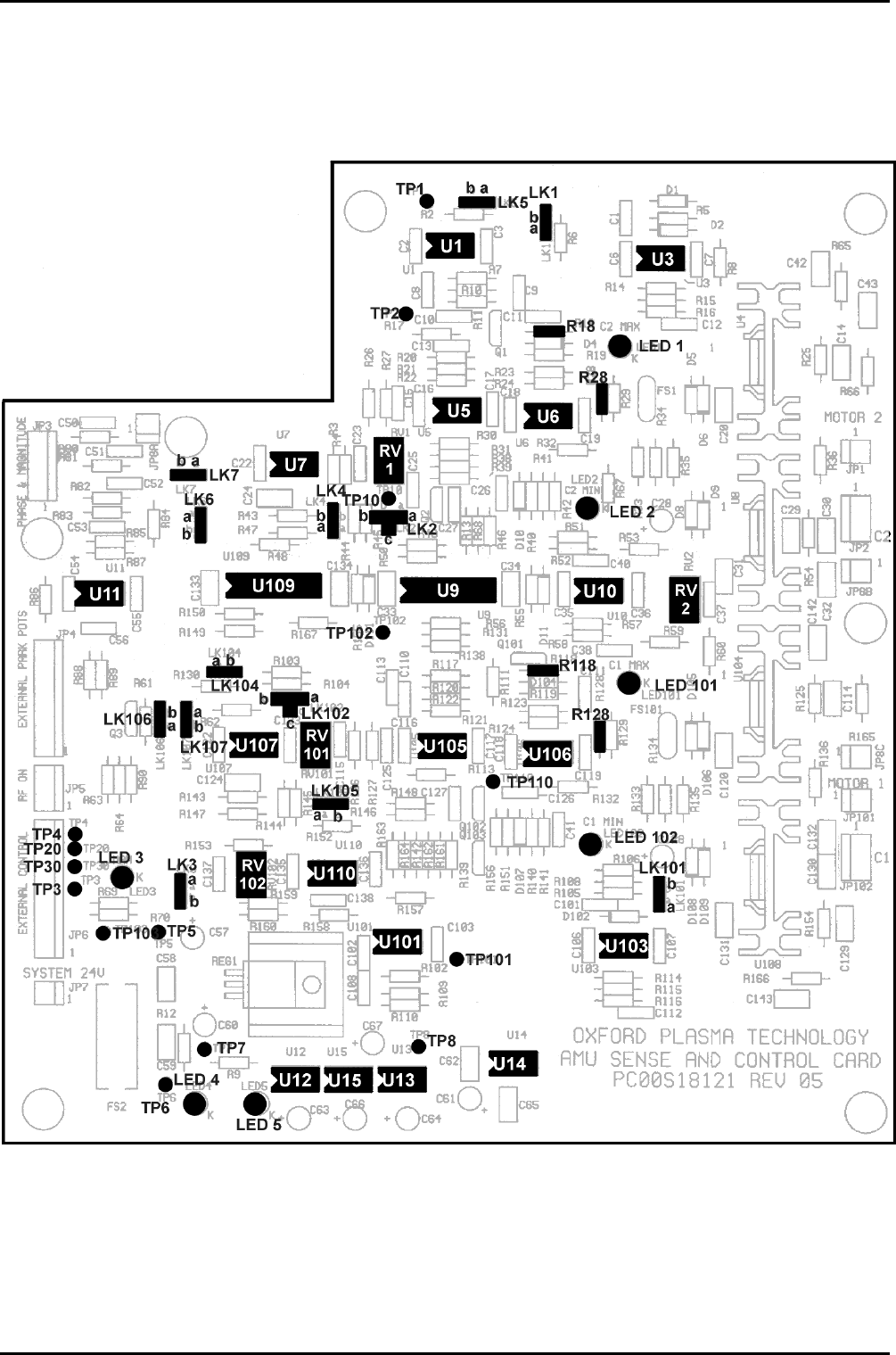
OKQ= pÉåëÉ=~åÇ=Åçåíêçä=m`_=
Refer to drawing 94-SE00A17801 for a circuit diagram of the AMU. The layout of the Sense
and Control PCB is shown in Fig 4 .
Fig 4: Sense and control PCB layout
OIPT Automatch Unit
Printed: 5-Jan-06, 8:03 Page 7 of 20 Issue 6: February 05
^ää=lfmq=póëíÉãë lñÑçêÇ=fåëíêìãÉåíë=mä~ëã~=qÉÅÜåçäçÖó== System Manual
PK= qÉëí=~åÇ=ëÉííáåÖ=ìé=
WARNING
HAZARDOUS RF VOLTAGE - CONTACT CAN CAUSE DEATH, SEVERE INJURY
OR BURNS.
ANY WORK REQUIRING THE REMOVAL OF COVERS OR PANELS MUST
ONLY BE PERFORMED BY AUTHORISED PERSONNEL WHO ARE AWARE OF
THE HAZARDS INVOLVED.
NOTE: Detailed test instructions are contained in Oxford Instruments Plasma Technology
Work Instruction No. 39. The following is a summary for the benefit of skilled service
engineers. It should
not be necessary for operators to perform these setting up
operations.
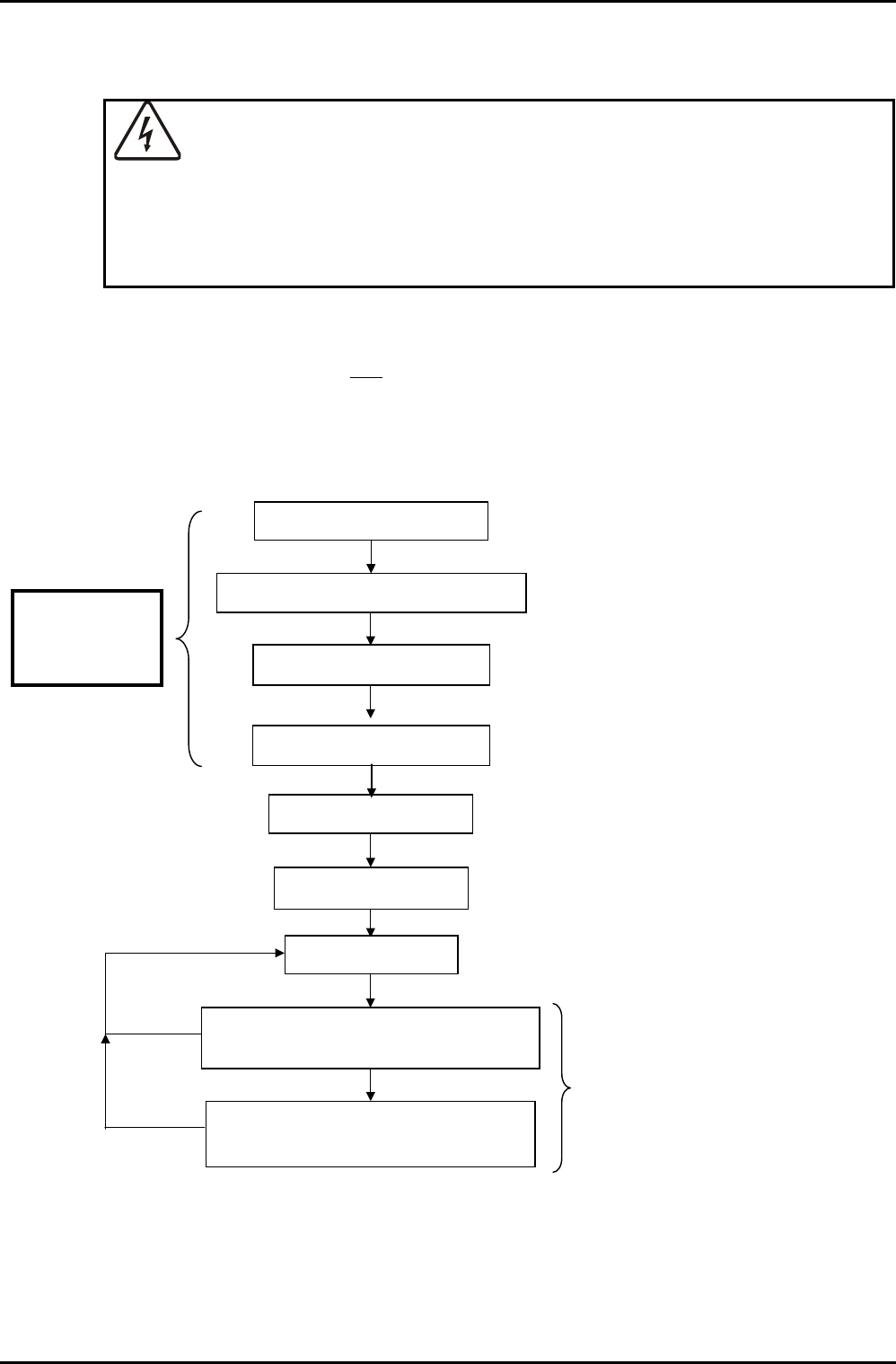
PKN= lîÉêîáÉï=
Set mechanical movement range
Confirm end-stop points
Find manual match
Set park positions
Set RV1 and RV2
Confirm auto-match for low power
operation
Confirm auto-match for high power
operation
Connect AMU to system
Set gain levels
Steps 1 to 5
Steps 1-8:
RF POWER
SUPPLY OFF
Step 6
Step 7
Step 8
Steps 9 to 12
Step 13
Step 14
Step 15
OIPT Automatch Unit
Issue 6: February 05 Page 8 of 20 Printed: 5-Jan-06, 8:03

System Manual lñÑçêÇ=fåëíêìãÉåíë=mä~ëã~=qÉÅÜåçäçÖó== ^ää=lfmq=póëíÉãë
PKO= mêçÅÉÇìêÉ=
WARNING
HAZARDOUS RF VOLTAGE - CONTACT CAN CAUSE DEATH, SEVERE INJURY
OR BURNS.
ENSURE THAT THE RF SUPPLY IS SWITCHED OFF WHILE CARRYING OUT
STEPS 1 TO 8.
1) Connect the AMU to the system. Make a good earth bond between the vacuum
chamber and the AMU chassis.
2) Connect the output strap to the plasma electrode with at least a 25 mm wide copper
strap, with at least 10 mm clearance between the live strap and any earthed part.
3) Confirm the polarity and voltage of the dc power source before connecting to the
Sense and Control PCB:
JP7 pin 1 +24 Vdc
JP7 pin 2 0 V
4) Ensure the ventilation fans are all pulling air
out of the automatch case and check
the system cooling is turned on. For sense board cooling, check one fan is pulling air
out and one is pulling air in to the sense board section.
5) Confirm the operation of each motor using the manual drive. An increase in
capacitor position should make the vanes overlap more. In the case of a vacuum
capacitor, an increase in position should turn the capacitor shaft anti-clockwise,
when looking at it from the motor end (see Fig 5). Check with a capacitance meter in
case of doubt.
If the motors do not turn in the correct direction check the plug in connector on the
board, refer to OIPT Work Instruction No. 39.
6a) Calibrate the motors and their respective positions as follows:
For gear driven capacitors: Loosen screws retaining the motors to the AMU box,
but don’t remove completely and ensure the gears don’t mesh.
For direct drive capacitors: Unscrew the motor plate attached to the side of the
AMU box and pull the coupling apart.
Then,
For Air Vane Capacitor AMU:
Keeping gears separated, overlap the vanes fully. Then, making sure that the gears
don’t mesh, drive both motors to maximum (999), using the AMU control panel.
For Vacuum Capacitor AMU (AMU board REV05 and earlier):
Set the capacitor positions and drive motors to their required position according to
the system type as shown in the following table:
OIPT Automatch Unit
Printed: 5-Jan-06, 8:03 Page 9 of 20 Issue 6: February 05