PSR_SIPLACE Setup Center 8.0 SP1.pdf - 第4页
ASM Assembly Sy stems GmbH & Co. KG SIPLACE Setup Ce nter 8.0 SP1 Status Nove mber 2015 Document: Author: PSR_SIPLACE Setup Center 8 .0 SP1.docx Stéphane Le Roux Template Version: 1.0 4 / 19 Print date: 07. December …

ASM Assembly Systems GmbH & Co. KG SIPLACE Setup Center 8.0 SP1 Status November 2015
Document: Author:
PSR_SIPLACE Setup Center 8.0 SP1.docx Stéphane Le Roux
Template Version: 1.0
3/ 19 Print date: 07. December 2015
Copyright (C) ASM Assembly Systems GmbH & Co. Kg 2011 All rights reserved Confidential
1. Product Status
Release date for SIPLACE Setup Center 8.0 SP1: CW 50/2015
1.1. Previous Documents
PSR – SIPLACE Setup Center RF 2.1; V1.1, February 2006
PSR – SIPLACE Setup Center 2.2; V1.2, July 2006
PSR – SIPLACE Setup Center 2.2 SP1; V1.5, April 2007
PSR – SIPLACE Setup Center 2.3; V1.1, November 2007
PSR – SIPLACE Setup Center 2.3 SP1; V1.5, May 2008
PSR – SIPLACE Setup Center 3.0; V1.1, August 2008
PSR – SIPLACE Setup Center 3.0 SP1; V1.0, December 2008
PSR – SIPLACE Setup Center 3.2; V1.0, June 2009
PSR – SIPLACE Setup Center 3.2 SP1; V1.0, November 2009
PSR – SIPLACE Setup Center 3.3; V1.0, May 2010
PSR – SIPLACE Setup Center 4.0; V1.0, June 2011
PSR – SIPLACE Setup Center 4.2; V1.0, September 2011
PSR – SIPLACE Setup Center 5.0; V1.0, April 2012
PSR – SIPLACE Setup Center 5.1; V1.0, November 2012
PSR – SIPLACE Setup Center 6.0; V1.0, November 2013
PSR – SIPLACE Setup Center 6.0; V1.1, February 2013
PSR – SIPLACE Setup Center 6.3; V1.0, May 2014
PSR – SIPLACE Setup Center 6.3; V1.1, September 2014
PSR – SIPLACE Setup Center 6.3; V1.2, November 2014
PSR – SIPLACE Setup Center 7.0; V1.0, December 2014
PSR – SIPLACE Setup Center 7.1; V1.0, May 2015
PSR – SIPLACE Setup Center 7.1; V1.1, September 2015
1.2. Discontinuation Windows XP
SIPLACE Setup Center 8.0 SP1, like all other SIPLACE software products delivered
from SW release R70 no longer supports the operating system Windows XP.

ASM Assembly Systems GmbH & Co. KG SIPLACE Setup Center 8.0 SP1 Status November 2015
Document: Author:
PSR_SIPLACE Setup Center 8.0 SP1.docx Stéphane Le Roux
Template Version: 1.0
4/ 19 Print date: 07. December 2015
Copyright (C) ASM Assembly Systems GmbH & Co. Kg 2011 All rights reserved Confidential
2. Product Structure and Licensing
2.1. Product Structure
117611 SIPLACE Setup Center Media Package V8.0 SP1
The Media Package only includes the media installation CD/DVD and customer documentation.
There is no license key included.
This package is required for new Setup Center customers as well as for upgrade customers.
SIPLACE Setup Center Media Package can be downloaded from our SIPLACE License
Management web portal with no additional cost for customer (SIPLACE License Web Portal).
117612 SIPLACE Setup Center Basic License V8.x
This package only includes the SIPLACE Setup Center factory license for new customers (Basic
license). Installation media are not included.
This package is necessary for new Setup Center customers once per factory.
SIPLACE Setup Center Basic License can be downloaded from our SIPLACE License
Management web portal with no additional cost for customer (SIPLACE License Web Portal).
117613 SIPLACE Setup Center Upgrade License V8.x
This package only includes the SIPLACE Setup Center factory upgrade license for upgrade
customers. Installation media are not included.
This package is necessary for Setup Center upgrade customers once per factory.
2.2. Product Licensing
2.2.1 New Handling for Basic Licenses
Since Release 50, the customer can get the basic license for free by downloading it from the SIPLACE
License Web Portal.
Workflow 1:
1. The customer is requesting the basic license in the SIPLACE license portal
2. SIPLACE Service Sales activates the license (same procedure like for the trial license)
Workflow 2:
1. SIPLACE Service is requesting the license for the customer
2. SIPLACE Service has to select the customer in the SIPLACE license portal
3. SIPLACE Service activates the license
2.2.2 Upgrade Licenses for SIPLACE Setup Center
When upgrading a customer from Setup Center 3.0 or lower to Setup Center 4.0 or higher, the
SIPLACE Setup Center 3.x Upgrade License 116956 MUST be ordered as well once per factory. This
license is required for technical reasons related to the SIPLACE License Management System
(License Portal).
Details about the new licensing process can be found in the PPR “Sales and Service Information
Licensing” in DMS (PPR Sales and Service Information Licensing).
Note: Machine connection licenses delivered with SIPLACE Setup Center 3.2 or higher are still
valid for SIPLACE Setup Center 8.x.
ASM Assembly Systems GmbH & Co. KG SIPLACE Setup Center 8.0 SP1 Status November 2015
Document: Author:
PSR_SIPLACE Setup Center 8.0 SP1.docx Stéphane Le Roux
Template Version: 1.0
5/ 19 Print date: 07. December 2015
Copyright (C) ASM Assembly Systems GmbH & Co. Kg 2011 All rights reserved Confidential
3. New Features
3.1. SIPLACE TX
SIPLACE Setup Center 8.0 SP1 supports the new SIPLACE TX series.
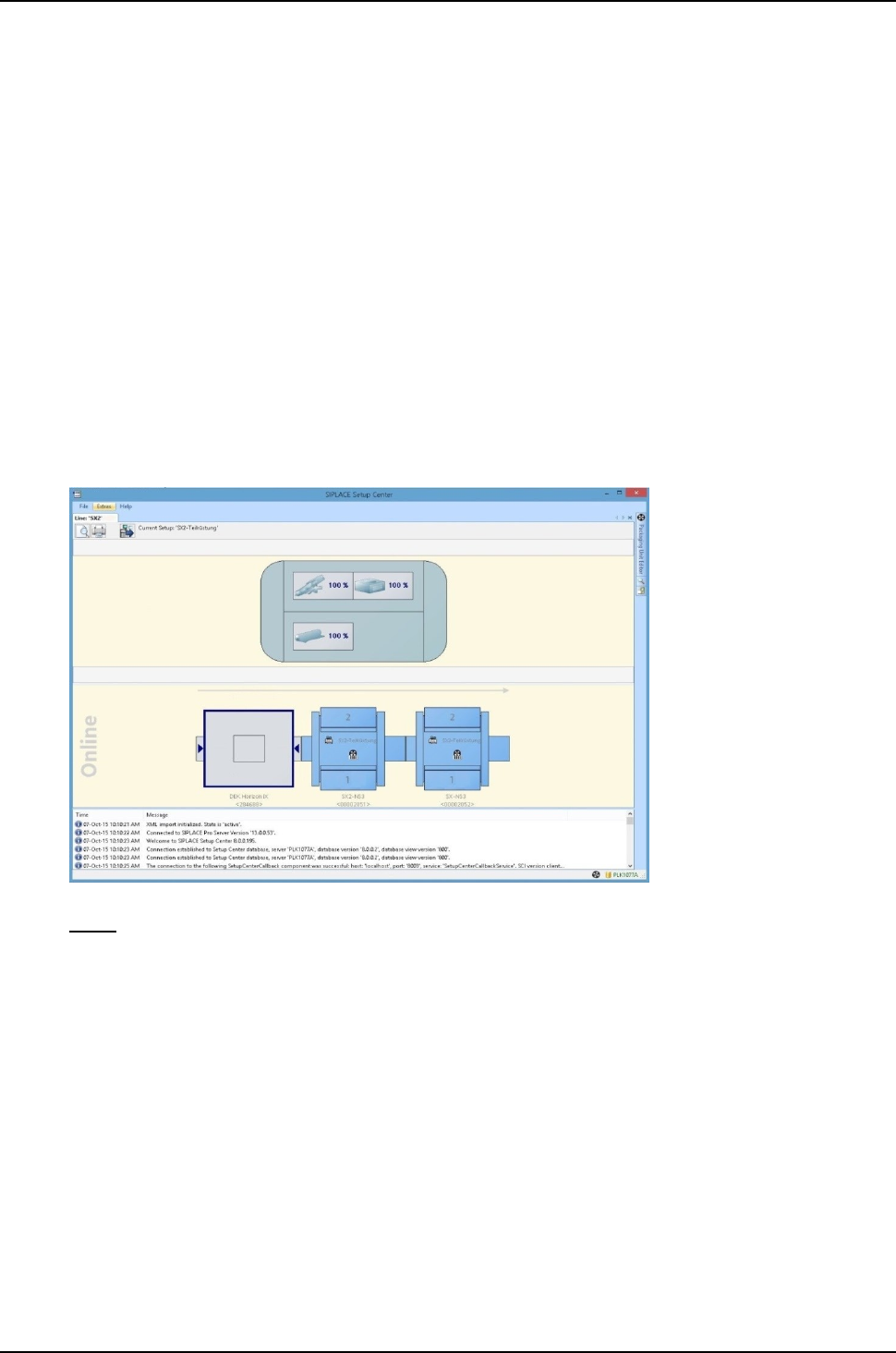
3.2. Monitor consumables of DEK printer
If a DEK printer is used on the line, SIPLACE Setup Center can display the status of the
consumables for this printer.
The DEK printer must be programmed in SIPLACE Pro.
The DEK consumables monitored by SIPLACE Setup Center are:
- Printing medium
- Stinger
- Fabric
- Cleaning solvent
Note: this feature requires DEK software V9 SP15 or higher.
3.3. Scanning brightness class at later time
The function for scanning the brightness class at a later time allows you to record the brightness
class for a packaging unit that has already been scanned. This function is necessary if the
brightness class of the packaging unit was not required during the first scan and therefore could not
be scanned.
In the following cases, it is possible to scan the brightness class at a later time:
1. When setting or refilling the machine or in the pre-setup area. In this case, the scan process
does not terminate after the UID but automatically recognizes the necessity of the brightness
class. As usual, the operator needs to scan the label on the reel including the brightness
class. After the scan, the brightness class is automatically recorded in the packaging unit
data.
2. The necessity of the brightness class is also detected after deactivation during a setup
changeover or after placing the feeder; the operator is prompted to scan the barcode labels
on the reel to record the brightness class. In this case, activation with the scanner button is
not possible.