00193794-11_VD_SSW 505.05_de en - 第41页
Software Version Description, Station Software 505.05 07/2008 Edition 5.17.1 Restrictions - Station-by-station download is not possible if t he placement machine is in "synchronous dual conveyor" mode. - In &qu…
Software Version Description, Station Software 505.05 07/2008 Edition
5.15 Synchronous dual conveyor with OIS
Up to now, it was not possible to record board data for a board using OIS if the placement machine
was operated in "synchronous dual conveyor" mode. This is now possible for OIS Version 2.4 in
combination with Version 505.01.xx of the station software.
It can be achieved as follows:8
OIS creates one record in its database per physical board. This means that two records are created
if the placement machine is working in "synchronous dual conveyor" mode and one record is
created if the machine is working in "single conveyor" mode.
5.16 2D PCB barcode reader for all machines
Using version 505.xx of the software, the 2D PCB barcode reader can be used on all machine types
supported by this version. Version 505.xx of the software supports both 1D and 2D barcode types.
5.17 Station-by-station download
To keep product change times as low as possible, version 505.xx of the software allows you to
specify a new job for each station individually in the line controller (SIPLACE Pro Line Control). This
means that it is no longer necessary to empty the entire line.
1. To initiate the job change the operator must first specify a new job in the SIPLACE Pro Line
Control user interface with the "Stationwise Download" option. Station-by-station download
only works, however, if "Standard Mode" is set for downloading under Tools Æ
Configuration....
2. When the last board of the current job moves into the input conveyor of the first station in the
line, the operator must click the flashing "Change job by station" icon in the main view of the
station computer interface. The station is emptied. Then the changeover can be performed
and once the changeover process has been confirmed, the new job can be processed at this
station.
3. The procedure described in point 2 must be repeated for every other station in the line.
- Station-by-station download can be carried out for a station with a single conveyor or with a dual
conveyor in "asynchronous dual conveyor" mode with or without a setup change.
- After a station-by-station download operation has been canceled, a complete line download
must first be carried out.
40 of 150

Software Version Description, Station Software 505.05 07/2008 Edition
5.17.1 Restrictions
- Station-by-station download is not possible if the placement machine is in "synchronous dual
conveyor" mode.
- In "asynchronous dual conveyor" mode, station-by-station download is only possible with a
change of setup if a recipe is specified for both conveyor lanes simultaneously.
- Station-by-station download is aborted if the Line Control Server is shut down and rebooted.
After the Line Control Server has been rebooted, production can only continue after a complete
line download.
- No package forms must be taught at the station during the download operation, otherwise the
station computer hangs.
5.18 Flexible dual conveyor
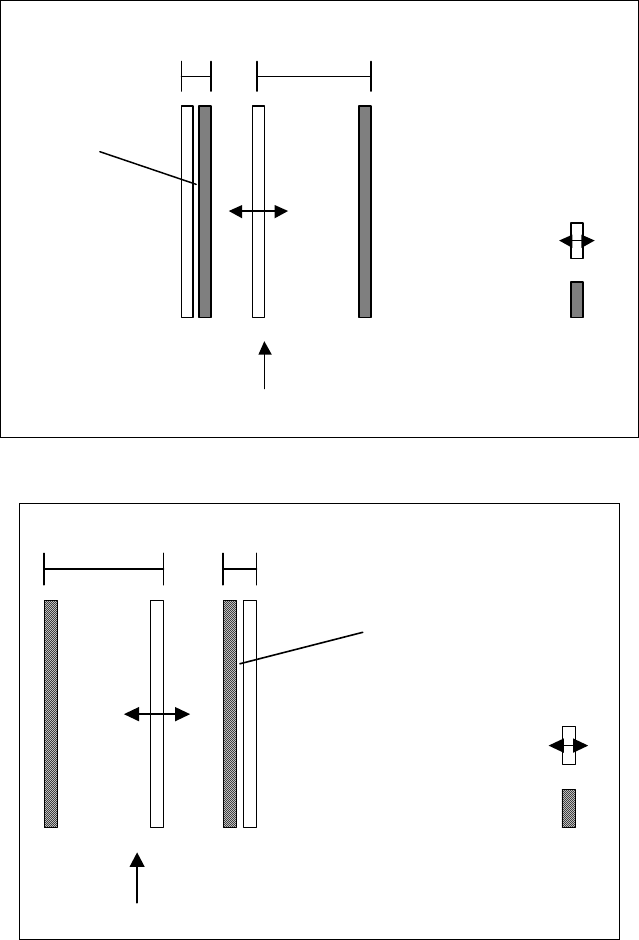
The "flexible dual conveyor" feature makes it possible to widen a conveyor lane beyond its
maximum width in order to process extra-wide boards (greater than 216 mm) on a machine with a
dual conveyor. This is done by completely closing up the conveyor edges of the second conveyor
lane. This deactivates this conveyor lane. The two diagrams below illustrate the principle of the
flexible dual conveyor.
Note:
Adjusting the conveyor width may cause a crash between the conveyor edge and the PCB
supports. A corresponding warning is displayed, requesting the operator to remove the PCB
supports before the conveyor edges are closed up.
41 of 150
Software Version Description, Station Software 505.05 07/2008 Edition
Fixed conveyor
edge
Moveable
conveyor edge
Transport direction
Conveyor
lane 1
Conveyor
lane 2
Deactivated
conveyor lane
Fig. 5-1: Dual conveyor with widened conveyor lane 1 (fixed conveyor edge on the right)
Transport direction
Fixed conveyor
edge
Moveable
conveyor edge
Conveyor
lane 2
Conveyor
lane 1
Deactivated
conveyor lane
Fig. 5-2: Dual conveyor with widened conveyor lane 2 (fixed conveyor edge on the left)
The widening of the conveyor lane is specified for a job by the programming system if this is
necessary to produce the job.
42 of 150