00193794-11_VD_SSW 505.05_de en - 第47页
Software Version Description, Station Software 505.05 07/2008 Edition 5.25 Maximum of 50 characters for object names at the st ation Object names (names of components, boards, placement lists, etc.) are restricted to 50 …
Software Version Description, Station Software 505.05 07/2008 Edition
5.24 Correct position (online editing, first version)
Fiducial positions or pickup positions can be changed directly on the station as required.
If placement is aborted due to a fiducial error during position recognition, the "Correct position"
function can be used to move exactly to the position of the fiducial which was not recognized during
fatal error handling. When the operator calls the "Correct position" function, the PCB camera is
automatically positioned on the fiducial which has not been recognized. If the operator now switches
the view to the PCB camera, he can use the cursor keys to position the crosshair precisely on the
fiducial position.
If the checkbox With automatic position recognition is checked in the "Correct position" dialog
box, the corrected fiducial position is re-measured when position recognition is carried out again. If
this is not successful, the position which has been taught is taken.
If the checkbox With automatic position recognition is unchecked, the position of the corrected
fiducial is taken over directly.
After closing the dialog box, the operator must restart position recognition.
An incorrect pickup position can be corrected before placement or if a "track empty" error occurs. To
do this, the operator selects the appropriate entry in the "Setup" or "Empty tracks" view, calls the
"Correct position" function, switches the view to the PCB camera, corrects the pickup position with
the cursor keys and finally accepts the corrected pickup position with "Accept".
5.24.1 Restrictions
- Fiducial positions and pickup positions which have been corrected at the station are not taken
over by the programming system. They only apply until the setup is changed. The operator must
enter the data on the corrected position in the programming system manually if necessary.
- If position recognition errors occur as a result of badly positioned boards, the operator must
measure all the fiducials which have not been recognized individually. The procedure described
above must therefore be performed again for every fiducial which is not recognized.
- Once a pickup position or fiducial position has been taught and acknowledged by the operator, it
cannot be reversed. If necessary, these must be corrected by teaching them again.
- Online-Editing can not be used for pick up positions on SIPLACE S25 machines. The LP vision
camera can not scan the pick up positions because the restricted y-travel profile.
46 of 150
Software Version Description, Station Software 505.05 07/2008 Edition
5.25 Maximum of 50 characters for object names at the station
Object names (names of components, boards, placement lists, etc.) are restricted to 50 characters.
However, since it is possible to enter names longer than 50 characters in SIPLACE Pro, for
instance, such names are abbreviated during a download. This applies to SIPLACE Pro, SIPLACE
OIS, SIPLACE Explorer and the SIPLACE station software.
5.25.1 Restrictions
The maximum number of characters for a PCB barcode is still restricted to 40 characters for a
board.
5.26 "Long PCB" option
Long PCBs are boards which are longer than the processing area (PA) or processing conveyor, and
which must therefore be assembled in two passes.
A board of this type can now be processed in a number of steps within a single processing area.
This is done by first moving the board to the first stop position, clamping it and processing it. Once
processing is completed, it is transported on to the next stop position. Here, processing of the board
continues, i.e. the placement content of a processing area is no longer placed in a single pass.
Instead, the board moves to a stop position, position recognition is performed and the placement
content assigned to this stop position is placed. This sequence is repeated for all the specified stop
positions of the processing area. The processing areas of a machine with two processing areas are
independent of each other.
Irrespective of the machine type, N stop positions can be assigned to each processing area. The
placement content of a stop position corresponds to one step.
47 of 150
Software Version Description, Station Software 505.05 07/2008 Edition
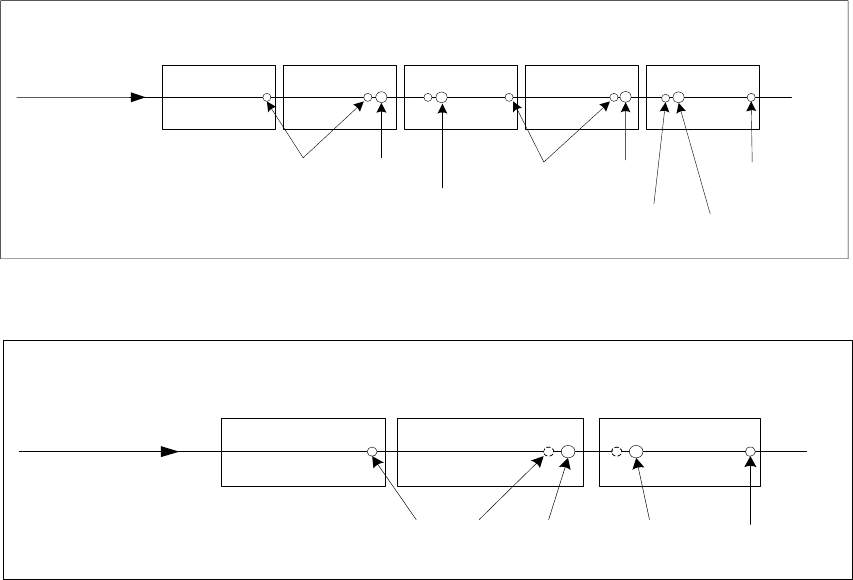
The two diagrams below each show one conveyor lane with two stop positions per processing area.
Transport direction
Proximity
switch
Bero
Stop
position 1
Proximity
switch
Stop
position 1
Stop
position 2
Input conveyor
Intermediate
conveyor
PA 1 PA 2 Output conveyor
Proximity
switch
Stop
position 2
Fig. 5-3: Conveyor track with two processing areas
Transport direction
Proximity
switch
Proximity
switch
Stop
position 1
Input conveyor
Processing
conveyor
Output conveyor
Stop
position 2
Fig. 5-4: Conveyor track with a single processing area
The following rules apply for the "Long PCB" option:
- If a global ink spot is defined, it must be possible to move to it in PA1, otherwise it is impossible
to decide whether to assemble the board or not.
- If position recognition is deactivated for subpanels and activated for the board, it must be
possible to move to the fiducials defined for the board in both processing areas.
- A subpanel can only be assembled in a processing area if it is possible to move to the
associated ink spot and the associated local fiducials, because
- it must be clear whether or not the subpanel is to be assembled before placement starts,
- the correction factors from the global position recognition must be known for placement.
All fiducials and ink spots for a subpanel must be located either completely in PA 1 or
completely in PA2.
- If placement of a component requires separate position correction, it must be possible to move
to all the fiducials defined for this placement position in the processing area in which the
component is to be placed.
- Fiducials can also be located outside the overlap region.
- Up to 6 fiducials must be defined for a fiducial set for a board.
48 of 150