00190802-02.pdf - 第19页
User’s Manual Line Computer UNIX 1 Hardware / Software Install ation Software Version 402.xx Edition 06/96 1.2 Hardware Installation 1 - 5 CA UTION ∆ ! On no ac count must the com puter be s witch ed on if the LC soft wa…

1 Hardware / Software Installation User’s Manual Line Computer UNIX
1.2 Hardware Installation Software Version 402.xx Edition 06/96
1 - 4
CAUTION
∆
!
To prevent any damage occurring to the hardware it is mandatory to ensure that computor - monitor - UPS -
power connection are correctly interconnected (refer to the following sections).
1.2.2 Preparatory Work Prior to Putting the Line Computer Into Service
☞
NOTE
To prevent the UNIX system and the LC software from being destroyed in the event of a power failure while
the computer is in operation, the power switch provided on the SIPLACE tower has been deactivated so that
the computer can only be switched on via the UPS. Therefore, all connections to the UPS must be completed
prior to operating the computer.
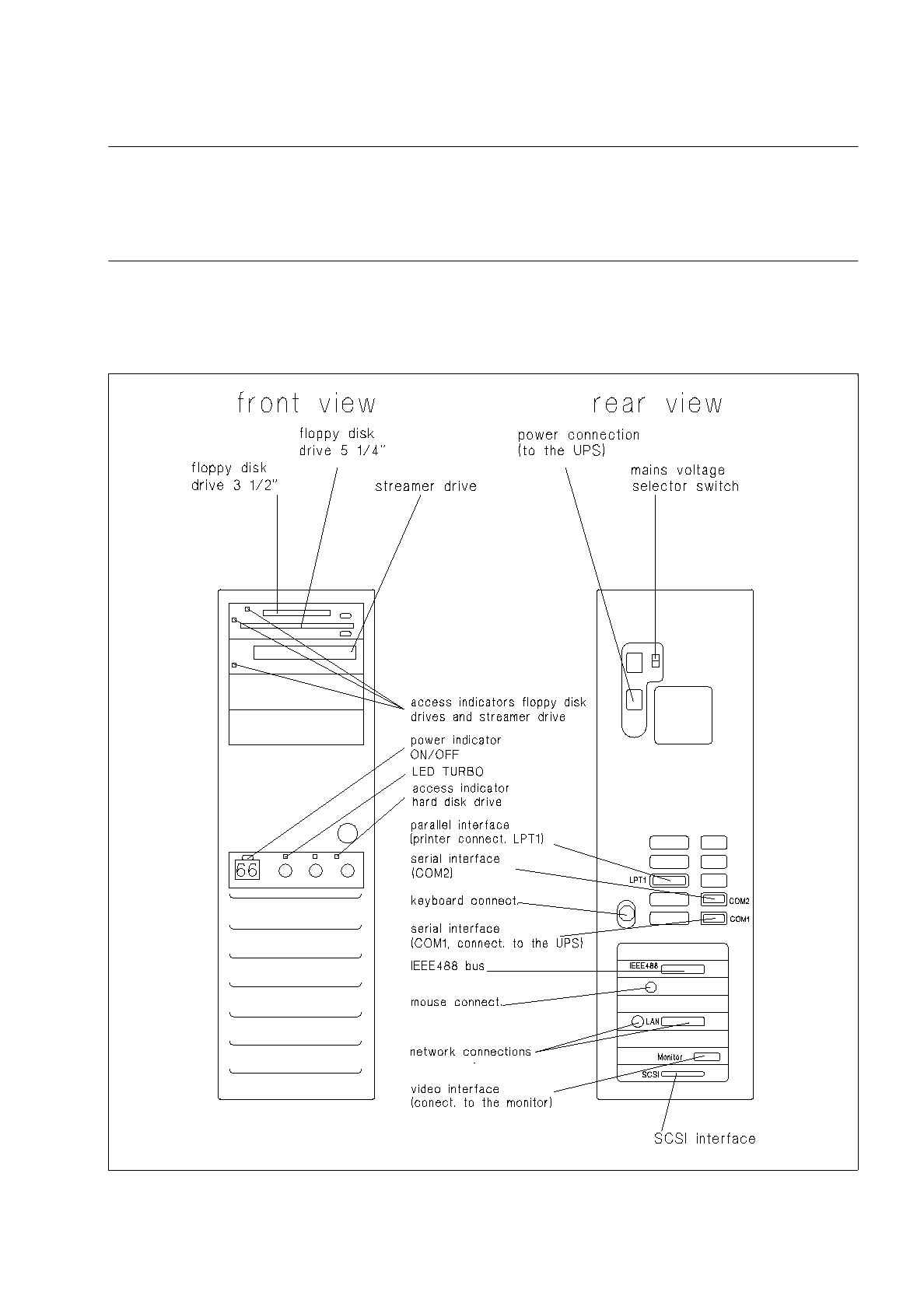
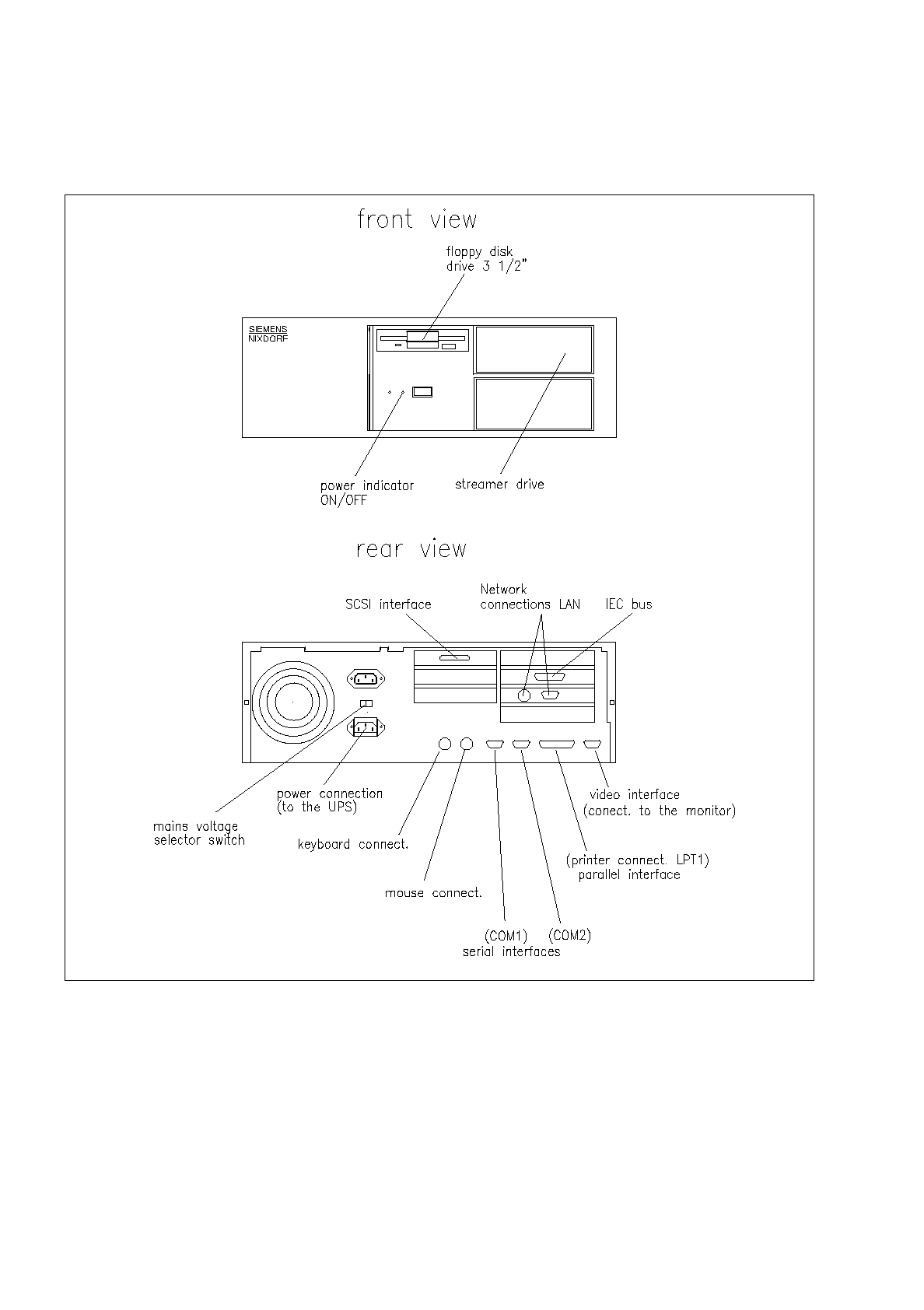
Fig. 1.2.1 and 1.2.2 shows the control elements of the computer and all connections required to be made
when connecting the computer to the UPS and the computer to the monitor.
PROCEDURE
●
Prior to the initial operation of the devices, check that the setting of the mains voltage selector
switch located on the rear of the computer corresponds to the line voltage prevailing at the site
and, if required, adjust the switch to the correct line voltage.
●
Plug power cable into UPS (see Fig. 1.2.6) and connect to mains.
●
Switch on UPS at power switch (see Fig. 1.2.6) and allow unit to be charged for 24 hours, if requi-
red (see note, page 1 - 20).
●
Connect power cable to monitor (see Fig. 1.2.3, 1.2.4 and 1.2.5) and to mains.
●
Switch on monitor using power switch (see Fig. 1.2.3, 1.2.4 and 1.2.5) .
CAUTION
∆
!
If now the power indicator light fails to light up on the monitor (see Fig. 1.2.3, 1.2.4 and 1.2.5), turn off
the monitor again and wait for approximately one minute before turning it back on again. If the power
indicator light still fails to illuminate, switch off the monitor again, pull the mains plug and inform the
Service.
●
Switch off UPS.
●
Connect computer and UPS by means of power and interface cables (see Fig. 1.2.1 or 1.2.2
and 1.2.6).
●
Connect monitor and computer by means of video cable (see Fig. 1.2.3, 1.2.4 and 1.2.5).
●
Connect keyboard and mouse to computer (see Fig. 1.2.1 and 1.2.2).
●
Start with the software installation proceeding as described in chapter 1.3.
User’s Manual Line Computer UNIX 1 Hardware / Software Installation
Software Version 402.xx Edition 06/96 1.2 Hardware Installation
1 - 5
CAUTION
∆
!
On no account must the computer be switched on if the LC software has not been installed yet, as it cannot
be shut down properly without the "Root password". Switching off the device without first allowing the UNIX
system to shut itself down properly can result in the destruction of the UNIX system
!!!
1.2.2.1 Computer - Type SIPLACE 486/66 DX2
Fig. 1.2.1 Computer - indicators, control elements, connections
1 Hardware / Software Installation User’s Manual Line Computer UNIX
1.2 Hardware Installation Software Version 402.xx Edition 06/96
1 - 6
1.2.2.2 Computer - Type PCD-5H Pentium 90 MHz
Fig. 1.2.2 Computer - indicators, control elements, connections