00190802-02.pdf - 第232页
8 Product / PCB User’s Manual Line Computer UNIX 8.1 PCB Editor Software Version 402.xx Edition 06/ 96 8 - 14 - Setting Set/c luster off set For e a c h par t ial stru ctur e a cluster off set must be enter ed. By ente r…

User’s Manual Line Computer UNIX 8 Product / PCB
Software Version 402.xx Edition 06/96 8.1 PCB Editor
8 - 13
-
Moving
a partial PCB structure with corresponding PCB type
This command serves to move a partial PCB structure, together with a cross-reference to a PCB type,
within a given PCB structure.
●
Activate icon .
●
Select target PCB type where partial PCB structure is to be moved to.
●
Select source PCB type containing the partial PCB structure to be moved.
The partial PCB structure - appended to the target PCB type - is shown in the display area.
-
Generating
a new partial PCB structure with the corresponding new PCB type
This command serves to generate a new partial structure with a cross-reference to a new PCB type
(not existing in the Master Data yet).
●
Activate icon .
●
Select PCB type.
The dialog box for entering the name is displayed.
●
Enter the name and confirm with
OK
.
The new PCB type is appended to the selected one and displayed in the display area.
-
Copying
a partial PCB structure together with the corresponding PCB type
This command serves to copy all data of the partial structure. A new partial structure containing a
cross-reference to a new PCB type is generated.
●
Activate icon .
●
Select PCB type in which the copied PCB type is to be contained.
●
Select PCB type to be copied.
The dialog box for entering the name is displayed.
●
Enter the name and confirm with
OK
.
Copying
a partial PCB structure together with corresponding PCB type, or an overall PCB structure, into
another (loaded) PCB structure
●
Activate icon .
●
Load the PCB with the structure to be copied via
SERVICES
-->
Structure Editor
.
●
In the window which is opened first click on the PCB type (target) which is to contain the copied
structure.
●
Select the PCB type to be copied (source) in the second window.
●
Enter name in the dialog box displayed and confirm with
OK
.
The copied structure is now inserted into the existing PCB structure.
8 Product / PCB User’s Manual Line Computer UNIX
8.1 PCB Editor Software Version 402.xx Edition 06/96
8 - 14
-
Setting
Set/cluster offset
For each
partial structure a cluster offset must be entered. By entering the cluster offset the PCB type
is provided with a coordinate offset, and a partial PCB structure is thus completely described.
●
Activate icon .
●
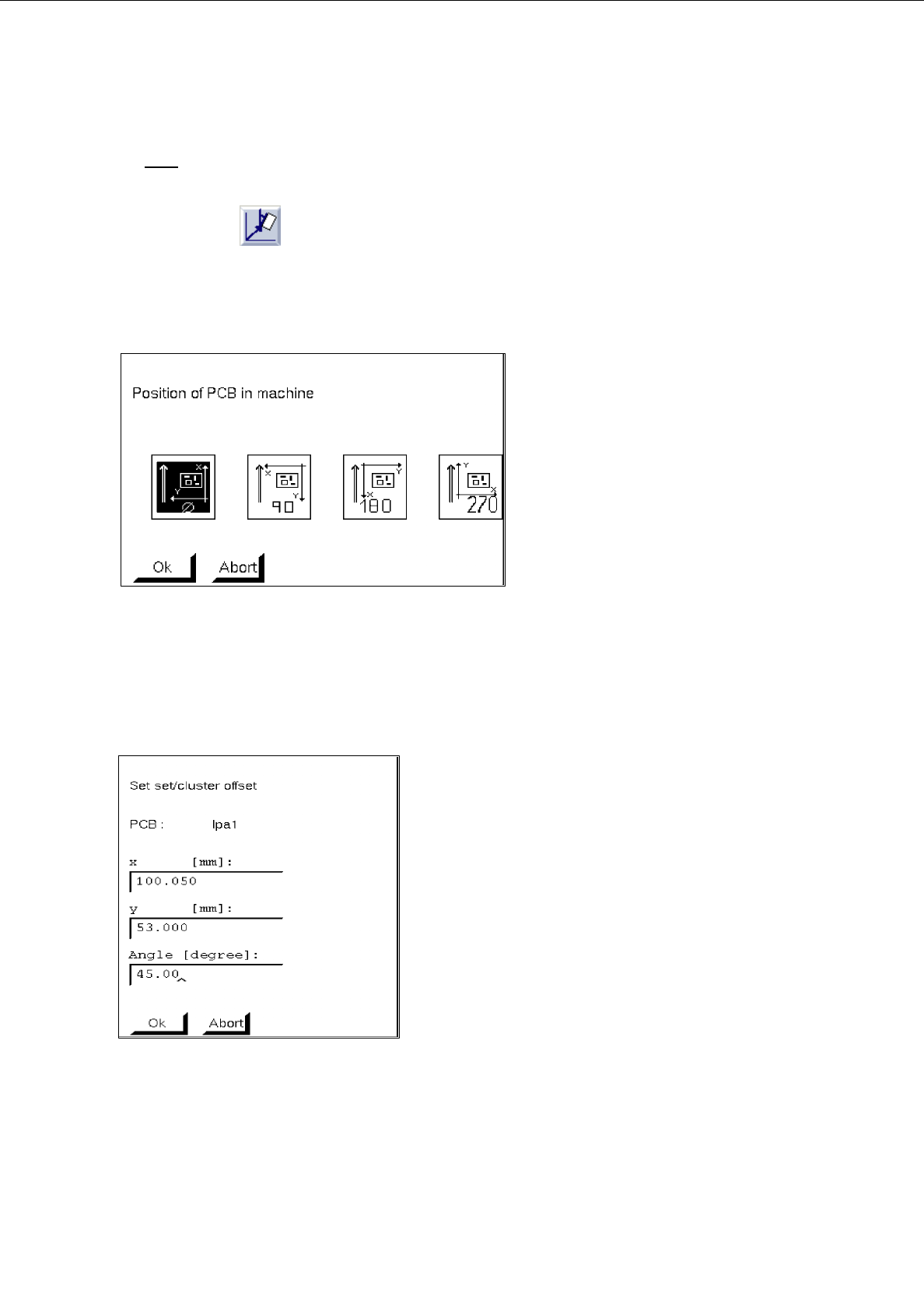
To define the position of the board (complete cluster) in the machine, first click on the uppermost
partial PCB structure of the PCB structure.
The following dialog box appears:
●
Select position by clicking on 0°, 90°, 180° or 270° in the dialog box.
●
Confirm with
OK
.
●
Click on partial PCB structure of the PCB structure.
The following dialog box appears:
●
Enter x, y-coordinates and angle with respect to partial PCB structure (cluster) in which the selec-
ted lower partial structure is contained (see Fig. 8.1.2).
●
Confirm with
OK
.
●
Repeat procedure for all partial PCB structures existing in the partial PCB structures loaded.
User’s Manual Line Computer UNIX 8 Product / PCB
Software Version 402.xx Edition 06/96 8.1 PCB Editor
8 - 15
8.1.3.4 Setting Area of Structure Editor (Graphic Mode)
-
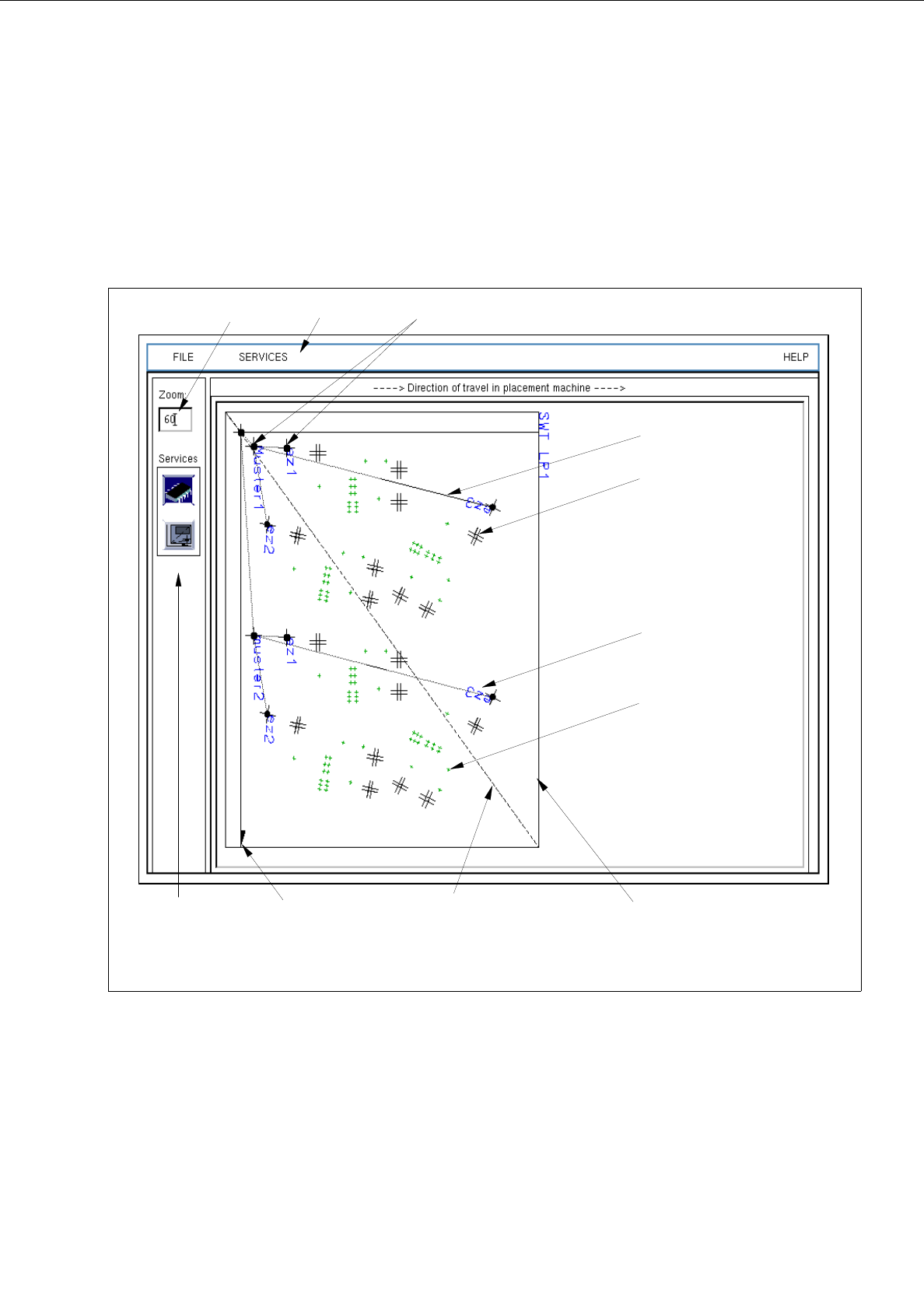
For a better visualization of the PCB in the display area, a zoom factor (10 - 999%) can be entered in the
editing field of the setting area, with the factor "100" corresponding to reality.
-
The remaining display options are symbolized by icons (see Fig. 8.1.6). The desired setting can be achie-
ved by activating an icon (see the description below).
Fig. 8.1.6 Main Window "Structure Editor" ("Graphic Mode" Display)
setting area
menu bar
placement position
fiducial
offset vector
x-axis (+)
editing field PCB zero points
PCB
dimensional vectors
Outline (dimensions)
of the PCB
name of the PCB
substructure